
1. פּראָדוקט איבערview
The atomberg Studio Nexus 1200mm BLDC Ceiling Fan is designed for efficient air circulation and modern aesthetics. It features a Brushless Direct Current (BLDC) motor for energy savings, a BEE 5-star rating, and quiet operation. This fan includes a remote control for convenient adjustments and a unique Moonbeam Light function.
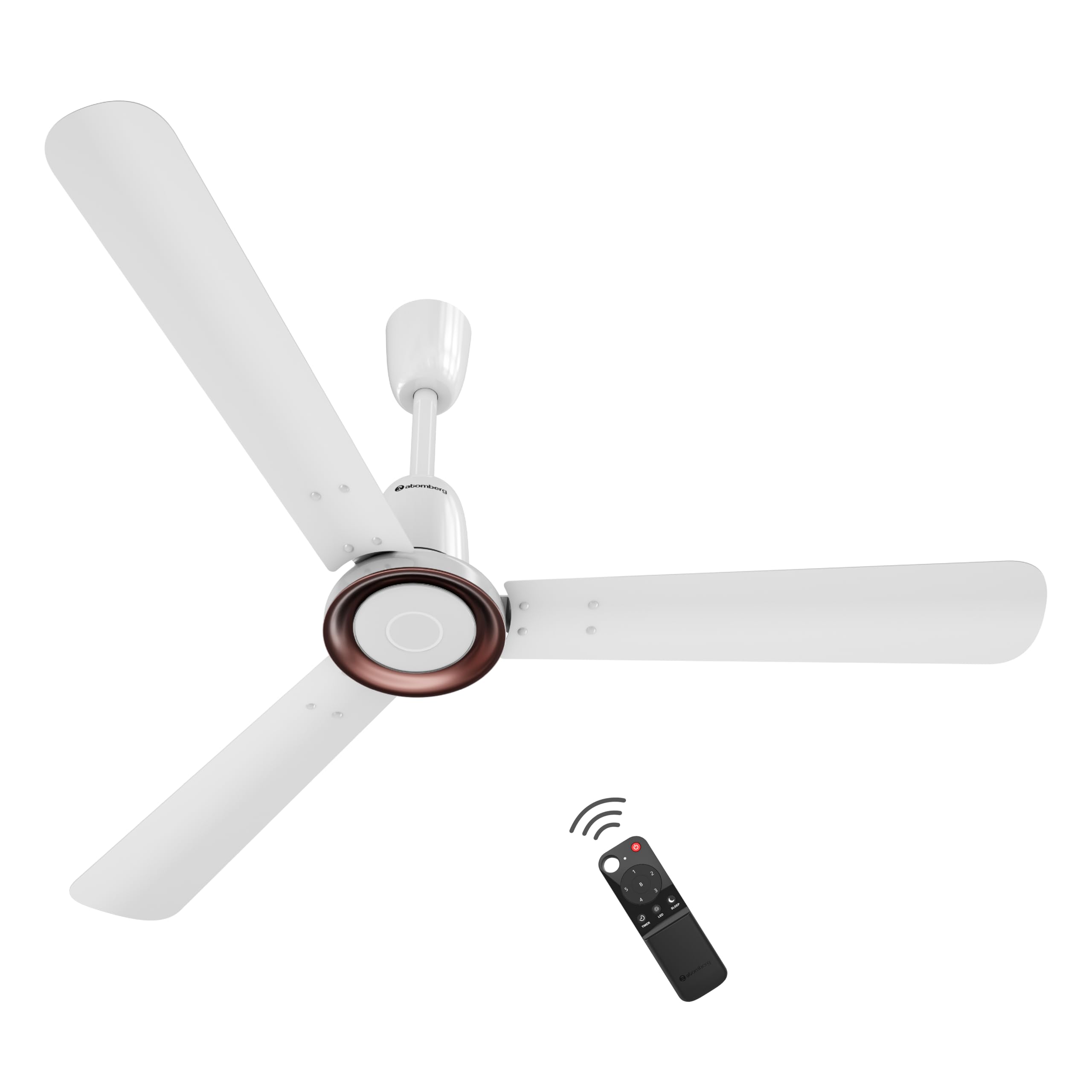
Figure 1: atomberg Studio Nexus 1200mm BLDC Ceiling Fan (Gloss White)
שליסל פֿעיִקייטן:
- Energy-Efficient BLDC Motor: Consumes only 35W at top speed, saving up to 65% electricity compared to unrated fans.
- BEE 5-Star Rated: Certified for high energy efficiency.
- High Air Delivery: Provides 230 CMM (Cubic Meters Per Minute) for optimal airflow.
- נידעריק ראַש אָפּעראַציע: Operates at less than 57 dB, ensuring a quiet environment.
- Smart IR Remote Control: Allows adjustment of speed, Boost Mode, Timer, and Sleep Mode.
- Moonbeam Light: Integrated night light with two intensity levels, providing visual feedback for remote commands.
- IoT קאַנעקטיוויטי: Supports smart control (details for app control are typically provided in a separate IoT guide).
- מאָדערן מינימאַליסט פּלאַן: Features a premium metallic body trim and wide designer curved blades.

Figure 2: Advanced Air+ Technology for enhanced air delivery and comfort.

פיגורע 3: איבערview of best-in-class performance, including remote operation, high air delivery, and low noise.
2. זיכערקייַט אינפֿאָרמאַציע
Please read all safety instructions carefully before installation and use. Retain this manual for future reference.
- זיכער מאַכן אַז די מאַכט צושטעל איז דיסקאַנעקטיד איידער ינסטאַלירונג, רייניקונג אָדער וישאַלט.
- די אינסטאַלאַציע זאָל דורכגעפירט ווערן דורך אַ קוואַליפֿיצירטן עלעקטריקער לויט די לאָקאַלע עלעקטרישע קאָודן.
- Mount the fan securely to a ceiling structure capable of supporting its weight.
- Keep hands, hair, and clothing clear of the fan blades during operation.
- פרובירט נישט צו פאררעכטן אדער מאדיפיצירן דעם פען אליין. קאנטאקטירט קאסטומער סופארט פאר הילף.
3. פּעקל אינהאַלט
באַשטעטיקן אַז אַלע קאָמפּאָנענטן זענען פאַראַן אין דעם פּעקל איידער איר גייט ווייטער מיט דער אינסטאַלאַציע:
- Blade set (1 Unit)
- Remote (1 Unit)
- Motor box (1 Unit)
- Canopy set (1 Unit)
- Downrod (1 Unit)
- Shackle kit (1 Unit)
- Manual Leaflet & Warranty card (1 Unit)
4. ינסטאַלירונג
The atomberg Studio Nexus fan is designed for versatile installation, accommodating both standard and false/low ceilings.
סופיט קאַמפּאַטאַבילאַטי:
- For Standard Ceilings: Use both the bottom and top canopy for a complete finish.
- For Low Height or False Ceilings: An additional ceiling plate is provided. Use this ceiling plate with the bottom canopy for a flush installation.
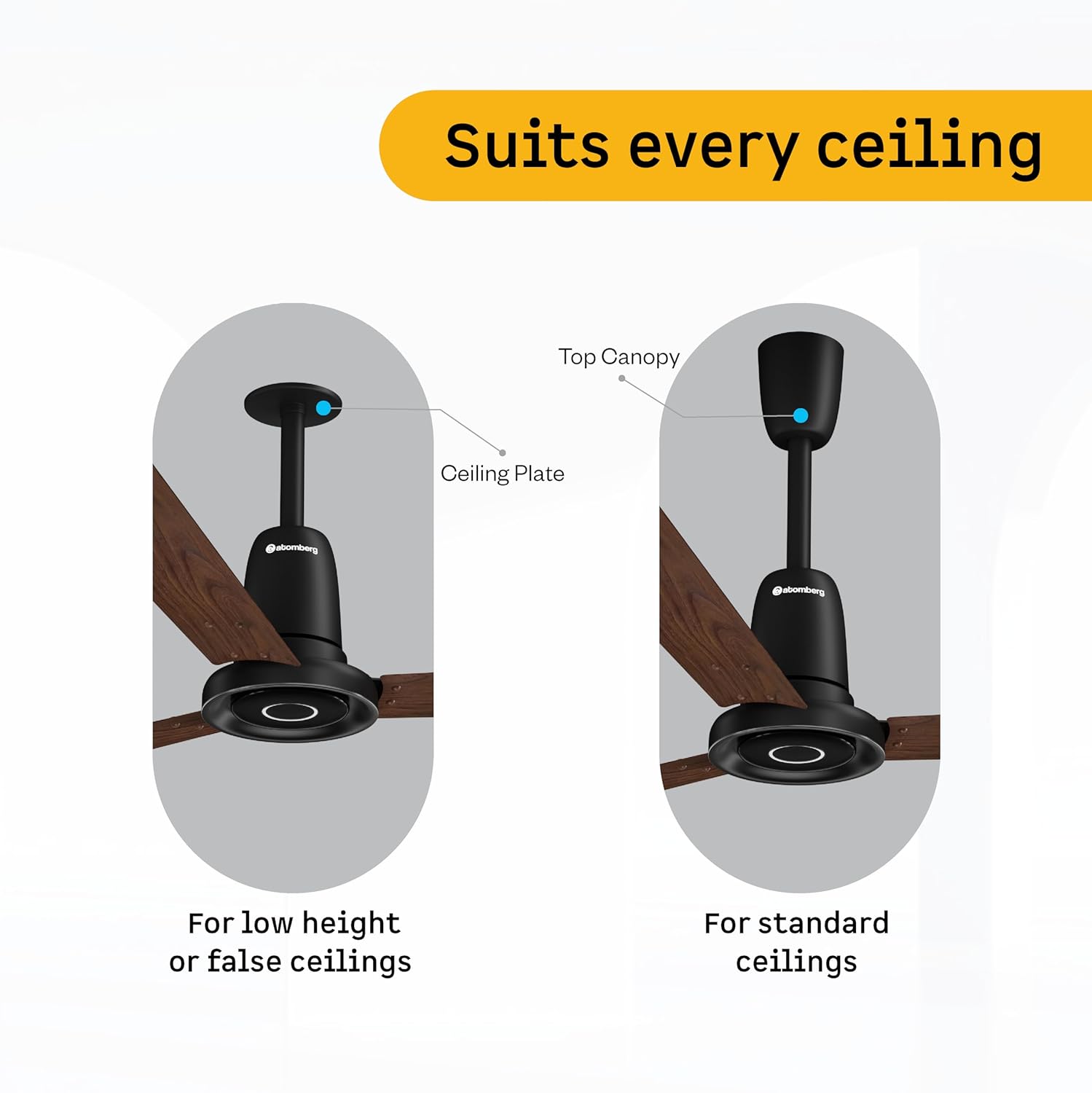
Figure 4: Illustration of ceiling fan installation for different ceiling types.
Detailed installation steps are provided in the included manual leaflet. It is recommended to have the fan installed by a professional.
5. אָפּעראַציע
Control your atomberg Studio Nexus fan using the included Smart IR Remote or through IoT connectivity.
ניצן די רימאָוט קאָנטראָל:
The universal IR remote allows for easy control of various fan functions. No pairing is required.

Figure 5: Smart IR Remote Control for the Studio Nexus fan.
- מאַכט אויף / אַוועק: דריק דעם מאַכט קנעפּל צו דרייען דעם ווענטילאַטאָר אָן אָדער אויס.
- גיכקייט אַדזשאַסטמאַנט: Use the numbered buttons (1-6) to select your desired fan speed.
- בוסט מאָדע: Activates the highest fan speed for rapid cooling.
- טיימער מאָדע: Set the fan to switch off automatically after a pre-set number of hours.
- שלאָפן מאָדע: Gradually decreases the fan's speed every two hours for comfortable sleep.
- געפירט ליכט קאָנטראָל: Turn the Moonbeam Light ON or OFF.
Moonbeam Light Function:
The integrated Moonbeam Light serves as a night light and provides visual feedback.
- It has two intensity levels, adjustable via the remote.
- The light blinks in response to remote commands (e.g., power on/off, speed change, timer, sleep mode) to confirm action.
IoT and App Control:
For advanced control and smart home integration, refer to the dedicated IoT setup guide or the atomberg app for instructions on connecting and controlling your fan via a smart device.
6. וישאַלט
Regular maintenance ensures optimal performance and longevity of your fan.
- רייניקונג: ווישט פּעריִאָדיש די ווענטילאַטאָר בליידז און מאָטאָר קעסטל מיט אַ ווייכן, דamp שטאָף. דו זאלסט נישט נוצן אַברייסיוו קלינערז אָדער סאָלוואַנץ.
- בלייד דורכקוק: Check blades for any damage or warping. Damaged blades can cause imbalance and noise.
- זיכער מאָונטינג: Ensure all mounting hardware remains tight and secure.
- שמירן: The BLDC motor is designed for maintenance-free operation and does not require lubrication.
שטענדיק דיסקאַנעקט די מאַכט איידער איר דורכפירן קיין רייניקונג אָדער וישאַלט.
7. טראָובלעשאָאָטינג
If you encounter issues with your atomberg Studio Nexus fan, refer to the following common troubleshooting tips:
- פאָכער טוט נישט קער אויף:
- Check if the main power supply to the fan is on.
- זיכער מאַכן אַז די באַטעריעס פון די ווײַטקאָנטראָל זענען נישט אויסגעשעפּט.
- באַשטעטיקן אַז די ווײַטקאָנטראָל איז גלייך געצילט אויפן ווענטילאַטאָר'ס ופנעמער.
- פען וואָבלס:
- זיכער מאַכן אַז אַלע בלייד שרויפן זענען זיכער צוגעצויגן.
- Check that the downrod and mounting bracket are firmly attached to the ceiling.
- Verify that the blades are not bent or damaged.
- רימאָוט קאָנטראָל ניט ריספּאַנדינג:
- פאַרבייַטן די ווייַט קאָנטראָל באַטעריז.
- פאַרזיכערן אַז עס זענען קיין אַבסטראַקשאַנז צווישן די ווייַט און די פאָכער.
- Moonbeam Light Not Working:
- Check if the light function is enabled via the remote.
- אויב די אַרויסגעבן בלייַבט, קאָנטאַקט קונה שטיצן.
For issues not covered here, please contact atomberg customer support.
8. ספּעסאַפאַקיישאַנז
Detailed technical specifications for the atomberg Studio Nexus 1200mm BLDC Ceiling Fan:
| שטריך | באַשרייַבונג |
|---|---|
| סאָרט | אַטאָמבערג |
| מאָדעל נאָמען | Studio Nexus |
| קאָליר | גלאָס ווייסע |
| עלעקטריק פאַן פּלאַן | Ceiling Fan |
| מאַכט מקור | קאָרדעד עלעקטריק |
| פּראָדוקט דימענשאַנז (ד רענטגענ וו רענטגענ ה) | 57D x 29W x 25.5H סענטימעטער |
| אָרט טיפּ | שלאָפצימער, עסצימער, היים אָפיס, לעבעדיק צימער, לערן צימער |
| ספּעציעלע פֿעיִקייטן | BLDC Motor with Remote, Low noise, Boost Mode, Timer, Moonbeam Light |
| מאַונטינג טיפּ | סטעליע בארג |
| קאָנטראָללער טיפּ | Button Control, Remote Control, App |
| נומער פון ספּידז | 6 |
| ראַש מדרגה | 57 דעציבעלן |
| וואָסtage | 35 וואטס |
| נומער פון בלאַדעס | 3 |
| לופט פלאָו קאַפּאַסיטי | 230 Cubic Meters Per Minute |
| ספּיד | 360 רפּם |
| Voltage | 220 וואלטס |
| דרינענדיק דרויסנדיק באַניץ | דרינענדיק |
| מאַטעריאַל טיפּ | אַלומינום |
| בלייד מאַטעריאַל | אַלומינום |
| באַשרייַבונג באגעגנט | BEE 5 Star |
| בלייד לענג | 1200 מילאַמיטערז |
| פּונקט וואָג | 4.2 קילאָגראַמס |
| לאַנד פון אָריגין | אינדיע |
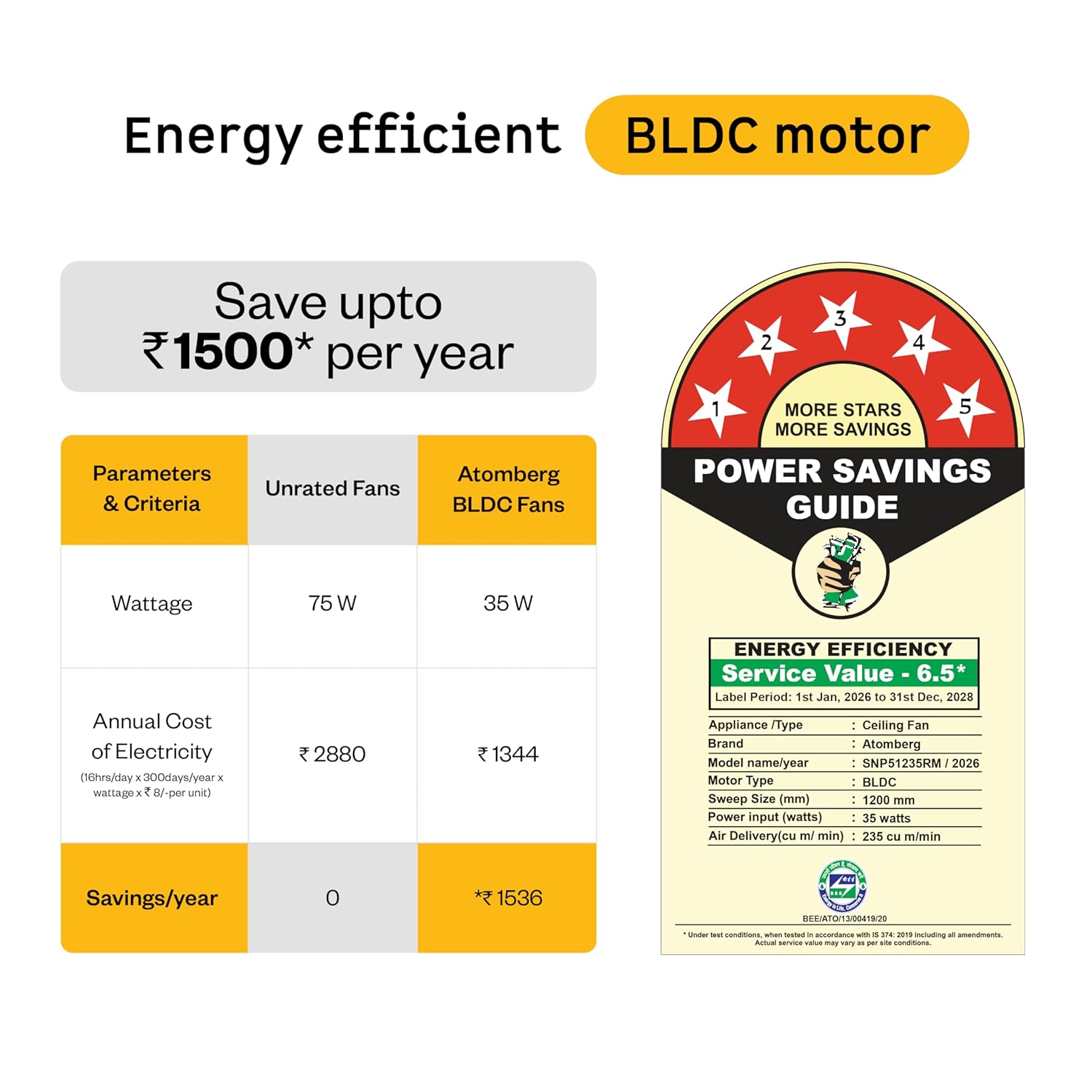
Figure 6: Energy Efficiency Guide for atomberg BLDC motor, highlighting 5-star rating and electricity savings.
9. וואָראַנטי און שטיצן
Your atomberg Studio Nexus ceiling fan comes with comprehensive warranty coverage and dedicated customer support.
וואָראַנטי אינפֿאָרמאַציע:
- נאָרמאַל וואָראַנטי: A 3-year warranty is included with your purchase.
- עקסטענדעד וואָראַנטי: An additional 2-year warranty can be availed by registering your product on the official atomberg website. This extends the total warranty period to 5 years.

Figure 7: Warranty details and registration process for extended coverage.
קונה שטיצן:
For any queries, technical assistance, or warranty claims, please contact atomberg customer support:
- בליצפּאָסט: support@atomberg.com
- טעלעפֿאָן: 08448449442
- Webפּלאַץ: Visit the official atomberg website for product registration and further information.