
הקדמה
This instruction manual provides guidance for the proper use and maintenance of your ZdalaMit RMT-AM120U replacement remote control. This remote is designed to be compatible with various Sony Home Audio Systems, offering direct functionality without the need for programming.
קאַמפּאַטאַבילאַטי
The RMT-AM120U remote control is compatible with the following Sony Home Audio System models:
- SHAKE-X7D
- MHC-GT3D
- MHC-GT5D
- MHC-V7D
- SHAKE-X1D
- SHAKE-X3D
- HCD-SHAKEX3
- HCD-SHAKEX1
- SS-SHAKEX3
- SS-SHAKEX1
סעטאַפּ
ייַנמאָנטירונג פון באַטאַרייע
- געפֿינען די באַטאַרייע אָפּטייל אויף די צוריק פון די ווייַט קאָנטראָל.
- רוקט דעם דעקל פונעם באַטעריע־אָפּטייל אַראָפּ אָדער אין דער ריכטונג וואָס ווערט אָנגעוויזן דורך אַ פײַל צו עס עפֿענען.
- Insert two (2) 1.5V AAA alkaline batteries, ensuring the positive (+) and negative (-) terminals match the diagrams inside the compartment.
- פֿאַרמאַכט דעם דעקל פֿון דער באַטעריע־אָפּטיילונג דורך עס צוריקצורוקן אין פּלאַץ ביז עס קליקט זיכער.
באַמערקונג: Batteries are not included with the remote control. Please use new alkaline batteries for optimal performance.
ערשט נוצן
No programming is required for this replacement remote control. Once batteries are installed correctly, the remote is ready for immediate use with your compatible Sony Home Audio System.
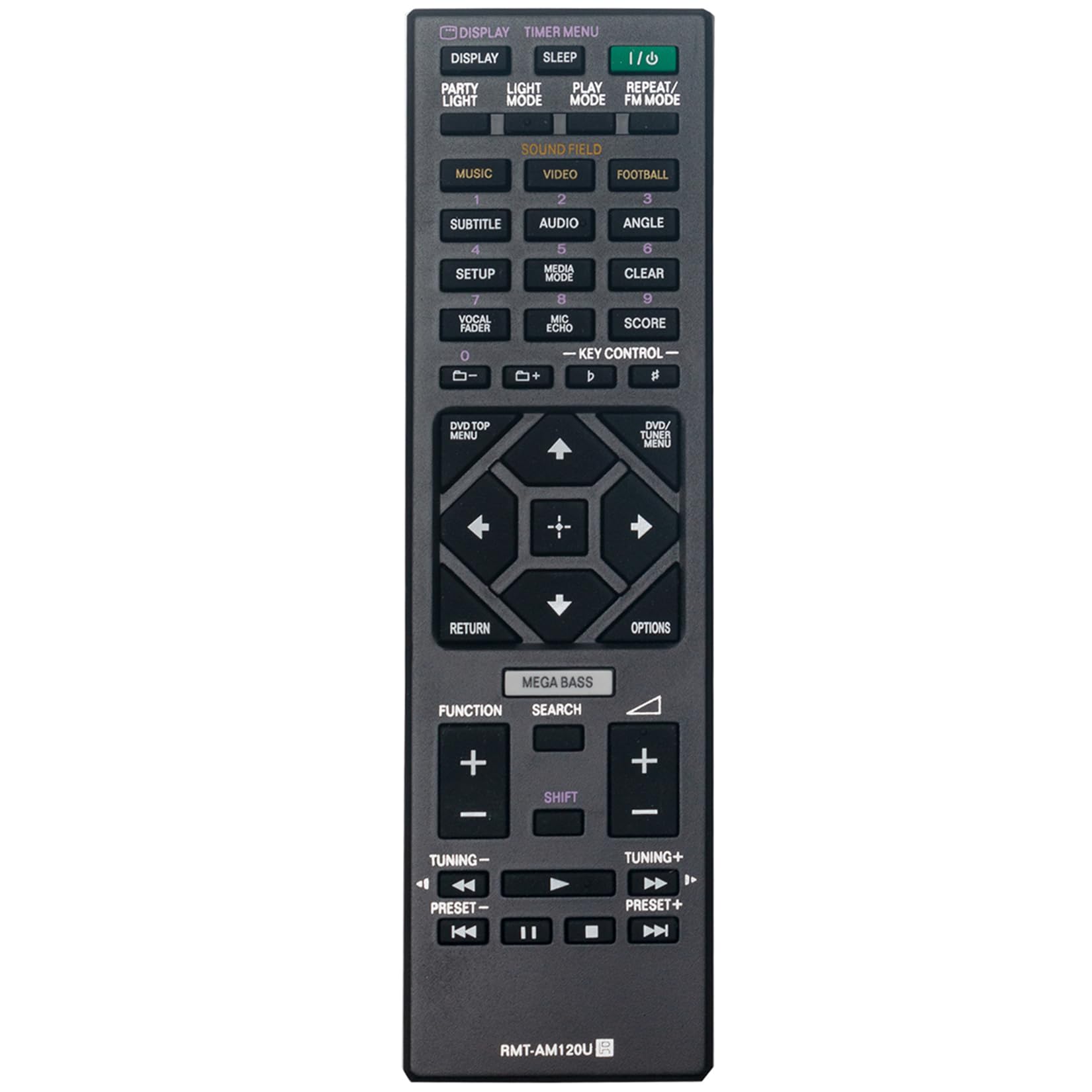
פיגורע 1: פראָנט view of the RMT-AM120U remote control.
אַפּערייטינג ינסטראַקשאַנז
Point the remote control directly at the infrared sensor on your Sony Home Audio System. Ensure there are no obstructions between the remote and the system.
שליסל פאַנגקשאַנז
The remote control features various buttons for controlling your audio system. Common functions include:
- Power (I/O): טוט אן אדער אויסלעשן די אודיא סיסטעם.
- ווייַז: Changes or shows display information.
- Timer Menu: Accesses timer settings.
- שלאָף: Sets a sleep timer.
- שפּיל מאָדע: Selects playback modes (e.g., Normal, Shuffle).
- איבערחזרן / עפעם מאָדע: Toggles repeat playback or switches FM radio mode.
- Music/Video/Football: Selects input sources or sound modes.
- Subtitle/Audio/Angle: Controls DVD/Blu-ray playback options.
- סעטאַפּ: צוטריט סיסטעם סעטטינגס.
- מעדיע מאָדע: Selects media input.
- קלאָר: Clears entries or selections.
- Vocal Fader/Mic Echo/Score: Controls microphone and karaoke functions.
- שליסל קאָנטראָל: Adjusts key for karaoke.
- נומעריק קנעפּלעך (0-9): For direct track selection or input.
- DVD/TOP MENU: Accesses the top menu of a DVD/Blu-ray disc.
- DVD/TUNER MENU: Accesses the menu for DVD or tuner functions.
- נאַוויגאַציע קנעפּלעך (אַרויף, אַראָפּ, לינקס, רעכטס, אַרייַן): פֿאַר מעניו נאַוויגאַציע און סעלעקציע.
- צוריקקומען: קערט צו די פריערדיקע פאַרשטעלן אָדער מעניו.
- אָפּציעס: Displays options menu.
- מעגאַ באַס: פֿאַרבעסערט באַס קלאַנג.
- זוכן: Initiates search function.
- פֿונקציע: Cycles through functions or inputs.
- באַנד (+/-): אַדזשאַסץ די באַנד מדרגה.
- Tuning (+/-): Tunes radio frequencies.
- Preset (+/-): אויסקלייבט פאָרגעשטעלטע ראַדיאָ סטאַנציעס.
- Playback Controls (Play, Pause, Stop, Fast Forward, Rewind, Skip Forward, Skip Back): קאָנטראָלס מעדיע פּלייבאַק.

פיגור 2: ווינקלדיק view highlighting the button layout.
וישאַלט
באַטערי פאַרבייַט
Replace batteries when the remote control's response becomes sluggish or stops functioning. Always replace both batteries at the same time with new 1.5V AAA alkaline batteries. Do not mix old and new batteries, or different types of batteries.
רייניקונג
ווישט אָפּ די ווײַטקאָנטראָל מיט אַ ווייכן, טרוקענעם שטאָף. ניצט נישט קיין שרײַבנדיקע רייניגער, סאָלווענטן אָדער אַלקאָהאָל, ווײַל די קענען שאַטן די ייבערפֿלאַך אָדער אינעווייניקסטע קאָמפּאָנענטן.
סטאָרידזש
אויב די ווײַטקאָנטראָל וועט נישט ווערן גענוצט פֿאַר אַ לענגערע צײַט, נעמט אַרויס די באַטעריעס כּדי צו פֿאַרמײַדן ליקאַדזש און מעגלעכן שאָדן.
טראָובלעשאָאָטינג
- ווייַט ניט ריספּאַנדינג:
- קאָנטראָלירט צי די באַטעריעס זענען ריכטיק אַרײַנגעשטעלט מיט דער ריכטיקער פּאָלאַריטעט.
- פאַרבייַטן אַלט באַטעריז מיט נייַע.
- Ensure there are no obstructions between the remote control and the audio system's sensor.
- Make sure you are within the effective operating range (approximately 33 feet).
- Limited range or intermittent operation:
- זיכער מאַכן אַז די באַטעריעס זענען פריש.
- Verify that the remote control is pointed directly at the audio system.
- Avoid strong light sources (e.g., direct sunlight, fluorescent lights) that might interfere with the infrared signal.
ספּעסאַפאַקיישאַנז
| שטריך | באַשרייַבונג |
|---|---|
| מאָדעל | RMT-AM120U |
| מאַכט צושטעלן | 2 x 1.5V AAA אַלקאַליין באַטעריעס |
| קאַנעקטיוויטי טעכנאָלאָגיע | ינפרערעד |
| קנעפּל קוואַנטיטעט | 15 |
| מאַקסימום קייט | 33 פֿיס (10 מעטער) |
| דימענסיעס (L X W X H) | 6.35" x 1.79" x 0.55" (16.13 ס״מ x 4.55 ס״מ x 1.40 ס״מ) |
| פּונקט וואָג | 40 גראַמז (0.09 לבס) |
| קאָליר | שוואַרץ |

Figure 3: Remote control with approximate dimensions.
וואָראַנטי אינפֿאָרמאַציע
This ZdalaMit RMT-AM120U replacement remote control comes with a 1 יאָר וואָראַנטי פֿון דעם קויפֿדאַטום. די וואָראַנטי דעקט פֿאַבריקאַציע־דעפֿעקטן אונטער נאָרמאַלן באַנוץ. עס דעקט נישט קיין שאָדן פֿאַראורזאַכט דורך אומרעכטן באַנוץ, אומגליקן, נישט־אָטעריזירטע מאָדיפֿיקאַציעס, אָדער באַטעריע־ליקאַדזש.
For warranty claims or support, please contact your retailer or the manufacturer directly.
שטיצן
For further assistance or inquiries regarding your ZdalaMit RMT-AM120U remote control, please refer to the contact information provided by your seller or visit the ZdalaMit official support channels.