
1. הקדמה
The MSXTTLY U2C-AIR Pro Wireless CarPlay Adapter converts your vehicle's existing wired CarPlay system into a wireless one. This allows for a seamless and automatic connection between your iPhone and your car's infotainment system, providing convenient access to navigation, music, calls, and messages without the need for cables.
2. זיכערקייַט אינפֿאָרמאַציע
- שטעלט נישט אויס דעם אפאראט צו עקסטרעמע טעמפעראטורן, דירעקטע זונשייַן, אדער פייכטקייט.
- Avoid disassembling or modifying the device, as this will void the warranty and may cause damage.
- האַלטן די מיטל אַוועק פון שטאַרק מאַגנעטיק פעלדער.
- Ensure the device is securely placed to prevent it from interfering with driving.
3. פּעקל אינהאַלט
באַשטעטיקן אַז אַלע זאכן זענען פאַראַן אין דיין פּעקל:
- U2C-AIR Pro CarPlay Adapter (x1)
- USB A to C Cable (x1)
- USB A to A Cable (x1)
- 3M Adhesive Tape (x1)

Image: What's in the Box. This image displays the U2C-AIR Pro adapter, a USB-A to USB-C cable, a USB-A to USB-A cable, and a user manual.
4. פּראָדוקט איבערview
The U2C-AIR Pro Wireless CarPlay Adapter is designed for convenience and performance. It features a compact design and gold-plated connectors for enhanced durability and conductivity.

Image: MSXTTLY U2C-AIR Pro Wireless CarPlay Adapter. This image shows the compact design of the adapter with its gold-plated USB connector.
שליסל פֿעיִקייטן:
- ווירעלעסס קאַרפּלייַ: Converts wired CarPlay to wireless for seamless iPhone integration.
- Fast and Stable Connection: Equipped with a 5G chip, 5.8 GHz WiFi, and Bluetooth 5.3 for low-latency performance.
- סאָליד פּלאַן: Small and stylish, minimizing space usage in your car.
- גאָלד-פּלייטאַד קאַנעקטערז: Enhances conductivity, reduces heat buildup, and boosts data speed.
- קייפל קאַנעקשאַן אָפּציעס: Compatible with various car ports using included USB A to C and USB A to A cables.
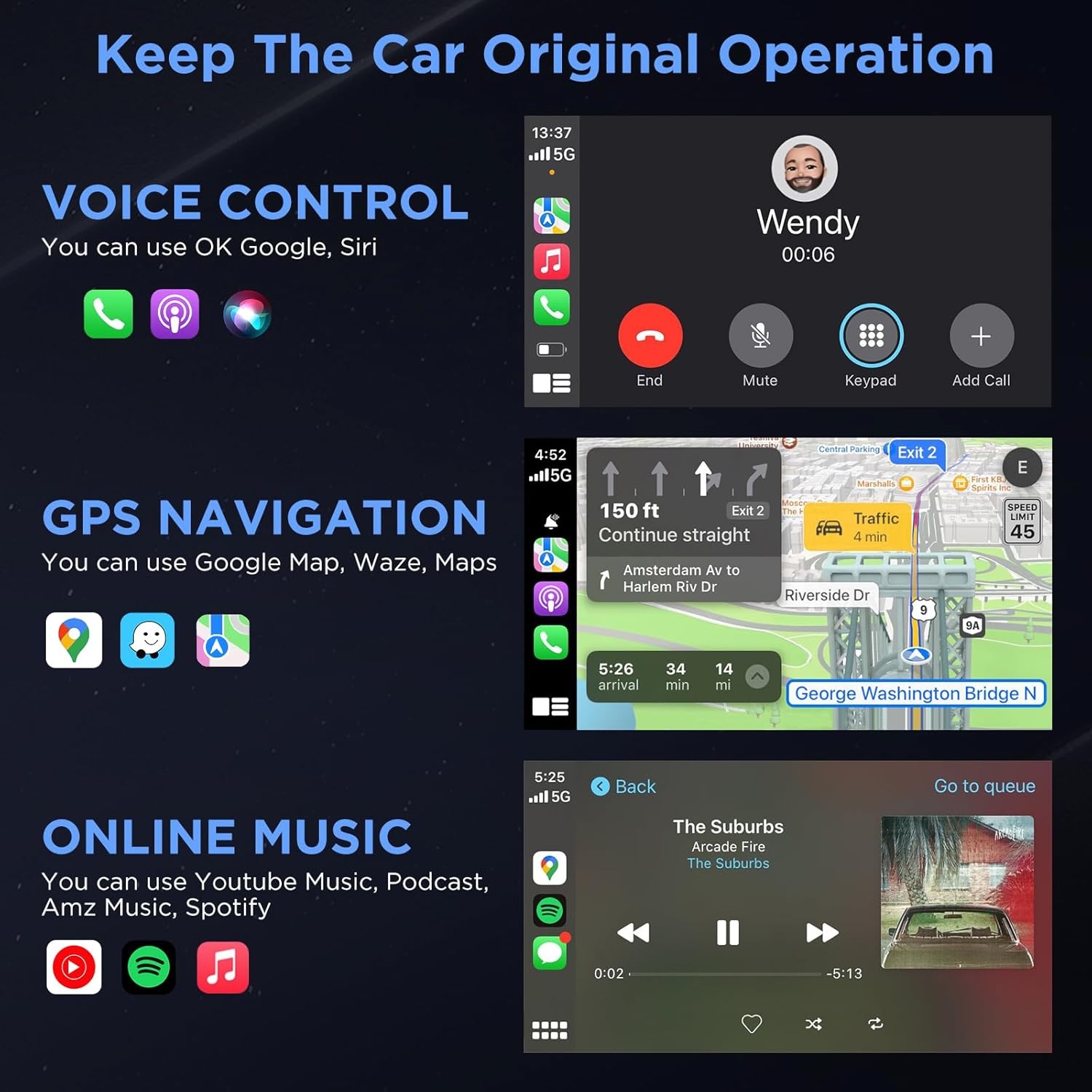
Image: Three Ways to Adapt to Car Various Ports. This image illustrates connecting the adapter via a built-in USB port, a USB-A to USB-C data cable, or a USB-A extension cable.

Image: Why Choose Gold-Plated Enclosure and Pins? This image explains the advantages of gold-plated connectors, including improved conductivity and durability.
5. סעטאַפּ אינסטרוקציעס
Follow these steps to connect your U2C-AIR Pro Wireless CarPlay Adapter:
- צאַפּן אין: Connect the U2C-AIR Pro adapter to your car's USB port that supports wired CarPlay. Use the appropriate cable (USB A to C or USB A to A) if needed.
- פּאָר: On your iPhone, enable Bluetooth and Wi-Fi. זוכן פֿאַר the adapter's Bluetooth name (e.g., "smartBox-XXXX") and pair with it. Confirm the CarPlay connection prompt on your iPhone.
- Use CarPlay: Once paired, CarPlay will automatically launch on your car's display. The adapter will automatically connect to your iPhone each time you start your car after the initial setup.

Image: Connection Method - Just 3 Steps. This image visually guides users through the plug-and-play setup process.
6. אַפּערייטינג ינסטרוקטיאָנס
Once connected, your car's display will show the CarPlay interface, allowing you to access various iPhone features safely while driving.
CarPlay Functions:
- קול קאָנטראָל: Use Siri for hands-free commands, such as making calls, sending messages, or getting directions.
- גפּס נאַוויגאַציע: Utilize Apple Maps, Google Maps, Waze, or other compatible navigation apps directly on your car's screen.
- Online Music & Podcasts: Stream audio from Spotify, Apple Music, podcasts, and other supported applications.
- רופן און מעסעדזשעס: Make and receive calls, and send/receive messages through the CarPlay interface.

Image: Keep The Car Original Operation. This image demonstrates the CarPlay interface with voice control, navigation, and music features.
קאָנטראָל מעטהאָדס:
The adapter supports your car's original control systems:
- ריר סקרין: Interact directly with the CarPlay interface via your car's touchscreen.
- קנופּ קאָנטראָל: Use your car's control knobs for navigation and selection.
- סטירינג ראָד קאָנטראָל: Utilize steering wheel buttons for audio, calls, and voice commands.

Image: Support Automobile Control System 100%. This image illustrates the various ways to control CarPlay using your car's built-in controls.
7. קאַמפּאַטאַבילאַטי
To ensure proper functionality, please check the following compatibility requirements:
- אויטאָ קאָמפּאַטאַביליטי: Your car's OEM or aftermarket head unit must support ווייערד קאַרפּלייַ. This adapter is designed for OEM wired car models from 2017 and newer.
- טעלעפאָן קאָמפּאַטאַביליטי: Requires an iPhone running יאָס 11 אָדער העכער.
- ינקאַמפּאַטאַבילאַטי: This adapter is נישט קאַמפּאַטאַבאַל with BMW or electric vehicles. It does not support video streaming applications.

Image: How to Check if Your Device is Compatible with This Product? This image provides a quick guide to verify car and iPhone compatibility.

Image: Car Compatible. This image provides a comprehensive list of car models and years that are compatible with the adapter.
8. טראָובלעשאָאָטינג
If you encounter issues with your U2C-AIR Pro adapter, consider the following:
- קשר ישוז: Ensure your car's USB port supports wired CarPlay. Try disconnecting and reconnecting the adapter. Verify Bluetooth and Wi-Fi are enabled on your iPhone.
- פאַרהאַלטונג אָדער דיסקאַנעקשאַנז: Wireless CarPlay may experience slight latency (0 to 1.5 seconds) depending on signal strength and usage. If disconnections are frequent, ensure no other devices are interfering with the Bluetooth or Wi-Fi signal.
- Firmware דערהייַנטיקונגען: The adapter supports online reporting and OTA (Over-The-Air) updates. Regularly check for and install updates to ensure optimal performance and resolve potential bugs.
- אויטאָ קאָמפּאַטאַביליטי: Double-check your vehicle's compatibility with the adapter. Refer to the compatibility section or the detailed list provided.
9. ספּעסאַפאַקיישאַנז
| שטריך | דעטאַל |
|---|---|
| מאָדעל נומער | RE-CP-US-219 |
| בלועטאָאָטה ווערסיע | 5.3 |
| ווי-פי אָפטקייַט | 5.8 גהז |
| טשיפּסעט | 5G Chip |
| פּעקל דימענשאַנז | 5.31 X 3.58 X 0.75 אינטשעס |
| פּונקט וואָג | 2.08 אונסעס |
10. וישאַלט
To ensure the longevity and optimal performance of your U2C-AIR Pro adapter:
- האַלטן די מיטל ריין דורך ווישן עס מיט אַ ווייך, טרוקן שטאָף.
- ויסמיידן ניצן האַרב קעמיקאַלז אָדער אַברייסיוו קלינערז.
- סטאָר די מיטל אין אַ קיל, טרוקן אָרט ווען ניט אין נוצן.
- זיכער מאַכן אַז די USB פּאָרץ זענען פריי פון שטויב און דעבריס.
11. וואָראַנטי און שטיצן
MSXTTLY is committed to providing excellent customer service and product reliability.
- וואָראַנטי: The U2C-AIR Pro CarPlay Adapter comes with a 12-month warranty from the date of purchase.
- טעכניש שטיצן: We offer 24/7 professional technical support to assist you with any questions or issues.
- לעבנס-לאַנג טעק שטיצע: Enjoy lifetime technical support for your product.
For support, please refer to the contact information provided in your product packaging or visit the official MSXTTLY webפּלאַץ.

Image: Peace of Mind Service. This image highlights the warranty and support services offered by MSXTTLY.