
1. הקדמה
Welcome to the Hot Pepper K82A Smartphone User Manual. This guide provides essential information to help you set up, operate, maintain, and troubleshoot your new device. The Hot Pepper K82A is an advanced Android smartphone featuring a 6.67-inch AMOLED display, a powerful Octa-Core processor, 256GB of storage, 8GB of RAM, and a long-lasting 5000mAh battery. It also boasts a versatile triple camera system with a 50MP main sensor and a 24MP selfie camera.
2. וואָס איז אין דער קעסטל
Upon unboxing your Hot Pepper K82A, please ensure all the following items are present:
- Hot Pepper KR10 Smartphone
- וסב אַדאַפּטער
- וסב-C טשאַרדזשינג קאַבלע
- באַניצער מאַנואַל
- סים עדזשעקטאָר טול

Image: Contents of the Hot Pepper K82A retail box.
3. דיווייס איבערview
Familiarize yourself with the physical components and ports of your Hot Pepper K82A smartphone.

Image: Hot Pepper K82A device overview, showing camera modules, side-mounted fingerprint sensor, and bottom ports.
- הויפּט אַפּאַראַט: High-resolution rear camera.
- ברייט-ווינקל קאַמעראַ: For broader landscape shots.
- טיפקייַט אַפּאַראַט: Enhances portrait mode effects.
- קינסטלעכע אינטעליגענץ פּנים אַנטלאַק: Front-facing camera for secure facial recognition.
- פינגערפּרינט סענסאָר: Side-mounted for quick and secure unlocking.
- געבויט-אין מיקראָפאָן: פֿאַר רופן און קול רעקאָרדינג.
- Type-C 2.0 Charger Port: פֿאַר טשאַרדזשינג און דאַטן אַריבערפירן.
4. סעטאַפּ
4.1. אריינשטעלן סים קארטל(ן)
- געפינט די סים קארטל טאַץ אויף דער זייט פון אייער טעלעפאָן.
- שטעקט אריין דעם סים קארטל ארויסווארפער געצייג אין דעם קליינעם לאך לעבן דעם טרעי און דריקט לײַכט ביז דער טרעי קומט ארויס.
- לייגט אריין אייערע נאַנאָ-סים קאַרטל(ן) און/אָדער מיקראָSD קאַרטל (אויב נויטיק) אין דעם טאַץ מיט די גאָלדענע קאָנטאַקטן אַראָפּגעקערט. מאַכט זיכער אַז זיי זענען ריכטיק אַרײַנגעזעצט.
- שטופּ פֿאָרזיכטיק צוריק דעם טאַץ אין טעלעפֿאָן ביז עס קליקט אַרײַן אין פּלאַץ.
4.2. פּאָווערינג אויף / אויסגעלאשן
- צו מאַכט אויף: Press and hold the Power button (usually on the right side) until the Hot Pepper logo appears.
- צו מאַכט אַוועק: Press and hold the Power button until the power options appear on the screen, then tap "Power off".
- צו ריסטאַרט: Press and hold the Power button, then tap "Restart".
4.3. ערשט סעטאַפּ
The first time you power on your phone, you will be guided through an initial setup process:
- אויסקלייַבן דיין בילכער שפּראַך.
- פאַרבינדן צו אַ Wi-Fi נעץ.
- Review און אָננעמען די תּנאים און באַדינגונגען.
- לאָג אַרײַן מיט אײַער גוגל אַקאַונט אָדער שאַפֿט אַ נײַעם.
- Set up screen lock (PIN, pattern, password, fingerprint, or face unlock).
- צוריקשטעלן דאַטן פֿון אַ פֿריִערדיקן מיטל (אַפּציאָנאַל).
5. אפערירן אייער סמאַרטפאָון
5.1. יקערדיק נאַוויגאַציע
- צאַפּן: צו אויסקלײַבן אַן אייטעם אָדער עפֿענען אַן אַפּ.
- לאַקכענען: צו סקראָלן דורך סקרינז אדער ליסטעס.
- קניפּ: צו פארגרעסערן אדער פארקלענערן בילדער און web בלעטער.
- לאנג פּרעס: צו צוקומען צו קאנטעקסטועלע מעניוס אדער באוועגן איקאנעס.
5.2. מאַכן רופן און שיקן מעסעדזשעס
- עפענען די טעלעפאָן app to dial numbers or access contacts.
- עפענען די אַרטיקלען אַפּ צו שיקן און באַקומען SMS/MMS.
5.3. קאַנעקטינג צו נעטוואָרקס
- ווי-פי: גיין צו סעטטינגס > נעץ און אינטערנעט > Wi-Fi צו פֿאַרבינדן זיך צו פֿאַראַן נעטוואָרקס.
- בלועטאָאָטה: גיין צו סעטטינגס > פארבונדענע דעווייסעס > בלועטוט צו פאַרבינדן זיך מיט אַנדערע בלועטוט דעוויסעס.
- מאָביל דאַטן: זיכער מאַכן אַז אייער סים קאַרטל איז אַקטיוו און מאָביל דאַטן איז ענייבאַלד אין סעטטינגס> נעץ & אינטערנעט> מאָביל נעץ.
6. קאַמעראַ יוז
Capture every moment with the Hot Pepper K82A's versatile AI Triple Camera system.
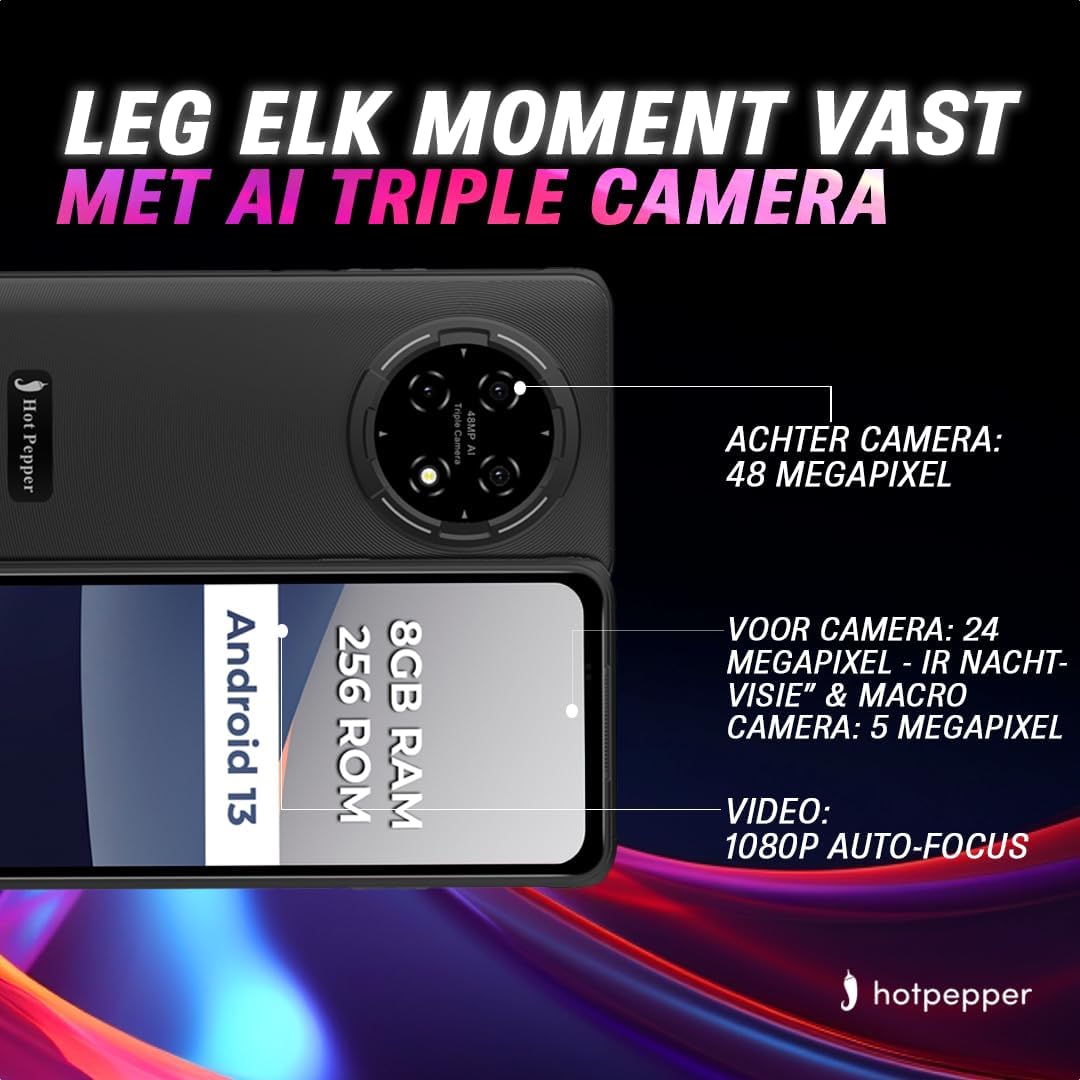
Image: Hot Pepper K82A camera specifications.
- דערציען אַפּאַראַט: 48 Megapixels for high-resolution photos.
- פראָנט אַפּאַראַט: 24 Megapixels, featuring IR Night Vision and Macro capabilities for detailed selfies and close-up shots.
- מאַקראָו אַפּאַראַט: 5 Megapixels for extreme close-up photography.
- ווידעא רעקאָרדינג: Supports 1080p video with auto-focus.
To use the camera, open the אַפּאַראַט app. You can switch between photo and video modes, adjust settings, and select different lenses (e.g., wide-angle, macro) as available.
7. באַטערי מאַנאַגעמענט
The Hot Pepper K82A is equipped with a 5000mAh battery designed for extended use. To optimize battery life and ensure proper charging:

Image: Hot Pepper K82A battery life and charging details.
- טשאַרדזשינג: Use the provided 18W fast charger and USB-C cable for optimal charging speed.
- דערוואַרט באַניץ: Up to 24 hours call time, 14 hours web usage, 8 hours video playback, 7 hours gaming, and 660 hours standby time.
- באַטעריע שפּאָרן עצות: Reduce screen brightness, disable unused features like Bluetooth or GPS, close background apps, and enable battery saver mode in settings.
8. Outdoor Features
The Hot Pepper K82A is built to withstand various outdoor conditions, making it an ideal companion for your adventures.

Image: Hot Pepper K82A outdoor durability features.
- שטאַרק פּלאַן: Engineered for durability, suitable for various environments.
- גפּס סיגנאַל: אינטעגרירטע דזשי-פי-עס פאר נאַוויגאַציע און לאָקאַציע באַדינונגען.
- IP68 וואַסער און שטויב קעגנשטעל: Protects against immersion in water and ingress of dust.
- דראָפּ קעגנשטעל: דיזיינד צו אויסהאלטן פאלן פון ביז 1.5 מעטער.
9. ספּעסאַפאַקיישאַנז
Detailed technical specifications for the Hot Pepper K82A smartphone:
| שטריך | באַשרייַבונג |
|---|---|
| סאָרט | הייס פעפער |
| מאָדעל נאָמען | Hot Pepper K82A |
| מאָדעל נומער | KR10 |
| אָפּערייטינג סיסטעם | אַנדרויד 13.0 |
| פאַרשטעלן גרייס | 6.78 אינטשעס |
| האַכלאָטע | 1080 X 2400 |
| באַראַן גרייס | 8 גיגאבייט |
| סטאָרידזש קאַפּאַסיטי | 256 גיגאבייט |
| קפּו מאָדעל | MediaTek Helio (Octa-Core) |
| דערציען אַפּאַראַט האַכלאָטע | 48 מעגאַפּיקסעלס (עפעקטיוו) |
| פראָנט קאַמעראַ האַכלאָטע | 24 מעגאַפּיקסעלס |
| באַטאַרייע זאַץ | ליטהיום-יאָן (5000 מאַה) |
| קאַנעקטיוויטי | וסב, 3.5 מם דזשאַק |
| סעליאַלער טעכנאָלאָגיע | 5G |
| ספּעציעלע פֿעיִקייטן | Robust Body, Dual SIM, Expandable Memory, Water Resistant (IP68) |
| קאָליר | בלוי |
10. וישאַלט
To ensure the longevity and optimal performance of your Hot Pepper K82A smartphone, follow these maintenance guidelines:
- רייניקונג: ניצט אַ ווייכע, לינט-פֿרייע שטאָף צו רייניקן דעם עקראַן און קערפּער. פֿאַרמייַדט אַברייסיוו מאַטעריאַלן אָדער שטרענגע כעמיקאַלן.
- ווייכווארג דערהייַנטיקונגען: קאָנטראָלירט און אינסטאַלירט רעגולער סיסטעם דערהייַנטיקונגען צו זיכער מאַכן אַז אייער מיטל האט די לעצטע פֿעיִקייטן, זיכערהייט פּאַטשאַז און פאָרשטעלונג פֿאַרבעסערונגען. גייט צו סעטטינגס > סיסטעם > סיסטעם דערהייַנטיקונג.
- סטאָרידזש פאַרוואַלטונג: פּעריִאָדיש אויסמעקן נישט-נייטיקע files, uninstall unused apps, and transfer large media files to cloud storage or a computer to free up internal storage.
- באַטערי זאָרגן: פֿאַרמײַדט עקסטרעמע טעמפּעראַטורן. לאָזט נישט דעם טעלעפֿאָן פֿול אָנגעלאָדן אָדער פֿול אויסגעלאָדן פֿאַר לענגערע פּעריאָדן.
11. טראָובלעשאָאָטינג
דאָ זענען לייזונגען צו עטלעכע געוויינטלעכע פּראָבלעמען וואָס איר קענט באַגעגענען:
11.1. מיטל ניט טורנינג אויף
- Ensure the battery is charged. Connect the phone to the charger for at least 15-30 minutes.
- דריק און האלט דעם פּאַוער קנעפּל פֿאַר 10-15 סעקונדעס צו צווינגען אַ ריסטאַרט.
11.2. עקראַן רעאַגירט נישט
- Force restart the device (see above).
- If the issue persists, consider a factory reset (data will be lost, back up first).
11.3. Network Issues (No Signal/Wi-Fi)
- אַקטיווירן און אויסלעשן די עראָפּלאַן מאָדע.
- ריסטאַרט די טעלעפאָן.
- קוק די סים קאָרט ינסערשאַן.
- For Wi-Fi, restart your router.
11.4. באַטעריע דריינט זיך שנעל אויס
- טשעק באַטאַרייע באַניץ אין סעטטינגס> באַטערי צו אידענטיפיצירן מאַכט-הונגעריקע אַפּפּס.
- רעדוצירן דעם עקראַן ברייטקייט און דיאַקטיווירן אומנייטיקע פֿעיִקייטן.
- שליסן הינטערגרונט אַפּפּס.
11.5. פאַבריק ריסעט (לעצטע מיטל)
אויב אייער דעווייס האט אנהאלטנדיקע ווייכווארג פראבלעמען, קען א פאבריק ריסעט זיין נויטיג. ווארענונג: דאָס וועט אויסמעקן אַלע דאַטן אויף דיין טעלעפאָן. מאַכט אַ באַקאַפּ פון וויכטיקע דאַטן איידער איר גייט ווייטער.
- גיין צו סעטטינגס > סיסטעם > צוריקשטעלן אָפּציעס.
- צאַפּן מעקן אַלע דאַטן (פאַבריק באַשטעטיק).
- באַשטעטיקט אייער באַשלוס און גיט אריין אייער פּין/פּאַראָל אויב געבעטן.
12. וואָראַנטי און שטיצן
Your Hot Pepper K82A smartphone comes with a standard manufacturer's warranty. Please refer to the warranty card included in your product packaging for specific terms and conditions, including coverage duration and limitations.
For technical support, warranty claims, or further assistance, please visit the official Hot Pepper website or contact their customer service through the contact information provided in your product documentation.