
ROBOTIME EAB01ROBOTIME
ROBOTIME EAB01 3D Puzzle Gift Factory Wooden Model Instruction Manual
Model: EAB01ROBOTIME | Brand: ROBOTIME
הקדמה
This manual provides detailed instructions for the assembly, operation, and maintenance of your ROBOTIME EAB01 3D Puzzle Gift Factory Wooden Model. Please read all instructions carefully before beginning assembly to ensure a smooth and enjoyable building experience. This model is designed to be a dynamic and interactive display piece, featuring a gift production line, LED lighting, and music.
זיכערקייַט אינפֿאָרמאַציע: Not suitable for children under 14 years due to small parts and complex assembly. Adult supervision is recommended for younger builders within the recommended age range.
וואָס איז אין די קעסטל
Your ROBOTIME EAB01 kit includes all necessary components for assembly. Please verify all parts are present before starting.
- Pre-cut wooden sheets with puzzle pieces
- Electronic components (LED lights, music module)
- פֿאַרזאַמלונג ינסטראַקשאַנז מאַנואַל
- Small accessories (e.g., screws, wires, plastic parts)

בילד: איבערview of the kit contents, including wooden sheets and the instruction manual.
סעטאַפּ און אַסעמבלי
The ROBOTIME EAB01 model is designed for advanced assembly, requiring approximately 12 hours to complete. No glue is needed as pieces fit together using wooden tenon and mortise joints.
צוגרייטונג
- אָפּלייגן קאַמפּאָונאַנץ: Carefully remove all wooden sheets and other components from the packaging.
- אָרגאַניזירן שטיקלעך: Identify and organize pieces by their corresponding sheet numbers or labels as indicated in the assembly manual.
- Review אינסטרוקציעס: Thoroughly read the entire assembly instruction manual provided in the kit before starting. Pay close attention to diagrams and step-by-step guidance.
- צוגרייטן וואָרקספּאַסע: Ensure you have a clean, well-lit, and spacious work area to prevent loss of small parts.
אַסעמבלי סטעפּס
Follow the illustrated assembly instructions provided with your kit. The process involves interlocking wooden pieces to form the structure, followed by the integration of electronic components for lighting and music.
- שריט-ביי-שריט קאנסטרוקציע: Assemble the model section by section, ensuring each joint is secure. Refer to the manual for the correct sequence.
- Electronic Integration: Install the LED lights and music module as directed. Ensure all connections are firm.
- טעסט: Periodically test the electronic functions during assembly if possible, especially before sealing sections that might make access difficult later.

בילד: דעטאַלירט view of the "Raw Stock" material processing and "Assembly Line" sections of the Gift Factory model.

בילד: דעטאַלירט view of the "Packaging and Sealing" and "Bow Tying" sections of the Gift Factory model's production line.
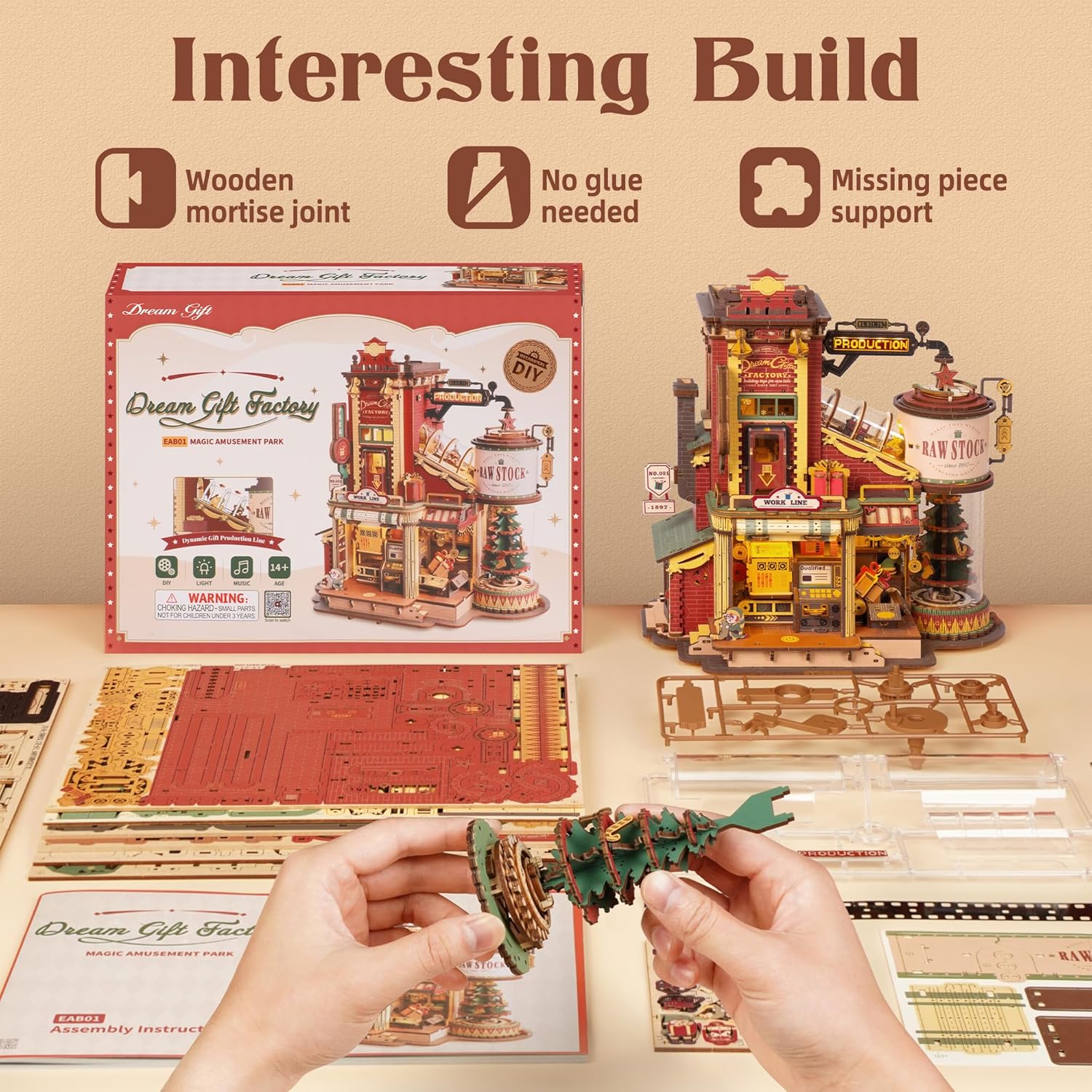
Image: The kit components spread out, demonstrating the wooden mortise joint design that requires no glue for assembly.
אַפּערייטינג ינסטראַקשאַנז
Once fully assembled, your ROBOTIME EAB01 Gift Factory model can be operated to showcase its dynamic features.
מאַכט אויף
Locate the power switch, typically found at the base or rear of the model. Flip the switch to the 'ON' position to activate the LED lights and music function.

Image: The assembled Gift Factory model with its lights on and music playing, illustrating its full operational state.
Dynamic Production Line
The model features a simulated gift production line. Observe the movement of the elves and gifts through the various stages: material processing, assembly line, packaging and sealing, and bow tying.
- Material Processing: Gifts begin their journey in the "Raw Stock" area.
- Assembly Line: Gifts move along the conveyor system.
- Packaging and Sealing: Gifts are prepared for shipment.
- Bow Tying: The final touch is added to the gifts.

Image: A visual breakdown of the four key stages of the Gift Factory's production process.
וישאַלט
Proper care will ensure the longevity and continued enjoyment of your ROBOTIME EAB01 model.
- רייניקונג: Use a soft, dry cloth to gently wipe dust from the model. Avoid using water or chemical cleaners, as they may damage the wood or electronic components.
- סטאָרידזש: Store the model in a dry environment, away from direct sunlight and extreme temperatures, to prevent warping or fading of the wood.
- האַנדלינג: Handle the model with care, especially when moving it, to avoid dislodging or damaging delicate parts.
- באַטערי פאַרבייַט: If your model uses batteries for the lights and music, replace them as needed following the instructions in the original assembly manual. Ensure correct polarity.
טראָובלעשאָאָטינג
If you encounter any issues with your ROBOTIME EAB01 model, refer to the following common problems and solutions:
| פּראָבלעם | מעגלעך סיבה | לייזונג |
|---|---|---|
| Lights or Music Not Working |
|
|
| Moving Parts Are Stuck |
|
|
| פעלנדיק אָדער דאַמידזשד פּאַרץ | Manufacturing defect or accidental damage during assembly. | Contact ROBOTIME customer service for assistance. They offer service for lost or damaged parts. |
ספּעסאַפאַקיישאַנז
| שטריך | דעטאַל |
|---|---|
| מאָדעל נאָמען | ROBOTIME EAB01 Gift Factory |
| מאָדעל נומער | EAB01ROBOTIME |
| מאַטעריאַל | הויך-קוואַליטעט פּלייוואָאָד |
| נומער פון פּיעסעס | 449 ברעקלעך |
| דערנענטערנ אַסעמבלי צייט | 12 שעה |
| אַסעמבאַלד דימענשאַנז (L x W x H) | 24.5 X 16.5 X 25.7 סענטימעטער (9.65 X 6.5 X 10.12 אינטשעס) |
| פֿעיִקייטן | Dynamic production line, LED lighting, Music function, 5 gift elves |
| רעקאַמענדיד עלטער | 14 יאר און העכער |
| אַסעמבלי מעטאָד | Wooden tenon and mortise assembly (no glue required) |

Image: Diagram illustrating the assembled dimensions of the Gift Factory model.
וואָראַנטי און שטיצן
ROBOTIME offers support for lost or damaged parts. For assistance, please contact ROBOTIME customer service directly.
For further information or support, you may visit the official ROBOTIME store on Amazon: ROBOTIME Store.
You can also scan the QR code on the product packaging for more information or support. An example link from the packaging is: ROBOTIME Support Link.
The UPC for this product is 6946785123371.
Ask a question about this manual
Ask about setup, troubleshooting, compatibility, parts, safety, or missing instructions. Manuals+ will review the question and use this page’s manual context to help answer it.