
amazon basics ABPBMP03
Wireless Microphone & Receiver User Manual
סאָרט: amazon basics | מאָדעל: ABPBMP03
1. הקדמה
This manual provides comprehensive instructions for the setup, operation, and maintenance of your amazon basics Wireless Microphone & Receiver System. Designed for superior audio clarity, this system features advanced 8-pin connector technology, ensuring fast setup and seamless integration. It is compatible with noise cancellation microphones and is suitable for various applications including YouTube Vlogging, Live Streaming, Video Shooting, Podcasting, and Video Conferencing.
פּעקל אינהאַלט:
- 1 רענטגענ ווירעלעסס מיקראָפאָן
- 1 x Receiver with 8-pin Connector
- באַניצער מאַנואַל (דעם דאָקומענט)

Figure 1: Wireless Microphone and Receiver components.
This image displays the wireless microphone and its accompanying receiver, showcasing their compact design and the clip-on feature of the microphone.
2. סעטאַפּ אינסטרוקציעס
The amazon basics Wireless Microphone & Receiver system is designed for effortless plug-and-play functionality, requiring minimal setup.
- טשאַרדזשינג די מיקראָפאָן: Ensure the wireless microphone is fully charged before first use. The built-in 50 mAh Li-Poly battery provides up to 5 hours of non-stop usage.
- פאַרבינדן די ופנעמער: Insert the 8-pin connector of the receiver into the compatible port of your device (e.g., iPhone, other 8-pin devices). The receiver is designed for a secure and rapid connection.
- מאַכט אָן דעם מיקראָפאָן: Locate the power button on the wireless microphone and press it to turn the device on. An indicator light will typically illuminate to confirm power status.
- אָטאַמאַטיק פּערינג: The microphone and receiver are designed to pair automatically upon power-on. No manual pairing steps are typically required.
- באַשטעטיקן קשר: Check your device's audio input settings to ensure the wireless microphone is recognized as the active input source.

Figure 2: Close-up of the 8-pin connector on the receiver, shown connected to a smartphone.
This image highlights the 8-pin connector, emphasizing its design for secure and efficient connection to compatible devices, with a visual of it plugged into a mobile phone.
3. אַפּערייטינג ינסטרוקטיאָנס
Once set up, the wireless microphone system provides crystal-clear audio transmission for various recording and streaming needs.
- אָרט: For optimal audio capture, clip the wireless microphone to your clothing, approximately 6-12 inches from your mouth. Ensure it is not obstructed by clothing or other objects.
- ווירעלעסס קייט: The system operates on a 2.4 GHz radio frequency and offers a wireless range of up to 10 meters (approximately 33 feet). Maintain this distance between the microphone and receiver for stable connection and audio quality.
- ראַש קאַנסאַליישאַן: The microphone seamlessly integrates with noise cancellation features to reduce unwanted background noise. This enhances speech clarity, especially in noisy environments.
- מאָניטאָרינג אַודיאָ: If your recording device allows, monitor the audio input through headphones to ensure proper sound levels and quality during recording or live streaming.
- מאַכט אַוועק: To conserve battery life, power off the microphone when not in use. Disconnect the receiver from your device when finished.
Battery Life and Wireless Performance:

Figure 3: Battery life and usage statistics.
This image highlights the microphone's battery performance, indicating up to 5 hours of non-stop usage and a built-in 50 mAh Li-Poly battery.

Figure 4: Wireless range and frequency details.
This image illustrates the microphone's wireless capabilities, featuring a 10-meter wireless range and operation on a 2.4 GHz radio frequency.
רעקאַמענדיד ניצט:
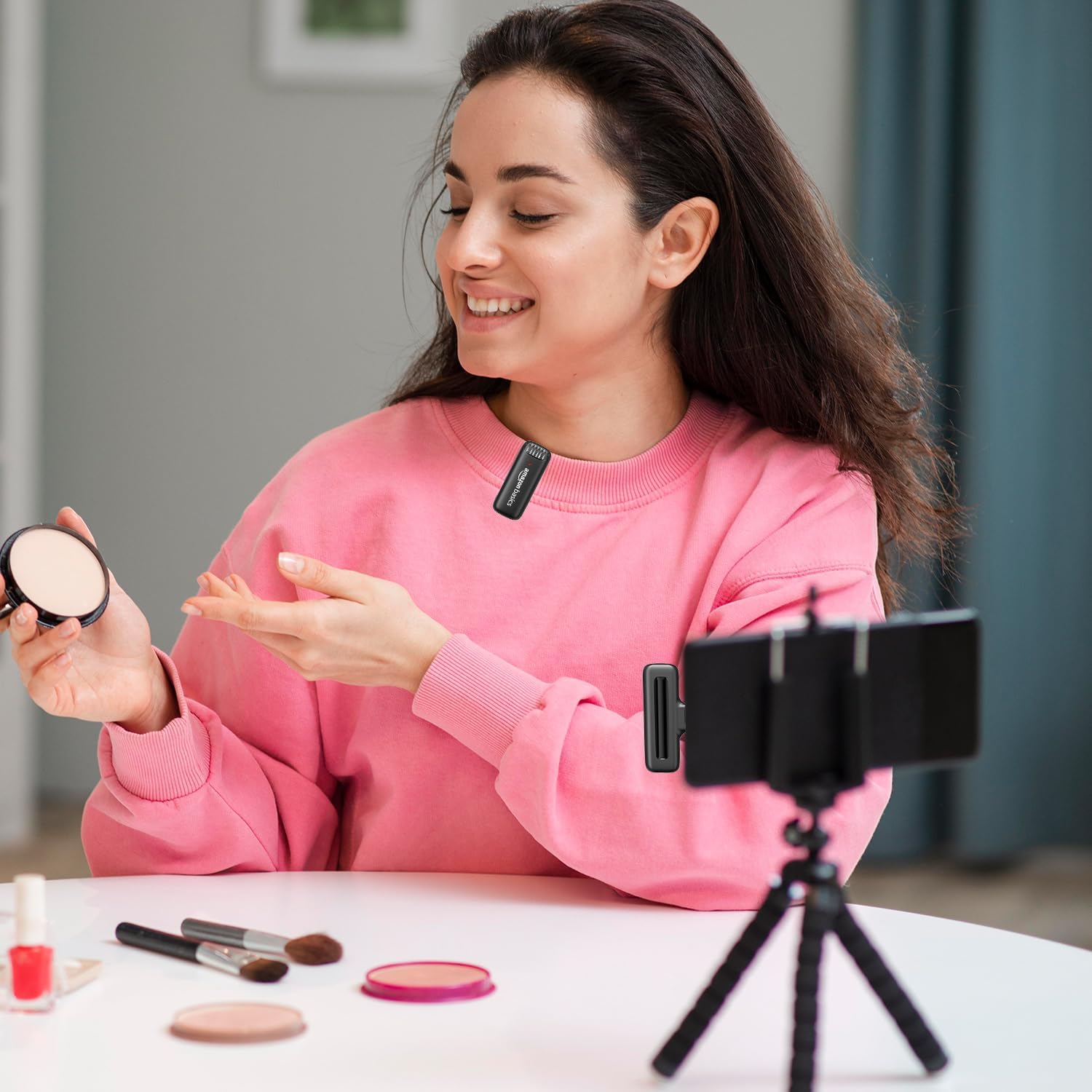
Figure 5: User demonstrating the wireless microphone in a recording setup.
This image shows a user wearing the clip-on microphone while recording video with a smartphone mounted on a tripod, illustrating a typical usage scenario for content creation.

Figure 6: Versatile applications of the wireless microphone.
This image presents a collage of four scenarios: podcasting, vlogging, live streaming, and video conferencing, demonstrating the wide range of applications for the microphone system.
- YouTube Vlogging
- לעבן סטרימינג
- ווידעא שיסערייַ
- בראָדקאַסטינג
- לעבן פּערפאָרמאַנסיז
- קאָנפֿערענצן
- פּאָדקאַסטינג
- ווידעא קאַנפראַנסינג
4. קער און וישאַלט
Proper care ensures the longevity and optimal performance of your wireless microphone system.
- רייניקונג: Use a soft, dry cloth to clean the microphone and receiver. Do not use liquid cleaners, aerosols, or solvents.
- סטאָרידזש: האַלט דעם אַפּאַראַט אין אַ קיל, טרוקן אָרט אַוועק פון דירעקט זונשייַן און עקסטרעמע טעמפּעראַטורן.
- ויסמיידן נעץ: Do not expose the microphone or receiver to water or excessive moisture. This can damage internal components.
- שעפּן מיט זאָרג: Avoid dropping or subjecting the devices to strong impacts, as this can cause internal or external damage.
- באַטערי זאָרגן: For optimal battery life, avoid fully discharging the microphone's battery frequently. Recharge it regularly, even if not in constant use.

Figure 7: Wireless microphone and receiver highlighting durable construction.
This image showcases the robust and compact design of both the microphone and receiver, emphasizing their dependable construction and convenient configuration for long-term use.
5. טראָובלעשאָאָטינג
אויב איר טרעפט פּראָבלעמען מיט אייער דראָטלאָזער מיקראָפאָן סיסטעם, זעט די פאלגענדע געוויינטלעכע פּראָבלעמען און לייזונגען:
| פּראָבלעם | מעגלעך סיבה | לייזונג |
|---|---|---|
| קיין קלאַנג אָדער נידעריקע וואָלומען. | Microphone not powered on, receiver not connected, device volume too low, microphone too far. | Ensure microphone is on and charged. Verify receiver is securely plugged in. Increase device volume. Move closer to the microphone. |
| די אַודיאָ קוואַליטעט איז שלעכט אָדער פאַרדרייט. | Interference, microphone too close/far, low battery. | Move away from other wireless devices. Adjust microphone placement. Recharge microphone battery. |
| מיקראָפאָן נישט פּערד מיטן ריסיווער. | Microphone or receiver not powered on, out of range. | Ensure both devices are powered on. Bring microphone closer to the receiver. Restart both devices. |
| קורץ באַטאַרייע לעבן. | Frequent full discharge, aging battery. | Ensure full charge before use. Avoid frequent full discharges. Battery life naturally degrades over time. |
6. פּראָדוקט ספּעסאַפאַקיישאַנז
| שטריך | דעטאַל |
|---|---|
| מאָדעל נאָמען | ABPBMP03 |
| ספּעציעלע שטריך | Wireless, Noise Cancellation |
| קאַמפּאַטאַבאַל דעוויסעס | 8 Pin devices, iPhone |
| קאָליר | שוואַרץ |
| אַרייַנגערעכנט קאַמפּאָונאַנץ | 1 Microphone, 1 Receiver |
| פּאָליאַר מוסטער | יבער קאַרדיאָיד |
| פּונקט וואָג | 61 גראַמז |
| מיקראָפאָן פאָרם פאַקטאָר | Handheld (Clip-on) |
| נומער דימענשאַנז (L X W X H) | 45 x 25 x 7 מילימעטער |
| מאַכט מקור | עלעקטריש מיט שנור (פֿאַר טשאַרדזשינג) |
| נומער פון באַטעריז | 1 ליטהיום יאָן (אַרייַנגערעכנט) |
| באַטערי טיפּ | ליטיום פּאָלימער (50 mAh) |
| מאַטעריאַל | פּלאַסטיק |
| ייַזנוואַרג פּלאַטפאָרמע | USB (for connectivity) |
| נומער פון טשאַנאַלז | 1 |
| קאַנעקטיוויטי טעכנאָלאָגיע | USB, Wireless (2.4 GHz) |
| ווירעלעסס ראַנגע | אַרויף צו 10 מעטער |
| פאַבריקאַנט | DONGGUAN ARCHER TECHNOLOGY CO., LTD |
| לאַנד פון אָריגין | כינע |
| ערשטער דאַטע בנימצא | 10 פעברואר 2025 |
7. וואָראַנטי און שטיצן
For information regarding warranty coverage and customer support, please refer to the product packaging or the official amazon basics website. You may also contact the importer for assistance:
אימפארטירער: IRIS TECH
אַדרעס: G-1/G-2, Dharam complex, Phase-1, Opp.Sapna Bar, Anjur Mankoli Road, Bhiwandi-421302
פֿאַר ווייטערדיקע הילף, ביטע באַזוכט די amazon basics Store on Amazon.
Ask a question about this manual
Ask about setup, troubleshooting, compatibility, parts, safety, or missing instructions. Manuals+ will review the question and use this page’s manual context to help answer it.