
1. הקדמה
This manual provides detailed instructions for the installation, operation, and maintenance of your DATOUBOSS 11KW 48V Hybrid Pure Sine Wave Inverter. Please read this manual thoroughly before installation and use to ensure proper function and safety. Keep this manual for future reference.

Figure 1: DATOUBOSS 11KW Hybrid Pure Sine Wave Inverter units.
2. שליסל פֿעיִקייטן
- הויך מאַכט רעזולטאַט: 11KW 48V DC to 230V AC pure sine wave hybrid inverter.
- Integrated MPPT: Features two built-in 160A MPPT charge controllers.
- פלעקסאַבאַל קאַנעקטיוויטי: Supports parallel operation of up to 9 units and grid connection.
- אַוואַנסירטע ווייַז: Equipped with an LCD display for real-time system data and operational status.
- קאָנפיגוראַבלע סעטטינגס: אַרייַנשרייַב וואָלtage range and AC/solar charger priority can be configured via LCD settings.
- מאַכט סטאַטיסטיק: View power statistics and analysis, with data storage for extended periods, even without Wi-Fi connection.
- Multiple Priority Modes: Three selectable priority modes: grid priority, solar priority, and battery priority, ensuring continuous power supply.
- פּורע סינע וואַווע רעזולטאַט: Provides stable, high-quality AC power for sensitive electronics.
- פולשטענדיק שוץ: Includes short circuit, overcurrent, overvoltage, ונדעראָלtage, overtemperature, overload, and fuse reverse connection protection.
- באַטערי פאַרוואַלטונג: Supports lithium battery activation function and regular charging/discharging to extend battery life.
- צווייענדיק רעזולטאַט פּאָרץ: Connects to two sockets, one for common output and the other for backup.
- ברייט אַפּלאַקיישאַן: Suitable for RVs, camping boats, home emergencies, and various appliances like stoves, rice cookers, lamps, TVs, and fans.
3. פּעקל אינהאַלט
Upon opening the package, verify that all items listed below are present and undamaged. If any items are missing or damaged, please contact your dealer immediately.
- DATOUBOSS 11KW Hybrid Inverter Unit
- מאַונטינג סקרוז און אַקסעסעריז
- Communication Cables (USB, RS232, RS485)
- באַניצער מאַנואַל
Video 1: Unboxing the DATOUBOSS 11KW Hybrid Inverter, showing the unit and included accessories.
4. פּראָדוקט איבערview און קאַמפּאָונאַנץ
Familiarize yourself with the inverter's physical layout and connection points.

פיגורע 2: דערציען טאַפליע view of the DATOUBOSS Inverter, highlighting various input and output ports.
פראָנט פּאַנעל:
- LCD ווייַז: Shows system data and operational status.
- סטאַטוס ינדיקאַטאָרס: AC/INV (AC/Inverter), CHG (Charging), FAULT (Error).
- פֿונקציע קיז: ESC, UP, DOWN, ENTER for navigation and settings adjustment.
דערציען פּאַנעל קאַנעקשאַנז:
- PV1 & PV2 Inputs: For connecting solar panel arrays.
- AC אַרייַנשרייַב: For connecting to the utility grid or generator.
- הויפּט רעזולטאַט: ערשטיק AC אַרויסגאַנג פֿאַר לאָודז.
- צווייטע אויסגאַבע: צווייטיקע AC אַרויסגאַנג פֿאַר לאָודז.
- RS232 & RS485 Ports: For communication and monitoring.
- פּאַראַלעל קאַנעקשאַן פּאָרט: פֿאַר פֿאַרבינדן קייפל ינווערטערס אין פּאַראַלעל.
- טרוקן קאָנטאַקט: פֿאַר עקסטערנער קאָנטראָל אָדער סיגנאַלינג.
- דק ינפּוט: For connecting to the battery bank.
- מאַכט באַשטימען אויף / אַוועק צו אנצינדן אדער אויסלעשן דעם אַפּאַראַט.

פיגורע 3: דעטאַילעד view of the inverter's rear panel, showing all connection points and their labels.
5. ספּעסאַפאַקיישאַנז
The following table outlines the technical specifications for the DATOUBOSS DT4811B Hybrid Inverter:
| פּאַראַמעטער | ווערט |
|---|---|
| מאָדעל | DT4811B |
| קאַפּאַציטעט | 11000VA/11000W |
| אַפּערייטינג טעמפּעראַטור ראַנגע | -10~50°C |
| שוץ גראַד | IP21 |
| דק אַרייַנשרייַב (באַטערי) | 48 וודק, 254.6 אַ |
| אַק רעזולטאַט | 230VAC, 50/60Hz, 47.8A, 1Φ |
| AC טשאַרדזשער | 54 וודק, 150 אַ |
| AC Input (Grid/Generator) | 230VAC, 50/60Hz, 60A, 1Φ |
| זונ פּאַנעל מאַכט | 2x5500 וו |
| Max Charging Current (Solar) | 150 א |
| זונ וואָלtagE קייט (Vmp) | 90-500VDC |
| בעסטער באַנדtagE קייט (Vmp) | 300-400VDC |
| מאַקס סאָלאַר וואָלtage | 500VDC |
| וואָג | 19.2 קילאָגראַמס |
| דימענשאַנז | 70.8 X 57 X 24.1 סענטימעטער |
| סעריע נומער (למשלampל) | 20241020 0476 |

Figure 4: Product label displaying detailed technical parameters and serial number.
6. סעטאַפּ און ייַנמאָנטירונג
Safety Warning: During any installation or maintenance operation, please ensure the power supply is completely turned off to prevent electric shock or damage to the equipment.
6.1 באַטערי קאַנעקשאַן
- Remove the side panel of the inverter to access the battery terminals.
- Connect the positive (red) battery cable to the inverter's positive (+) DC input terminal.
- Connect the negative (black) battery cable to the inverter's negative (-) DC input terminal.
- Ensure correct polarity before tightening the connections. Verify that all wiring is secure.
6.2 AC אַרייַנגאַנג און אַרויסגאַנג קאַנעקשאַנז
- Connect the AC input wires (Live, Neutral, Ground) to the designated AC Input terminals on the inverter.
- Connect the main AC output wires (Live, Neutral, Ground) to the Main Output terminals.
- If using, connect the second AC output wires to the Second Output terminals.
- It is recommended to install an appropriate fuse or circuit breaker for both AC input and output lines for protection.
6.3 זונ פּאַנעל פֿאַרבינדונג
Connect your solar panel arrays to the PV1 and PV2 inputs. Ensure the total voltage and current from your solar panels do not exceed the inverter's maximum ratings (Max Solar Voltage: 500VDC, Max Charging Current: 150A).
Video 2: Demonstrates battery and AC wiring connections, emphasizing safety and correct polarity.
7. אַפּערייטינג ינסטרוקטיאָנס
After all connections are securely made, you can power on the inverter and configure its settings using the LCD display and function keys.
7.1 פּאַוערינג אויף / אַוועק
- זיכער מאַכן אַז אַלע וויירינג איז ריכטיק און זיכער.
- Turn on the DC input breaker (if installed) for the battery.
- Flip the Power ON/OFF switch on the inverter to the 'ON' position.
- דער LCD דיספּלעי וועט זיך אָנצינדן, און דער ינווערטער וועט אָנהייבן זיין סטאַרטאַפּ סיקוואַנס.
7.2 על-סי-די דיספּלעי און נאַוויגאַציע
The LCD display provides real-time information and allows for system configuration. Use the function keys (ESC, UP, DOWN, ENTER) to navigate through menus and adjust settings.
- ESC: Exits the current menu or setting.
- אַרויף אַראָפּ: נאַוויגירט דורך מעניו אָפּציעס אָדער אַדזשאַסטירט ווערטן.
- אַרייַן: Selects an option or confirms a setting.
Refer to the detailed user manual for specific menu structures and parameter settings, including output voltage range, charger priority (AC/solar), and battery type configuration.
8. פּאַראַלעל אָפּעראַציע
The DATOUBOSS 11KW Hybrid Inverter supports parallel operation of up to 9 units to increase overall power capacity. This feature allows for scalable power solutions tailored to specific energy demands.
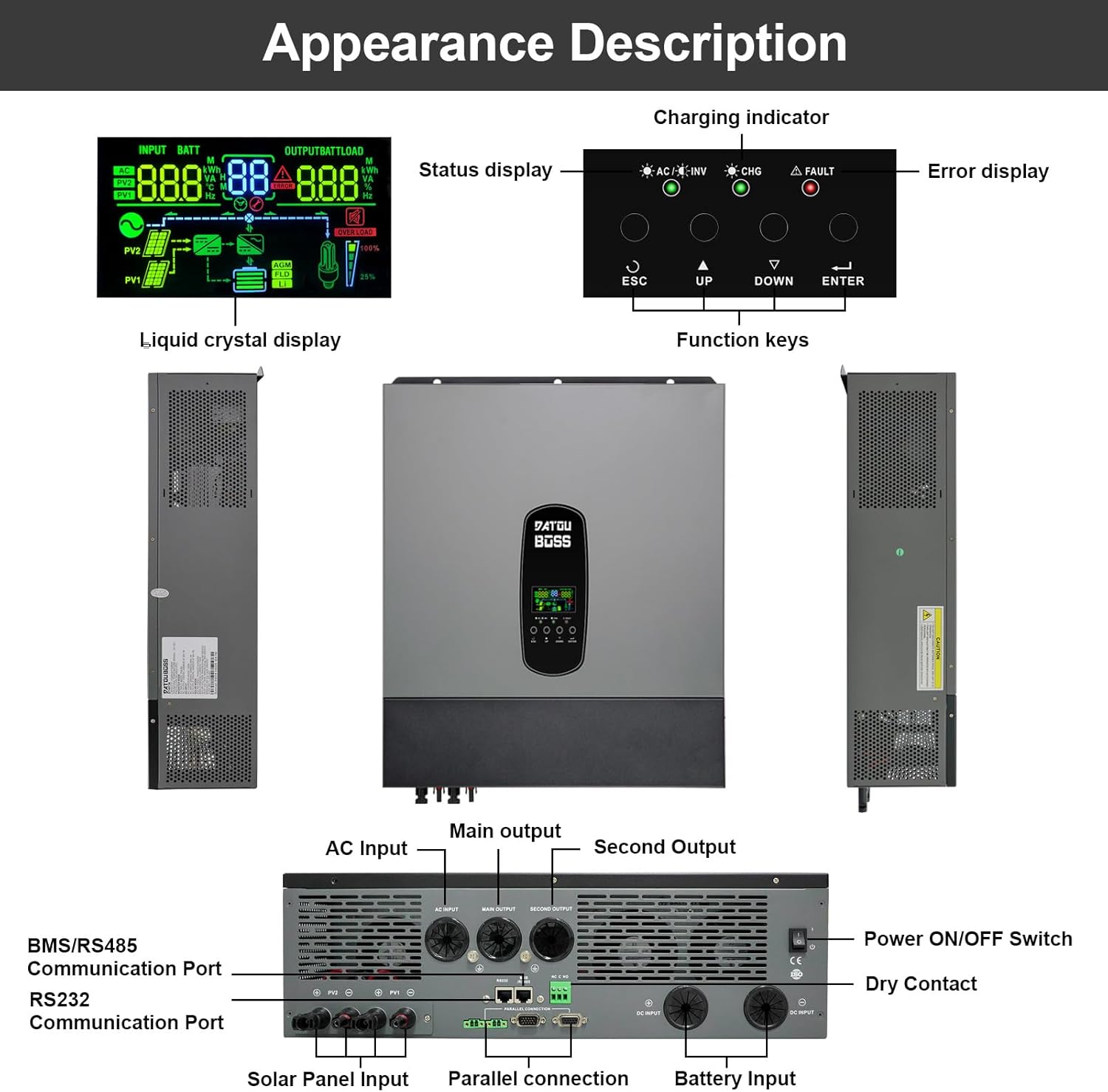
Figure 5: Diagrams illustrating the wiring for two and three inverters in parallel, including communication connections.
For detailed instructions on parallel connection, including wiring diagrams and configuration steps, please consult the comprehensive user manual provided with your inverter. Proper communication cabling and settings are crucial for stable parallel operation.
9. Battery-Free Operation
This hybrid inverter supports battery-free operation, allowing it to be powered directly from photovoltaic (PV) modules to supply alternating current for homes or other loads without the need for batteries. This feature offers greater flexibility in system design and can reduce initial investment or battery usage.
9.1 How Battery-Free Operation Works:
- Direct PV Power: The inverter directly converts DC power from the PV modules into AC power for connected loads.
- Grid-Assisted Supply: If PV generation is insufficient to meet load demand, the system can draw energy from the grid to ensure continuous power supply.
9.2 אַדוואַנtagעס:
- רעדוצירטע ערשטע קאָסטן: Operate the system without batteries initially, adding them later if needed.
- Improved System Flexibility: Direct use of solar power during peak generation, reducing grid dependence.
- Reduced Battery Loss: Extends battery life by skipping battery usage when solar power is abundant.
9.3 Limitations and Precautions:
- No Power Supply at Night: In battery-free mode, there is no power supply from the inverter at night or on cloudy days if there is no grid access.
- PV Generation Fluctuations: Load power supply may be affected by unstable solar generation (e.g., cloudy weather).
9.4 Applicable Scenarios:
- Daytime peak electricity users.
- Industrial and agricultural pumping stations in areas with sufficient sunlight.

Figure 6: Visual explanation of battery-free operation, its benefits, and how it functions.

Figure 7: Summary of advantages, limitations, and applicable scenarios for battery-free operation.
10. שוץ פֿעיִקייטן
The DATOUBOSS 11KW Hybrid Inverter is equipped with multiple protection functions to ensure safe and reliable operation of your system and connected appliances.

פיגורע 8: איבערview of the inverter's comprehensive 360-degree protection features.
- קורץ קרייַז שוץ: Prevents damage from short circuits in the output.
- איבער-לאָאַד שוץ: Shuts down the inverter if the connected load exceeds its capacity.
- איבער קראַנט פּראַטעקשאַן: זיכערהייטן קעגן איבערגעטריבענעם קראַנט שטראָם.
- Backfill Protection: Prevents reverse current flow.
- איבער וואָלtagE שוץ: Protects against excessively high voltagE לעוועלס.
- איבער-טעמפּעראַטור שוץ: Shuts down the unit if internal temperatures become too high.
- אונטער וואָלtagE שוץ: Prevents damage from excessively low voltagE לעוועלס.
- איבער אָפּצאָל שוץ: Protects batteries from overcharging.
11. וישאַלט
רעגולערע אויפהאלטונג גאראנטירט די לאנגעוויטי און אפטימאלע פאָרשטעלונג פון אייער ינווערטער.
- רייניקונג: רייניקט פּעריִאָדיש די אויסערלעכע זייט און ווענטילאַציע עפענונגען פון דעם ינווערטער צו פאַרמייַדן שטויב אָנזאַמלונג, וואָס קען שטערן קילן. ניצט אַ טרוקן, ווייך שטאָף.
- קשר טשעקס: Regularly inspect all electrical connections (battery, AC, solar) for tightness and signs of corrosion. Tighten any loose connections.
- ינווייראַנמענאַל טנאָים: Ensure the inverter is operated within its specified temperature range (-10~50°C) and in a well-ventilated area.
- Firmware דערהייַנטיקונגען: קוק די פאַבריקאַנט ס webזייטל פֿאַר אַלע בנימצא פירמווער דערהייַנטיקונגען צו ענשור אָפּטימאַל פאָרשטעלונג און אַקסעס צו נייַע פֿעיִקייטן.
12. טראָובלעשאָאָטינג
די סעקציע גיט גרונטלעכע פראבלעם לייזונג טריט פאר אלגעמיינע פראבלעמען. פאר מער קאמפליצירטע פראבלעמען, ביטע קאנטאקטירט קאסטומער סופארט.
פּראָסט ישוז און סאַלושאַנז:
- ינווערטער טוט זיך נישט אן:
- Check battery connections for proper polarity and tightness.
- באַשטעטיקן די באַטאַרייע וואָלtage איז אין די אַפּערייטינג קייט.
- Ensure the Power ON/OFF switch is in the 'ON' position.
- קיין AC אַרויסגאַנג:
- טשעק AC אַוטפּוט וויירינג און קרייַז ברעאַקערס.
- Verify that the inverter is not in fault mode (FAULT indicator).
- קאָנטראָלירט פֿאַר איבערלאַסטונג באדינגונגען; רעדוצירט פֿאַרבונדענע לאָודז.
- טשאַרדזשינג ישוז:
- For solar charging, check solar panel connections and ensure sufficient sunlight.
- For AC charging, verify AC input connection and grid power availability.
- Check charging settings on the LCD display.
- טעות קאָדעס אויף LCD:
- Refer to the detailed user manual for a list of error codes and their corresponding solutions.
13. וואָראַנטי און שטיצן
DATOUBOSS is committed to product quality and customer satisfaction.
- וואָראַנטי: דער פּראָדוקט קומט מיט אַ 5 יאָר וואָראַנטי.
- קונה סערוויס: We provide 24-hour professional customer service.
- קאָנטאַקט: If you have any product-related questions or require technical assistance, please do not hesitate to contact us through the Amazon reserved area. We have a specialized technical service team available to assist you.

Figure 9: Icons representing 10 years lifespan, 5 years guarantee, 24 hours response, and local warehouses.