
הקדמה
This manual provides comprehensive instructions for the installation, operation, and maintenance of your Generic Tempered Glass Screen Protector for the Xiaomi Mi 10i 5G. This screen protector is engineered to offer superior protection against scratches, impacts, and daily wear, while preserving the original touch sensitivity and visual clarity of your device's display. Its 9H hardness and oleophobic coating ensure durability and resistance to fingerprints and smudges.
פּעקל אינהאַלט
באַשטעטיקט אַז אַלע זאכן וואָס זענען אויסגערעכנט אונטן זענען אַרייַנגערעכנט אין אייער פּעקל:
- טעמפּערד גלאז סקרין פּראָטעקטאָר
- מיקראָפיבער שטאָף
- Wet Wipe (Alcohol Prep Pad)
- טרוקן ווישן
- גייד סטיקערז
- Dust Absorber Sticker
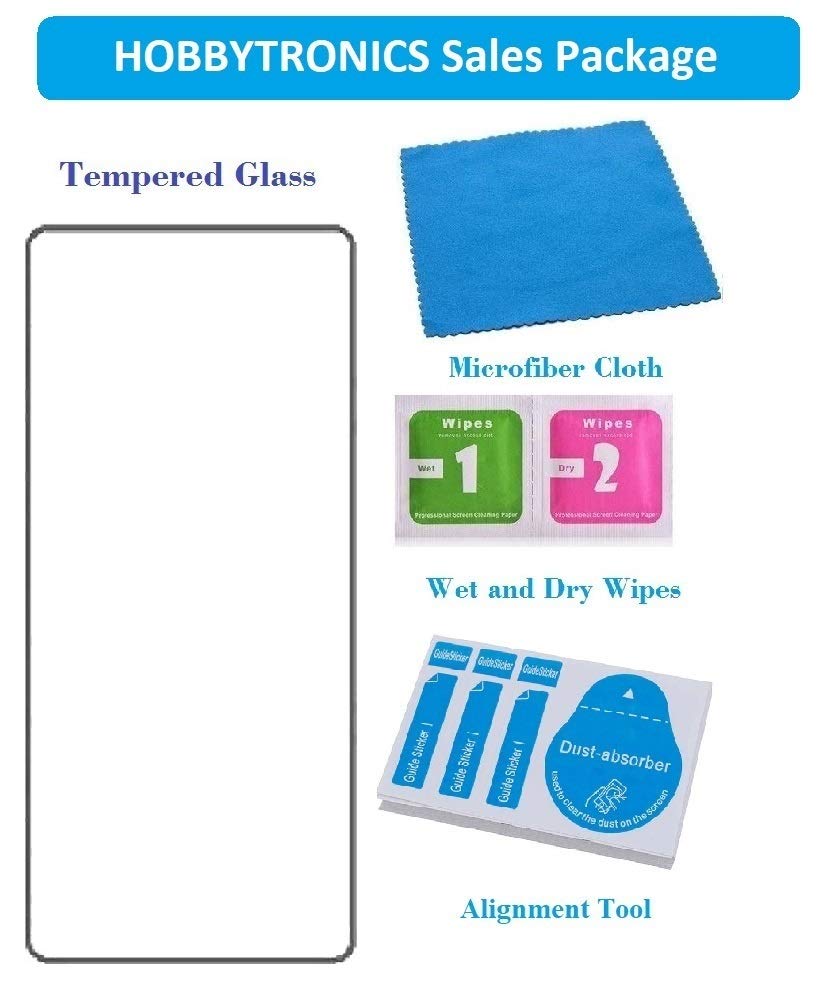
Image: Contents of the screen protector package, showing the tempered glass, microfiber cloth, wet and dry wipes, guide stickers, and a dust absorber sticker.
ינסטאַללאַטיאָן גייד
Follow these steps carefully for a bubble-free installation:
- ריין די פאַרשטעלן: Use the wet cleaning wipe (labeled "1") to thoroughly clean your phone's screen, removing all dirt, oil, and smudges.
- טריקנט דעם עקראַן: Immediately use the dry wipe (labeled "2") to dry the screen completely, ensuring no moisture remains.
- אַראָפּנעמען שטויב: Use the dust absorber sticker to gently dab the screen and remove any remaining dust particles. Ensure the screen is completely dust-free.
- Position the Protector: Carefully align the tempered glass screen protector with your phone's screen. Pay attention to the cutouts for the camera and sensors. Use guide stickers if provided to help with alignment.
- שאָלעט אָפּ דעם הינטערשטן טייל: Once aligned, peel off the protective film from the adhesive side of the tempered glass. Avoid touching the adhesive surface.
- אָנווענדן דעם פּראָטעקטאָר: Gently place the tempered glass onto the screen, starting from one edge and slowly lowering it. The adhesive will begin to spread.
- אַראָפּנעמען באַבאַלז: If any bubbles appear, gently push them towards the edges of the screen using the microfiber cloth or a soft card. Small bubbles should disappear within 24-48 hours.
- לעצטע וויש: Use the microfiber cloth to give the installed screen protector a final wipe.
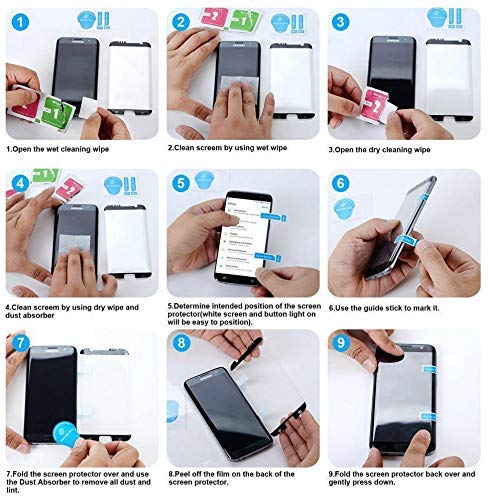
Image: A visual guide illustrating the nine steps for screen protector installation, from cleaning the screen to applying the glass and removing bubbles.
אָפּעראַציע און פֿעיִקייטן
Once installed, your screen protector provides enhanced protection and maintains the functionality of your device:
- Delicate Touch Sensitivity: The ultra-thin design ensures that your screen's touch response remains unaffected, providing a smooth and responsive user experience.
- Anti-Fingerprint Coating: An oleophobic coating resists fingerprints and smudges, keeping your screen clear and easy to clean.
- גאַנץ קאַווערידזש: Designed for edge-to-edge coverage (except for the very edges to allow for case compatibility), offering maximum protection for your display.
- 9H Hardness: Provides robust scratch protection against keys, coins, and other sharp objects.
- 2.5D Curved Edges: The rounded edges offer a comfortable feel and help deflect shock from impacts.

Image: An infographic highlighting key features of the screen protector, including delicate touch, anti-fingerprint properties, oleophobic coating, full coverage, slim design, and 9H hardness.

Image: An infographic illustrating the ultra-clear screen quality, the benefits of dot matrix technology for enhanced touch sensitivity, and the soft, comfortable edges of the screen protector.
וישאַלט
כדי צו האַלטן די קלאַרקייט און עפעקטיווקייט פון דיין פאַרשטעלן פּראָטעקטאָר:
- Regularly wipe the screen with a clean, soft microfiber cloth to remove dust and fingerprints.
- פֿאַר שווערע פֿלעקן, לײַכט דראַפֿטןampen the microfiber cloth with water or a screen cleaner designed for electronics. Avoid harsh chemicals or abrasive materials.
- Do not attempt to peel off and reapply the screen protector, as this may compromise its adhesive and lead to dust or bubbles.
טראָובלעשאָאָטינג
פּראָסט ישוז און זייער סאַלושאַנז:
- באַבאַלז נאָך ינסטאַלירונג:
- Small bubbles often disappear naturally within 24-48 hours.
- For larger bubbles, gently lift the nearest edge of the screen protector slightly and re-apply, pushing the bubble out with a microfiber cloth. Ensure no dust is trapped underneath.
- Dust Trapped Underneath:
- If dust is trapped, carefully lift the corner of the screen protector closest to the dust particle using a piece of tape. Use another piece of tape to gently dab and remove the dust from the adhesive side. Re-apply carefully.
- פארקלענערטע ריר סענסיטיוויטי:
- Ensure the screen protector is properly seated and there are no air gaps.
- Clean the screen protector surface thoroughly.
ספּעסאַפאַקיישאַנז
| סאָרט | גענעריק |
| מאָדעל נאָמען | סקרין פּראָטעקטאָר |
| מאָדעל נומער | XIO-MI10I-T001 |
| קאַמפּאַטאַבאַל דעוויסעס | Xiaomi Mi 10i 5G |
| מאַטעריאַל | טעמפּערד גלאז |
| ענדיקן טיפּ | גלאָסי |
| קאָליר | טראַנספּעראַנט |
| פּראָדוקט דימענסיעס (L x B) | 18L x 12W סענטימעטער |
| נעץ קוואַנטיטי | 1.0 גראף |
| פאַבריקאַנט | HOBBYTRONICS |
| לאַנד פון אָריגין | אינדיע |
וואָראַנטי אינפֿאָרמאַציע
Warranty information for this product is not explicitly provided. Please refer to the retailer's return policy or contact the seller directly for details regarding any applicable warranty or guarantee.
שטיצן
For further assistance or inquiries, please contact the retailer from whom you purchased this product. Manufacturer contact information is HOBBYTRONICS.