
1. פּראָדוקט איבערview
The Fanvil V60P is a professional IP phone designed for business communication. It features a color display, programmable keys, and Power over Ethernet (PoE) support for simplified installation and operation. This manual provides essential information for setting up, operating, and maintaining your device.
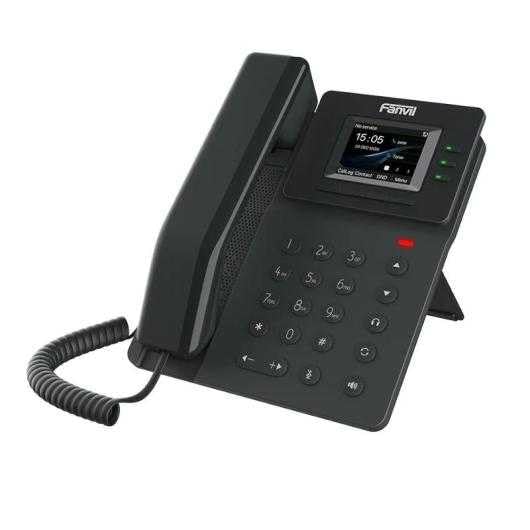
Figure 1: Fanvil V60P Professional IP Phone. This image shows the black IP phone with its handset, color display, and numeric keypad. The display shows "15:05" and menu options.
2. סעטאַפּ און ייַנמאָנטירונג
2.1 פּעקל אינהאַלט
Before installation, verify that all items are present in the package:
- Fanvil V60P IP Phone unit
- האַנטסעט און אויפגעשפּולט שנור
- עטהערנעט קאַבלע
- שטיין
- שנעלע אינסטאַלאַציע גייד (אויב אַרייַנגערעכנט)
2.2 פיזיש קאַנעקשאַן
- צוטשעפּען די שטיין: Securely attach the desk stand to the back of the phone unit.
- פֿאַרבינדן דעם האַנדסעט: שטעקט איין עק פון דעם אויפגעדרײלטן שנור אין דעם האַנדסעט און דעם אַנדערן עק אין דעם האַנדסעט פּאָרט אויף דער טעלעפאָן באַזע.
- Connect to Network and Power (PoE):
- פֿאַרבינדט איין עק פֿונעם עטערנעט קאַבל צום לאַן port on the phone.
- Connect the other end of the Ethernet cable to a Power over Ethernet (PoE) enabled switch or injector. The phone will power on automatically.
- פאַרבינדן צו קאָמפּיוטער (אפציאָנעל): If you need to connect a computer through the phone, connect an Ethernet cable from your PC to the PC port on the phone.
Note: If PoE is not available, a separate power adapter (not included) may be required. Refer to the product specifications for compatible power adapter details.
3. אַפּערייטינג ינסטרוקטיאָנס
3.1 גרונטלעכע רוף פונקציעס
- מאַכן אַ רוף:
- Pick up the handset or press the Speakerphone button.
- רעדל די געבעטן נומער ניצן די קיפּאַד.
- דרוק די רעדל soft key or wait for the automatic dialing timeout.
- ענטפֿערן אַ רוף:
- נעמען אַרויף די כאַנדסעט.
- Alternatively, press the Speakerphone button or the ענטפער ווייך שליסל.
- ענדיקן אַ רוף: Hang up the handset or press the Speakerphone button.
3.2 Using Programmable DSS Keys
The Fanvil V60P features 6 programmable DSS (Direct Station Select) keys. These keys can be configured for various functions such as speed dial, line keys, busy lamp field (BLF), or other custom features as defined by your system administrator.
- To use a programmed DSS key, simply press the corresponding button.
- Configuration of DSS keys is typically done via the phone's web interface or your IP PBX system.
3.3 Local Phonebook
The phone supports a local phonebook with up to 1000 entries.
- צוטריט צום טעלעפאן בוך דורך די Directory or קאָנטאַקט soft key on the display.
- Use the navigation keys to browse entries.
- Select an entry and press the רעדל soft key to initiate a call.
3.4 Audio Conferencing
The V60P supports local 6-party audio conferencing.
- Establish a call with the first participant.
- דרוק די קאָנפ soft key. The first participant will be put on hold.
- Dial the number of the second participant and establish the call.
- דרוק די קאָנפ soft key again to merge all participants into a conference.
- Repeat steps 2-4 to add more participants, up to a total of 6.
4. וישאַלט
4.1 רייניקונג די מיטל
To maintain the appearance and functionality of your Fanvil V60P IP Phone (made of plastic material), follow these cleaning guidelines:
- Disconnect the phone from its power source (PoE) before cleaning.
- ניצן אַ ווייך, אַ ביסל דamp, lint-free cloth to wipe the surfaces.
- Avoid using harsh chemicals, abrasive cleaners, or solvents, as these can damage the plastic and display.
- שפריצט נישט רייניגער גלייך אויפן טעלעפאן.
4.2 פירמוואַרע דערהייַנטיקונגען
Firmware updates may be released periodically to improve performance, add features, or fix bugs. Consult your IT administrator or Fanvil's official website for information on available updates and instructions for installation.
5. טראָובלעשאָאָטינג
This section addresses common issues you might encounter with your Fanvil V60P IP Phone.
| פּראָבלעם | מעגלעך סיבה | לייזונג |
|---|---|---|
| דער טעלעפאָן גייט נישט אָן. | No PoE connection or faulty Ethernet cable. | Ensure the Ethernet cable is securely connected to the LAN port and a PoE-enabled switch/injector. Verify the PoE source is active. |
| קיין רעדל טאָן. | SIP registration failure or network issue. | Check network connectivity. Verify SIP account settings with your IT administrator. Restart the phone. |
| קען נישט מאַכן/באַקומען רופן. | Network issues, incorrect SIP configuration, or firewall blocking. | Confirm network connection. Check SIP registration status on the phone's display. Contact your IT administrator for network and SIP configuration verification. |
| נעבעך אַודיאָ קוואַליטעט. | נעץ פארשטאפונג אדער דעפעקטיווער האנטסעט/רעדנער. | Check network bandwidth and latency. Try using a different handset or speaker mode. If the issue persists, contact support. |
6. ספּעסאַפאַקיישאַנז
| שטריך | דעטאַל |
|---|---|
| מאָדעל | V60P |
| סיסטעם | לינוקס |
| ווייַז | 2.4-inch, 320 x 240 Color Screen |
| דסס קיז | 6 פּראָגראַממאַבלע קיז |
| SIP ליניעס | 4 |
| Local Phonebook | 1000 איינסן |
| כאַנדסעט | ווייערד כאַנדסעט |
| אַודיאָ קאַנפראַנסינג | 6-party Local Conference |
| Wideband Codecs | ג.722, אָפּוס |
| Narrowband Codecs | G.711, G.723.1, G.726, G.729, G.729A, G.729B, G.729AB, iLBC |
| פּאָע | יא |
| נעץ פּאָרץ | 2 x 10/100 Mbps Ethernet Ports |
| EHS Support | יא |
| IPv6 שטיצן | יא |
| מאַטעריאַל | פּלאַסטיק |
| דימענשאַנז (LxWxH) | 15 X 200 X 15 סענטימעטער |
| וואָג | 600 גראַמז |
| קאַללער שייַן | יא |
| מולטי-ליניע אפעראציע | יא |
| Conference Call Functionality | Support Multiple Conferences |
| Standby Duration (if applicable) | 10 שעה |
7. וואָראַנטי און שטיצן
7.1 פּראָדוקט וואָראַנטי
The Fanvil V60P IP Phone comes with a דריי־יאָריקע גאַראַנטיע קעגן פאַבריקאַציע־דעפעקטןדי וואָראַנטי דעקט חסרונות אין מאַטעריאַלן און אַרבעט אונטער נאָרמאַל נוצן. ביטע האַלטן דיין קויפן באַווייַז פֿאַר וואָראַנטי קליימז.
7.2 טעכניש שטיצן
For technical assistance, troubleshooting beyond this manual, or warranty inquiries, please contact your reseller or Fanvil's official customer support channels. You may need to provide your product model (V60P) and serial number.