
1. פּראָדוקט איבערview
The WE-VIBE Chorus is a couples vibrator designed for shared pleasure. It features an adjustable design for comfortable, hands-free use during intimate moments. The device is made from body-safe silicone and is 100% waterproof, allowing for easy cleaning and versatile use.
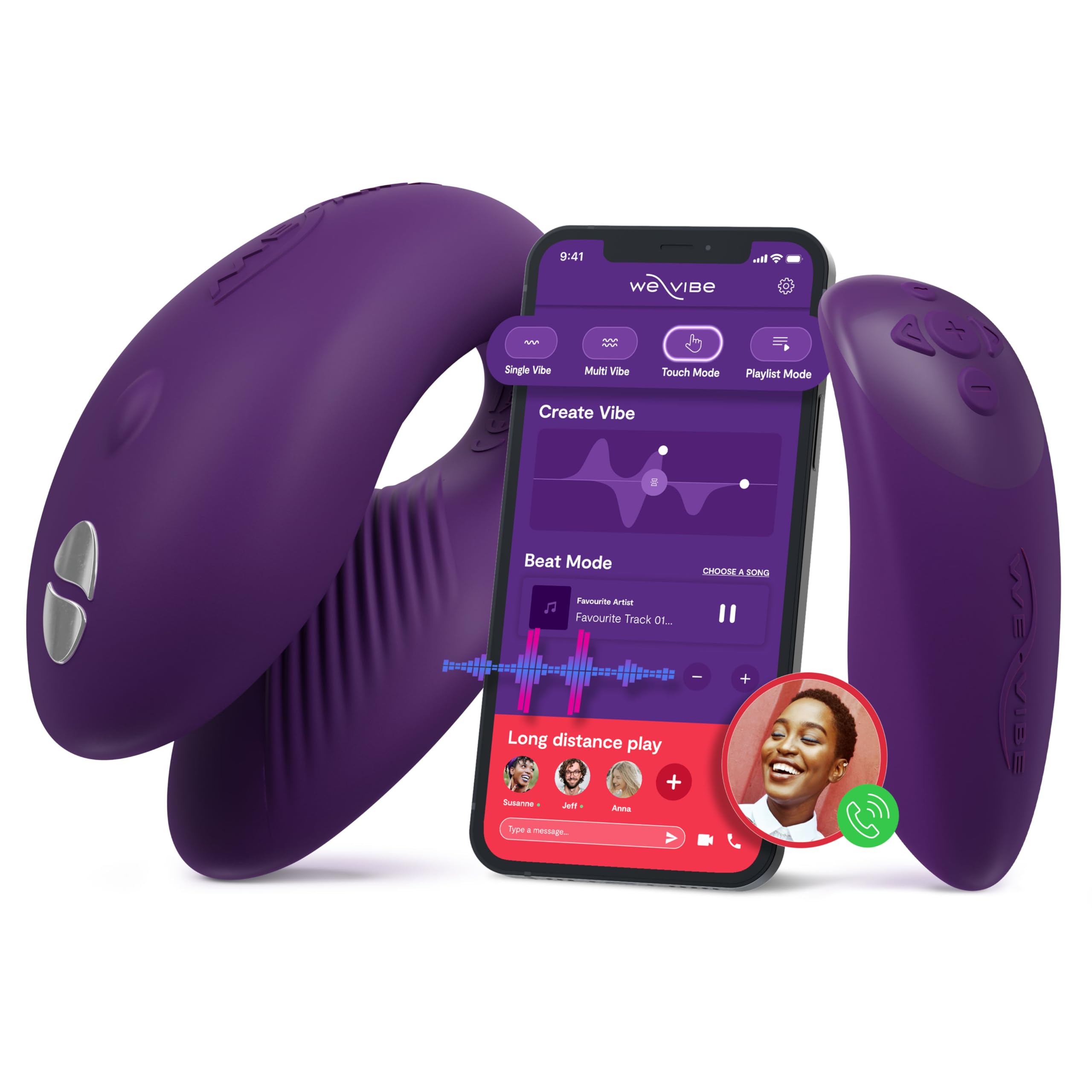
Figure 1: WE-VIBE Chorus Couples Vibrator and its control options.
שליסל פֿעיִקייטן:
- Triple Stimulation: Designed to stimulate the clitoris, G-spot, and penis simultaneously during penetrative sex.
- אַדזשאַסטאַבאַל פּלאַן: Flexible and soft material ensures a comfortable and adaptable fit for hands-free use.
- Squeeze Remote: Offers intuitive control; squeezing increases vibration intensity.
- Touch Sense Modes: Unique touch-sensitive receptors allow movements to control vibrations.
- אַפּ קאָנטראָל: Connects via Bluetooth to the free We-Connect phone app for remote control, custom vibration patterns, and long-distance play.
- וואָטערפּרוף (IPX7): Fully submersible for easy cleaning and use in various environments.
2. סעטאַפּ
2.1 טשאַרדזשינג די מיטל
Before first use, fully charge your WE-VIBE Chorus. The device comes with a charging case that also serves as a discreet storage solution.
- Place the Chorus vibrator and its remote into the designated slots in the charging case.
- Connect the charging cable to the port on the charging case and to a USB power source.
- An indicator light on the charging case will show the charging status. It will typically change color or turn off when fully charged.

Figure 2: WE-VIBE Chorus vibrator and remote in its charging case.
2.2 אַפּ ינסטאַלירונג און קאַנעקשאַן
For enhanced control and features, download the We-Connect app.
- Download the free We-Connect app from your device's app store (available on Google Play and the App Store).
- זיכער מאַכן אַז אייער טעלעפאָן'ס בלועטוט איז ענייבאַלד.
- Turn on your WE-VIBE Chorus device by pressing the power button.
- Open the We-Connect app and follow the on-screen instructions to pair your device.

Figure 3: The We-Connect app interface for intuitive control.
3. אַפּערייטינג ינסטרוקטיאָנס
3.1 Basic Use (Device Only)
- Apply a water-based lubricant to the internal arm of the toy for comfortable insertion.
- Insert the device as desired.
- Press the power button on the device to turn it on and cycle through vibration modes.
- Hold the power button to turn the device off.
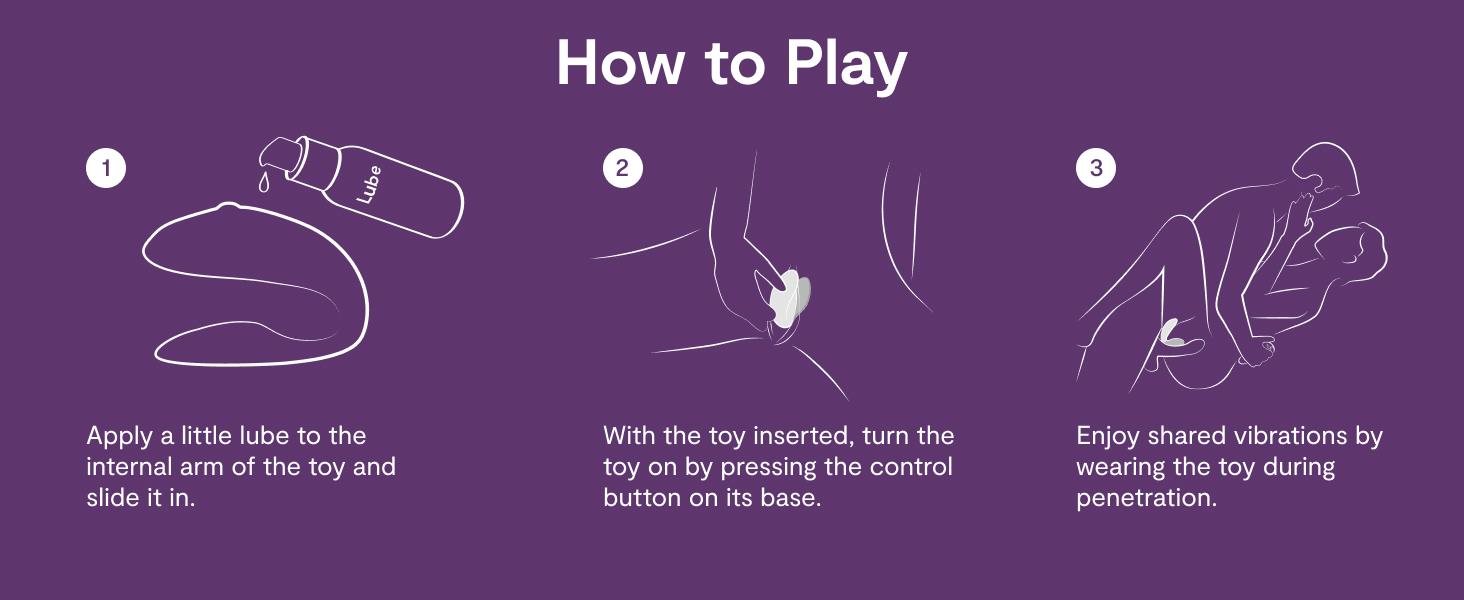
Figure 4: How to use the WE-VIBE Chorus for shared pleasure.
3.2 ניצן די רימאָוט קאָנטראָל
The included remote control provides convenient access to the device's functions.
- מאַכט קנעפּל: Turns the device on/off and cycles through modes.
- ינטענסיטי קנעפּלעך: Use the '+' and '-' buttons to adjust vibration intensity.
- Squeeze Mode: The remote features a squeeze function; applying pressure increases intensity.

Figure 5: The WE-VIBE Chorus vibrator and its dedicated remote control.
3.3 Using the We-Connect App
The We-Connect app offers advanced control and customization.
- Custom Vibes: Create and save personalized vibration patterns.
- Long-Distance Play: Share control of your device with a partner from anywhere in the world.
- מוזיק סינק: Some app modes allow vibrations to sync with music.
- ריר מאָדע: Control vibrations directly through touch on your phone screen.

Figure 6: Long-distance control and app features for the WE-VIBE Chorus.
4. וישאַלט
4.1 רייניקונג אינסטרוקציעס
Proper cleaning ensures hygiene and extends the lifespan of your device.
- After each use, wash the device thoroughly with warm water and a mild, toy-safe soap or specialized toy cleaner.
- Rinse completely to remove all soap residue.
- טרוקן אָפּ מיט אַ לינט-פֿרײַעם שטאָף אָדער לאָזט עס גאָר טרוקן אין דער לופֿט איידער איר לייגט עס אַוועק.
- Do not use harsh chemicals, alcohol-based cleaners, or petroleum-based lubricants, as these can damage the silicone material.
4.2 סטאָרידזש
Store the WE-VIBE Chorus in its charging case or a clean, dry place away from direct sunlight and extreme temperatures. Avoid storing it with other toys made of different materials to prevent material degradation.
5. טראָובלעשאָאָטינג
5.1 דיווייס טוט זיך נישט אן אדער רעאגירט נישט
- קאָנטראָלירן די באַטאַרייע: Ensure the device is fully charged. Place it in the charging case and verify the indicator light.
- מאַכט קנעפּל: דריק און האלט דעם פּאַוער קנעפּל פֿאַר אַ פּאָר סעקונדעס צו זיכער מאַכן אַז עס רעגיסטרירט זיך.
5.2 App/Remote Connectivity Issues
- בלועטאָאָטה: זיכער מאַכן אַז בלועטוט איז ענייבאַלד אויף דיין טעלעפאָן און די מיטל איז אין דערגרייך.
- ריפּער: If connection is lost, try unpairing and re-pairing the device within the We-Connect app.
- מניעות: Physical obstructions or body positioning can sometimes interfere with signal strength, especially with the remote. Try adjusting positions.
- אַפּ דערהייַנטיקן: Ensure your We-Connect app is updated to the latest version.
- ריסטאַרט: Try restarting both your phone and the WE-VIBE Chorus device.
5.3 Uncomfortable Fit
- סטרויערן שטעלע: The Chorus is designed to be adjustable. Experiment with different placements and angles to find the most comfortable fit.
- שמירן: Ensure adequate water-based lubricant is used to minimize friction and improve comfort.
6. ספּעסאַפאַקיישאַנז
| שטריך | דעטאַל |
|---|---|
| מאָדעל נאָמען | כאָר |
| סאָרט | מיר-וויבע |
| מאַטעריאַל | סיליקאָנע |
| קאָליר | טונקל לילאַ |
| פּראָדוקט דימענשאַנז | 4.33 X 3.84 X 4.33 אינטשעס |
| וואָג | 1.1 פונט |
| באַטעריז | 1 CR2032 batteries required (for remote) |
| וואָטערפּרוף רייטינג | IPX7 |
| קאַנעקטיוויטי | Bluetooth (We-Connect App) |
7. וואָראַנטי & שטיצן
For detailed warranty information and customer support, please refer to the official WE-VIBE webזייטל אדער קאנטאקט זייער קאסטומער סערוויס גלייך. האלט אייער באווייז פון קויפן פאר יעדע גאראנטיע טענות.
פאַבריקאַנט: WOW Tech
Webפּלאַץ: www.we-vibe.com (עקסample, please verify official site)