
TKOWTB G518
Electric Bicycle Display G518 LCD Display User Manual
Brand: TKOWTB | Model: G518
הקדמה
This manual provides comprehensive instructions for the installation, operation, and maintenance of your TKOWTB G518 LCD Display. This display is designed for electric bicycles and scooters, compatible with 24V, 36V, 48V, 60V, and 72V systems, offering clear data visualization and easy control.
שליסל פֿעיִקייטן
- LCD display clearly shows state and data, with backlight for visibility in dim environments.
- Intuitive buttons for quick and easy operation.
- High temperature resistance, ensuring durability and safe use.
- Constructed from high-quality, rainproof, and sturdy materials.
- Suitable for a wide range of electric bicycles and scooters.
ינסטאַללאַטיאָן גייד
פּעקל אינהאַלט
- 1 x G518 LCD Display
וויירינג אינסטרוקציעס
Follow the standard wiring sequence and color function for proper connection to your electric bicycle or scooter system.
Description: This image illustrates the standard wiring sequence and color functions for the G518 LCD display. The connections are: 1 Red (VCC) - meter power cable; 2 Blue (Kp) - power control cable of the controller; 3 Black (GND) - instrument ground cable; 4 Green (RX) - instrument data receiving line; 5 Yellow (TX) - instrument data transmission line.

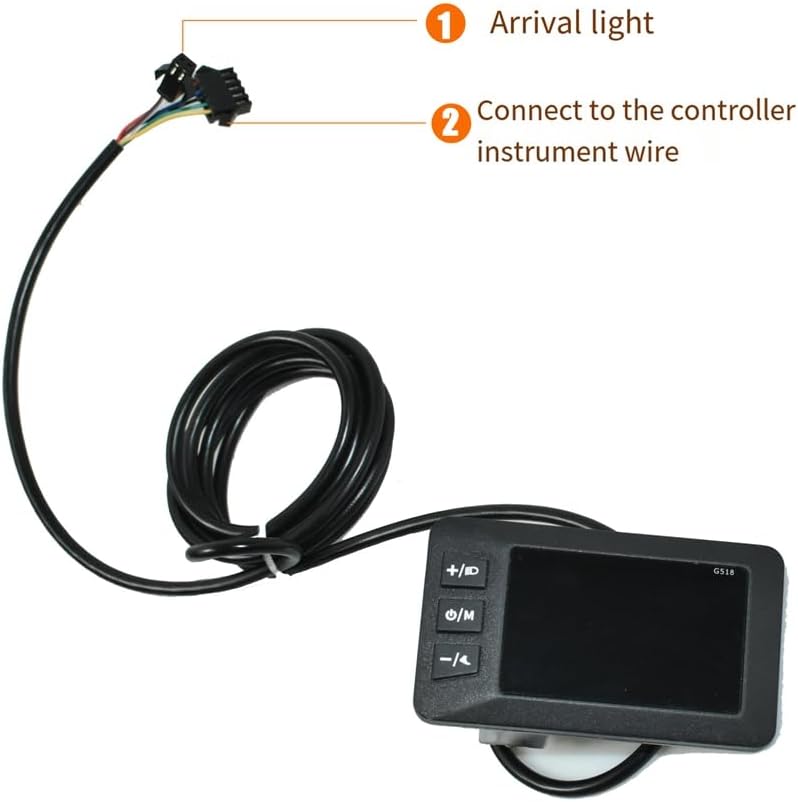
Description: This image shows the connection points for the G518 display. Point 1 indicates the arrival light connection, and point 2 indicates the connection to the controller instrument wire.
מאָונטינג די אַרויסווייַזן
Securely attach the display to your bicycle or scooter handlebars using the integrated clamp. Ensure the display is positioned for optimal visibility and easy access to the control buttons during operation.

Description: This image displays the side profile of the G518 display, highlighting the integrated mounting clamp designed for secure attachment to handlebars.
אַפּערייטינג ינסטראַקשאַנז
ווייַז איבערview

באַשרייַבונג: דאָס בילד גיט אַ נאָענטע בילד view of the G518 LCD display, showing the screen interface with speed, battery level, and odometer readings, along with the three control buttons on the left side.
קנעפּל פאַנגקשאַנז
- +/D Button: Used to increase values, navigate menus, or activate specific functions such as the headlight.
- U/M Button: Functions as Power On/Off, Mode selection, or entering settings. Press and hold to power the display on or off. Short press to cycle through different display modes.
- -/A Button: Used to decrease values, navigate menus, or activate specific functions.
יקערדיק אָפּעראַציע
מאַכט אויף / אַוועק: Press and hold the U/M button for a few seconds until the display turns on or off.
Changing Display Modes: Short press the U/M button to cycle through various information displays, which may include current speed, odometer, trip distance, and battery level.
אַדזשאַסטינג סעטטינגס: For detailed instructions on how the display interacts with controller settings and advanced functions, please refer to your electric bicycle or scooter's main controller manual, as specific functions may vary.
וישאַלט
To ensure the longevity and optimal performance of your G518 LCD Display, follow these maintenance guidelines:
- Keep the display screen and body clean using a soft, damp cloth. Avoid using abrasive cleaners, solvents, or harsh chemicals, as these can damage the display surface.
- קאָנטראָלירט רעגולער אַלע דראָט פֿאַרבינדונגען צו זיכער מאַכן אַז זיי זענען זיכער און פֿרײַ פֿון קעראָוזשאַן. לויזע פֿאַרבינדונגען קענען פֿירן צו אומגעריכטע אָפּעראַציע אָדער שאָדן.
- While the display is designed to be rainproof, avoid prolonged exposure to heavy rain or submersion in water.
- When not in use for extended periods, store the display in a dry, cool environment away from direct sunlight.
טראָובלעשאָאָטינג
| פּראָבלעם | מעגלעך סיבה | לייזונג |
|---|---|---|
| Display does not power on | Loose power connection; Battery low; Faulty display or controller. | Check all wiring connections, ensuring they are firmly seated. Ensure your e-bike battery is sufficiently charged. If possible, test with another display or controller to isolate the issue. |
| Incorrect speed/distance reading | Incorrect wheel diameter setting; Speed sensor issue. | Consult your e-bike controller manual for instructions on how to set the correct wheel diameter. Verify the speed sensor connection and ensure it is clean and unobstructed. |
| Display backlight not working | Backlight setting is off; Internal fault. | Check the display settings for backlight control (if available). If the issue persists, there may be an internal fault, and you should contact customer support. |
| קנעפּלעך ניט ריספּאַנדאַבאַל | Dirt or debris under buttons; Internal fault. | Gently clean around the buttons to remove any accumulated dirt or debris. If buttons remain unresponsive, it may indicate an internal fault, and support should be contacted. |
פּראָדוקט ספּעסאַפאַקיישאַנז
| שטריך | דעטאַל |
|---|---|
| סאָרט | TKOWTB |
| מאָדעל | G518 |
| VoltagE קאַמפּאַטאַבילאַטי | 24 וו / 36 וו / 48 וו / 60 וו / 72 וו |
| ווייַז טיפּ | על-סי-די קאָליר פאַרשטעלן |
| קאָליר | שוואַרץ |
| פּונקט וואָג | 137 גראַמז |
| נומער דימענשאַנז (LxWxH) | 5.12 X 3.15 X 3.15 אינטשעס |
| מאַנופאַקטורער טייל נומער | 500715028 |
| ASIN | B0DTDPQ25W |
| ערשטער דאַטע בנימצא | 18 יאנואר 2025 |
וואָראַנטי און שטיצן
For detailed warranty information regarding your TKOWTB G518 LCD Display, please refer to the specific warranty policy provided by your seller or retailer at the time of purchase. It is recommended to retain your purchase receipt as proof of purchase for any warranty claims.
For technical support, troubleshooting assistance beyond this manual, or inquiries about replacement parts, please contact TKOWTB customer service directly through their official website or reach out to your authorized retailer. They will be able to provide the most accurate and up-to-date support.
Ask a question about this manual
Ask about setup, troubleshooting, compatibility, parts, safety, or missing instructions. Manuals+ will review the question and use this page’s manual context to help answer it.