
הקדמה
This manual provides comprehensive instructions for the TKOWTB MK321U Programmable Macro Mini Keyboard. Please read this manual carefully before using the product to ensure proper operation and to maximize its functionality. This device is designed to enhance your computing experience through customizable key functions for various applications, including gaming, multimedia control, and office tasks.
פּראָדוקט פֿעיִקייטן
- פּראָגראַממאַבלע שליסלען: Customize button functions for keyboard, mouse, multimedia, character strings, game functions, and macro definitions.
- מעטשאַניקאַל סוויטשיז: Features strong tactile feedback and crisp sound for a comfortable typing experience.
- ערגאָנאָמיק פּלאַן: Button curves are designed for comfortable use.
- אַנטי-גליטש פּאַדס: Equipped with anti-slip pads on the bottom to prevent movement during use.
- ברייט אַפּלאַקיישאַן: Suitable for various uses including office work, gaming, and multimedia control.
- סיסטעם קאַמפּאַטאַבילאַטי: Key definition setting software is system-based and can be used across various operating systems after initial setup.
פּעקל אינהאַלט
ביטע קאָנטראָלירט די אינהאַלט פון דער פּאַקעט ווען איר נעמט עס אויס. אויב עס פעלט עפּעס אָדער עס זענען צעבראָכן, קאָנטאַקטירט קונה סערוויס.
- 1 x TKOWTB MK321U Mini Keyboard
- 1 x USB קאַבל (טיפּ-C)

Image: The TKOWTB MK321U Mini Keyboard shown with its included USB cable. The keyboard features three large, white mechanical keys and a Type-C port for connection.
סעטאַפּ אינסטרוקציעס
- פֿאַרבינדן די קלאַוויאַטור: Insert the Type-C end of the provided USB cable into the port on the mini keyboard.
- פאַרבינדן צו קאָמפּיוטער: שטעקט אריין דעם סטאַנדאַרט USB-A עק פונעם קאַבל אין אַ פאַראַן USB פּאָרט אויף אייער קאָמפּיוטער.
- דרייווער ינסטאַלירונג: The keyboard is typically plug-and-play. Your operating system should automatically detect and install the necessary drivers.
- Software Installation (for Programming): To customize key functions, you will need to download and install the dedicated key definition setting software from the manufacturer's official website. (Note: For Linux or macOS users, initial setup and programming must be done on a compatible system, then the device can be used on your preferred OS.)

בילד: א נאָענטע בילד view of the TKOWTB MK321U Mini Keyboard's ports, showing the Type-C input and an adjacent switch. This illustrates where to connect the USB cable for power and data transfer.
אַפּערייטינג ינסטראַקשאַנז
יקערדיק אָפּעראַציע
Once connected, the mini keyboard will function according to its default settings or previously programmed configurations. Pressing a key will execute its assigned function.
Programming Key Functions
The primary feature of the MK321U is its programmability. Follow these steps to customize key functions:
- אראפקאפיע ווייכווארג: Obtain the key definition setting software from the official TKOWTB webפּלאַץ.
- ינסטאַלירן ווייכווארג: גיי די אינסטרוקציעס אויף דעם עקראַן צו ינסטאַלירן די ווייכווארג אויף דיין קאָמפּיוטער.
- קאַטער ווייכווארג: Open the installed programming software.
- פֿאַרבינדן קלאַוויאַטור: Ensure your MK321U keyboard is connected to the computer. The software should detect the device.
- אויסקלייַבן שליסל: אין דער ווייכווארג אינטערפייס, אויסקלייבן דעם שליסל וואס איר ווילט פּראָגראַמירן.
- Assign Function: Choose from the available function types:
- קלאַוויאַטור פֿונקציע: Assign standard keyboard keys (e.g., A, Ctrl, Shift, Enter).
- מויז פונקציע: Assign mouse clicks (left, right, middle), scroll up/down, etc.
- מולטימעדיאַ פֿונקציע: Assign media controls (e.g., Play/Pause, Volume Up/Down, Mute).
- Character String Function: Assign a sequence of characters to be typed with a single press.
- Game Function: Assign specific game commands.
- Macro Definition Function: Record and assign a complex sequence of key presses and delays.
- היט קאָנפיגוראַטיאָן: After assigning functions, save the configuration to the keyboard's onboard memory. This allows the settings to persist even when connected to different computers without the software.

Image: The TKOWTB MK321U Mini Keyboard with graphical overlays indicating its key features: good-quality material, multifunctional use, and ease of use. A prominent note highlights that all keys are programmable.

Image: A hand interacting with the TKOWTB MK321U Mini Keyboard, emphasizing its standard as a mini keyboard. Icons illustrate its sensitive switches, smooth linear typing experience, and lower sound profile.
וישאַלט
Proper maintenance ensures the longevity and optimal performance of your mini keyboard.
- רייניקונג: ניצט אַ ווייכע, טרוקענע שטאָף צו ווישן די ייבערפלאַך פון דער קלאַוויאַטור. פֿאַר שווערע שמוץ, אַ ביסל טרוקןampווייקט דעם שטאָף מיט וואַסער אָדער אַ מילדער רייניקונג לייזונג. פֿאַרמייַדט איבעריקע פֿײַכטקייט.
- ויסמיידן ליקווידס: Do not spill liquids directly onto the keyboard. If liquid contact occurs, immediately disconnect the keyboard and allow it to dry completely before reconnecting.
- סטאָרידזש: האַלט די קלאַוויאַטור אין אַ קיל, טרוקן אָרט אַוועק פון דירעקט זונשייַן און עקסטרעמע טעמפּעראַטורן.
- שעפּן מיט זאָרג: פֿאַרמײַדט צו לאָזן פאַלן אָדער אויסשטעלן די קלאַוויאַטור צו שטאַרקע קלאַפּן.
טראָובלעשאָאָטינג
If you encounter issues with your TKOWTB MK321U, refer to the following common problems and solutions:
- קלאַוויאַטור ניט ריספּאַנדינג:
- זיכער מאַכן אַז דער USB קאַבל איז זיכער פארבונדן צו ביידע די קלאַוויאַטור און דעם קאָמפּיוטער.
- פרובירט צו קאנעקטן די קלאַוויאַטור צו אַן אַנדער USB פּאָרט אויף אייער קאָמפּיוטער.
- פּרובירט די קלאַוויאַטור אויף אַן אַנדער קאָמפּיוטער צו אויסשליסן סיסטעם-ספּעציפֿישע פּראָבלעמען.
- ריסטאַרט דיין קאָמפּיוטער.
- Keys Not Performing Assigned Functions:
- Verify that the key definition setting software was used to save the configuration to the keyboard.
- זיכער מאַכן אַז די ווייכווארג איז אַרויף-צו-דאַטע.
- If using on Linux or macOS, confirm that the programming was done on a compatible Windows system first.
- Try resetting the keyboard to factory defaults via the software and reprogram the keys.
- ווייכווארג דעטעקטירט נישט קלאַוויאַטור:
- Make sure the keyboard is properly connected via USB.
- Close and reopen the programming software.
- Reinstall the programming software.
- קוק אין דיין קאָמפּיוטער'ס דעווייס מענעדזשער צו זען אויב די קלאַוויאַטור ווערט דערקענט.
ספּעסאַפאַקיישאַנז
| סאָרט | TKOWTB |
| מאָדעל נאָמען | MK321U (500757523) |
| קאָליר | ווייַס |
| מאַטעריאַל | פּלאַסטיק |
| פּראָדוקט דימענשאַנז | 3.15 X 2.36 X 1.57 אינטשעס (8 X 6 X 4 סענטימעטער) |
| פּונקט וואָג | 2.47 אונסעס (70 גראַמז) |
| קאַנעקטיוויטי | וסב טיפּ-C |
| פּראָגראַממאַביליטי | All keys programmable via dedicated software |

Image: A close-up of the TKOWTB MK321U Mini Keyboard next to a laptop, highlighting its Type-C charging port and rechargeable design, indicating modern connectivity and power options.

Image: A collage showing the TKOWTB MK321U Mini Keyboard being used in different environments: an office setting, a laboratory, and a gaming setup, demonstrating its wide scope of application.
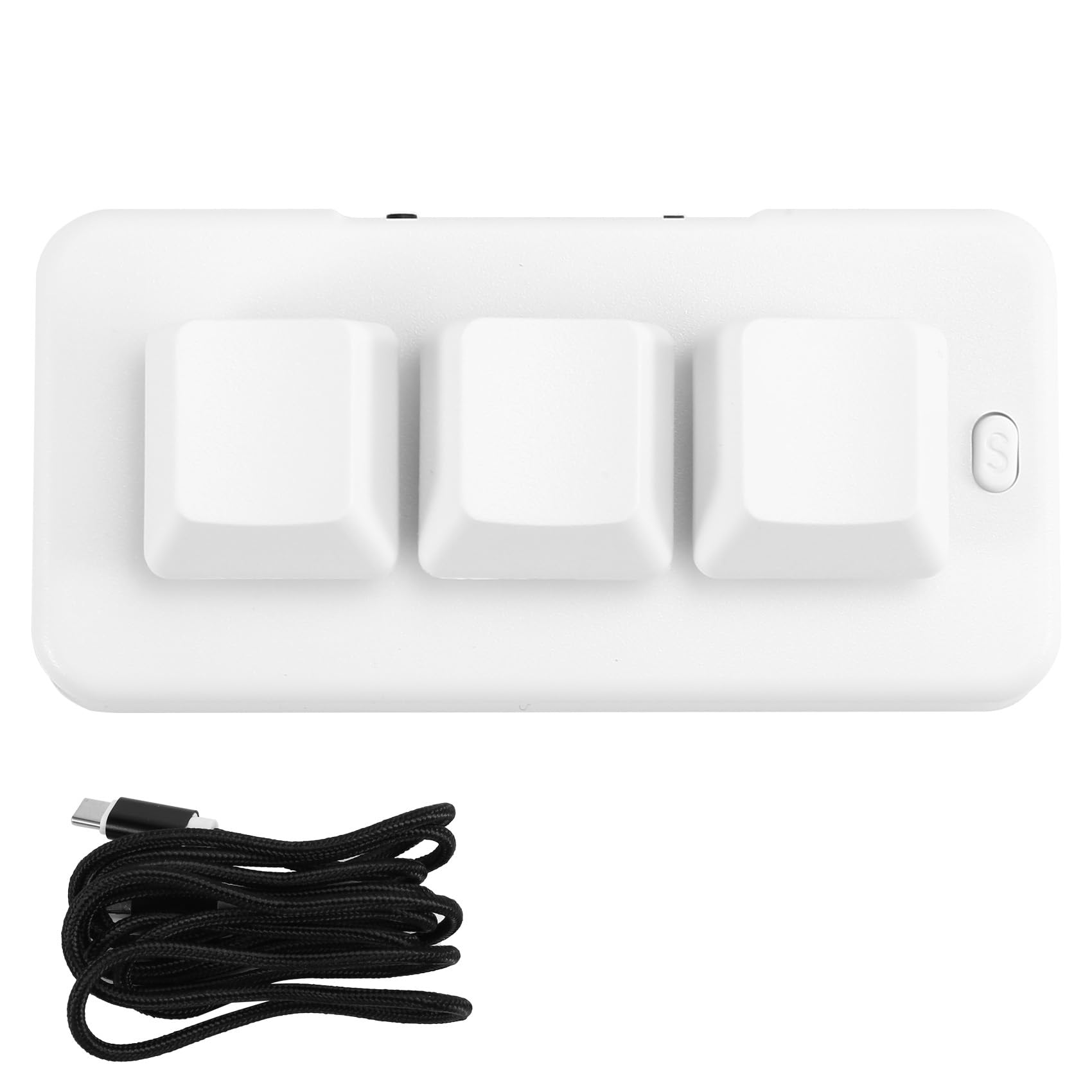
Image: A person placing the TKOWTB MK321U Mini Keyboard into a small carrying pouch, illustrating its compact and portable design, making it easy to transport.
וואָראַנטי און שטיצן
For warranty information, please refer to the documentation included with your purchase or visit the official TKOWTB webזייטל. שטיצע רעסורסן, אַרייַנגערעכנט אָפֿט געשטעלטע פֿראַגעס און קאָנטאַקט אינפֿאָרמאַציע, קען מען אויך געפֿינען אויף דער פאַבריקאַנט'ס webפּלאַץ.
פאַבריקאַנט: TKOWTB
Webפּלאַץ: TKOWTB Official Page (via Amazon)