
הקדמה
Thank you for choosing the SONICAKE Source Comp Compressor Pedal. This manual provides detailed instructions for the proper setup, operation, and maintenance of your new effects pedal. Please read this manual thoroughly to ensure optimal performance and longevity of your device.
פּראָדוקט איבערview
The SONICAKE Source Comp is a mini analog compressor pedal designed for electric guitar and bass. It features a full-analog circuit for classic compression characteristics and offers extensive control over your sound dynamics with six adjustable knobs. The pedal is equipped with a buffer bypass to maintain signal integrity when disengaged and includes an LED indicator for real-time dynamic feedback.

Image: The SONICAKE Source Comp Compressor Pedal, showcasinג זײַן קאָמפּאַקטן פּלאַן און קאָנטראָל אויסלייג.
שליסל פֿעיִקייטן:
- Full-Analog Circuit Design: Provides a classic compressor sound.
- Rich Parameter Knobs: Offers comprehensive control for dynamic accommodation.
- Dynamic LED Feedback: Multi-color LED indicates gain reduction in real-time.
- Buffer Bypass: Preserves signal strength and quality when the pedal is off.
- סאָליד און דוראַבאַל: Full metal shell, sturdy and suitable for crowded pedalboards.
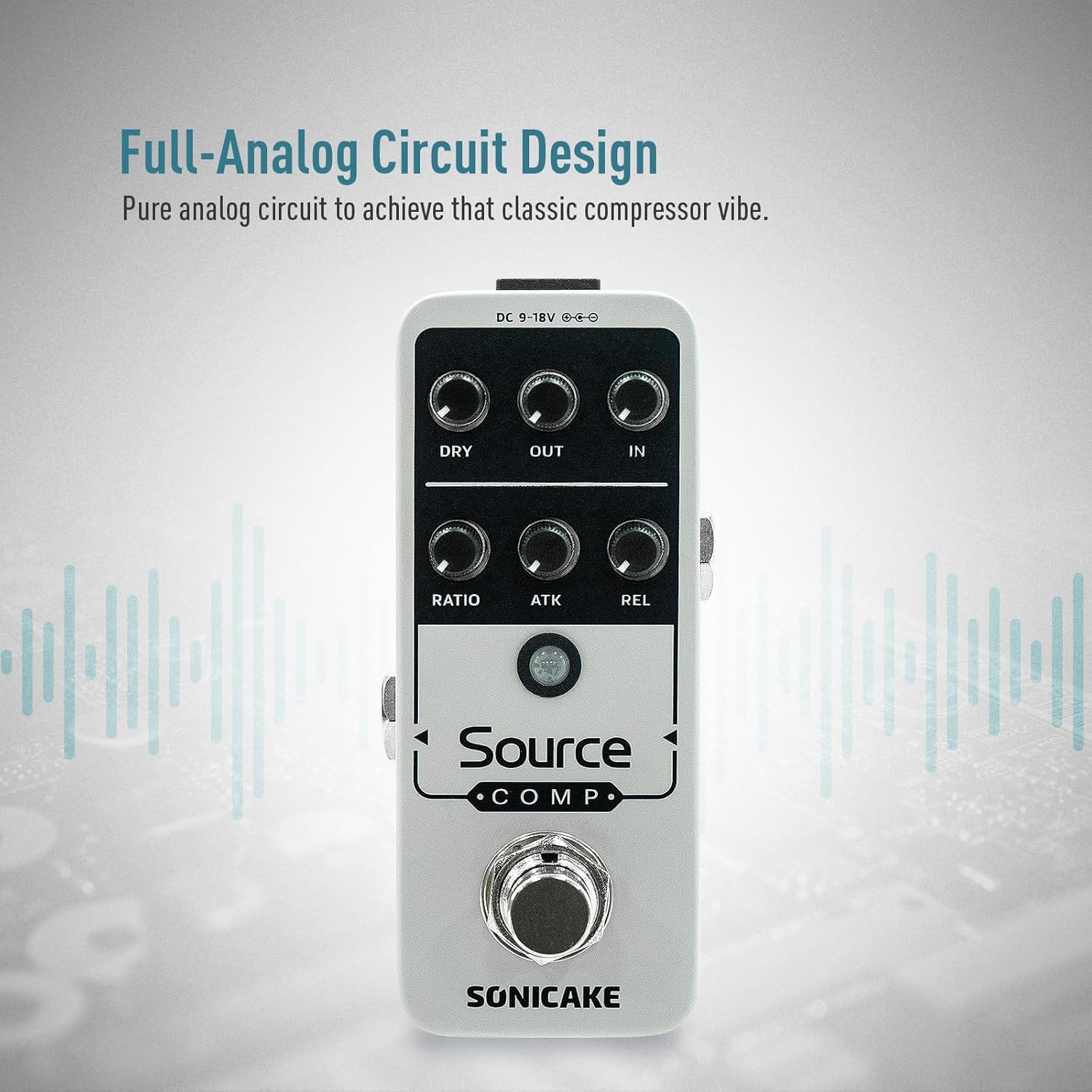
Image: Diagram illustrating the full-analog circuit design of the Source Comp pedal, emphasizing its classic compressor sound.

Image: Illustration showing the LED indicator changing color based on signal input, providing dynamic feedback.
קאָנטראָלס און פאַנגקשאַנז
The SONICAKE Source Comp pedal features six control knobs, a footswitch, and an LED indicator. Refer to the diagram below for component identification.

Image: A numbered diagram of the SONICAKE Source Comp pedal, highlighting its various controls and input/output jacks.
- DC 9-18V מאַכט אַרייַנגאַנג: Connect a 9-18V DC center-negative power supply (not included).
- IN (Input) Knob: Adjusts the input level of your signal. Higher settings increase the amount of compression.
- OUT (Output) Knob: Controls the overall output volume of the pedal. Use to match levels when the pedal is engaged or disengaged.
- טרוקן קנופּ: Blends the dry (uncompressed) signal with the compressed signal. Allows for parallel compression.
- פאַרהעלטעניש קנעפּל: Sets the compression ratio, determining how much the signal is compressed once it exceeds the threshold.
- ATK (Attack) Knob: Adjusts how quickly the compressor reacts to the initial transient of a note.
- REL (Release) Knob: Controls how quickly the compressor returns to its uncompressed state after the signal drops below the threshold.
- אַרייַנשרייַב דזשאַק: Connect your instrument (guitar or bass) here.
- רעזולטאַט דזשאַק: פאַרבינדן צו דיין ampליפיער אדער דער נעקסטער פּעדאַל אין אייער סיגנאַל קייט.
- פאָאָטסוויטש: Engages or disengages the compression effect.
סעטאַפּ
Follow these steps to set up your SONICAKE Source Comp pedal:
- מאַכט קשר: Connect a 9-18V DC center-negative power supply to the DC input jack (1). Ensure the power supply meets the specified voltage און פּאָלאַריטעט רעקווירעמענץ.
- מכשיר קשר: Connect your electric guitar or bass to the Input Jack (8) using a standard 1/4-inch instrument cable.
- Ampליפיער קשר: Connect the Output Jack (9) to your amplifier's input or to the input of the next pedal in your effects chain using a standard 1/4-inch instrument cable.
- ערשט סעטטינגס: For a starting point, set all knobs (IN, OUT, DRY, RATIO, ATK, REL) to the middle (12 o'clock) position.

Image: Diagram illustrating the correct DC 9-18V center-negative power connection for the pedal.
אַפּערייטינג ינסטראַקשאַנז
Once the pedal is set up, you can begin to explore its compression capabilities:
- אַרייַנציען די פּעדאַל: Press the Footswitch (10) to activate the compression effect. The LED indicator will illuminate.
- Adjust Input (IN): Slowly increase the IN knob. As you increase the input, the LED will change color (e.g., from green to orange/red) indicating gain reduction, meaning compression is occurring. Higher IN settings result in more compression.
- Set Ratio: Adjust the RATIO knob to control the intensity of the compression. Lower ratios provide subtle leveling, while higher ratios create a more squashed, sustained sound.
- Control Attack (ATK): The ATK knob determines how quickly the compressor engages. A fast attack (lower setting) will compress the initial transient of a note, while a slow attack (higher setting) allows the initial pick attack to pass through uncompressed before the compression kicks in.
- Control Release (REL): The REL knob sets how long the compression effect lasts after the signal drops. A fast release (lower setting) can make the sound pump, while a slow release (higher setting) provides a smoother, more sustained effect.
- Blend Dry Signal (DRY): Use the DRY knob to mix your original, uncompressed signal with the compressed signal. This parallel compression technique can help retain the natural dynamics and punch of your playing while still benefiting from compression.
- Adjust Output (OUT): After setting your desired compression, use the OUT knob to adjust the overall volume of the pedal. Ensure the volume matches your bypassed signal or provides a slight boost if desired.
Experiment with different knob combinations to find the compression settings that best suit your playing style and musical context. The LED indicator provides visual feedback on the amount of gain reduction applied.
וישאַלט
- רייניקונג: ניצט אַ ווייכע, טרוקענע שטאָף צו רייניקן די אויסערלעכע זייט פון דעם פּעדאַל. פֿאַרמייַדט ניצן אַברייסיוו רייניגער אָדער סאָלווענטן, ווייל זיי קענען שעדיקן די ענדיקונג.
- סטאָרידזש: Store the pedal in a dry environment, away from extreme temperatures and direct sunlight. Disconnect the power supply when not in use for extended periods.
- מאַכט צושטעלן: Always use a regulated 9-18V DC center-negative power supply. Using an incorrect power supply can damage the unit and void the warranty.
טראָובלעשאָאָטינג
- קיין קול:
- קאָנטראָליר אַלע קאַבל קאַנעקשאַנז (אינסטרומענט, ampלעפיערער, מאַכט).
- זיכער מאַכן אַז די מאַכט צושטעל איז ריכטיק פארבונדן און אַרבעטנדיק.
- באַשטעטיקן אַז אייער אינסטרומענט און ampליפיער אַרבעט ריכטיק.
- איבערגעטריבענע ראַש/זשומען:
- Ensure you are using a high-quality, isolated power supply. Daisy-chaining power with other noisy pedals can introduce hum.
- Lower the IN knob setting. High compression levels inherently raise the noise floor.
- קוק פֿאַר גראַונד לופּס אין דיין סיגנאַל קייט.
- Test the pedal in a different electrical outlet or location to rule out external interference.
- ווירקונג נישט אינטערעסאנט:
- Press the footswitch firmly.
- Check if the LED indicator illuminates when the footswitch is pressed. If not, verify power supply.
ספּעסאַפאַקיישאַנז
| באַשרייַבונג | ווערט |
|---|---|
| מאָדעל נומער | QSS-27 |
| פּונקט וואָג | 8.8 אונסעס (249 גראַמז) |
| פּראָדוקט דימענשאַנז | 3.94 X 2.36 X 2.36 אינטשעס (10 X 6 X 6 סענטימעטער) |
| מאַכט מקור | DC 9-18V, Center Negative |
| סיגנאַל פֿאָרמאַט | אַנאַלאָג |
| אַודיאָ אַרויסגאַנג עפֿעקטן | קאַמפּרעשאַן |
| קאָנטראָלס טיפּ | קנופּ |
וואָראַנטי און שטיצן
For warranty information and customer support, please refer to the documentation provided with your purchase or visit the official SONICAKE webזייטל. איר קענט אויך קאָנטאַקטירן אייער הענדלער פֿאַר הילף.
פאַבריקאַנט: Changsha Hotone Audio Co., Ltd.
אַדרעס: Unit 1, 2, 6, 7, 2nd Floor, East Block, Hunan University Science Park, No.186, Guyuan Road, Yue Lu District, Changsha City, Hunan Province, P.R. China
UPC: 0843037102640