
1. הקדמה
Thank you for choosing the VIGORWORK 1 Din 12V Car Radio. This versatile audio system is designed to enhance your in-car entertainment experience, offering a wide range of features including DVD/VCD/CD/MP3 playback, Bluetooth connectivity for hands-free calls and audio streaming, FM radio, and support for USB, SD card, and AUX input. This manual provides detailed instructions to help you install, operate, and maintain your new car radio.
2. פּעקל אינהאַלט
ביטע קאָנטראָלירט דעם אינהאַלט פֿון דער פּאַקעט קערפֿול בײַם אויספּאַקן. אויב עפּעס פֿעלט אָדער איז צעבראָכן, קאָנטאַקטירט אײַער פֿאַרקויפֿער.
- VIGORWORK 1 Din Car Radio Unit
- מאַכט און רעדנער וויירינג כאַרניס
- ווייַט קאָנטראָל
- Installation Removal Keys (2 pieces)
- באַניצער מאַנואַל

Image: Contents of the VIGORWORK car radio package, including the main unit, wiring, remote, removal keys, and manual.
3. פּראָדוקט איבערview
Familiarize yourself with the main components and controls of your car radio.
אויסלייג פון די פראָנט טאַפליע

בילד: פראָנט view of the VIGORWORK car radio, highlighting the display, control knob, buttons (PWR, MUTE, BND, MOD, CLK), USB port, SD card slot, and AUX input.
- Power (PWR) / Mute: Turns the unit on/off or mutes/unmutes audio.
- באַנד קנעפּל: Adjusts audio volume. Press to select menu options.
- Band (BND): Switches between FM radio bands (FM1, FM2, FM3).
- Mode (MOD): Cycles through input sources (Radio, DVD/CD, USB, SD, AUX, Bluetooth).
- זייגער (CLK): Displays or sets the time.
- וסב פּאָרט: Connect USB flash drives for media playback or charging.
- SD Card Slot: אַרײַנשטעלן SD קאַרדס פֿאַר מעדיע ווידערשפּיל.
- AUX אַרייַנשרייַב: פֿאַרבינדט עקסטערנע אַודיאָ דעוויסעס דורך אַ 3.5 מם דזשעק.
- דיסק שפּעלטל: Insert DVDs or CDs for playback.

Image: A smartphone screen displaying an incoming call next to the car radio, illustrating the intelligent Bluetooth call feature for convenient call management.

Image: A collage showing various car entertainment scenarios, including video playback, Bluetooth hands-free calling, listening to radio, and cell phone charging, demonstrating the unit's versatility.

Image: An infographic highlighting eight key advantages of the car radio, such as professional hardware, Bluetooth, DVD player, radio reception, U disk/SD card play, 52W*4 power output, USB car charger, and sound quality enhancement.
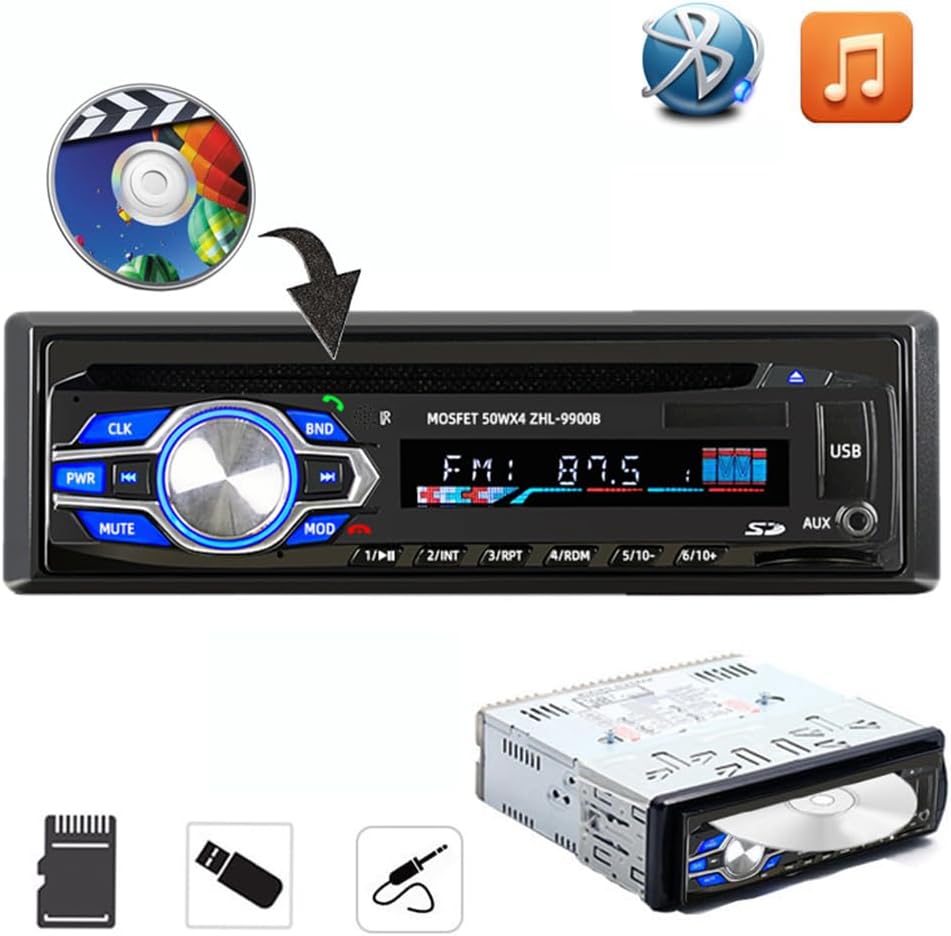
Image: The car radio unit with icons representing various media playback options, including CD/DVD, Bluetooth, and music notes, indicating its compatibility with different audio sources.

Image: The car radio unit with arrows pointing to the USB port and SD card slot, emphasizing its support for vast USB/SD storage equipment for convenient music playback.

Image: A hand holding a smartphone connected to the car radio via USB, illustrating the unit's ability to provide 5V USB charging for mobile devices.
דימענשאַנז

Image: The car radio unit with dimensions labeled: 18.8cm (7.4 inches) width and 5.8cm (2.3 inches) height, indicating its standard 1 Din size.
4. סעטאַפּ און ייַנמאָנטירונג
This car radio is designed for easy installation in most vehicles. It is recommended to have the installation performed by a qualified professional if you are unsure about the wiring or mounting process.
ינסטאַלירונג סטעפּס:
- דיסקאַנעקט באַטערי: איידער איר הייבט אן, דיסקאנעקטירט דעם נעגאטיוון טערמינאל פון אייער אויטא'ס באטעריע כדי צו פארמיידן עלעקטרישע קורצע צוזאמענברוכן.
- אַראָפּנעמען אַלטע אַפּאַראַט: Carefully remove your existing car radio from the dashboard.
- פאַרבינדן וויירינג: Connect the provided wiring harness to your vehicle's wiring. Ensure correct connections for power (constant 12V, accessory 12V, ground), speaker outputs, and antenna. Refer to your vehicle's wiring diagram if necessary.
- Mount Unit: Slide the new VIGORWORK car radio into the dashboard opening until it clicks into place. Use the provided removal keys to secure or remove the unit.
- רעקאָננעקט באַטערי: פֿאַרבינדט ווידער דעם נעגאַטיוון וואָקזאַל פֿון אייער פֿאָרמיטל'ס באַטעריע.
- טעסט פאַנגקשאַנאַליטי: Turn on the unit and test all functions (radio, CD/DVD, USB, Bluetooth, AUX) to ensure proper operation.
5. אַפּערייטינג ינסטרוקטיאָנס
5.1 אײַנשטעלן/אויסשטעלן און מאָדע אויסוואַל
- דרוק די PWR קנעפּל צו אנצינדן דעם אַפּאַראַט. דריקן און האַלטן צו אויסלעשן.
- דרוק די מאָד button repeatedly to cycle through available input sources: FM Radio, DVD/CD, USB, SD, AUX, Bluetooth.
5.2 בלועטאָאָטה קאַנעקשאַן
די אַפּאַראַט פֿאַרמאָגט אַן אייַנגעבויטע בלועטוט פֿאַר הענט-פֿרײַ רופן און אַודיאָ סטרימינג.
- Ensure the car radio is powered on and in Bluetooth mode (select using מאָד קנעפּל).
- אויף דיין רירעוודיק מיטל, געבן בלועטאָאָטה און זוכן פֿאַר בנימצא דעוויסעס.
- Select "VIGORWORK" or a similar name from the list.
- Once paired, the unit will confirm the connection. You can now make/receive calls and stream audio.
- Use the car radio's controls or remote to answer/end calls, adjust volume, and control music playback.
5.3 FM ראַדיאָ אָפּעראַציע
- דרוק מאָד to select FM radio mode.
- דרוק BND to switch between FM1, FM2, and FM3 bands. Each band can store 6 stations, totaling 18 presets.
- ניצן די << און >> קנעפּלעך צו מאַנועל סטאַנציע אָדער זוכן סטאַנציעס.
- צו אויטאמאטיש סקענען און אויפהיטן סטאנציעס, דריק און האלט די BND קנעפּל.
- To recall a preset station, press the corresponding number button (1-6).
5.4 USB/SD קאַרטל ווידערשפּיל
- אַרײַנשטעלן אַ USB פלאַש דרייוו אין דעם USB פּאָרט אָדער אַן SD קאַרטל אין דעם SD קאַרטל שפּאַלט.
- The unit will automatically switch to USB/SD mode and begin playing compatible audio/video files.
- ניצן די << און >> קנעפּלעך פֿאַר טראַק נאַוויגאַציע.
- The unit supports MP3, WMA, and other common audio formats, as well as DIVX and MPEG4 video formats.
5.5 DVD/CD ווידערשפּילן
- Gently insert a DVD or CD into the disc slot with the label side facing up.
- The unit will automatically load the disc and begin playback.
- Use the control buttons or remote for playback control (play, pause, skip, fast forward/rewind).
5.6 AUX אַרייַנשרייַב
- Connect an external audio device (e.g., smartphone, MP3 player) to the AUX input jack using a 3.5mm audio cable.
- דרוק מאָד צו אויסקלייַבן AUX מאָדע.
- Audio from the connected device will now play through the car radio's speakers. Control playback from the external device.
6. וישאַלט
געהעריגע אויפהאלטונג גאראנטירט די לאנגעוויטי און אפטימאלע פאָרשטעלונג פון אייער אויטאָ ראַדיאָ.
- רייניקונג: ניצט אַ ווייכע, טרוקענע שטאָף צו ווישן דעם פראָנט פּאַנעל. פֿאַר שווערע שמוץ, דampen the cloth slightly with water. Do not use abrasive cleaners or solvents.
- דיסק באַהאַנדלונג: האַלט די דיסקס ביי די ברעגעס. האַלט זיי ריין און אָן קראַצן. לייגט די דיסקס אין זייערע קעסטלעך ווען זיי ווערן נישט גענוצט.
- טעמפּעראַטור: פֿאַרמײַדט אויסשטעלן דעם אַפּאַראַט צו עקסטרעמע טעמפּעראַטורן, דירעקטע זונשײַן פֿאַר פֿאַרלענגערטע פּעריאָדן, אָדער הויכע פֿײַכטקייט.
- ווענטילאַטיאָן: Ensure the unit has adequate ventilation to prevent overheating. Do not block ventilation openings.
7. טראָובלעשאָאָטינג
אויב איר טרעפט פּראָבלעמען מיט אייער אויטאָ ראַדיאָ, זעט די פאלגענדע געוויינטלעכע פּראָבלעמען און לייזונגען:
| פּראָבלעם | מעגלעך סיבה | לייזונג |
|---|---|---|
| קיין מאַכט | Blown fuse; Incorrect wiring; Loose connection. | Check vehicle's fuse box and unit's fuse; Verify wiring connections (constant 12V, accessory 12V, ground); Ensure all connectors are secure. |
| קיין געזונט | Volume too low; Mute function active; Incorrect speaker wiring; Damaged speakers. | Increase volume; Press MUTE button; Check speaker wire connections; Test with known good speakers. |
| בלועטאָאָטה ניט קאַנעקטינג | בלועטוט נישט איינגעשטעלט אויף דעם דעווייס; איינהייט נישט אין פארבינדונג מאָדע; אריינמישונג. | Ensure Bluetooth is on and discoverable on your phone; Select Bluetooth mode on the unit; Move closer to the unit; Try unpairing and re-pairing. |
| דיסק טעות / דיסק שפּילט זיך נישט | Dirty or scratched disc; Incorrect disc format; Disc inserted incorrectly. | Clean the disc; Ensure disc format is compatible (DVD, VCD, CD, MP3); Re-insert disc correctly. |
| USB/SD Not Reading | ינקאַמפּאַטאַבאַל file פֿאָרמאַט; פֿאַרדאָרבן files; USB/SD card not formatted correctly; Card/drive capacity too large. | פאַרזיכערן files are MP3/WMA/DIVX/MPEG4; Reformat USB/SD card to FAT32; Try a different USB/SD card. |
8. ספּעסאַפאַקיישאַנז
Key technical specifications for the VIGORWORK 1 Din Car Radio.
- מאָדעל נומער: 5014בט
- מאַכט צושטעלן: 12V DC (נעגאַטיוו ערד)
- רעזולטאַט מאַכט: 52 וואט x 4 (מאקס)
- שטיצט דיסק פֿאָרמאַטירונגען: DVD, VCD, CD, MP3
- Supported Video Encoding: MPEG-4, DIVX
- עפעם Frequency Range: 87.5 - 107.90 מעגהערץ
- בלועטאָאָטה: Built-in Bluetooth for hands-free calls and audio streaming
- קאַנעקטיוויטי: USB, SD Card, AUX (3.5mm Jack)
- קאַמפּאַטאַבאַל דעוויסעס: Smartphone, Tablet, Laptop (via AUX/Bluetooth)
- אַודיאָ רעזולטאַט מאָדע: סטערעאָ
- סאָונד סאָונד קאַנאַל קאַנפיגיעריישאַן: 5.1 (for compatible media)
- נומער דימענשאַנז (L x W x H): 7.4 X 2.3 X 6.5 אינטשעס (18.8 X 5.8 X 16.5 סענטימעטער)
- נומער וואָג: בעערעך 3.03 פונט (1.38 קג)
9. וואָראַנטי און שטיצן
For warranty information, technical support, or service inquiries, please contact the manufacturer, VIGORWORK, or your authorized retailer. Keep your purchase receipt as proof of purchase.