
1. הקדמה
א דאנק פארן קויפןasing the AGPTEK A02XT MP3 Player. This device is designed to provide a high-quality audio experience with its HIFI lossless sound and Bluetooth 5.3 connectivity. It features a compact design, button operation, and various functions including FM radio, voice recording, and a pedometer. This manual will guide you through the setup, operation, and maintenance of your new MP3 player.

Figure 1.1: AGPTEK A02XT MP3 Player with accessories.
2. פּראָדוקט איבערview
2.1 פּעקל אינהאַלט
- AGPTEK A02XT MP3 Player (1)
- USB-C טשאַרדזשינג קאַבלע (1)
- באַניצער מאַנואַל (1)
- Earphones (1 pair) - May vary by region/package

Figure 2.1: Contents of the AGPTEK A02XT package.
2.2 אַפּאַראַט אויסלייג און קאָנטראָלס
Familiarize yourself with the buttons and ports on your A02XT MP3 player.

פיגורע 2.2: פראָנט view of the A02XT MP3 Player.
- פאַרשטעלן: Displays menus, music information, and settings.
- M קנעפּל: Menu/Back button. Long press to lock/unlock the screen.
- שפּיל / פּויזע קנעפּל: סטאַרץ אָדער פּאָזאַז פּלייבאַק.
- פריערדיגע/נעקסטע קנעפּלעך: Navigates through tracks or menu options.
- VOL קנעפּל: באַנד קאָנטראָל.
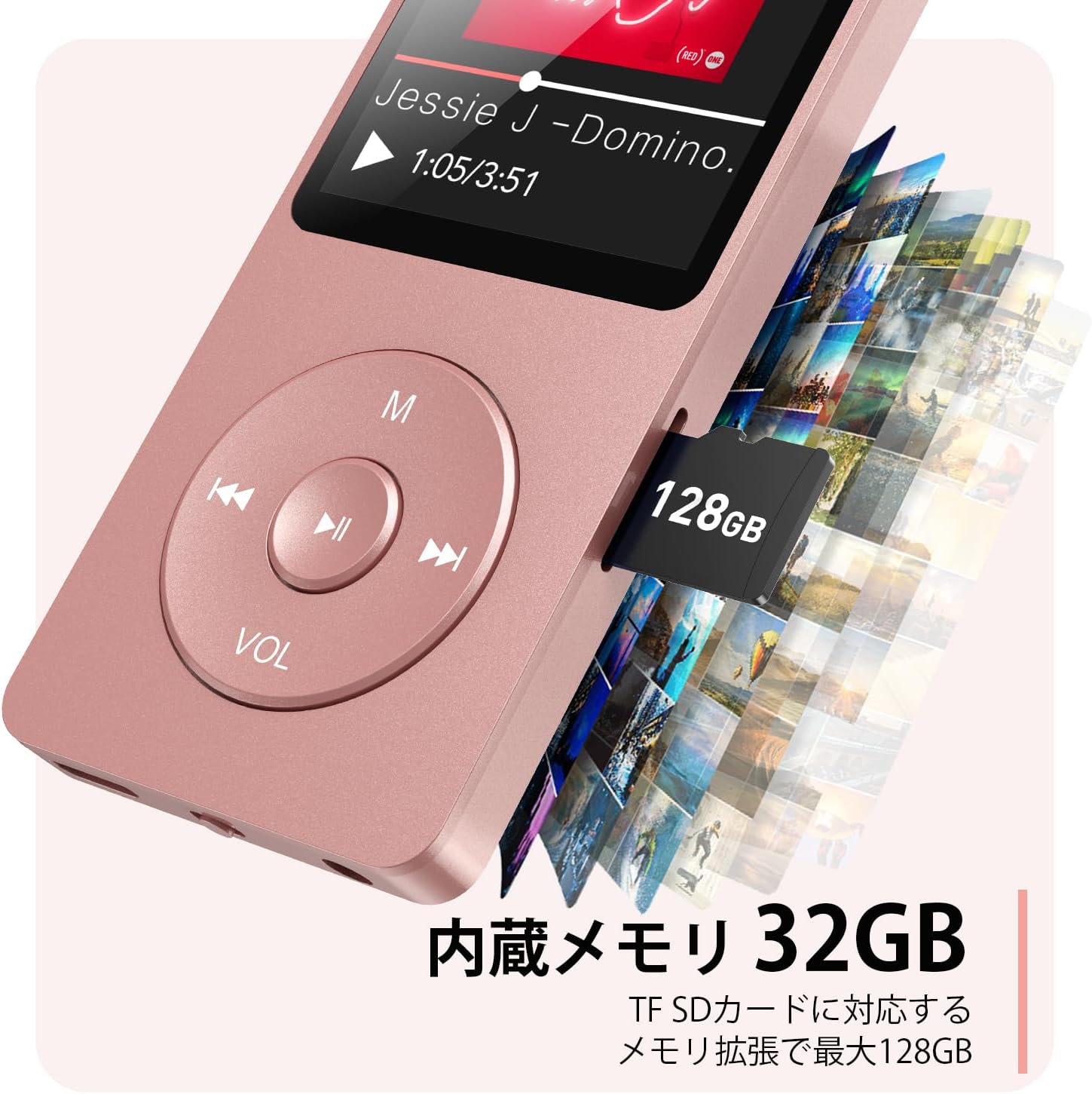
פיגורע 2.3: זייַט view with microSD card slot.
- וסב- C פּאָרט: פֿאַר טשאַרדזשינג און דאַטן אַריבערפירן.
- 3.5 מם כעדפאָון דזשאַק: פֿאַר דראָטיקער אַודיאָ אַוטפּוט.
- מיקראָסד קאָרט שפּעלטל: פֿאַר יקספּאַנדאַבאַל סטאָרידזש ביז 64 גיגאבייט.
3. סעטאַפּ
3.1 טשאַרדזשינג די מיטל
Before first use, fully charge the MP3 player. Connect the provided USB-C cable to the player's USB-C port and the other end to a USB power adapter (not included) or a computer's USB port. The screen will indicate charging status. A full charge takes approximately 2 hours and provides up to 40 hours of music playback.

Figure 3.1: MP3 Player charging indication.
3.2 אריינשטעלן א מיקראָSD קאַרטל
The player has 32GB of internal storage. To expand storage, insert a microSD card (up to 64GB, not included) into the microSD card slot until it clicks into place. Ensure the card is inserted correctly to avoid damage.
3.3 איבערפירן מוזיק Files
- פֿאַרבינדט דעם MP3 שפּילער צו אייער קאָמפּיוטער מיטן USB-C קאַבל.
- The player will appear as a removable disk on your computer.
- שלעפּן און פאַלן דיין מוזיק files (MP3, WMA, OGG, WAV, APE, FLAC, AAC, ACELP) into the 'Music' folder on the player or microSD card.
- אַרויסוואַרפן דאָס דעווייס זיכער פֿון אייער קאָמפּיוטער איידער איר אָפּטיילט דעם קאַבל.
4. אַפּערייטינג ינסטרוקטיאָנס
4.1 מאַכט אויף / אַוועק
- מאַכט אויף: Long press the Power button (usually on the side or top edge) until the screen lights up.
- מאַכט אַוועק: Long press the Power button until the 'Power Off' option appears, then select it.
4.2 יקערדיק נאַוויגאַציע
Use the navigation buttons (Previous, Next, Play/Pause, M) to move through menus and select options. The Play/Pause button often acts as a 'Confirm' button in menus.

Figure 4.1: Main menu interface with various functions.
4.3 מוזיק פּלייבאַק
- פֿון הויפּט מעניו, אויסקלײַבן 'מוזיק'.
- Browse by Artist, Album, Songs, Playlists, etc.
- Select a song to begin playback.
- Use the Previous/Next buttons to skip tracks, and Play/Pause to control playback.
- Adjust volume using the VOL button.
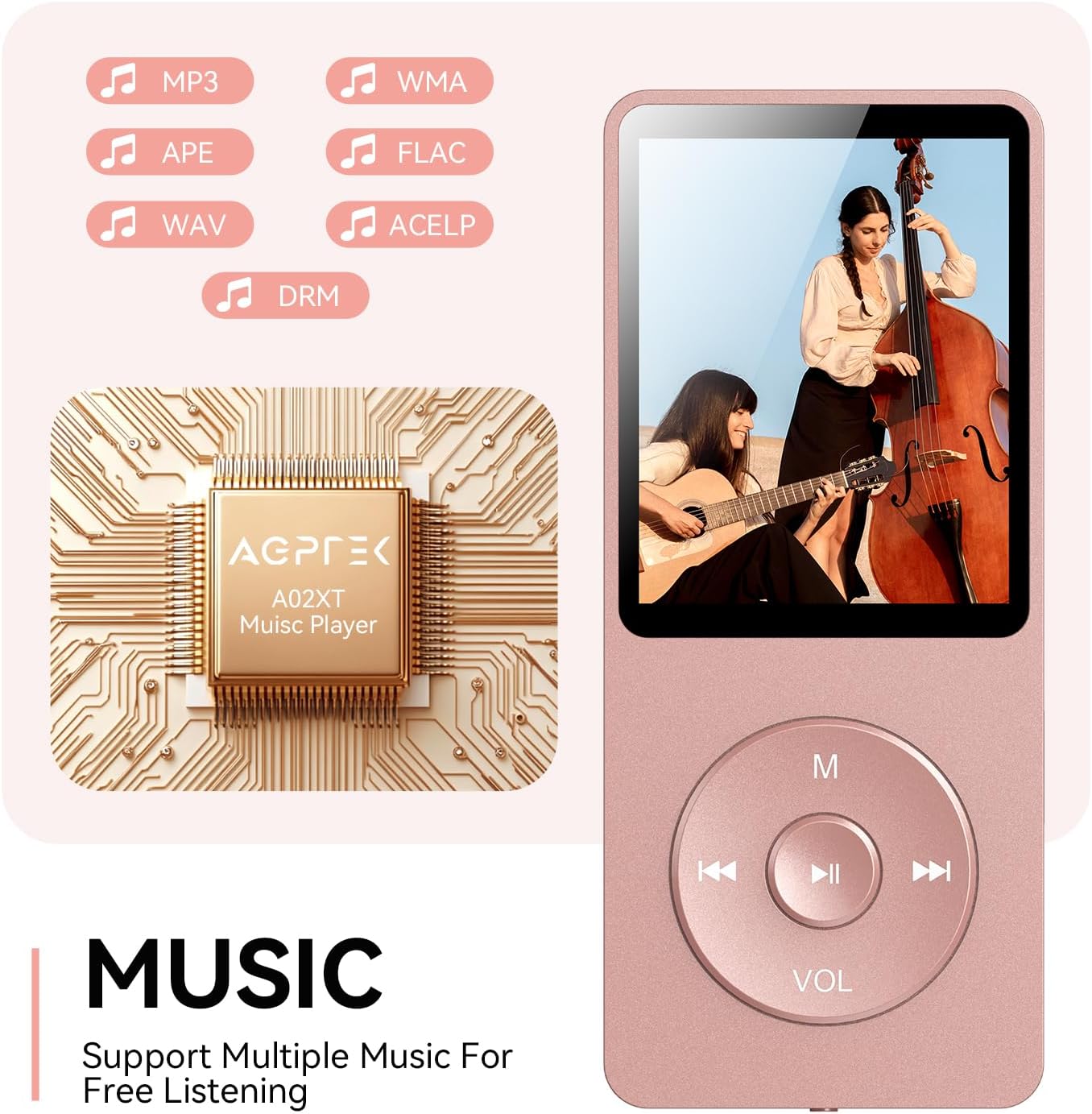
Figure 4.2: Music playback screen and supported formats.
4.4 בלועטאָאָטה קאַנעקשאַן
The A02XT supports Bluetooth 5.3 for wireless audio output to headphones or speakers.
- From the main menu, select 'Bluetooth'.
- Turn on Bluetooth on the player.
- זיכער מאַכן אַז אייערע בלועטוט כעדפאָונז/רעדנער זענען אין פּערינג מאָדע.
- The player will search for nearby devices. Select your device from the list to pair.
4.5 עפעם ראַדיאָ
- Connect wired earphones to the 3.5mm jack; they act as the antenna.
- פֿון הויפּט מעניו, אויסקלײַבן 'FM ראַדיאָ'.
- ניצט די נאַוויגאַציע קנעפּלעך צו סקענען פֿאַר סטאַנציעס אָדער מאַנועל טונען.
4.6 קול רעקאָרדינג
- From the main menu, select 'Record'.
- Choose 'Start Voice Recording' to begin.
- Press Play/Pause to stop and save the recording.
4.7 סקרין לאַק
To prevent accidental button presses, long press the 'M' button to lock the screen. Repeat the action to unlock.
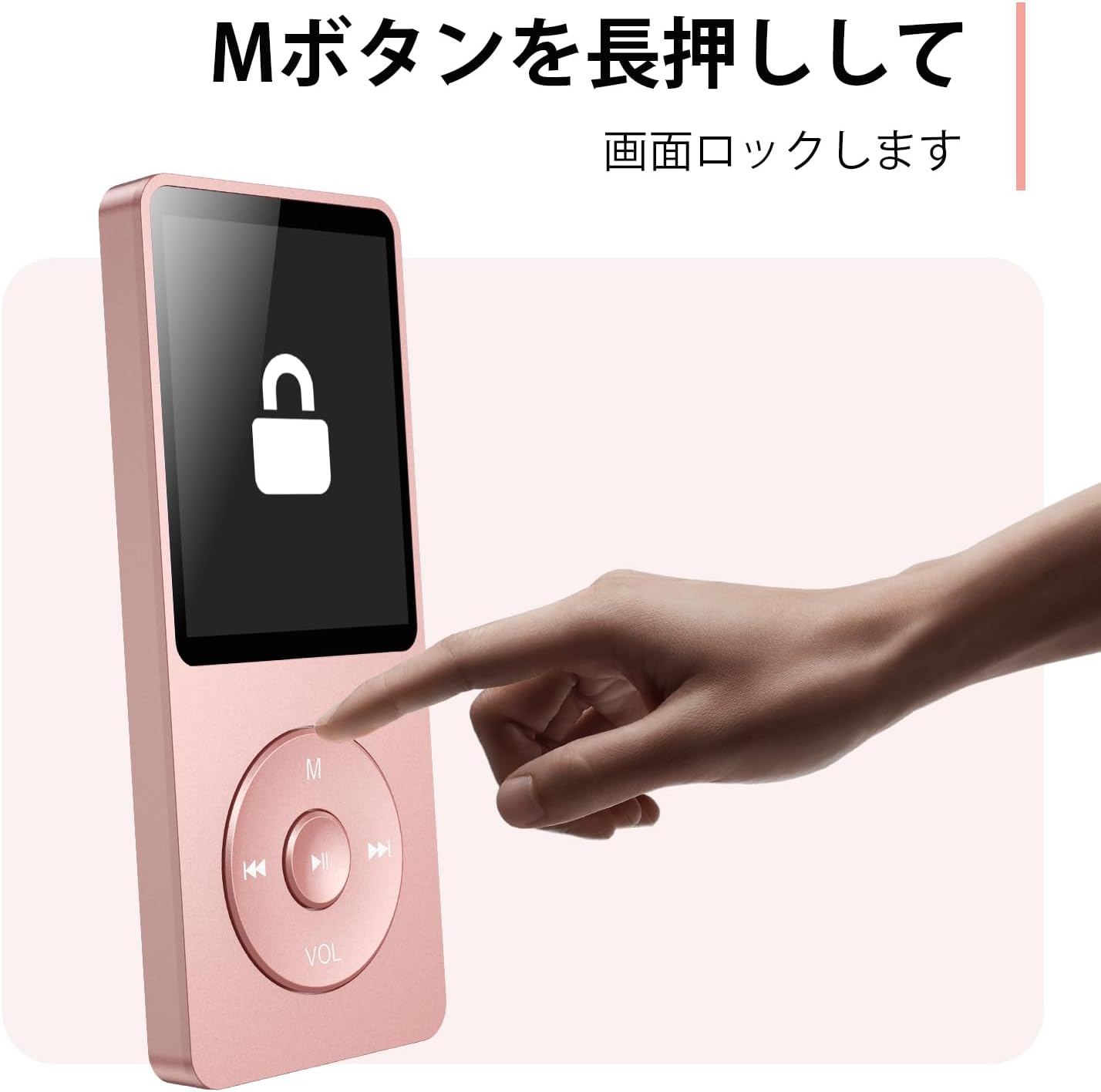
Figure 4.3: Screen lock function using the M button.
5. וישאַלט
5.1 רייניקונג
- ווישן די מיטל מיט אַ ווייך, טרוקן שטאָף.
- ניצט נישט פליסיקע רייניגער אדער סאָלווענטן.
5.2 סטאָרידזש
- האַלט דעם שפּילער אין אַ קיל, טרוקן אָרט אַוועק פון דירעקט זונשייַן און עקסטרעמע טעמפּעראַטורן.
- ויסמיידן דראַפּינג אָדער אונטערטעניק די מיטל צו שטאַרק ימפּאַקץ.
5.3 באַטערי קער
- לאָדט די באַטאַרייע רעגולער, אפילו אויב זי ווערט נישט גענוצט, כדי צו האַלטן די באַטאַרייע געזונט.
- פֿאַרמײַדט אָפֿט גאָר אויסצוליידיקן די באַטעריע.
6. טראָובלעשאָאָטינג
6.1 אַפּאַראַט טוט זיך נישט אָן
- זיכער מאַכן אַז די באַטאַרייע איז אויפגעלאָדן. פֿאַרבינדט עס צו אַ מאַכט מקור און פּרוּווט ווידער.
- Perform a hard reset by pressing and holding the power button for 10-15 seconds.
6.2 קען נישט איבערפירן Files
- Check the USB-C cable connection. Try a different cable or USB port.
- Ensure the device is properly recognized by your computer.
- באַשטעטיקן אַז די file format is supported by the player.
6.3 בלוטוט פּאָרינג פּראָבלעמען
- Ensure both the player and the Bluetooth device are in pairing mode and within range.
- אויסלעשן און אנשטעלן בלועטוט אויף ביידע דעווייסעס.
- אויסמעקן פריערדיקע פּאָרינגז און פּרוּווט ווידער פּאָרן.
6.4 קיין געזונט
- קאָנטראָלירן די באַנד מדרגה.
- Ensure headphones are properly connected or Bluetooth device is paired.
- Test with different headphones or Bluetooth device.
7. ספּעסאַפאַקיישאַנז
| סאָרט | AGPTEK |
| מאָדעל נאָמען | A02XT |
| זכּרון סטאָרידזש קאַפּאַסיטי | 32 GB (expandable up to 64 GB via microSD card) |
| קאָליר | ראָזעווע |
| פאַרשטעלן גרייס | 8.9 סענטימעטער (אומגעפער 3.5 אינטשעס) |
| מעדיע טיפּ | מיקראָסד קאַרד |
| ווייַז טעכנאָלאָגיע | לקד |
| שטיצט אַודיאָ פֿאָרמאַטירונגען | MP3, WMA, OGG, WAV, APE, FLAC, AAC, ACELP |
| באַטערי לעבן | אַרויף צו 40 שעה |
| פּונקט וואָג | 130 גראַמז |
8. וואָראַנטי און שטיצן
8.1 וואָראַנטי אינפֿאָרמאַציע
This AGPTEK A02XT MP3 Player comes with a 1 יאָר וואָראַנטי פֿון דעם קויפֿדאַטום. די וואָראַנטי דעקט פֿאַבריקאַציע חסרונות און מאַלפאַנגקשאַנז אונטער נאָרמאַל נוצן. עס דעקט נישט שעדיקן געפֿירט דורך מיסברויך, אַקסאַדאַנץ, נישט-אָטעריזירטע מאָדיפֿיקאַציעס, אָדער נאָרמאַל טראָגן און טרער.
8.2 קונה שטיצן
If you encounter any issues or have questions regarding your AGPTEK A02XT MP3 Player, please refer to the troubleshooting section of this manual first. If the problem persists, contact AGPTEK customer support through the official website or your retailer's support channels. Please have your purchase receipt and product model number (A02XT) ready when contacting support.