
1. הקדמה
The MESTEK EMF02R is a versatile 5-in-1 Electromagnetic Field (EMF) meter designed to detect and measure electric fields, magnetic fields, and radio frequency (RF) radiation. This rechargeable device provides accurate readings for various electromagnetic sources, including household appliances, WiFi signals, 5G signals, and base stations. It features a clear LCD display, audible and visual alarms, data hold, and maximum/average value measurement functions, making it an essential tool for assessing electromagnetic environments.

Figure 1: MESTEK EMF02R 5-in-1 EMF Meter with key features highlighted.
2. זיכערקייַט אינפֿאָרמאַציע
- לייענען אַלע ינסטראַקשאַנז קערפאַלי איידער איר נוצן די מיטל.
- פרובירט נישט צו צענעמען אדער מאדיפיצירן דעם אפאראט. דאס קען שאפן שאדן און בטל מאכן די גאראנטיע.
- האַלט דעם אַפּאַראַט אַוועק פון וואַסער און הויך-פייכטקייט סביבות.
- פֿאַרמײַדן אויסצושטעלן דעם אַפּאַראַט צו עקסטרעמע טעמפּעראַטורן אָדער דירעקטער זון פֿאַר פֿאַרלענגערטע פּעריאָדן.
- ניצט נאָר דעם צוגעשטעלטן טשאַרדזשינג קאַבל אָדער אַ קאָמפּאַטיבלע USB-C קאַבל צום טשאַרדזשינג.
- Dispose of the device and its battery according to local regulations. Do not incinerate.
3. פּעקל אינהאַלט
באַשטעטיקן אַז אַלע זאכן זענען פאַראַן אין פּעקל:
- 1 x MESTEK EMF02R EMF Meter
- 1 רענטגענ וסב טיפּ- C טשאַרדזשינג קאַבלע
- 1 x באַניצער מאַנואַל (דאָס דאָקומענט)
- 1 x EMF Meter Carry Bag

Figure 2: Package contents of the MESTEK EMF02R.
4. פּראָדוקט איבערview
Familiarize yourself with the components and controls of the MESTEK EMF02R meter.

Figure 3: Labeled diagram of the MESTEK EMF02R components.
- Induction Probe: Detects electromagnetic fields.
- ווייַז פאַרשטעלן: Shows measurement values, modes, and status indicators.
- מאַכט אויף / אַוועק קנעפּל: דרוק צו קער די מיטל אויף אָדער אַוועק.
- SEL Button (Function Selection): Used to switch between Electric Field (E-field) and Magnetic Field (H-field) measurement modes.
- AVG/MAX Button: Toggles between average and maximum value display.
- האַלטן קנעפּל: איינפֿרירט די איצטיקע לייענונג אויפן דיספּלעי.
- שרעק קנעפּל: Toggles the audible alarm on or off.
- RF Button (High-frequency Signal Selection): Activates Radio Frequency (RF) measurement mode.
- טשאַרדזשינג ינדיקאַטאָר ליכט: ינדיקייץ טשאַרדזשינג סטאַטוס.
- טיפּ C טשאַרדזשינג פּאָרט: פֿאַר פֿאַרבינדן דעם USB-C טשאַרדזשינג קאַבל.
5. סעטאַפּ
5.1 טשאַרדזשינג די מיטל
The MESTEK EMF02R is equipped with a 2000mAh/3.7V Lithium battery and supports USB-C charging.
- Connect the provided USB Type-C charging cable to the charging port on the device.
- Plug the other end of the cable into a standard USB power adapter (not included) or a computer's USB port.
- די טשאַרדזשינג אינדיקאַטאָר ליכט וועט זיך אָנצינדן בעת טשאַרדזשינג.
- A full charge typically takes several hours. The indicator light will change or turn off once charging is complete.
- The device features a low battery indication on the display to alert you when charging is needed.

Figure 4: USB-C charging port and charging indicator.
6. אַפּערייטינג ינסטרוקטיאָנס
6.1 מאַכט אויף / אַוועק
- צו קער אויף די מיטל, דריקן און האַלטן די מאַכט אויף / אַוועק קנעפּל ביז דער עקראַן באַלויכטנט זיך.
- צו קער אַוועק די מיטל, דריקן און האַלטן די מאַכט אויף / אַוועק קנעפּל ביז די אַרויסווייַזן טורנס אַוועק.
- The device features an auto-shutdown function after 15 minutes of inactivity to conserve battery life.
6.2 Measurement Modes (RF, E-field, H-field)
The MESTEK EMF02R can measure three types of electromagnetic fields:
- RF (Radio Frequency) Radiation: Detects WiFi signals, 5G signals (30MHz ~ 8GHz), and microwave radiation.
- E-field (Electric Field) Radiation: Measures electric fields emitted by household appliances like TVs, laptops, and microwaves.
- H-field (Magnetic Field) Radiation: Measures magnetic fields from appliances such as refrigerators, washing machines, and air conditioners.

Figure 5: Switching between RF, E-field, H-field modes and using the HOLD function.
- High-frequency Signal Radiation Measurement (RF): קורץ דריקן די RF button. The screen will display "RF" and show the high-frequency radiation measurement.
- E-field Radiation Measurement: קורץ דריקן די SEL button. The screen will display "E-field" to enter electric field radiation measurement mode.
- Electromagnetic Field Radiation Measurement (H-field): קורץ דריקן די SEL button again (after E-field mode). The screen will display "H-field" to enter electromagnetic field radiation measurement mode. Short press SEL button again to change the measurement unit (mG/µT).
6.3 דאַטאַ האַלטן פֿונקציע
צו איינפֿרירן די איצטיקע לייענונג אויף דער אַרויסווייַזונג:
- קורץ דריקן די האַלטן button to lock the displayed data. The "HOLD" indicator will appear on the screen.
- דרוק די האַלטן button again to unlock the data and resume real-time measurement.
6.4 MAX/AVG Measurement
The device can display either the instantaneous reading, the maximum value detected, or the average value detected.

Figure 6: Maximum (MAX) and Average (AVG) value display.
- קורץ דריקן די AVG/MAX button to cycle through instantaneous, maximum (MAX), and average (AVG) readings during measurement.
6.5 שרעק סעטטינגס
The MESTEK EMF02R provides visual and audible alarms when radiation levels exceed predefined thresholds.
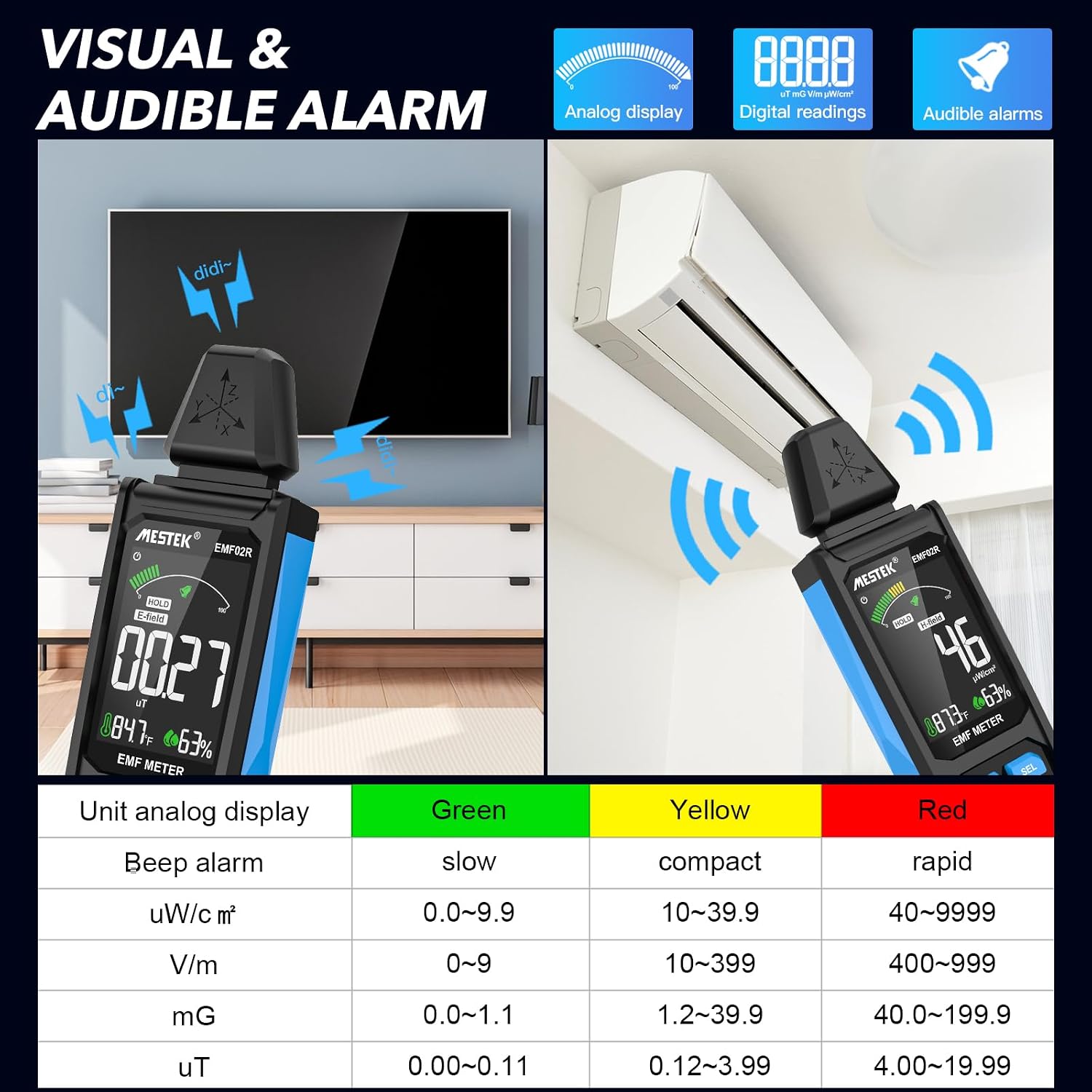
Figure 7: Visual and audible alarm thresholds.
- The display will show a color-coded bar (Green, Yellow, Red) indicating the radiation level.
- When the analog display reaches the yellow area, the device will emit an audible alarm, indicating that radiation levels are elevated.
- When the red area is reached, the alarm will become more rapid, indicating high radiation levels.
- To toggle the audible alarm on or off, short press the שרעק קנעפּל.
6.6 Unit Switching and Temperature/Humidity Display
The device can display temperature and humidity, and allows switching between temperature units.

Figure 8: Temperature and humidity display with unit switching.
- The device displays ambient temperature in both Celsius (°C) and Fahrenheit (°F), and relative humidity (%).
- To switch between °C and °F, refer to the specific instructions in the device's on-screen menu or a dedicated button if available (not explicitly detailed in provided data, typically combined with another button press or a menu option).
7. Understanding Readings and Radiation Sources
The MESTEK EMF02R helps identify common sources of electromagnetic radiation in your environment.

Figure 9: Common sources of electromagnetic radiation.
- Radio Frequency (RF) Sources: Routers, cell phones, 5G towers, microwave ovens (when operating).
- Electric Field (E-field) Sources: TVs, laptops, power lines, ungrounded electrical appliances.
- Magnetic Field (H-field) Sources: Refrigerators, washing machines, induction cookers, motors, high-voltagE קייבאַלז.
When measuring, slowly move the meter closer to the suspected source. Observe the readings and the alarm indicators to determine the strength and type of radiation. If the radiation value reaches the yellow or red alarm zone, consider taking protective measures or increasing your distance from the source.
8. וישאַלט
- רייניקונג: ווישט אָפּ דאָס אַפּאַראַט מיט אַ ווייכן, טרוקענעם שטאָף. ניצט נישט קיין שרײַבנדיקע רייניגערס אָדער סאָלווענטן.
- סטאָרידזש: Store the device in its carry bag in a cool, dry place, away from direct sunlight and extreme temperatures.
- באַטערי זאָרגן: פֿאַר אַן אָפּטימאַלן באַטעריע לעבן, לאָדט די דעווייס רעגולער, אפילו אויב איר ניצט עס נישט אָפט. פֿאַרמייַדט צו גאָר אויסלאָדן די באַטעריע פֿאַר לענגערע פּעריאָדן.
9. טראָובלעשאָאָטינג
| פּראָבלעם | מעגלעך סיבה | לייזונג |
|---|---|---|
| די מיטל איז נישט קער אויף. | נידעריגע באַטעריע אָדער קיין אָפּצאָל. | לאָדט אויף דעם דעווייס מיטן USB-C קאַבל. |
| ומפּינקטלעך רידינגז. | Interference from other electronic devices; device not held correctly. | Move away from other electronics; ensure the probe is directed towards the source. |
| Audible alarm not working. | Alarm function is turned off. | דרוק די שרעק קנעפּל צו אַקטאַווייט עס. |
| Display is frozen. | Data Hold function is active. | דרוק די האַלטן קנעפּל צו מעלדונג. |
10. ספּעסאַפאַקיישאַנז
- מעזשערמאַנט מאָדעס: Electric Field (E-field), Magnetic Field (H-field), Radio Frequency (RF)
- רף אָפטקייַט ראַנגע: 30 מהז ~ 8 גהז
- Magnetic Field Units: mG / µT (switchable)
- Electric Field Units: V/m
- RF Field Units: uW/cm²
- ווייַז: Large Color LCD Screen
- באַטערי: 2000mAh/3.7V Lithium Ion (rechargeable)
- טשאַרדזשינג פּאָרט: וסב טיפּ-C
- אַוטאָ מאַכט אַוועק: 15 מינוט פון ינאַקטיוויטי
- נאָך פֿעיִקייטן: Data Hold, MAX/AVG measurement, Audible/Visual Alarm, Low Battery Indication, Temperature & Humidity Display
- נומער וואָג: 15.2 אונסעס
- פּעקל דימענשאַנז: 7 X 2 X 1 אינטשעס
11. וואָראַנטי און שטיצן
MESTEK provides comprehensive customer support for your EMF02R meter.
- וואָראַנטי: 24 months after-sale service.
- טעכניש שטיצן: 7/24 קונה סערוויס בנימצא.
- פאַרבייַט פּאָליטיק: If the meter is damaged within 24 months of purchase, please contact MESTEK customer service for a replacement.
For assistance, please refer to the contact information provided with your purchase or visit the official MESTEK webפּלאַץ.