
הקדמה
The Holosun IRIS-RD4 is a quad-function multi-laser device designed for versatile applications. It features a robust 7075 aluminum housing, offering a compact and lightweight design. This device integrates a powerful infrared (IR) illuminator, a high-lumen white light, a visible (VIS) laser pointer, and an infrared (IR) laser pointer.
Key features include independent fire buttons for ambidextrous activation of momentary or constant ON functions for both lasers and the white light. An updated, rear-facing power and mode selector switch enhances ergonomic control. The IRIS-RD4 also comes with a three-button remote activation switch, which includes a VIS override function.
וואָס איז אין די קעסטל
נאָך אַנפּאַקינג, מאַכן זיכער אַז אַלע קאַמפּאָונאַנץ זענען פאָרשטעלן:
- IRIS-RD4 Laser Unit
- High/Low Intensity Selector Switch
- Remote Activation Switch (3-button)
- באַניצער מאַנואַל (דעם דאָקומענט)
סעטאַפּ
Follow these steps to prepare your IRIS-RD4 device for use:
- ייַנמאָנטירונג פון באַטאַרייע: The IRIS-RD4 operates on a CR123A or 18650 battery. Locate the battery compartment, typically secured with a screw-on cap. Insert the battery with the correct polarity as indicated inside the compartment. Securely close the cap.
- מאָונטינג: Attach the IRIS-RD4 to your desired platform using the integrated mounting system. Ensure the device is securely fastened to prevent movement during operation.
- רימאָוט סוויטש קאַנעקשאַן: If using the remote activation switch, connect its cable to the designated port on the IRIS-RD4 unit. Secure the remote switch in an accessible location.
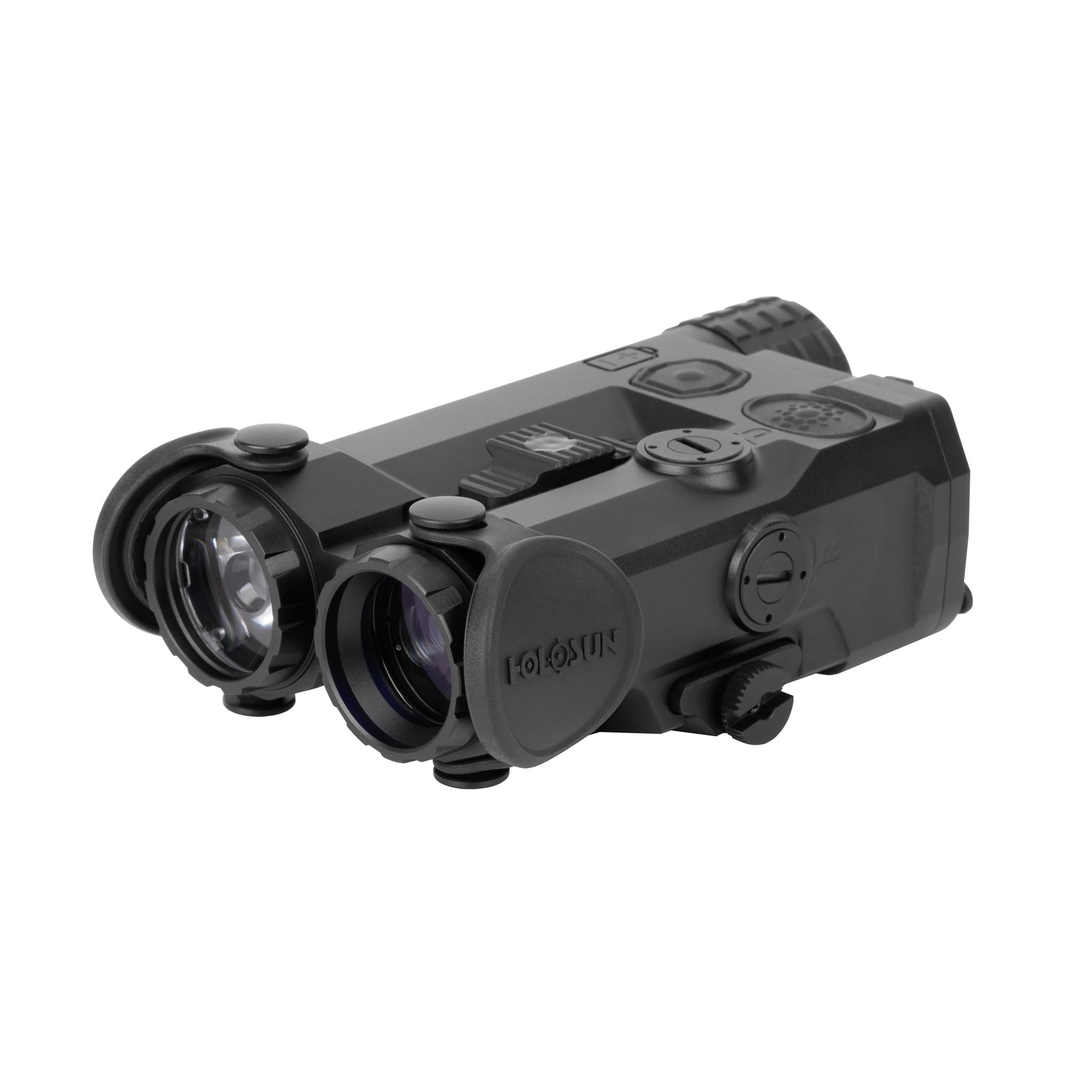
Image: The Holosun IRIS-RD4 multi-laser device, showcasing its compact design with the IR illuminator and white light apertures visible on the front, and control buttons on the top surface.
אַפּערייטינג ינסטראַקשאַנז
The IRIS-RD4 offers multiple functions controlled by its integrated switches and remote activation switch.
- Power/Mode Selector Switch: Located at the rear of the unit, this switch controls the overall power and selects the operating mode (e.g., IR laser, VIS laser, IR illuminator, white light). Rotate or slide the switch to cycle through available modes.
- Independent Fire Buttons: The device features separate buttons for activating the laser functions and the white light. Press and hold for momentary activation, or press and release for constant ON, depending on the selected mode and configuration.
- IR יללומינאַטאָר: The 60mW IR illuminator provides infrared light for use with night vision devices. It features quick adjustable focus to tailor the beam spread.
- ווייַס ליכט: The 1,000 lumen / 25,000 candela white light provides powerful visible illumination.
- VIS Laser Pointer: The visible red laser pointer (5mW) is used for aiming and target designation.
- IR Laser Pointer: The infrared laser pointer (0.7mW VCSEL) is used for aiming with night vision devices.
- Remote Activation Switch: The included three-button remote switch allows for convenient activation of functions without breaking your grip. It also includes a VIS override function for quick access to the visible laser.
- High/Low Intensity Selector Switch: Adjust the output intensity of certain functions using this dedicated switch.
- Coaxial Laser Mechanism: This design ensures that the visible and infrared lasers are aligned for consistent aiming.
Refer to the markings on the device for specific button functions and switch positions.
וישאַלט
Proper maintenance ensures the longevity and reliable performance of your IRIS-RD4 device.
- רייניקונג: Use a soft, clean cloth to wipe down the exterior of the device. For lenses, use a lens cleaning solution and a microfiber cloth to avoid scratches. Do not use abrasive cleaners or solvents.
- באַטערי זאָרגן: Remove the battery if the device will not be used for an extended period to prevent leakage. Store batteries in a cool, dry place.
- סטאָרידזש: Store the device in a protective case or a dry environment away from extreme temperatures and direct sunlight.
- דורכקוק: Periodically check all mounting screws and connections for tightness.
טראָובלעשאָאָטינג
| פּראָבלעם | מעגלעך סיבה | לייזונג |
|---|---|---|
| די מיטל טוט נישט מאַכט אויף. | טויטע אדער נישט ריכטיק אינסטאלירטע באַטעריע. | Check battery polarity. Replace with a fresh CR123A or 18650 battery. |
| Laser or light output is weak. | Low battery power. Dirty lens. | Replace battery. Clean the lens with a suitable lens cleaning kit. |
| Remote switch not functioning. | Loose connection. Damaged cable. | Ensure the remote switch cable is securely plugged into the device. Inspect the cable for damage. |
If issues persist, contact Holosun customer support for further assistance.
ספּעסאַפאַקיישאַנז
| מאָדעל | IRIS-RD4 |
| האָוסינג מאַטעריאַל | 7075 ט6 אַלומינום |
| IR Illuminator Output | 60mW |
| IR Laser Output | 0.7mW VCSEL |
| Visible (Red) Laser Output | 5mW |
| ווייַס ליכט רעזולטאַט | 1,000 Lumens / 25,000 Candela |
| באַטערי טיפּ | CR123A / 18650 |
| פּונקט וואָג | 8.5 אונסעס (אומגעפער 241 ג) |
| פּראָדוקט דימענשאַנז | 2.3"ל x 1.4"בר x 4.2"ה (אומגעפער 5.8 ס״מ ל x 3.6 ס״מ ב x 10.7 ס״מ ה) |
| קאָליר | Red (referring to visible laser color) |
| UPC | 810047073888 |
וואָראַנטי און שטיצן
Holosun products are typically covered by a limited warranty. For specific warranty terms and conditions, please refer to the warranty card included with your product or visit the official Holosun webזייטל. האַלט דיין קויפן באַווייַז פֿאַר וואָראַנטי קליימז.
For technical support, service, or inquiries regarding your IRIS-RD4 device, please contact Holosun customer service through their official webזייטל אדער די קאָנטאַקט אינפֿאָרמאַציע וואָס איז צוגעשטעלט אין אייער פּראָדוקט פּאַקאַדזשינג.


