
MOREFINE M9Pro-1340p
MOREFINE M9 Pro Mini PC User Manual
Model: M9Pro-1340p
1. הקדמה
This manual provides detailed instructions for the setup, operation, maintenance, and troubleshooting of your MOREFINE M9 Pro Mini PC. Please read this manual thoroughly before using the device to ensure proper functionality and longevity.

בילד: פראָנט view of the MOREFINE M9 Pro Mini PC, showcasing its compact design and front ports.
2. פּעקל אינהאַלט
באַשטעטיקן אַז אַלע זאכן זענען פאַראַן אין פּעקל:
- 1 x MOREFINE M9 Pro Mini PC
- 1 x HDMI קאַבלע
- 1 x מאַכט אַדאַפּטער
- 1 x באַניצער מאַנואַל (דאָס דאָקומענט)
3. סעטאַפּ אינסטרוקציעס
3.1 קאַנעקטינג פּעריפעראַלס
- פֿאַרבינדן דיספּליי: Use the provided HDMI cable to connect the Mini PC to a monitor or TV. The device supports up to three displays simultaneously via two HDMI 2.0 ports and one Type-C port.
- פאַרבינדן וסב דעוויסעס: Plug in your keyboard, mouse, and other USB peripherals into the available USB 3.2 and USB 2.0 ports.
- פֿאַרבינדן נעץ (אָפּציאָנאַל): For a wired internet connection, connect an Ethernet cable to the 2.5G LAN port. Alternatively, the device supports WiFi 6 for wireless connectivity.
- פאַרבינדן מאַכט: Plug the power adapter into the DC Power port on the Mini PC, then connect the adapter to a power outlet.

בילד: הינטערשטע און זייט view of the MOREFINE M9 Pro Mini PC, illustrating the various ports including HDMI, USB, Type-C, LAN, and power input.
3.2 ערשט מאַכט אויף
After connecting all necessary peripherals and power, press the power button located on the front of the Mini PC. The system will boot up. Follow any on-screen instructions for initial operating system setup.
4. אַפּערייטינג ינסטרוקטיאָנס
4.1 מאַכט מאַנאַגעמענט
- מאַכט אויף: דרוק די מאַכט קנעפּל.
- שאַט אַראָפּ: Use the operating system's shutdown function.
- ריסטאַרט: Use the operating system's restart function.
- שלאָפן מאָדע: Use the operating system's sleep function.
- אַוטאָ מאַכט אויף: This feature can be enabled in the BIOS settings. Consult your operating system documentation for accessing BIOS.
- Wake on LAN (WoL): This feature can be enabled in the BIOS settings to power on the device remotely via the network.
4.2 ווייַז קאַנפיגיעריישאַן
The Mini PC supports triple display output at 4K resolution (3840x2160 pixels) via its two HDMI 2.0 ports and one Type-C port. To configure multiple displays, access your operating system's display settings. You can extend, duplicate, or use only one display.
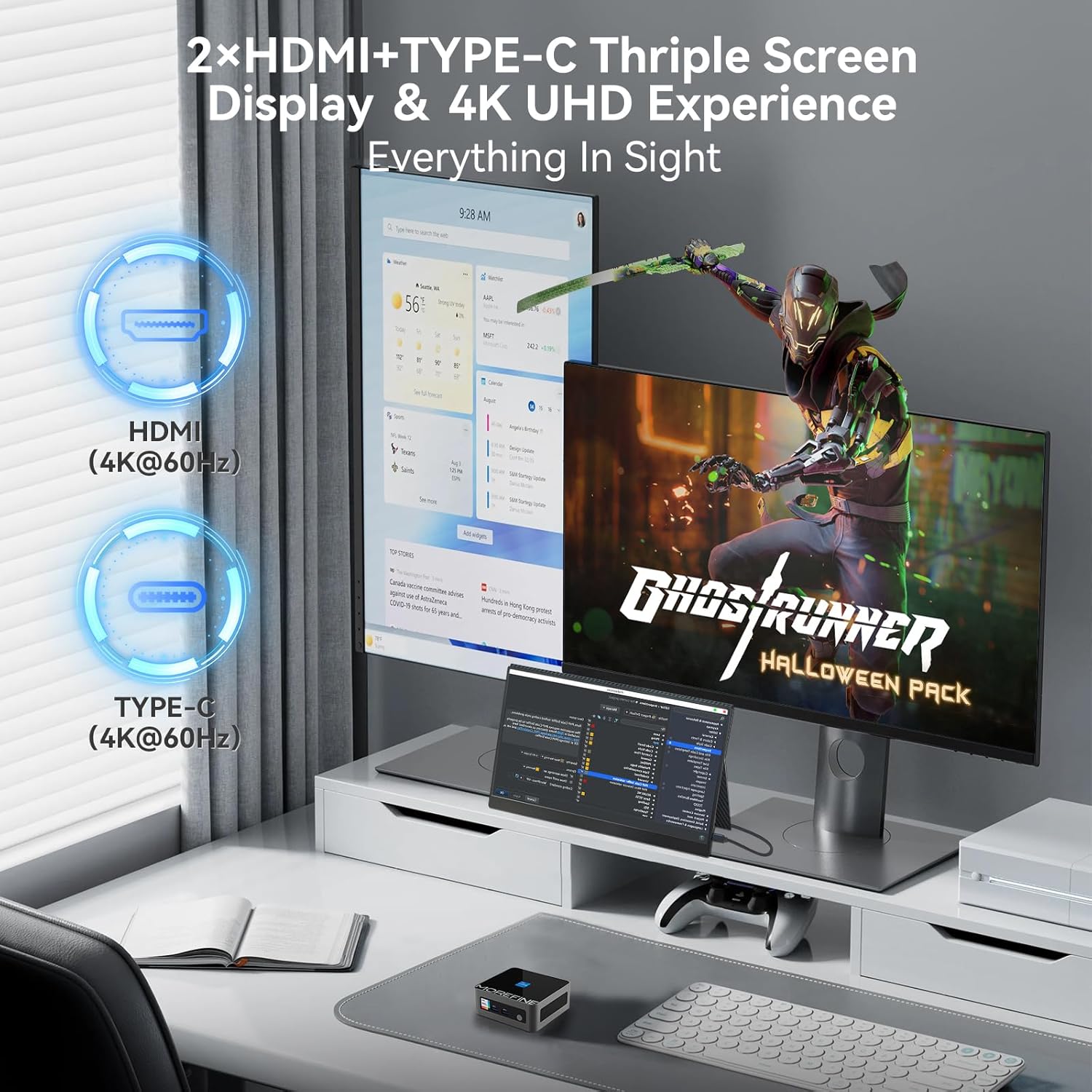
Image: A MOREFINE M9 Pro Mini PC connected to a triple monitor setup, demonstrating its multi-display capability.
4.3 נעץ קאָנעקטיוויטי
- ווייערד קשר: Connect an Ethernet cable to the 2.5G LAN port for a stable wired network connection.
- Wireless Connection (WiFi 6): The device features an integrated WiFi 6 module. Access your operating system's network settings to connect to available wireless networks.
- בלועטאָאָטה 5.2: For connecting wireless peripherals such as keyboards, mice, or headphones, use the integrated Bluetooth 5.2. Pair devices through your operating system's Bluetooth settings.

Image: The MOREFINE M9 Pro Mini PC with visual indicators for WiFi 6 and Bluetooth 5.2 connectivity, emphasizing its wireless capabilities.
5. וישאַלט
5.1 רייניקונג
- פאַרזיכערן אַז די מיטל איז פּאַוערד אַוועק און אַנפּלאַגד איידער רייניקונג.
- ניצט אַ ווייכן, טרוקענעם שטאָף צו ווישן די אויסערלעכע זייט פון די מיני פּיסי.
- For dust accumulation in vents, use compressed air. Do not insert objects into the vents.
- ויסמיידן ניצן פליסיק קלינערז אָדער אַברייסיוו מאַטעריאַלס.
5.2 Storage and Upgrades
The Mini PC is equipped with dual-channel DDR4 SO-DIMM memory, supporting up to 64GB. It also includes one M.2 2242 slot and one M.2 2280 slot for storage expansion, supporting up to 4TB. The pre-installed storage is an M.2 NVME Gen3 X4 SSD. For memory or storage upgrades, consult a qualified technician or refer to detailed upgrade guides available from MOREFINE.

בילד: אן אינערליכע view of the MOREFINE M9 Pro Mini PC, illustrating the DDR4 SO-DIMM memory slots and M.2 SSD slots for potential upgrades.
6. טראָובלעשאָאָטינג
| פּראָבלעם | מעגלעך סיבה | לייזונג |
|---|---|---|
| קיין מאַכט | Power adapter not connected; power outlet issue | Ensure power adapter is securely connected to both the Mini PC and a working power outlet. Test the outlet with another device. |
| ניט קיין אַרויסווייַזן רעזולטאַט | Display cable loose; incorrect input selected on monitor | Check HDMI/Type-C cable connections. Ensure the monitor is set to the correct input source. Try a different display cable or port. |
| קיין אינטערנעט פֿאַרבינדונג (ווייערד) | Ethernet cable loose; router/modem issue | Verify Ethernet cable is securely connected. Restart your router/modem. Check network settings in the operating system. |
| קיין אינטערנעט פֿאַרבינדונג (וויירלעס) | WiFi disabled; incorrect password; signal interference | Ensure WiFi is enabled in OS settings. Re-enter WiFi password. Move closer to the router or reduce interference. |
| סיסטעם שטייט אדער נישט-רעאגירנדיק | Too many applications running; insufficient RAM/storage; overheating | Close unnecessary applications. Check system resources (Task Manager/Activity Monitor). Ensure proper ventilation. Consider RAM/SSD upgrade if issues persist. |
7. ספּעסאַפאַקיישאַנז
| שטריך | דעטאַל |
|---|---|
| מאָדעל | M9Pro-1340p |
| פּראַסעסער | 13th Gen Intel Core i5-1340P (12 Cores, 16 Threads, up to 4.6GHz, 12MB Cache) |
| גראַפיקס | אינטעל איריס קסע גראַפיקס (אינטעגרירט) |
| באַראַן | 16GB DDR4 SO-DIMM (Dual-channel, expandable up to 64GB) |
| סטאָרידזש | 1TB PCIe3.0 NVME SSD (1x M.2 2280 slot, 1x M.2 2242 slot, max 4TB total) |
| ווייַז רעזולטאַט | 2 x HDMI 2.0, 1 x Type-C (Supports 4K UHD Triple Display) |
| וסב פּאָרץ | 3 רענטגענ וסב 3.2, 1 רענטגענ וסב 2.0 |
| נעץ | 2.5G LAN, WiFi 6 (2.5G/5G/6G Tri-band) |
| בלועטאָאָטה | בלועטאָאָטה 5.2 |
| אַודיאָ | 1 x MIC (Audio Jack) |
| אָפּערייטינג סיסטעם | אָפּערירן סיסטעם (פאַר-אינסטאַלירט, ספּעציפֿישע ווערסיע קען זיין אַנדערש) |
| דימענשאַנז | 4.48 X 4.17 X 1.77 אינטשעס (11.2 X 10.5 X 4.3 סענטימעטער) |
| וואָג | בעערעך 2.2 פונט (1 קג) |
| ספּעציעלע פֿעיִקייטן | Auto Power On, PXE Boot, Wake on LAN |
8. וואָראַנטי און שטיצן
8.1 וואָראַנטי אינפֿאָרמאַציע
The MOREFINE M9 Pro Mini PC comes with a standard manufacturer's warranty. Please refer to the warranty card included in your package or visit the official MOREFINE webזייטל פֿאַר דעטאַלירטע וואָראַנטי טערמינען און באַדינגונגען. האַלט דיין באַווייַז פון קויפן פֿאַר וואָראַנטי קליימז.
8.2 טעכניש שטיצן
For technical assistance, troubleshooting beyond this manual, or service inquiries, please contact MOREFINE customer support. Contact information can typically be found on the official MOREFINE webוועבזייטל אדער אויף דער פּראָדוקט פּאַקאַדזשינג.
אָנליין רעסורסן: Visit the MOREFINE Store on Amazon
Ask a question about this manual
Ask about setup, troubleshooting, compatibility, parts, safety, or missing instructions. Manuals+ will review the question and use this page’s manual context to help answer it.