
הקדמה
This manual provides essential information for the safe and effective use of your Minolta MNB5Z 56MP Dual Lens Point & Shoot Digital Camera. Please read this manual thoroughly before using the camera and keep it for future reference. The Minolta MNB5Z is designed to capture high-quality photos at 56MP and record videos in 5K Ultra HD, featuring a 5x optical zoom and a user-friendly 2.8-inch IPS touchscreen.
זיכערקייַט אינפֿאָרמאַציע
- שטעלט נישט אויס די קאַמעראַ צו וואַסער אָדער נעץ. די קאַמעראַ איז נישט וואַסער-קעגנשטעליק.
- פֿאַרמײַדט צו לאָזן פֿאַלן די קאַמעראַ אָדער אויסשטעלן זי צו שטאַרקע קלאַפּן.
- Keep the camera away from direct sunlight, high temperatures, and dusty environments.
- ניצט נאָר ספּעציפֿישע באַטעריעס און אַקסעסאָריעס.
- פרובירט נישט צו צענעמען אדער מאדיפיצירן די קאמערא. לאָזט איבער אלע סערוויסעס צו קוואַליפֿיצירטע פּערסאָנעל.
- האַלטן אויס פון דערגרייכן פון קינדער.
פּעקל אינהאַלט
באַשטעטיקן אַז אַלע זאכן זענען פאַראַן אין דיין פּעקל:
- Minolta MNB5Z 56MP Digital Camera
- וסב טשאַרדזשינג קאַבלע
- קריקאָנלאָדלעך ליטהיום-יאָן באַטערי
- MicroSDHC Ultra 64GB Memory Card
- Flexible Vlogging Tripod
- זכּרון קאַרטל בייטל
- USB Card Reader (SD/microSD)
- קאַמעראַ באַג
- רייניקונג קיט
- Corel Photo, Video, & Art Suite Deluxe Software (Download information may be included)
סעטאַפּ
1. באַטאַרייע ייַנמאָנטירונג
- געפינט דעם דעקל פונעם באַטעריע־אָפּטייל אויף דער אונטערשטער טייל פון דער קאַמעראַ.
- שלעפּט דעם דעקל-שליסל צו עפֿענען דעם אָפּטייל.
- Insert the Lithium-Ion battery according to the polarity indicators (+/-).
- פֿאַרמאַכט דעם דעקל פֿון דער באַטעריע־אָפּטיילונג זיכער ביז עס קליקט אַרײַן אין פּלאַץ.
2. זכּרון קאַרטל ינסטאַלירונג
The Minolta MNB5Z supports microSD and microSDHC cards up to 256GB.
- Open the battery compartment cover. The microSD card slot is usually located near the battery.
- Insert the microSD card with the gold contacts facing down, gently pushing until it clicks into place.
- צו אַרויסנעמען, שטופּ די קאַרטל ווידער אַרײַן ביז זי שפּרינגט אַרויס.
- נאָענט די דעקן פון די באַטאַרייע אָפּטייל.
3. טשאַרדזשינג די באַטערי
- פֿאַרבינדט דעם קליינעם עק פֿון דעם USB טשאַרדזשינג קאַבל צום קאַמעראַ'ס USB פּאָרט.
- פֿאַרבינדט דעם אַנדערן עק פֿונעם USB קאַבל צו אַ USB מאַכט אַדאַפּטער (נישט אַרייַנגערעכנט) אָדער אַ קאָמפּיוטער'ס USB פּאָרט.
- The charging indicator light (CHG) will illuminate during charging and turn off when fully charged.
4. ערשטע איינשאַלטונג
- דריקן און האַלטן די ON/OFF קנעפּל וואָס געפינט זיך אויף דער שפּיץ פון דער קאַמעראַ.
- The camera will power on, and the display screen will activate.
- פֿאָלגט אַלע אינסטרוקציעס אויף דעם עקראַן פֿאַר דער ערשטער סעטאַפּ, אַזאַ ווי שטעלן דעם דאַטע און צייט.
אַפּערייטינג די אַפּאַראַט
1. קאַמעראַ אויסלייג און קאָנטראָלס
Familiarize yourself with the camera's buttons and touchscreen interface.

בילד: הינטערשטע view of the Minolta MNB5Z camera, highlighting the touchscreen display and physical control buttons for navigation and function selection.
- ON/OFF קנעפּל: מאַכט אָן אָדער אויס די קאַמעראַ.
- לאָדן קנעפּל: Press halfway to focus, fully to take a photo.
- זום לעווער: קאָנטראָלירט דעם 5x אָפּטישן זום.
- מאָדע קנעפּל: Switches between different shooting modes (Photo, Video, Playback, etc.).
- Directional Pad (DISP/OK): נאַוויגירט מעניוז און באַשטעטיקט סעלעקשאַנז.
- פּלייבאַק קנעפּל: גייט אריין אין ווידערשפּיל מאָדע צו view פאָטאָס און ווידיאס.
- מעניו קנעפּל: צוטריט קאַמעראַ סעטטינגס און אָפּציעס.
- 2.8-אינטש IPS טאָוטשסקרין: For intuitive navigation and reviewאינהאַלט.
2. גענומען פאָטאָס
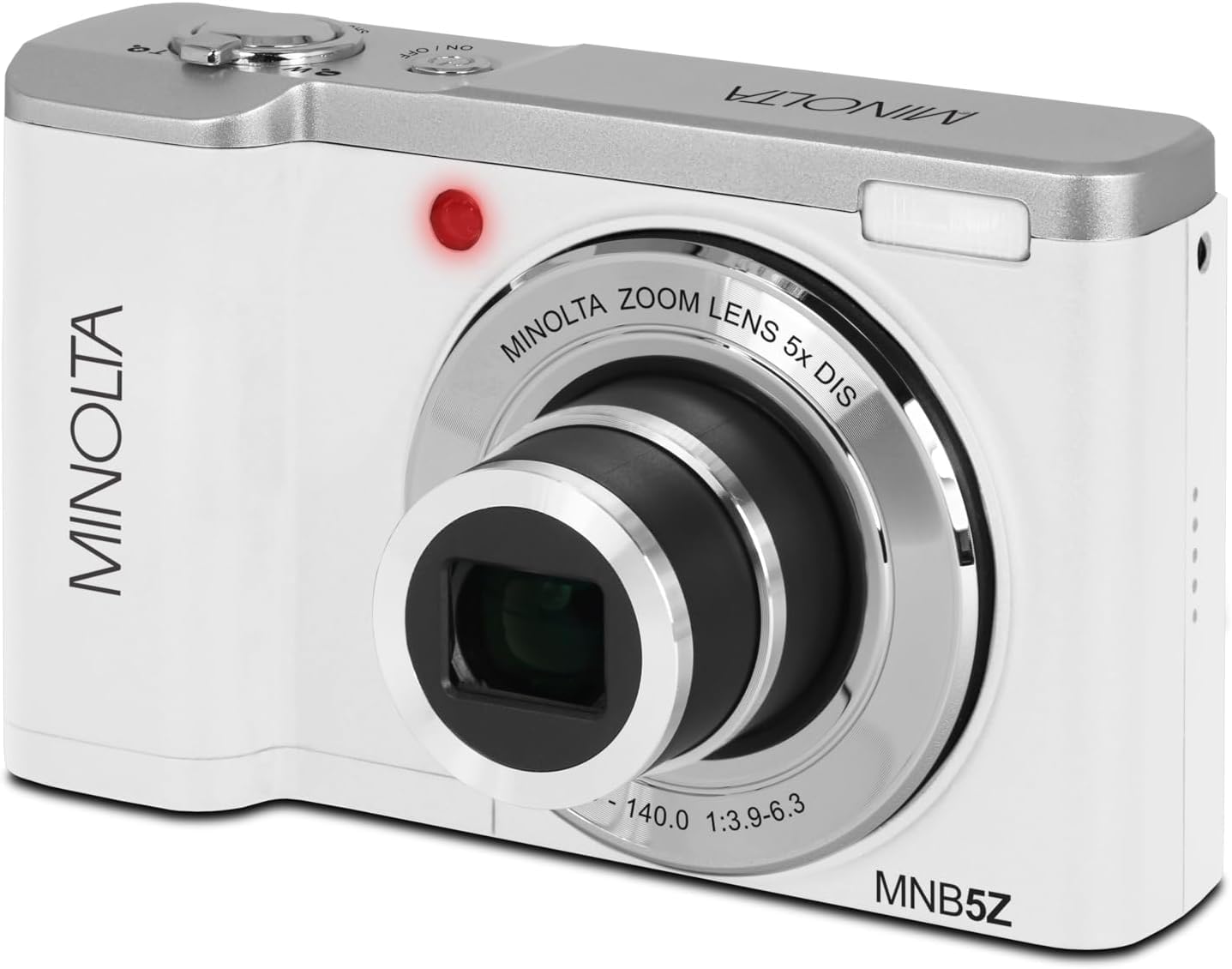
בילד: פראָנט view of the Minolta MNB5Z camera, showing the lens extended for capturing images, with the Minolta branding visible.
- Turn on the camera and ensure it is in Photo mode.
- Frame your shot using the 2.8-inch IPS touchscreen.
- ניצט דעם זום לעווער צו סטרויערן דעם 5x אָפּטישן זום.
- Press the shutter button halfway down to allow the camera to focus. The focus indicator will confirm focus.
- Press the shutter button fully to capture the photo.
- פלאַש: The built-in flash can be set to Auto, On/Fill, or Off via the menu.
- שאָס מאָדעס: Access various modes like Photo Burst, Time-Lapse, and Slow Motion via the Mode button or touchscreen menu.
3. רעקאָרדינג ווידיאס
- Turn on the camera and switch to Video mode using the Mode button.
- Frame your subject on the touchscreen.
- Press the shutter button to start recording. A recording indicator will appear on the screen.
- דרוק די לאָדן קנעפּל ווידער צו האַלטן רעקאָרדינג.
- The camera records in 5K Ultra HD resolution and includes a built-in microphone for audio capture.
4. פּלייַבאַקק
- דריק דעם פּלייבּעק קנעפּל צו אַרייַן פּלייבּעק מאָדע.
- Use the directional pad or swipe on the touchscreen to browse through your photos and videos.
- דרוק דעם OK קנעפּל צו view a video or zoom into a photo.
- דריק נאכאמאל דעם פּלעיבעק קנעפל צו פארלאזן פּלעיבעק מאָדע.
5. אַפּאַראַט סעטטינגס
- Press the Menu button to access camera settings.
- Use the directional pad or touchscreen to navigate through options such as resolution, white balance, ISO, exposure compensation, and color filters.
- Select an option and press OK to confirm or adjust.
- דרוק די מעניו קנעפּל ווידער צו אַרויסגאַנג די מעניו.
6. פֿאַרבינדן זיך צו אַ קאָמפּיוטער (USB)
- מאַכן זיכער אַז די אַפּאַראַט איז פּאַוערד אַוועק.
- פאַרבינדן די אַפּאַראַט צו דיין קאָמפּיוטער מיט די צוגעשטעלט וסב קאַבלע.
- Turn on the camera. It should be recognized as a removable disk or media device.
- איר קענט איצט איבערפירן בילדער און ווידיאס צו אייער קאמפיוטער.
7. ווי-פי קאַנעקטיוויטי
The Minolta MNB5Z features Wi-Fi connectivity for wireless transfer of images and remote control via a compatible smartphone application (if available). Refer to the camera's on-screen menu for Wi-Fi setup instructions and pairing with your device.
וישאַלט
1. רייניקונג די קאַמעראַ
- ניצט אַ ווייכן, לינט-פֿרייע שטאָף צו רייניקן דעם קאַמעראַ קערפּער.
- For the lens and screen, use a specialized lens cleaning cloth and solution. Avoid harsh chemicals.
- Gently blow away dust from the lens surface before wiping.
2. סטאָרידזש

בילד: פראָנט view of the Minolta MNB5Z camera with its lens retracted, demonstrating its compact form factor for easy storage in the included camera bag.
- When not in use, store the camera in the provided camera bag to protect it from dust and scratches.
- אַראָפּנעמען די באַטאַרייע אויב די אַפּאַראַט וועט נישט זיין געוויינט פֿאַר אַ לאַנג צייַט.
- Store in a cool, dry place, away from extreme temperatures and humidity.
טראָובלעשאָאָטינג
| פּראָבלעם | לייזונג |
|---|---|
| די קאַמעראַ גייט נישט אָן. | Ensure the battery is correctly inserted and fully charged. Try charging the battery for at least 2 hours. |
| קען נישט נעמען בילדער/ווידעאס. | Check if the memory card is inserted correctly and has sufficient free space. Ensure the camera is in the correct mode (Photo/Video). |
| בילדער זענען בלערי. | Ensure the lens is clean. Press the shutter button halfway to allow the camera to focus before fully pressing. Use digital image stabilization in shaky conditions. |
| פלאַש אַרבעט נישט. | Check flash settings in the menu to ensure it is not set to 'Off'. |
| די קאַמעראַ פרירט זיך אָדער ווערט נישט-רעאַגירנדיק. | Remove the battery, wait a few seconds, and reinsert it to reset the camera. |
ספּעסאַפאַקיישאַנז
| שטריך | דעטאַל |
|---|---|
| מאָדעל נאָמען | MNB5Z |
| פאָטאָ האַכלאָטע | 56 מעגאַפּיקסעלס |
| ווידעא האַכלאָטע | 5K Ultra HD (30 FPS) |
| אָפּטיש פארגרעסער | 5x |
| בילד סטאַביליזאַטיאָן | דיגיטאַל |
| פאַרשטעלן גרייס | 2.8 אינטשעס IPS טאָוטשסקרין |
| זיקאָרן קאַרד שטיצן | microSD, microSDHC (up to 256GB) |
| קאַנעקטיוויטי | וסב, ווי-פי |
| באַטערי טיפּ | ליטהיום יאָן |
| פלאַש | Built-In (Auto, On/Fill) |
| סענסאָר טיפּ | קמאָס |
| מינימום לאָדן ספּיד | 1/4000 סעק |
| געשטיצט File פאָרמאַץ | JPEG (פאָטאָס), MP4 (ווידעאָס) |
| פּונקט וואָג | 2.37 פונט |
וואָראַנטי און שטיצן
Minolta products are manufactured to the highest quality standards. For information regarding your product's warranty, please refer to the warranty card included in your package or visit the official Minolta support website. For technical assistance, troubleshooting, or service inquiries, please contact Minolta customer support.
אָנליין שטיצן: Visit the official Minolta webזייטל פֿאַר אָפֿט געשטעלטע פֿראַגעס, דרייווער דאַונלאָודז, און קאָנטאַקט אינפֿאָרמאַציע.
קונה סערוויס: זעט אייער פּראָדוקט פּאַקאַדזשינג אָדער די מינאָלטאַ webזייטל פֿאַר קונה סערוויס קאָנטאַקט דעטאַילס.