
1. הקדמה
The tenlamp G1 Audio Mixer is a compact and versatile sound card designed for live streaming, podcasting, gaming, and recording. It offers multi-channel mixing capabilities, customizable sound effects, voice changing features, and noise reduction technology. This manual provides detailed instructions for setting up, operating, and maintaining your G1 Audio Mixer to ensure optimal performance.
2. פּראָדוקט איבערview
The G1 Audio Mixer integrates essential audio controls and effects into a user-friendly interface. Familiarize yourself with the device's layout and key features.
2.1 שליסל פֿעיִקייטן
- מולטי-קאַנאַל מיקסינג: Supports 3.5mm microphones and instrument inputs for comprehensive audio control.
- צאַפּן און שפּיל קאַנעקטיוויטי: Easy connection to PC, Mac, or mobile devices via USB-C, 3.5mm audio cable, or Bluetooth.
- קוסטאָמיזאַבלע געזונט יפעקץ: Adjust bass, midrange, treble, and reverb settings. Includes 6 customizable ambient sound effects.
- ראַש רעדוקציע: Equipped with a dedicated noise reduction function for clear audio output.
- קול טשאַנגער: Offers multiple voice effects (female, deep, baby, magic) with adjustable parameters.
- רעווערב מאָדעס: Four preset reverb modes (Sing, Boom, Magic, MC) for various applications.
- פּאָרטאַטיוו פּלאַן: Compact with a built-in 1000mAh battery for up to 6 hours of usage.
2.2 מיטל אויסלייג
The following image illustrates the main controls and indicators on the G1 Audio Mixer.

פיגורע 1: פראָנט view of the tenlamp G1 Audio Mixer, showing sliders for Mic, Music, Charge, B/T, Sing, Boom, Magic, MC, Monitor, Output, Reverb, Ducking, VocalCut, and buttons for Auto tune, Voice changer, Reverb preset, Customize effects, Original sound, Mute, Loopback, Denoise, and Power.
The rear panel features various input and output ports for connecting your devices.
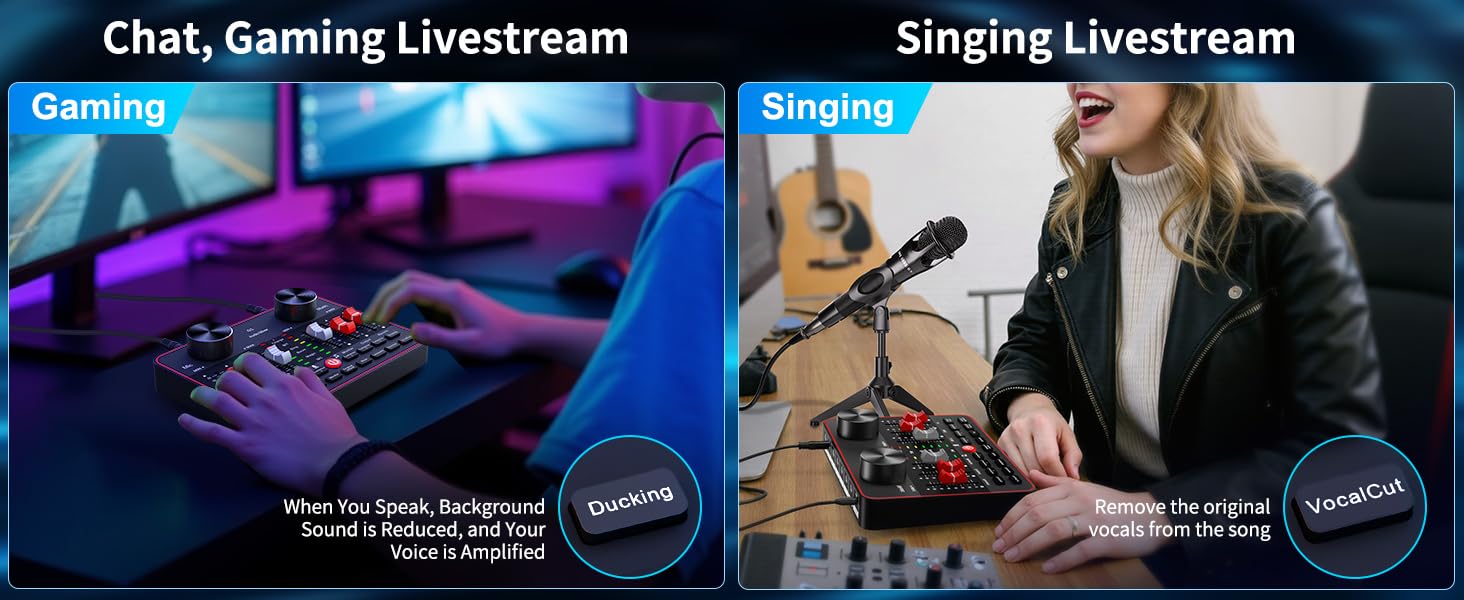
Figure 2: Rear panel of the tenlamp G1 Audio Mixer, indicating USB-C, Output (x2), Music, Monitor, Headset, and Mic (x2) ports.
3. סעטאַפּ אינסטרוקציעס
Follow these steps to set up your G1 Audio Mixer for various applications.
3.1 אנשטעלן דעם אפאראט
- Connect the G1 mixer to a power source (e.g., computer USB port, USB wall adapter) using the provided USB-C cable. The 'Charge' indicator will illuminate.
- דריקן און האַלטן די מאַכט קנעפּל (U) located on the front panel until the indicators light up.
- The built-in 1000mAh battery provides up to 6 hours of usage on a full charge, allowing for portable operation.
3.2 Connecting Microphones and Headsets
- מיקראָפאָן: Connect your 3.5mm condenser microphones to the 'Mic' input ports on the rear panel. The G1 supports two microphones simultaneously.
- העאַדסעט: Plug your headset into the 'Headset' port for monitoring your audio.
3.3 Connecting to Devices (PC/Mobile)
- PC/Mac Connection: Use the USB-C cable to connect the G1 mixer to your computer. The device will be recognized as an audio input/output device. Select the G1 as your default audio device in your operating system's sound settings and your streaming/recording software.
- Mobile Device Connection (Analog): Use a 3.5mm TRRS audio cable to connect your mobile device to the 'Output' port for live streaming.
- Mobile Device Connection (Bluetooth): Activate Bluetooth on your mobile device and pair with the G1 mixer. This allows for wireless accompaniment input.
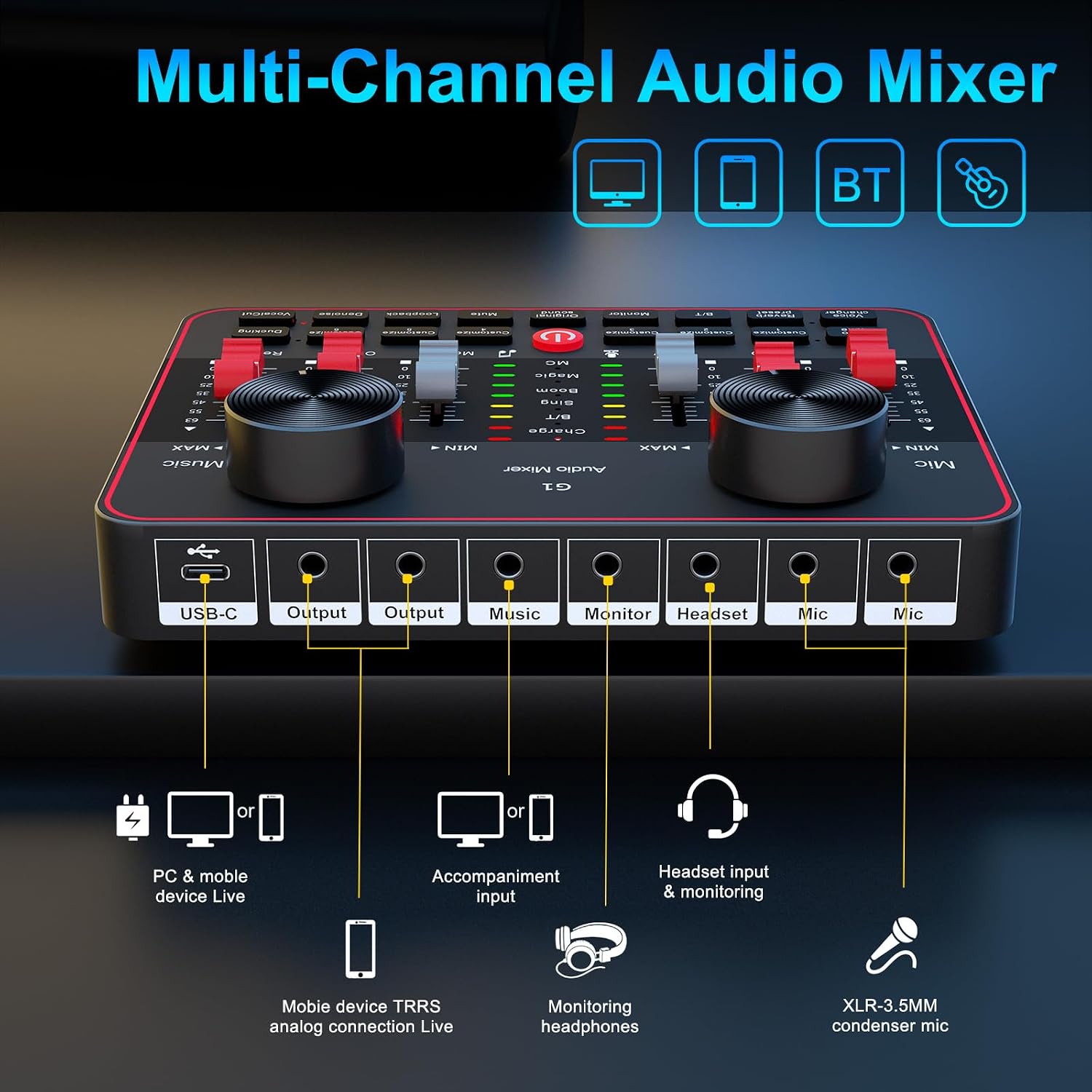
Figure 3: Connection diagram for PC, mobile devices, Bluetooth, headsets, and microphones.
4. אַפּערייטינג ינסטרוקטיאָנס
This section details the functions of the G1 Audio Mixer's controls and features.
4.1 וואָלומען און טאָן קאָנטראָל
- מיק באַנד: Use the 'Mic' slider to adjust the input volume of your microphone.
- מוזיק באַנד: Use the 'Music' slider to control the volume of background music or accompaniment.
- Tone Adjustment (HI, MID, LOW): Use the dedicated sliders to fine-tune the high, mid, and low frequencies of your microphone's audio.
4.2 Reverb Modes and Effects
The G1 offers four preset reverb modes and customizable reverb settings.

Figure 4: Visual representation of the four preset reverb modes: Sing, Boom, Magic, and MC.
- Preset Reverb Modes: Press the 'Reverb preset' button to cycle through 'Sing', 'Boom', 'Magic', and 'MC' modes.
- Reverb Slider: Adjust the intensity of the reverb effect using the 'Reverb' slider.
4.3 Voice Changer and Auto-Tune
Enhance your audio with voice modulation and pitch correction.

Figure 5: Voice changer options and tone controls.
- קול טשאַנגער: Press the 'Voice changer' button to cycle through different voice effects such as female, deep, baby, or magic voices. Further adjustments to bass, treble, and reverb can personalize these effects.
- אַוטאָ-ניגן: The 'Auto tune' button provides 12 steps of pitch correction for singing.
- וואָקאַל קאַטינג: The 'VocalCut' button can remove original vocals from a song, useful for karaoke or instrumental tracks.
4.4 Noise Reduction and Ambient Effects
Improve audio clarity and add interactive elements to your streams.

Figure 6: Smart Noise Reduction and Dodge features.
- דענאָיסע: Press the 'Denoise' button to activate intelligent noise filtering, reducing background noise for clearer vocals.
- דאַקינג: The 'Ducking' feature automatically lowers background music volume when you speak and restores it when you stop.
- Customizable Interactive Effects: The G1 includes 6 customizable buttons ('Customize 1' through 'Customize 6') for adding ambient sound effects like applause or laughter.
4.5 Monitoring and Loopback
- מאָניטאָר: Use the 'Monitor' slider to adjust the volume of your headset monitoring.
- לופּבאַקק: The 'Loopback' function allows the mixer's output to be routed back as an input, useful for recording computer audio alongside your microphone.
5. וישאַלט
Proper maintenance ensures the longevity and optimal performance of your G1 Audio Mixer.
- רייניקונג: ניצט אַ ווייכע, טרוקענע שטאָף צו רייניקן די אויסערלעכע זייט פון דעם אַפּאַראַט. פֿאַרמייַדט ניצן פֿליסיקע רייניקונגס־מיטלען אָדער אַברייסיוו מאַטעריאַלן.
- באַטערי זאָרגן: To prolong battery life, avoid fully discharging the device frequently. Charge the mixer regularly, especially if it will be stored for an extended period.
- סטאָרידזש: האַלט דעם מיקסער אין אַ קיל, טרוקן אָרט אַוועק פון דירעקט זונשייַן, עקסטרעמע טעמפּעראַטורן און צו פיל שטויב.
- קאַבלע פאַרוואַלטונג: Ensure all cables are connected securely and are not bent or crimped, which can cause damage or signal loss.
6. טראָובלעשאָאָטינג
If you encounter issues with your G1 Audio Mixer, refer to the following common problems and solutions.
| פּראָבלעם | מעגלעך סיבה | לייזונג |
|---|---|---|
| קיין געזונט רעזולטאַט | Incorrect cable connection; volume levels too low; incorrect audio device selection. | Verify all cables are securely connected. Check 'Mic', 'Music', and 'Output' sliders. Ensure G1 is selected as the default audio device in your computer/software settings. |
| שלעכטע געזונט קוואַליטעט אָדער סטאַטיק | Faulty cable; microphone issues; high background noise; incorrect gain settings. | Try a different cable. Test the microphone with another device. Activate the 'Denoise' function. Adjust 'Mic' and tone sliders. |
| בלועטאָאָטה קשר ישוז | דעווייס נישט אין פּערינג מאָדע; שטערונג; דעווייס צו ווייט. | Ensure Bluetooth is enabled on both devices. Move closer to the mixer. Restart both devices and try pairing again. |
| Voice changer effects are not as expected | Misunderstanding of effect type; settings not optimized. | The voice changer provides modulated effects, not perfect impersonations. Experiment with the 'Voice changer' button and adjust bass, treble, and reverb sliders for desired variations. |
| Settings reset after changing modes | Certain modes may have default settings that override previous adjustments. | Re-adjust settings after switching modes if necessary. Understand that some mode changes might prioritize specific audio profiles. |
אויב די פראבלעם בלייבט נאך פרובירן די לייזונגען, ביטע קאנטאקטירט קאסטומער סופארט.
7. ספּעסאַפאַקיישאַנז
Detailed technical specifications for the tenlamp G1 Audio Mixer.
| שטריך | באַשרייַבונג |
|---|---|
| מאָדעל נומער | G1 |
| סאָרט | tenlamp |
| פּונקט וואָג | 15.5 אונסעס |
| פּראָדוקט דימענשאַנז | 6.42 x 1.73 x 4.92 אינטשעס (6.42"ד x 1.73"ברייט x 4.92"ה) |
| נומער פון טשאַנאַלז | 2 |
| קאַנעקטיוויטי טעכנאָלאָגיע | 3.5mm audio cable, Bluetooth, USB |
| מאַכט מקור | באַטאַרייע פּאַוערד |
| באַטערי טיפּ | 1 ליטהיום יאָן באַטאַרייע (אַרייַנגערעכנט) |
| Voltage | 5 וואלטס |
8. וואָראַנטי און שטיצן
tenlamp is committed to providing quality products and customer service.
- 365 טעג פאַרבייַט: The product is eligible for replacement within 365 days of purchase.
- לעבן טעכניש שטיצן: tenlamp offers lifetime technical assistance for the G1 Audio Mixer.
- קונה סערוויס: 24/7 customer service support is available for any inquiries or issues.
- שוץ פלענער: Extended protection plans (2-Year and 3-Year) may be available for purchase separately.
For support, please refer to the contact information provided with your product packaging or visit the official tenlamp webפּלאַץ.