
הקדמה
This manual provides essential information for the proper setup, operation, and maintenance of your CNAPXAIA Electronic Drum Set. Please read this manual thoroughly before using the product to ensure optimal performance and longevity.
פּעקל אינהאַלט
באַשטעטיקן אַז אַלע זאכן זענען פאַראַן אין פּעקל:
- Electronic Drum Kit (main unit with 9 pads)
- Drumsticks (1 pair)
- Foot Pedals (2 units)
- באַניצער מאַנואַל (דעם דאָקומענט)
פּראָדוקט פֿעיִקייטן
The CNAPXAIA Electronic Drum Set offers the following key features:
- 9 Professional Drum Pads: Includes various drum and cymbal sounds for a comprehensive drumming experience.
- געבויט-אין סטערעאָ רעדנער: Delivers clear audio with adjustable volume levels (0 to 10).
- כעדפאָון דזשאַק: Allows for private practice without disturbing others (3.5mm).
- Portable and Roll-Up Design: Made with flexible silicone, making it lightweight and easy to transport and store.
- ווערסאַטאַל נוצן: Suitable for beginners and experienced drummers, and an engaging musical toy for children aged 3 and above.
סעטאַפּ
- אַנפּאַק: קערפאַלי באַזייַטיקן אַלע קאַמפּאָונאַנץ פון די פּאַקקאַגינג.
- Unroll the Drum Pad: Place the electronic drum pad on a flat, stable surface. The silicone material allows it to unroll easily.
- Connect Foot Pedals: Locate the pedal input jacks on the drum pad unit. Insert the cables from the two foot pedals into their respective jacks. These pedals control the bass drum and hi-hat sounds.
- מאַכט אויף: Connect the drum set to a power source using the provided cable. The unit is powered by an internal Lithium Polymer battery (included). Ensure the battery is charged for optimal performance.
- סטרויערן באַנד: Use the volume controls on the main unit to set a comfortable listening level.
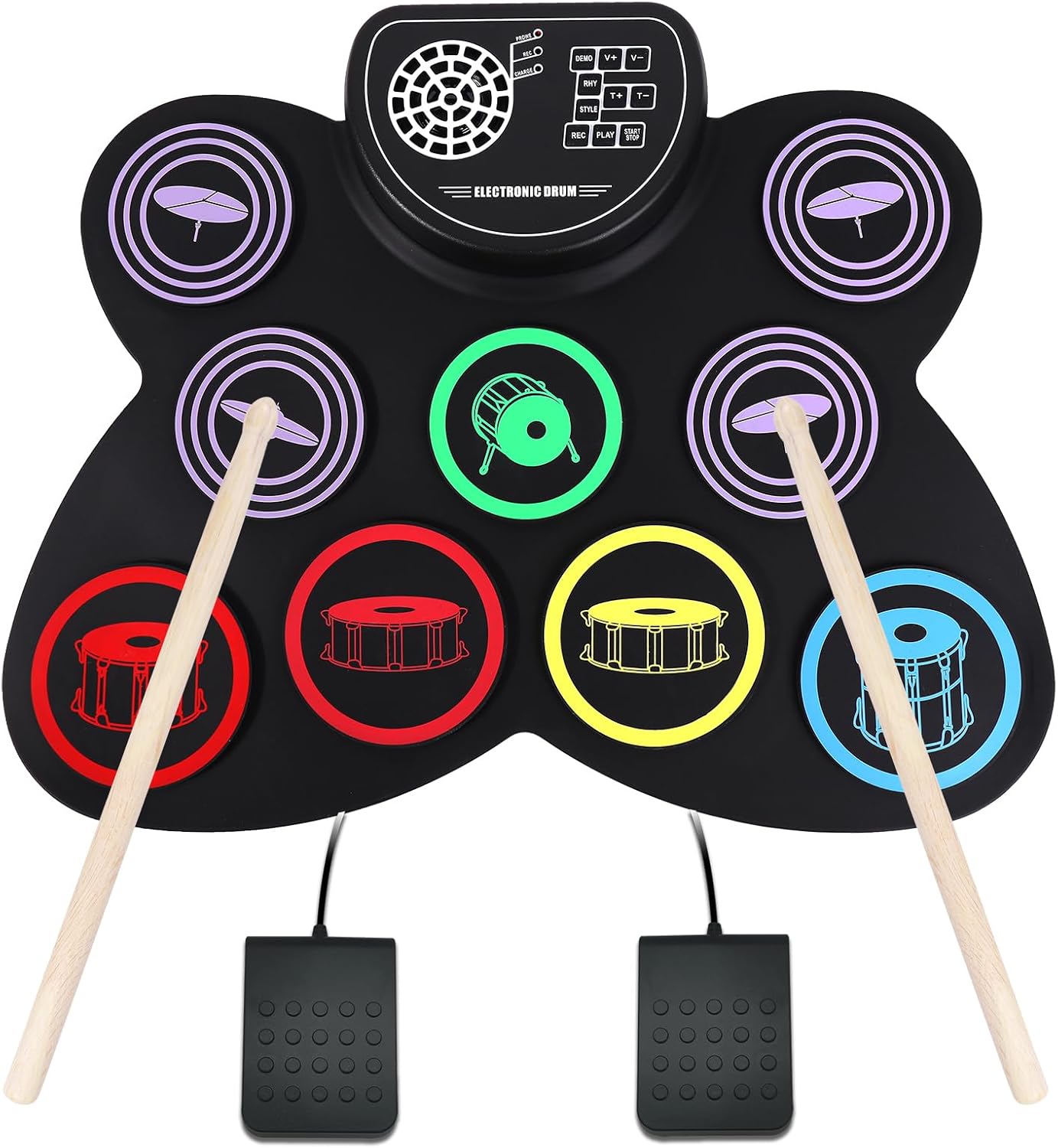
Image: The CNAPXAIA Electronic Drum Set, showing the 9 drum pads, central control panel, drumsticks, and foot pedals. The pads are color-coded for different drum sounds, and the control panel features buttons for various functions.
אַפּערייטינג ינסטראַקשאַנז
פּויק פּאַדס
The drum set features 9 sensitive pads that respond to touch from the drumsticks. Each pad is assigned a specific drum or cymbal sound. Experiment with different pads to discover the full range of sounds.
קאָנטראָל פּאַנעל פאַנגקשאַנז
The central control panel provides various functions to enhance your drumming experience:
- דעמאָ: Plays pre-recorded demo songs. Press to cycle through available demos.
- V+ / V-: Adjusts the main volume of the drum set. V+ increases volume, V- decreases volume.
- RHY: Selects different rhythm patterns. Press to cycle through available rhythms.
- T+ / T-: Adjusts the tempo (speed) of the rhythm patterns. T+ increases tempo, T- decreases tempo.
- סטייל: Changes the drum kit sound style (e.g., rock, pop, jazz). Press to cycle through different styles.
- רעק: Initiates recording mode. Press once to start recording your drumming.
- שפּיל: Plays back your recorded drumming.
- אָנהייב / האַלטן: Starts or stops the selected demo song or rhythm pattern.
כעדפאָון נוצן
To practice silently, connect standard 3.5mm headphones to the headphone jack located on the control panel. The internal speaker will automatically mute when headphones are connected.
וישאַלט
- רייניקונג: Use a soft, dry cloth to wipe down the drum pad and control panel. Do not use abrasive cleaners or solvents.
- סטאָרידזש: When not in use, roll up the drum pad gently and store it in a cool, dry place away from direct sunlight and extreme temperatures.
- באַטערי זאָרגן: If the unit will not be used for an extended period, ensure the battery is fully charged before storage. Recharge periodically to maintain battery health.
- פֿאַרמייַדן פּונקטורן: The silicone material is durable but can be damaged by sharp objects. Handle with care.
טראָובלעשאָאָטינג
| פּראָבלעם | מעגלעך סיבה | לייזונג |
|---|---|---|
| קיין קלאַנג פֿון רעדנער. | די קול איז צו נידעריג אדער שטיל. די כעדפאָונז זענען פארבונדן. | Increase volume using V+ button. Disconnect headphones. |
| דער אַפּאַראַט טוט נישט מאַכט אויף. | באַטעריע איז אויסגעשעפּט. שטראָם קאַבל נישט ריכטיק פארבונדן. | Charge the battery. Ensure power cable is securely connected. |
| Foot pedals not working. | Pedals not connected properly. | Check that pedal cables are fully inserted into their respective jacks. |
| Pads are unresponsive. | Unit may be in an incorrect mode or power issue. | זיכער מאַכן אַז די אַפּאַראַט איז אָנגעצונדן. פּרוּווט ריסטאַרטן די אַפּאַראַט. |
ספּעסאַפאַקיישאַנז
| שטריך | דעטאַל |
|---|---|
| מאָדעל נאָמען | עלעקטראָניש פּויק קיט |
| מאָדעל נומער | CNKD001 |
| סאָרט | CNAPXAIA |
| נומער פון פּאַדס | 9 |
| גוף מאַטעריאַל | סיליקאָנע |
| Top מאַטעריאַל | פּלאַסטיק |
| דימענסיעס (L X W X H) | 15.75 X 12.2 X 1.18 אינטשעס |
| פּונקט וואָג | 1.76 פונט (800 גראַמז) |
| באַטערי טיפּ | 1 ליטהיום פּאָלימער (אַרייַנגערעכנט) |
| Voltage | 5 וואלטס (דק) |
| וואָסtage | 2 וואטס |
| קאַנעקטער טיפּ | Auxiliary (3.5mm headphone jack) |
וואָראַנטי און שטיצן
Specific warranty details for the CNAPXAIA Electronic Drum Set are not provided in this manual. For information regarding warranty coverage, technical support, or service inquiries, please refer to the manufacturer's official webזייטל אדער קאנטאקט זייער קאסטומער סערוויס גלייך. האלט אייער קויף קוויטל אלס באווייז פון קויפן פאר יעדע גאראנטיע טענות.