
1. פּראָדוקט איבערview
The Lisowod L62Pro is a compact and versatile home projector designed to deliver a high-quality viewing experience. Featuring Android TV 14 and Whale OS, it provides access to a vast library of applications. With 1000 ANSI lumens brightness and support for 4K resolution, it ensures clear and vibrant images. Advanced image correction features like automatic vertical keystone, 4D/4P keystone, and electric focus simplify setup, while Wi-Fi 6 and bidirectional Bluetooth 5.4 offer seamless connectivity for streaming and audio.

Figure 1: The Lisowod L62Pro Projector showcasing its Android TV 14.0 interface.
שליסל פֿעיִקייטן:
- Whale OS & Android TV 14: Access to over 10,000 applications for direct streaming.
- True Full HD 1080P & 4K Support: Delivers sharp and detailed images.
- 1000 ANSI לומען: Bright projection suitable for various lighting conditions.
- Automatic & Manual Keystone Correction: Includes auto vertical keystone and 4D/4P manual correction for flexible placement.
- Electric Focus & 50-100% Zoom: Easy image adjustment without moving the projector.
- Wi-Fi 6 & Bidirectional Bluetooth 5.4: High-speed, zero-latency wireless connectivity for streaming and audio.
- שטיל אָפּעראַציע: אַרבעט מיט אַ נידעריקן ראַש לעוועל פון 30dB.
- לאנג לעבן: Light source rated for 90,000 hours of use.
- ברייט קאַמפּאַטאַבילאַטי: Connects to various devices via HDMI, USB, AV, and 3.5mm audio jack.
2. סעטאַפּ גייד
2.1 אַנפּאַקינג און פּלייסמאַנט
Carefully remove the projector and all accessories from the packaging. Place the projector on a stable, flat surface or mount it according to your preference (tabletop, stand, or ceiling projection are supported).

Figure 2: Flexible projection methods including tabletop, stand, and ceiling mounting.
2.2 מאַכט קאַנעקשאַן
- פֿאַרבינדט דעם מאַכט אַדאַפּטער צום פּראָיעקטאָר'ס מאַכט אַרייַנגאַנג פּאָרט.
- צאַפּן די מאַכט אַדאַפּטער אין אַ פּאַסיק עלעקטריקאַל ווענטיל.
- The projector will typically enter standby mode, indicated by a power indicator light.
2.3 ערשט מאַכט אויף
Press the power button on the projector or the remote control to turn on the device. The projector will boot up and display the Android TV interface.
2.4 בילד אַדזשאַסטמאַנט
The L62Pro features automatic and electric adjustments for optimal image display:
- אָטאַמאַטיק ווערטיקאַל קיסטאָנע קערעקשאַן: The projector will automatically detect and correct vertical image distortion when moved.
- 4D/4P Keystone Correction: Use the remote control to manually adjust horizontal and corner distortions for a perfectly rectangular image from any angle.
- עלעקטריק פאָקוס: Press the focus button on the remote control to achieve a clear image. This adjustment takes approximately 3 seconds.
- פארגרעסער פֿונקציע: Adjust the image size from 50% to 100% using the remote control without physically moving the projector.
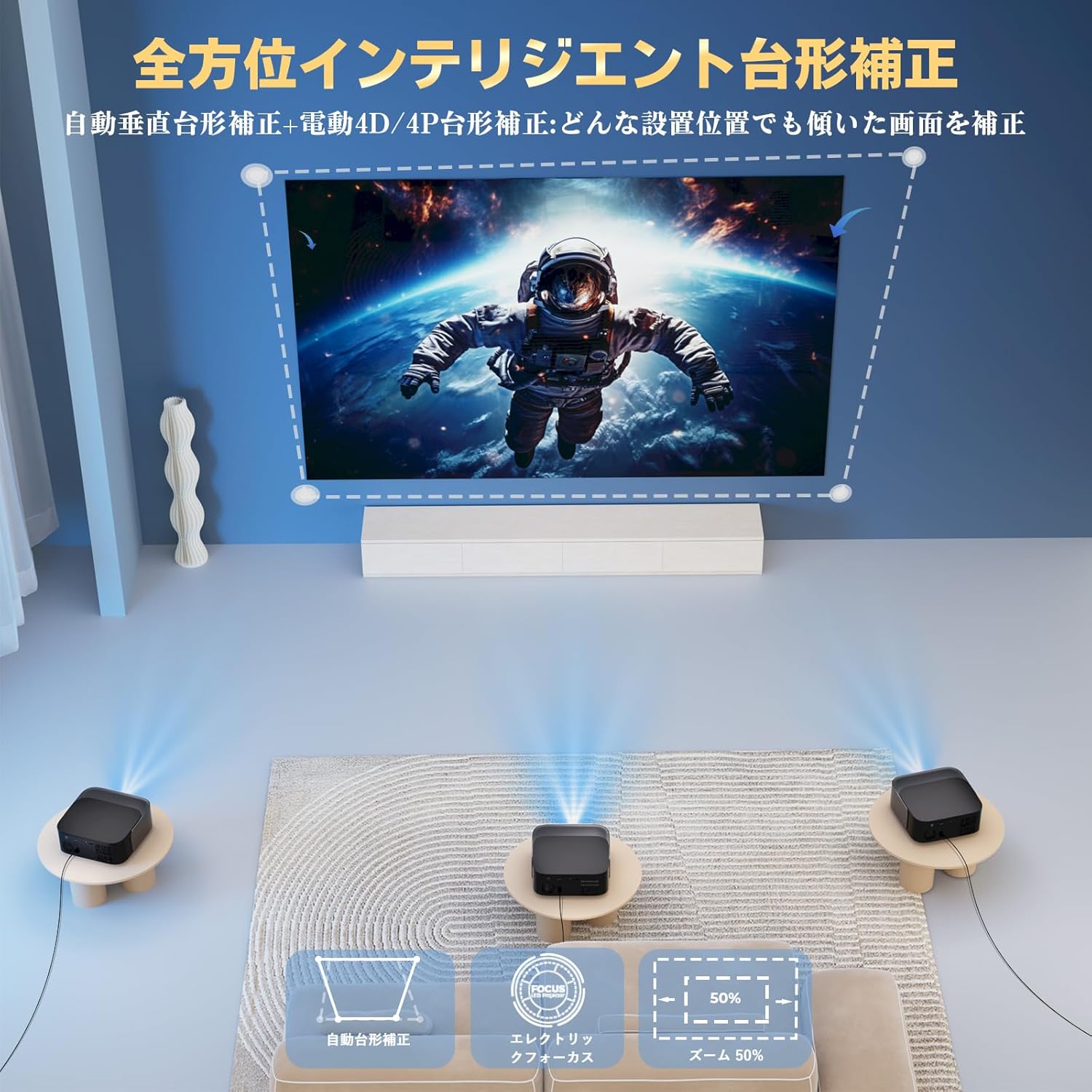
Figure 3: Visual representation of automatic keystone correction, electric focus, and zoom capabilities.
2.5 קאַנעקטינג פונדרויסנדיק דעוויסעס
The L62Pro offers multiple connectivity options:
- הדמי: Connect gaming consoles (PS4, Switch), PCs, or other HDMI-enabled devices.
- וסב: שטעק אריין USB דרייווס פאר מעדיע ווידערשפיל.
- פון: פֿאַרבינדט עלטערע דעווייסעס מיט אַן AV קאַבל.
- 3.5 מם אַודיאָ דזשאַק: פֿאַרבינדט דראָטיקע כעדפאָונז אָדער עקסטערנע רעדנערס.

Figure 4: Multi-functional compatibility with various devices via different input ports.
3. אַפּערייטינג ינסטרוקטיאָנס
3.1 Navigating Android TV 14 & Whale OS
Use the provided remote control to navigate the user interface. The home screen displays various applications and content recommendations. You can directly launch streaming services like Netflix, YouTube, and Disney+ without needing a separate browser.

Figure 5: The projector's Whale OS interface with direct access to numerous applications.
3.2 Wi-Fi Connectivity (Wi-Fi 6)
The projector supports Wi-Fi 6 for high-speed, zero-latency internet connectivity. To connect:
- Go to Settings on the home screen.
- סעלעקטירן נעץ & אינטערנעט.
- קלייַבן דיין Wi-Fi נעץ און אַרייַן די פּאַראָל.
3.3 Bluetooth Audio (Bidirectional Bluetooth 5.4)
The L62Pro features bidirectional Bluetooth 5.4, allowing it to function in two ways:
- פּראָיעקטאָר מאָדע: Connect Bluetooth headphones or external speakers to the projector for enhanced audio.
- רעדנער מאָדע: Connect your smartphone or other devices to the projector via Bluetooth to use the projector's built-in HiFi speakers as a standalone audio system.

Figure 6: Bidirectional Bluetooth 5.4 enables versatile audio connections.
4. וישאַלט
4.1 רייניקן די לינז
To maintain optimal image clarity, regularly clean the projector lens using a soft, lint-free cloth specifically designed for optical lenses. Avoid using abrasive materials or harsh chemicals.
4.2 ווענטאַליישאַן
Ensure that the projector's ventilation openings are not blocked to prevent overheating. Adequate airflow is crucial for the projector's performance and longevity.
4.3 Light Source Lifespan
The L62Pro features a durable light source with an impressive lifespan of 90,000 hours, significantly reducing the need for frequent replacements compared to traditional projectors.
4.4 ווייכווארג דערהייַנטיקונגען (OTA)
The projector supports Over-The-Air (OTA) updates, ensuring that your device always runs on the latest system version with improved features and performance. Connect to the internet to receive automatic updates.
5. טראָובלעשאָאָטינג
If you encounter any issues with your Lisowod L62Pro projector, please refer to the following common troubleshooting steps:
- קיין בילד געוויזן:
- Ensure the projector is powered on and the power indicator light is active.
- Check all cable connections (HDMI, USB) are secure.
- באַשטעטיקן אַז די ריכטיקע אַרייַנגאַנג מקור איז אויסגעקליבן אויף דעם פּראָיעקטאָר.
- If using screen mirroring, ensure your device is properly connected and mirroring is enabled.
- בילד איז פארשוואומען:
- Use the electric focus function on the remote control to adjust clarity.
- Ensure the projector lens is clean and free of dust or smudges.
- Check that the projection surface is flat and smooth.
- קיין קול:
- אַדזשאַסטירן דעם באַנד אויף ביידע דעם פּראָיעקטאָר און דעם פֿאַרבונדענעם מקור מיטל.
- If using external speakers or headphones, ensure they are properly connected via Bluetooth or the 3.5mm audio jack.
- Check audio settings on the projector to ensure output is directed correctly.
- קאָנעקטיוויטי פּראָבלעמען (Wi-Fi/Bluetooth):
- Ensure Wi-Fi or Bluetooth is enabled on the projector and the device you are trying to connect.
- Check Wi-Fi network password if connection fails.
- Move closer to the Wi-Fi router or Bluetooth device to improve signal strength.
- Restart the projector and your connected device.
- רימאָוט קאָנטראָל ניט ריספּאַנדינג:
- פאַרבייַטן די באַטעריז אין די ווייַט קאָנטראָל.
- זיכער מאַכן אַז עס זענען נישטאָ קיין שטערונגען צווישן דעם ווײַטקאָנטראָל און דעם פּראָיעקטאָר'ס IR ופנעמער.
- ריכט די ווײַטקאָנטראָל גלייך צום פּראָיעקטאָר.
6. ספּעסאַפאַקיישאַנז
| סאָרט | ליסאָוואָד |
| מאָדעל נומער | L62Pro |
| פּראָדוקט דימענשאַנז | 20 X 15 X 5 סענטימעטער |
| פּונקט וואָג | 1.57 קילאָגראַמס |
| האַכלאָטע | 1920 x 1080 (Full HD), 4K Supported |
| ברייטנאַס | 1000 אַנסי לומענס |
| קאַנעקטיוויטי טעכנאָלאָגיע | Bluetooth 5.4, Wi-Fi 6, HDMI, USB, 3.5mm Audio Jack, AV |
| וואָסtage | 60 וו |
| ליכט מקור לעבנסדויער | 90,000 שעה |
| ראַש מדרגה | 30dB |
| קייסטאָנע קערעקשאַן | Automatic Vertical, 4D/4P Manual |
| פאָקוס | עלעקטריק פאָקוס |
| פארגרעסער פונקציע | 50-100% Optical Zoom |
| רעקאַמענדיד נוצן | Versatile for entertainment, business, and educational purposes. |
7. וואָראַנטי און שטיצן
Lisowod stands behind the quality of the L62Pro projector. We offer a 36-month unconditional exchange or refund service from the date of purchase. Additionally, comprehensive technical support is available to assist you with any questions or issues you may encounter.
For warranty claims or technical assistance, please contact our support team through the contact information provided in your product packaging or on the official Lisowod website. Our specialized team is ready to provide prompt and reliable support.