
1. הקדמה
Welcome to the user manual for your new XIAOMI Redmi Note 14 Pro+ 5G Smartphone. This guide provides essential information on setting up, operating, and maintaining your device. Please read it carefully to ensure optimal performance and longevity of your smartphone.
2. פּעקל אינהאַלט
באַשטעטיקן אַז דיין פּעקל כּולל די פאלגענדע זאכן:
- XIAOMI Redmi Note 14 Pro+ 5G Smartphone
- וסב קאַבלע
- שנעלע אָנהייב גייד (קען זיין אַנדערש לויט ראַיאָן)
- SIM Eject Tool (may vary by region)
Note: A charger is not included in the package. Please use a compatible 120W HyperCharge adapter for optimal charging.
3. דיווייס איבערview
Familiarize yourself with the physical components of your Redmi Note 14 Pro+ 5G.
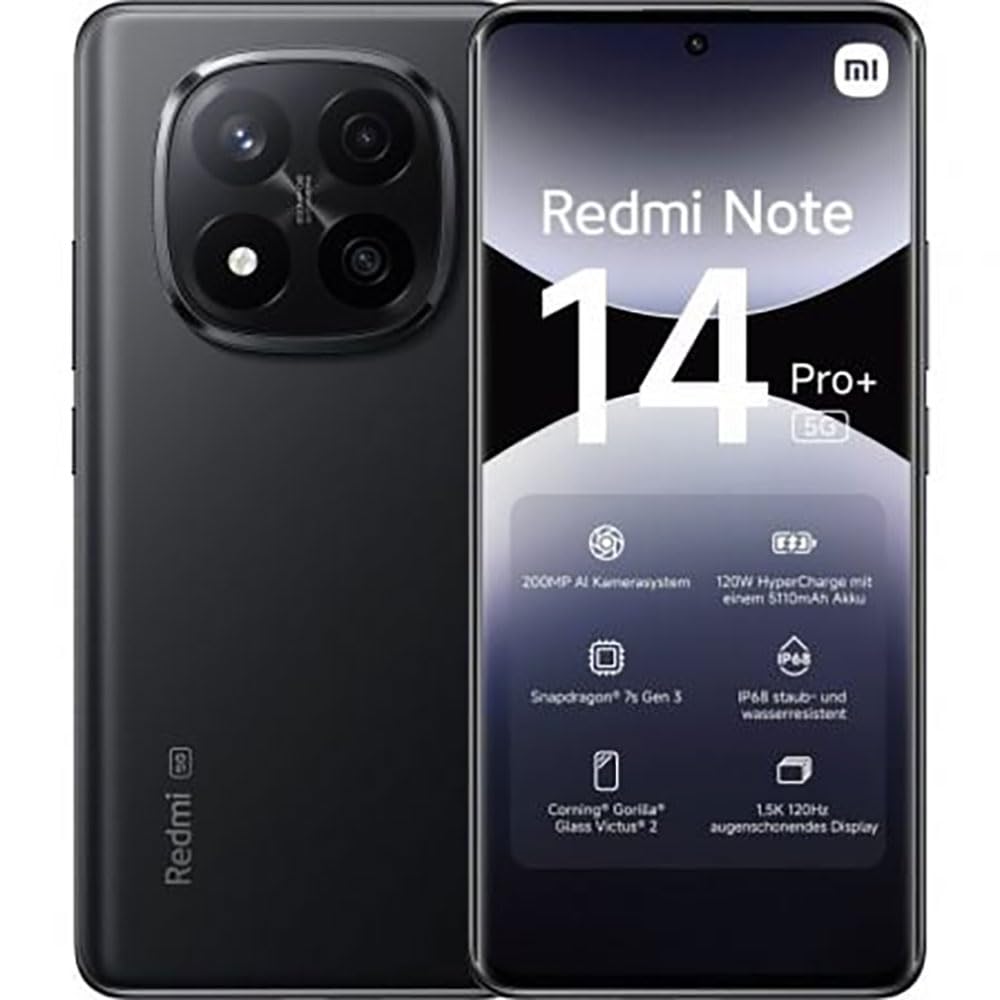
The image displays the front and back of the XIAOMI Redmi Note 14 Pro+ 5G smartphone. The front shows the display with 'Redmi Note 14 Pro+ 5G', '200 Megapixels', and '256 GB' text. The back features a prominent camera module with multiple lenses and the 'Redmi 5G' branding.
שליסל קאַמפּאָונאַנץ:
- פראָנט אַרויסווייַז: 6.67-inch 1.5K 120Hz AMOLED display with Corning Gorilla Glass Victus 2.
- הינטערשטע קאַמעראַ מאָדול: Houses the 200MP Pro-Grade AI Camera system.
- מאַכט קנעפּל: Located on the side, used to power on/off and wake/sleep the device.
- באַנד קנעפּלעך: Located on the side, used to adjust media and call volume.
- וסב טיפּ-C פּאָרט: פֿאַר טשאַרדזשינג און דאַטן אַריבערפירן.
- SIM קאָרט שפּעלטל: Supports Dual SIM Nano SIM cards.
- רעדנער: סטערעאָ רעדנערס פֿאַר אַודיאָ אַרויסגאַנג.
4. סעטאַפּ
4.1. ינסערטינג די סים קאַרד
- געפינט די סים קארטל טאַץ אויף דער זייט פון אייער דעווייס.
- שטעקט אריין דעם סים קארטל ארויסווארף געצייג אין דעם קליינעם לאך לעבן דעם טרעי און דריקט פעסט ביז דער טרעי קומט ארויס.
- לייגט אריין אייערע נאַנאָ סים קאַרט(ן) אין דעם טאַץ מיט די גאָלדענע קאָנטאַקטן אַראָפּ. זאָרגט אַז זיי זענען ריכטיק אָריענטירט.
- שטופּן דעם טאַץ צוריק אין דעם שפּאַלט ביז עס קליקט אַרײַן אין פּלאַץ.
4.2. אנשטעלן אייער אפאראט
דריקן און האַלטן די מאַכט קנעפּל on the side of the phone until the XIAOMI logo appears on the screen. Follow the on-screen instructions to complete the initial setup, including connecting to Wi-Fi, setting up your Google account, and configuring security features like fingerprint recognition.
4.3. ערשטע אָפּצאָל
It is recommended to fully charge your device before first use. Connect the USB Type-C cable to the phone and a compatible 120W HyperCharge adapter (not included) to a power outlet.
5. אפערירן אייער סמאַרטפאָון
5.1. יקערדיק נאַוויגאַציע
- ריר סקרין: צאַפּן צו סעלעקטירן, סווייפּן צו סקראָלן, צוקניפּן צו פארגרעסערן.
- היים פאַרשטעלן: אייער צענטראלער צענטער פֿאַר אַפּפּס און ווידזשעטס.
- אָנזאָג פּאַנעל: סווייפּ אַראָפּ פֿון דער שפּיץ פֿונעם עקראַן צו צוקומען צו נאָטיפיקאַציעס און שנעלע סעטטינגס.
- אַפּ שופלאָד: Swipe up from the bottom of the screen (or tap the app drawer icon) to view אַלע אינסטאַלירן אַפּלאַקיישאַנז.
5.2. מאַכט אויף/אויס און ריסטאַרט
- צו מאַכט אַוועק: Press and hold the Power Button until the power menu appears, then select "Power off."
- צו ריסטאַרט: Press and hold the Power Button until the power menu appears, then select "Restart."
5.3. זיכערהייַט פֿעיִקייטן
Your device supports various security options:
- פינגערפּרינט דערקענונג: רעגיסטרירט אייערע פינגער-אפדרוקן פאר שנעלע און זיכערע אויפשליסן.
- פּנים ופשליסן: ניצט אייער פנים צו עפענען דעם אפאראט.
- פּין/מוסטער/פּאַראָל: Standard security methods.
Access these settings via סעטטינגס > זיכערהייט און פּריוואַטקייט.
6. קאַמעראַ פֿעיִקייטן
The Redmi Note 14 Pro+ 5G features a powerful 200MP Pro-Grade AI Camera system designed to enhance your photography experience.
- 200MP הויפּט קאַמעראַ: Capture highly detailed images with optical image stabilization (OIS).
- קייפל קאַמעראַ מאָדעס: Includes automatic, scene, portrait, and manual modes for versatile shooting.
- Dual LED Flash: Provides enhanced lighting in low-light conditions.
- פראָנט אַפּאַראַט: A 20MP front sensor for high-quality selfies and video calls.
- ווידעא רעקאָרדינג: Supports up to 8K video capture at 120 fps.
7. קינסטלעכע אינטעליגענץ פֿעיִטשערס
Leverage the integrated AI functionalities for a smarter user experience:
- AI Erase Pro: Intelligently remove unwanted objects or people from your photos.
- AI Image Expansion: Expand the boundaries of your images using AI.
- AI Notes: Smart note-taking capabilities.
- AI Subtitles: Generate subtitles for videos or audio in real-time.
- AI Recorder: Enhanced voice recording with AI features.
- AI Interpreter: רעאַל-צייט שפּראַך איבערזעצונג.
- צווילינג: Integrated AI assistant.
- Circle to Search by Google: Quickly search for information by circling objects on your screen.
8. טשאַרדזשינג
Your Redmi Note 14 Pro+ 5G supports 120W HyperCharge technology for rapid charging.
- באַטאַרייע קאַפּאַציטעט: 5110mAh Lithium-polymer battery.
- טשאַרדזשינג: Use the provided USB Type-C cable with a compatible 120W power adapter (sold separately) for optimal charging speeds.
- באַטאַרייע לעבן: Expect up to 20 hours of talk time. Actual battery life may vary based on usage.
Always use certified charging accessories to prevent damage to your device.
9. וישאַלט
9.1. וואַסער און שטויב קעגנשטעל
די דעווייס פֿעיִטשערט אַ IP68 שאַץ for dust and water resistance. This means it is protected against dust ingress and can withstand immersion in water up to 1.5 meters for 30 minutes. However, this resistance is not permanent and may decrease over time with normal wear. Avoid exposing the device to hot water, saltwater, or other liquids.
9.2. רייניקן דיין דעווייס
- ניצט אַ ווייכן, לינט-פֿרייע שטאָף צו רייניקן דעם עקראַן און קערפּער.
- פֿאַרמײַדן די נוצן פֿון אַברייסיוו רייניגער, סאָלוואַנץ, אָדער אַעראָסאָל ספּרײַס.
- If the device gets wet, wipe it thoroughly with a clean, dry cloth before charging or using ports.
9.3. ווייכווארג דערהייַנטיקונגען
קאָנטראָלירט און אינסטאַלירט רעגולער ווייכווארג דערהייַנטיקונגען צו זיכער מאַכן אַז אייער מיטל האט די לעצטע פֿעיִקייטן, זיכערהייט פּאַטשאַז און פאָרשטעלונג פֿאַרבעסערונגען. גייט צו סעטטינגס > וועגן טעלעפאָן > MIUI ווערסיע צו קאָנטראָלירן פֿאַר דערהייַנטיקונגען.
10. טראָובלעשאָאָטינג
אויב איר טרעפט פּראָבלעמען מיט אייער מיטל, פּרוּווט די פֿאָלגנדיקע געוויינטלעכע לייזונגען:
- מיטל נישט קער אויף: זיכער מאַכן אַז די באַטאַרייע איז אויפגעלאָדן. פֿאַרבינדט עס צו אַ טשאַרדזשער פֿאַר לפּחות 15 מינוט, און דערנאָך פּרוּווט עס אָנצוצינדן.
- אַפּפּס קראַשן אָדער פרירן: שליסט צו די פראבלעמאטישע אפליקאציע און עפנט זי ווידער. אויב די פראבלעם בלייבט, ריסטארט אייער טעלעפאן.
- נעבעך נעץ קשר: Check your SIM card is correctly inserted. Try toggling Airplane Mode on and off. If the issue persists, contact your network provider.
- די באַטאַרייע פליסן געשווינד: Reduce screen brightness, close unused apps, and disable unnecessary features like GPS or Bluetooth when not in use.
- עקראַן רעאַגירט נישט: Force restart your device by holding the Power Button for approximately 10-15 seconds.
פֿאַר מער קאָמפּליצירטע פּראָבלעמען, זעט די אָפֿיציעלע XIAOMI שטיצע webפּלאַץ אָדער קאָנטאַקט קונה דינסט.
11. ספּעסאַפאַקיישאַנז
| שטריך | באַשרייַבונג |
|---|---|
| סאָרט | XIAOMI |
| מאָדעל נאָמען | Redmi Note 14 Pro+ 5G |
| אָפּערייטינג סיסטעם | אַנדרויד 14 |
| קפּו מאָדעל | Snapdragon 7 Gen 3 |
| באַראַן | 8 גיגאבייט |
| סטאָרידזש קאַפּאַסיטי | 256 גיגאבייט |
| פאַרשטעלן גרייס | 6.67 אינטשעס |
| ווייַז האַכלאָטע | 2712 X 1220 בילדצעלן |
| דערפרישן קורס | 120 הז |
| דערציען אַפּאַראַט האַכלאָטע | 200 Megapixels (with OIS) |
| פראָנט קאַמעראַ האַכלאָטע | 20 מעגאַפּיקסעלס |
| באַטאַרייע קאַפּאַציטעט | 5110 מאַה |
| טשאַרדזשינג טעכנאָלאָגיע | 120 וואט היפּערטשאַרדזש |
| וואַסער קעגנשטעל | IP68 |
| סעליאַלער טעכנאָלאָגיע | 5G |
| סים קאָרט טיפּ | Nano SIM (Dual SIM) |
| קאַנעקטיוויטי | וסב טיפּ-C |
12. וואָראַנטי און שטיצן
12.1. פאַבריקאַנט'ס גאַראַנטיע
Your XIAOMI Redmi Note 14 Pro+ 5G Smartphone comes with a 2-יאָר פאַבריקאַנט ס וואָראַנטידי וואָראַנטי דעקט חסרונות אין מאַטעריאַלן און אַרבעט אונטער נאָרמאַל נוצן. ביטע האַלטן דיין קויפן באַווייַז פֿאַר וואָראַנטי קליימז.
The warranty does not cover damage caused by accidents, misuse, unauthorized modifications, or normal wear and tear.
12.2. קונה שטיצן
For technical assistance, warranty claims, or further information, please visit the official XIAOMI support website or contact their customer service department. Contact details can typically be found on the XIAOMI webזייטל אדער אין דער וואָראַנטי קאַרטל וואָס איז אַרייַנגערעכנט מיט אייער פּראָדוקט.