
הקדמה
This manual provides instructions for setting up and using your ECONTROLLY BN59-01385B Voice Remote Control. This replacement remote is designed to be compatible with various Samsung Smart TV models, offering voice control functionality and direct access buttons for popular streaming services.

פראָנט view of the ECONTROLLY BN59-01385B Voice Remote Control.
סעטאַפּ גייד
1. ינסטאָלינג באַטעריז
The remote control requires two AAA alkaline batteries (not included).
- עפענען די באַטאַרייע אָפּטייל דעקן אויף די צוריק פון די ווייַט קאָנטראָל.
- אַרײַנשטעלן צוויי AAA באַטעריעס, און זיכער מאַכן אַז די פּאָזיטיוו (+) און נעגאַטיוו (-) טערמינאַלן זענען ריכטיק אויסגעשטעלט מיט די אינדיקאַטאָרן אינעווייניק.
- פאַרמאַכן די באַטאַרייע אָפּטייל דעקן סיקיורלי.
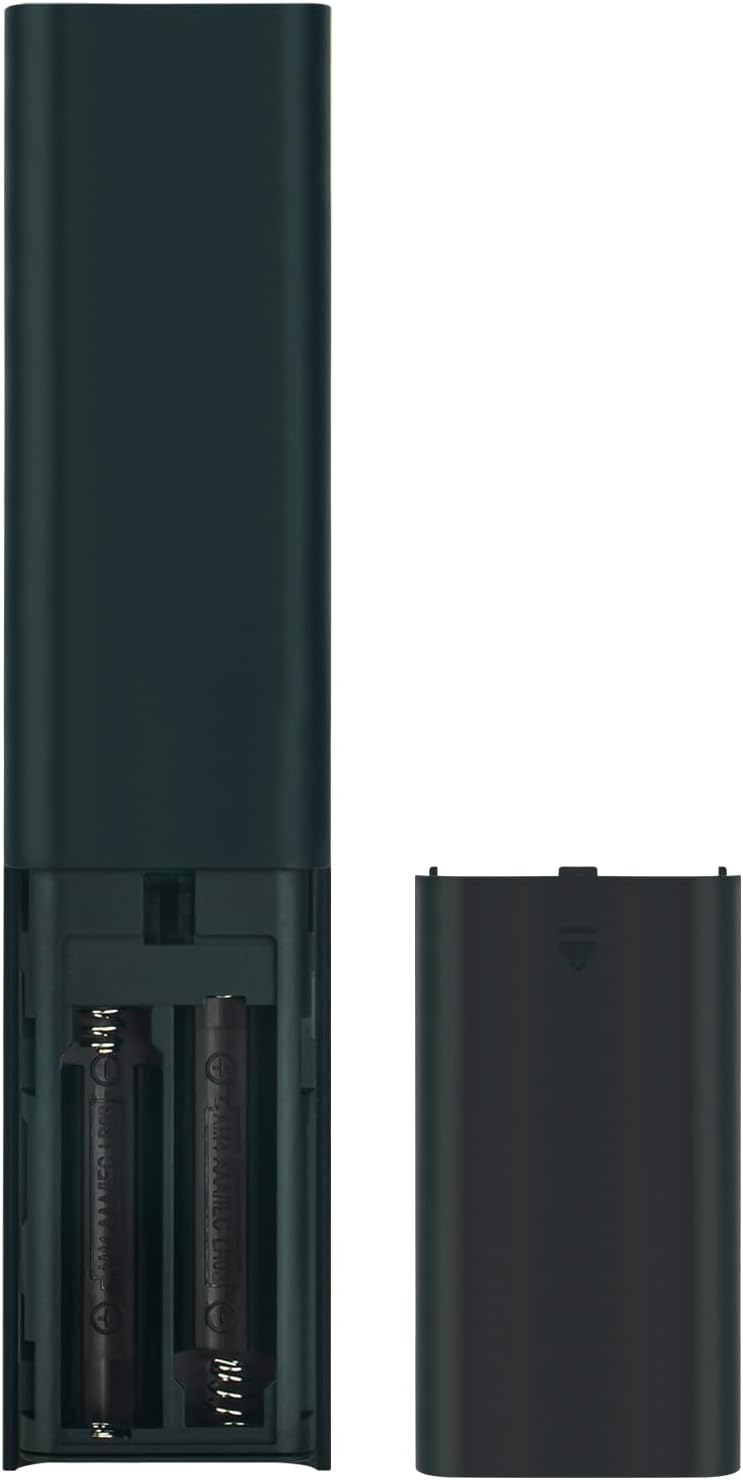
Image showing the battery compartment for AAA batteries.
2. Pairing the Remote Control with Your TV
This remote control uses Bluetooth connectivity and requires pairing with your Samsung TV before use. Follow these steps to pair:
- זייט זיכער אז אייער סאַמסונג טעלעוויזיע איז אנגעצונדן.
- Point the remote control towards your TV.
- סיימאַלטייניאַסלי דריקן און האַלטן די צוריקקומען קנעפּל (געבויגענער פײַל) און די שפּיל / פּויזע קנעפּל פֿאַר 3 סעקונדעס אָדער מער.
- A pairing message should appear on your TV screen, indicating successful pairing.
If pairing is unsuccessful, ensure the batteries are correctly installed and try again. Move closer to the TV if necessary.
אַפּערייטינג ינסטראַקשאַנז
The ECONTROLLY BN59-01385B remote control provides intuitive navigation and voice command capabilities.
שליסל פאַנגקשאַנז:
- מאַכט קנעפּל: Located at the top right, typically marked with a circle and a vertical line. Turns the TV on or off.
- קול קאָנטראָל קנעפּל (
 ): Located near the top, marked with a microphone icon. Press and hold to activate voice commands for searching content, changing settings, or controlling smart home devices.
 - Navigation Pad (Directional Buttons & Enter): The large circular pad in the center. Use to navigate menus and select items.
- צוריקקומען קנעפּל: Located below the navigation pad, marked with a curved arrow. Returns to the previous screen or menu.
- היים קנעפּל: Located below the navigation pad, marked with a house icon. Accesses the Smart Hub or home screen.
- שפּיל / פּויזע קנעפּל: Located below the navigation pad, marked with a play/pause icon. Controls media playback.
- באנד אַרויף/אַראָפּ בוטטאָנס (+/-): Adjusts the TV volume.
- קאַנאַל אַרויף / אַראָפּ קנעפּלעך (up/down arrows): Changes TV channels.
- שנעל אַקסעס קנעפּלעך: Dedicated buttons for Netflix, Samsung TV Plus, Prime Video, and Disney+ for direct app launch.
The microphone button activates voice control for your Samsung TV.
וישאַלט און זאָרג
- Keep the remote control dry. Moisture can damage the internal circuits.
- Avoid exposing the remote to extreme temperatures.
- Clean the remote with a soft, dry cloth. Do not use abrasive cleaners or solvents.
- אויב דער ווײַטקאָנטראָל וועט נישט ווערן גענוצט פֿאַר אַ לענגערע צײַט, נעמט אַרויס די באַטעריעס כּדי צו פֿאַרמײַדן ליקאַדזש.
- Handle the remote with care to prevent drops or impacts.
טראָובלעשאָאָטינג
| פּראָבלעם | לייזונג |
|---|---|
| די ווײַטקאָנטראָל רעאַגירט נישט. |
|
| שטימע קאנטראל ארבעט נישט. |
|
| קנעפּלעך זענען קלעפּיק אָדער רעאַגירן נישט. |
|
ספּעסאַפאַקיישאַנז
- מאָדעל נומער: PT-BN59-01385B
- סאָרט: קאָנטראָללי
- קאַנעקטיוויטי: בלועטאָאָטה
- קאָנטראָללער טיפּ: קול קאָנטראָל
- ספּעציעלע פֿעיִקייטן: Voice Search, Quick Access Buttons
- קאַמפּאַטאַבאַל דעוויסעס: סאַמסונג טעלעוויזיעס
- מאַכט מקור: 2 x AAA אַלקאַליין באַטעריעס (נישט אַרייַנגערעכנט)
- מאַקסימום קייט: 10 מעטער (33 פֿיס)
- מאַטעריאַל: ABS
- קאָליר: שוואַרץ
- דימענשאַנז (L x W): Approximately 16.1 cm (6.33 in) x 3.5 cm (1.37 in)
- וואָג: Approximately 2 Ounces (56.7 grams)

Physical dimensions of the remote control.
קאָמפּאַטיבלע טעלעוויזיע מאָדעלס
This remote control is compatible with various Samsung Smart TV models, including but not limited to:
- QN85B סעריע: QA55QN85BA, QA65QN85BA, QA75QN85BA, QA85QN85BA, QA65QN85BAW, QA75QN85BAW, QA85QN85BAW, QA55QN85BAWXXY, QA65QN85BAWXXY, QA75QN85BAWXXY
- Q60B Series: QA55Q60BA, QA65Q60BA, QA75Q60BA, QA85Q60BA, QA55Q60BAW, QA65Q60BAW, QA75Q60BAW, QA85Q60BAW, QA55Q60BAWXXY, QA65Q60BAWXXY, QA75Q60BAWXXY, QA85Q60BAWXXY
- Q70B Series: QA55Q70BA, QA65Q70BA, QA75Q70BA, QA85Q70BA, QA55Q70BAW, QA65Q70BAW, QA75Q70BAW, QA85Q70BAW, QA55Q70BAWXXY, QA65Q70BAWXXY, QA75Q70BAWXXY, QA85Q70BAWXXY
- Q80B Series: QA55Q80BA, QA65Q80BA, QA75Q80BA, QA85Q80BA, QA55Q80BAW, QA65Q80BAW, QA75Q80BAW, QA85Q80BAW, QA55Q80BAWXXY, QA65Q80BAWXXY, QA75Q80BAWXXY, QA85Q80BAWXXY
- QN90B סעריע: QA43QN90BA, QA50QN90BA, QA55QN90BA, QA65QN90BA, QA75QN90BA, QA85QN90BA, QA43QN90BAW, QA50QN90BAW, QA55QN90BAW, QA65QN90BAW, QA75QN90BAW, QA85QN90BAW, QA43QN90BAWXXY, QA50QN90BAWXXY, QA55QN90BAWXXY
This list is not exhaustive. If your TV model is not listed, please refer to your TV's user manual or contact ECONTROLLY support for compatibility information.

Visual comparison of the replacement remote with an original remote.
שטיצן און קאָנטאַקט
For further assistance or inquiries, please refer to the product listing on Amazon or contact ECONTROLLY customer support.