
1. פּראָדוקט איבערview
The REPTITRIP PT02A Reptile Dimming Thermostat is an advanced temperature control device designed to maintain precise and stable temperature conditions for reptile habitats. Utilizing PID (Proportional-Integral-Derivative) algorithms, it smoothly adjusts the power output to heating elements, preventing sudden temperature fluctuations and mimicking natural day/night cycles. This thermostat is suitable for various reptile species requiring specific thermal environments.

שליסל פֿעיִקייטן:
- Smart Day/Night Cycle Automation: Program separate day and night temperatures for dual presets, allowing the thermostat to automatically adjust heat lamps/mats for smooth transitions.
- PID Precision Control: Maintains habitat temperatures within ±1°F accuracy by continuously adjusting the heating element's output.
- ענערגיע-שפּאָרנדיקע עפעקטיווקייט: Smoothly dims heat sources, reducing wear on bulbs and potentially lowering energy consumption compared to on/off thermostats.
- Easy Setup & Clear Display: Features a large screen showing real-time temperature and power output, with user-friendly controls.
- וניווערסאַל קאַמפּאַטאַבילאַטי: Works with various heating devices such as heat mats, ceramic emitters, and heat lampס (ביז 260 וואט).
2. סעטאַפּ אינסטרוקציעס
Follow these steps to set up your REPTITRIP Dimming Thermostat:
- ופשליסן די מיטל: Carefully remove the thermostat, temperature probe, and power cables from the packaging.
- Connect Heating Device: Plug your reptile's heating device (e.g., heat lamp, heat mat, ceramic emitter) into the thermostat's output socket. Ensure the heating device's wattagE טוט נישט יקסיד 260W.
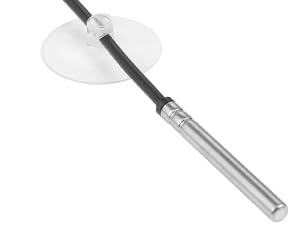
- שטעלט די טעמפּעראַטור פּראָבע: Place the temperature sensor probe in the reptile's basking area or the desired temperature monitoring location within the enclosure. The probe can be mounted using the included suction cup. Ensure the probe is not directly touching the heating element or submerged in water.
- פאַרבינדן צו מאַכט: Plug the thermostat's power cord into a standard 120VAC, 60Hz electrical outlet. The display will illuminate.

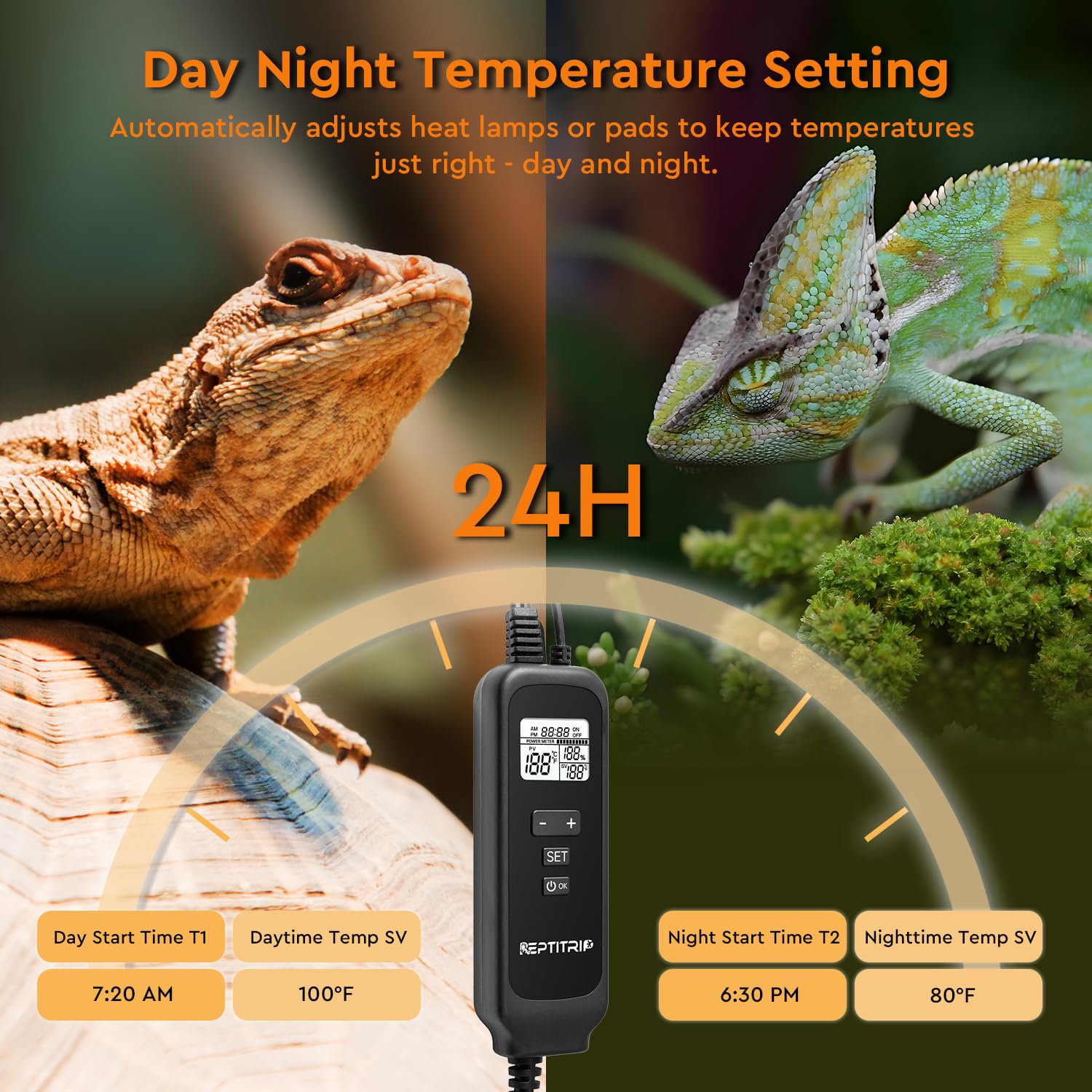

3. אַפּערייטינג ינסטרוקטיאָנס
The REPTITRIP Dimming Thermostat offers precise control over your reptile's environment. Familiarize yourself with the display and buttons:

Setting Day and Night Temperatures:
This thermostat allows you to program distinct day and night temperature settings to simulate natural environmental cycles.
- אַרייַן באַשטעטיקן מאָדע: דרוק די שטעלן button. The display will show the current time setting.
- שטעלן די איצטיקע צייט: ניצן די + און - buttons to adjust the current time. Press שטעלן צו באַשטעטיקן און מאַך צו די ווייַטער באַשטעטיקן.
- Set Day Start Time (T1): Adjust the time when the daytime temperature setting should begin. Press שטעלן.
- Set Daytime Temperature (SV1): Adjust the desired temperature for the daytime period. Press שטעלן.
- Set Night Start Time (T2): Adjust the time when the nighttime temperature setting should begin. Press שטעלן.
- Set Nighttime Temperature (SV2): Adjust the desired temperature for the nighttime period. Press שטעלן.
- אַרויסגאַנג פון סעטטינג מאָדע: פאָרזעצן דרינגלעך שטעלן until the display returns to the main screen, or wait for it to automatically exit after a few seconds of inactivity.


סוויטשינג טעמפּעראַטור איינהייטן (°F/°C):
To switch between Fahrenheit (°F) and Celsius (°C), press and hold the OK button for a few seconds until the unit changes on the display.
PID Dimming Function:
The thermostat uses PID control to gradually increase or decrease the power to the heating element, ensuring stable temperatures without sudden on/off cycles. This dimming action is similar to a sunrise/sunset effect, which is beneficial for light-sensitive reptiles and extends the lifespan of heating bulbs.

Compatibility with Heating Devices:
The REPTITRIP Dimming Thermostat is compatible with various heating devices. Refer to the table below for recommended sensor placement.

Dimming Thermostat vs. On/Off Thermostat:
פֿאַרשטיין דעם אַדוואַנטtages of a dimming thermostat over traditional on/off models:

4. וישאַלט
Proper maintenance ensures the longevity and accuracy of your thermostat:
- רייניקונג: Wipe the thermostat unit and probe with a soft, dry cloth. Do not use abrasive cleaners or immerse the unit in water.
- פּראָבע באַהאַנדלונג: Regularly check the temperature probe for any damage or debris. Ensure it remains securely positioned in the desired monitoring area.
- קאַבלע דורכקוק: Periodically inspect all cables for signs of wear, fraying, or damage. Replace if necessary.
5. טראָובלעשאָאָטינג
אויב איר טרעפט פּראָבלעמען מיט אייער טערמאָסטאַט, זעט די פאלגענדע געוויינטלעכע פּראָבלעמען און לייזונגען:
- Temperature Not Reaching Set Point (SV):
If the current temperature (PV) consistently fails to reach your set temperature (SV), the heating bulb or element may be of insufficient wattage. Replace the heating bulb with one of higher wattage, ensuring it does not exceed the thermostat's maximum supported power of 260W.
- Clock Resets After Power Loss:
The thermostat's internal clock may reset to a default time (e.g., 8:00 AM) if power is lost or the unit is unplugged. This is a known characteristic. You will need to reset the current time manually after a power interruption to ensure accurate day/night cycle transitions.
- נישט פּינקטלעכע טעמפּעראַטור מעסטונגען:
Ensure the temperature probe is correctly placed in the basking area and is not directly touching the heating element or any surfaces that might skew readings. Verify the probe cable is not damaged.
- ווייַז ניט ארבעטן:
Check if the thermostat is properly plugged into a live power outlet. If the issue persists, contact customer support.
6. ספּעסאַפאַקיישאַנז
Detailed technical specifications for the REPTITRIP PT02A Dimming Thermostat:

| באַשרייַבונג | ווערט |
|---|---|
| מאָדעל נאָמען | PT02A |
| אַרייַנשרייַב וואָלtage | 120VAC, 60Hz |
| רעזולטאַט מאַסע | מאַקסימום 260 וו |
| טעמפּעראַטור באַשטעטיקן ראַנגע | 68-113 F / 20-45 C |
| טעמפּעראַטור קאָנטראָל מאָדע | PID Thermostatic Control |
| טעמפּעראַטור אַקקוראַסי | ±1°F |
| זאָנד לענג | 5.8 ft |
| מאַכט שנור לענג | 5 ft |
| Socket Length | 0.9 ft |
| ווייַז טיפּ | דיגיטאַל לקד |
| ויסווייניקסט מאַטעריאַל | פּלאַסטיק |
| דרינענדיק / דרויסנדיק באַניץ | דרינענדיק |
| אַרייַנגערעכנט קאַמפּאָונאַנץ | Thermostat Unit, Temperature Probe, Instruction Manual |
7. וואָראַנטי און שטיצן
This product comes with an instruction manual for guidance. For any further assistance, technical support, or warranty inquiries, please refer to the contact information provided with your purchase or visit the official REPTITRIP webפּלאַץ.
פאַבריקאַנט: REPTITRIP
ביטע באַהאַלטן אייער קויפן-באַווייַז פֿאַר יעדע וואָראַנטי-פאָדערונג.