
הקדמה
This manual provides detailed instructions for the setup, operation, and maintenance of your Weofly Nova Active Noise Cancelling Headphones. Please read this manual thoroughly before using the product to ensure optimal performance and longevity.
וואָס איז אין די קעסטל
Upon unboxing your Weofly Nova headphones, please verify that all the following components are included:
- Weofly Nova Over-Ear Headphones
- USB-A צו וסב-C טשאַרדזשינג קאַבלע
- 3.5mm AUX Cable (USB-C to 3.5mm TRS)
- באַניצער מאַנואַל

Image: The Weofly Nova Active Noise Cancelling Headphones in Sliver, showcasinג זייער פּלאַן.
פּראָדוקט איבערview
The Weofly Nova headphones are designed for comfort and high-quality audio, featuring Active Noise Cancellation and Bluetooth 5.4 connectivity.

Image: A woman wearing the Weofly Nova headphones, illustrating their lightweight and stylish design. The headphones weigh only 130g.

Image: Two pairs of Weofly Nova headphones, one in brown and one in white, highlighting their distinct aesthetic and color options.
שליסל פֿעיִקייטן:
- אַקטיוו ראַש קאַנסאַליישאַן (ANC): Advanced technology to reduce ambient noise.
- בלועטאָאָטה וו5.4: For faster and more stable wireless connections.
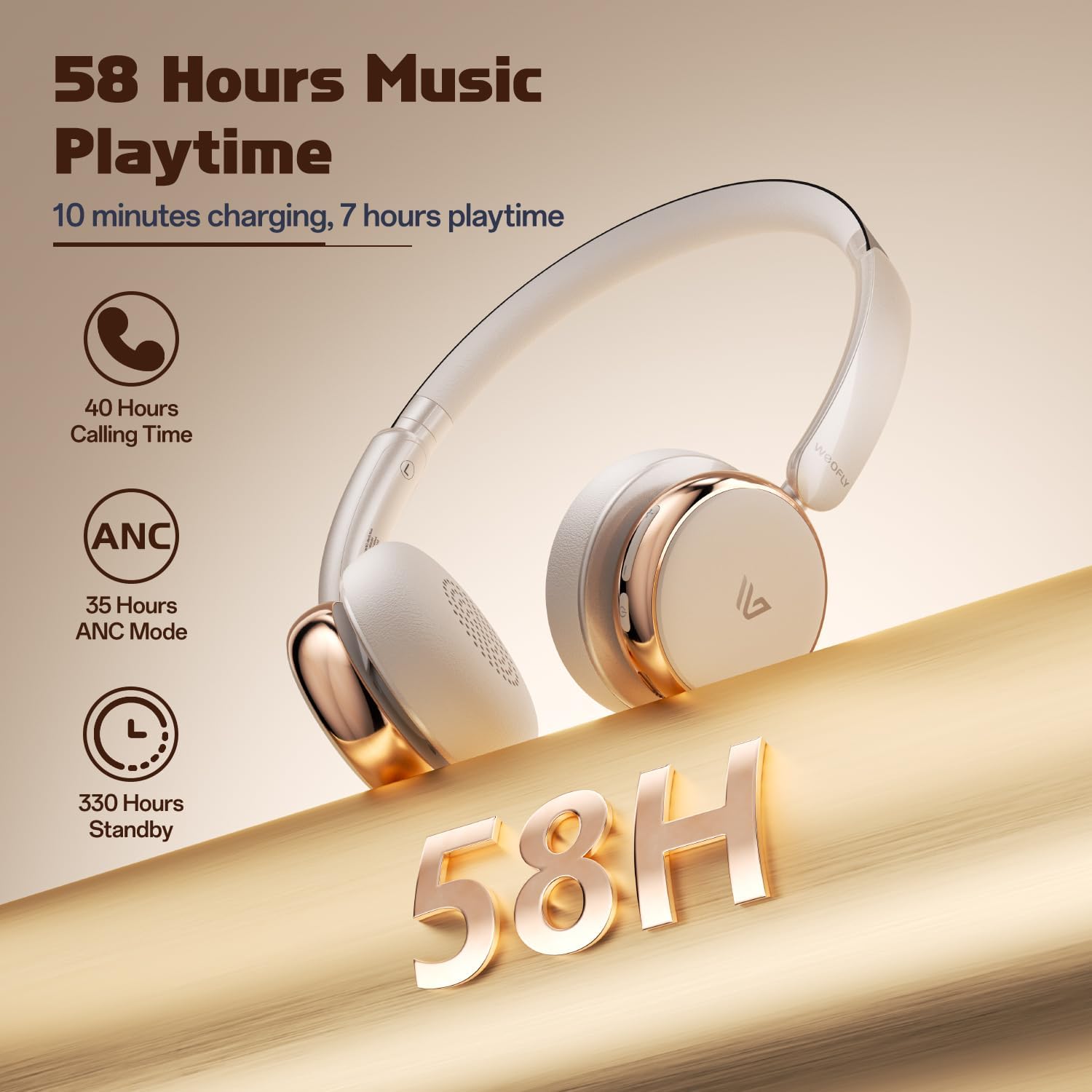
- לאנג באַטאַרייע לעבן: Up to 58 hours of music playtime on a single charge.
- באַקוועם פּלאַן: Ultra-soft memory protein earcups and adjustable headband.
- הויך-פאַדעליטי סאָונד: 40mm dynamic drivers for clear audio with rich bass.
- Multi-device Connectivity: Connect to two smart devices simultaneously.
ווידעא: אן איבערview of the Weofly Nova Active Noise Cancelling Headphones, demonstrating their features and design.
סעטאַפּ אינסטרוקציעס
1. טשאַרדזשינג די כעדפאָונז
Before first use, fully charge your Weofly Nova headphones. A full charge takes approximately 2 hours.
- Connect the USB-C end of the charging cable to the headphone's charging port.
- פֿאַרבינדט דעם USB-A עק צו אַ קאָמפּאַטיבלע USB מאַכט אַדאַפּטער (נישט אַרייַנגערעכנט) אָדער אַ קאָמפּיוטער'ס USB פּאָרט.
- די אינדיקאַטאָר ליכט וועט ווייַזן טשאַרדזשינג סטאַטוס און וועט זיך אויסלעשן אָדער טוישן קאָליר ווען גאָר טשאַרדזשד.

Image: The Weofly Nova headphones being charged via a USB-C cable, illustrating the fast charging capability.
2. פּאָווערינג אויף / אויסגעלאשן
- צו מאַכט אויף: דריק און האַלט דעם פּאַוער קנעפּל ביז די אינדיקאַטאָר ליכט בלינקט.
- צו מאַכט אַוועק: דריק און האלט דעם פּאַוער קנעפּל ביז די אינדיקאַטאָר ליכט גייט אויס.
3. בלועטאָאָטה פּערינג
The headphones support quick pairing. The first time you power them on, they will automatically enter pairing mode.
- מאַכן זיכער אַז די כעדפאָונז זענען פּאַוערד אַוועק.
- Press and hold the Power button for approximately 5 seconds until the indicator light flashes blue and red alternately, indicating pairing mode.
- אויף אייער דעווייס (סמאַרטפאָן, טאַבלעט, לאַפּטאָפּ), אַקטיווירט בלועטוט און זוכט פֿאַר פֿאַראַן דעווייסעס.
- Select "Weofly Nova" from the list of devices.
- אַמאָל פארבונדן, וועט די אינדיקאַטאָר ליכט ווערן שטענדיק בלוי אָדער בלינקען בלוי לאַנגזאַם.
The headphones can connect to two devices simultaneously. To connect a second device, repeat the pairing process. The headphones will automatically switch between devices for calls or media playback.

Image: An illustration showing the Weofly Nova headphones connecting to a laptop and a smartphone via advanced Bluetooth 5.4, highlighting faster transmission and stable connection.
אַפּערייטינג ינסטראַקשאַנז
1. אַקטיווע ראַש קאַנסאַליישאַן (ANC)
The Weofly Nova headphones feature Active Noise Cancellation to minimize ambient sounds.
- צו אַקטיווירן/דעאַקטיווירן ANC: Press the dedicated ANC button on the earcup. An audible prompt will confirm the status.

Image: A woman wearing Weofly Nova headphones while focused on her laptop, demonstrating the effectiveness of ANC in reducing distractions.
2. מוזיק פּלייבאַק
Control your music directly from the headphones:
- שפּיל / פּויזע: דרוק אַ מאָל אויף די מולטי-פונקציאָנירן.
- ווייַטער שפּור: דריק און האַלט די באַנד אַרויף קנעפּל.
- פֿריִערדיקע שפּור: דריקן און האַלטן די Volume Down קנעפּל.
- באַנד אַרויף: דריק קורץ דעם "Volume Up" קנעפל.
- באַנד אַראָפּ: דריק קורץ דעם "Volume Down" קנעפל.
3. רופן מאַנאַגעמענט
Manage phone calls with ease:
- ענטפֿערן / סוף רופן: דרוק אַ מאָל אויף די מולטי-פונקציאָנירן.
- אָפּוואַרפן רופן: דריקן און האַלטן די מולטי-פונקציע קנעפּל פֿאַר 2 סעקונדעס.
- ריאַל די לעצטע נומער: טאָפּל דריקן די מולטי-פונקציע קנעפּל.
4. קול אַססיסטאַנט
אַקטיווירן דיין מיטל'ס שטימע אַסיסטאַנט:
- אַקטאַווייט קול אַססיסטאַנט: דריקן די מולטי-פונקציע קנעפּל דרייַ מאָל.

Image: A multi-panel image illustrating the comfort of the headphones during travel, and the functionality of voice assistance and built-in microphone for hands-free calls.
5. שפּיל מאָדע
For reduced latency during gaming, activate Game Mode:
- Activate/Deactivate Game Mode: Press and hold the Multi-function button for 2 seconds (while not on a call or playing music).
6. ווייערד קאַנעקשאַן
Use the provided 3.5mm AUX cable for a wired connection:
- Connect the USB-C end of the AUX cable to the headphone's USB-C port.
- Connect the 3.5mm end to your audio source's headphone jack.
- די כעדפאָונז וועלן אויטאָמאַטיש איבערגיין צו ווייערד מאָדע.
וישאַלט
To ensure the longevity and optimal performance of your Weofly Nova headphones, follow these maintenance guidelines:
- רייניקונג: ניצט אַ ווייכע, טרוקענע שטאָף צו רייניקן די כעדפאָונז. ניצט נישט קיין שרײַבנדיקע רייניגערס אדער סאָלווענטן.
- סטאָרידזש: האַלט די כעדפאָונז אין אַ קיל, טרוקן אָרט אַוועק פון דירעקט זונשייַן און עקסטרעמע טעמפּעראַטורן.
- ויסמיידן נעץ: שטעלט נישט אויס די כעדפאָונז צו וואַסער אָדער צו פיל פייכטקייט.
- שעפּן מיט זאָרג: פֿאַרמײַדט צו לאָזן פאַלן אָדער אויסשטעלן די כעדפאָונז צו שטאַרקע קלאַפּן.
טראָובלעשאָאָטינג
If you encounter issues with your Weofly Nova headphones, refer to the following common solutions:
| פּראָבלעם | לייזונג |
|---|---|
| קאָפּהערער ווערן נישט אָנגעצינדן | Ensure the headphones are fully charged. Connect to a power source and allow to charge for at least 30 minutes before attempting to power on again. |
| קען נישט צוזאמענשטעלן מיטן אפאראט | Ensure headphones are in pairing mode (flashing blue/red). Turn off and on your device's Bluetooth. Move headphones closer to the device. Clear previous Bluetooth connections on your device. |
| ניט געזונט אָדער נידעריק באַנד | Check headphone and device volume levels. Ensure headphones are properly connected via Bluetooth or AUX cable. Test with a different audio source. |
| ANC אַרבעט נישט עפֿעקטיוו | Ensure ANC is activated. Adjust headphone fit to ensure a good seal around your ears. ANC is most effective against low-frequency, constant noise. |
| ינטערמיטאַנט קשר | Ensure no obstacles are between the headphones and your device. Move away from other wireless devices that may cause interference. Ensure headphones are fully charged. |
ספּעסאַפאַקיישאַנז
Technical details for the Weofly Nova Active Noise Cancelling Headphones:
- מאָדעל נאָמען: נאָוואַ
- קאַנעקטיוויטי טעכנאָלאָגיע: ווירעלעסס (בלועטאָאָטה)
- ווירעלעסס קאָמוניקאַציע טעכנאָלאָגיע: בלועטאָאָטה 5.4
- אַודיאָ דרייווער טיפּ: 40 מם דינאַמיש דרייווער
- ראַש קאָנטראָל: אַקטיוו ראַש קאַנסאַליישאַן
- באַטאַרייע לעבן: Up to 58 hours (music playtime), 40 hours (talk time), 35 hours (ANC mode)
- טשאַרדזשינג צייט: בעערעך 2 שעה
- באַטאַרייע קאַפּאַציטעט: 500 מאַה
- נומער וואָג: 0.26 קילאָגראַמס (9.1 אונסעס)
- אויער אָרט: איבער אויער
- קאַמפּאַטאַבאַל דעוויסעס: סעלפאָונז, טאַבלעטן, לאַפּטאַפּס, קלוגע רעדנערס
בילד: א דעטאַלירטע view of the Weofly Nova earcup, emphasizing the 40mm dynamic driver responsible for high-fidelity sound quality.

Image: The Weofly Nova headphones prominently displaying '58H', signifying their extended battery life of 58 hours for music playback.
וואָראַנטי און שטיצן
Weofly products come with a standard manufacturer's warranty. For specific warranty details, please refer to the warranty card included in your product packaging or visit the official Weofly website. For technical support, troubleshooting assistance, or any inquiries regarding your Weofly Nova headphones, please contact Weofly customer service through the contact information provided on our webוועבזייטל אדער אין אייער פּראָדוקט דאָקומענטאַציע.