
1. וויכטיק סאַפעטי אינפֿאָרמאַציע
Please read this entire manual before installation and assembly. If you have any questions regarding any of the instructions or warnings, please contact your local distributor for assistance.
- We accept no responsibility for incorrect or faulty installation.
- Follow the enclosed installation instructions carefully.
- Check the condition and completeness of all items before beginning.
- The fastening materials supplied for wall mounting are intended exclusively for fastening to solid masonry or concrete. For other wall types, such as hollow bricks, plasterboard, or lightweight construction, please contact a specialist retailer for information on suitable fastening elements.
- Under no circumstances should you exceed the limit values specified for the product.
2. פּעקל אינהאַלט
Verify that all components are present and undamaged before installation. If any parts are missing or damaged, do not attempt to install. Contact customer support for replacement parts.

Figure 2.1: XTRARM TiTon Double TV Wall Mount and included hardware components, including various screws, anchors, washers, and a drilling template.
דער פּעקל טיפּיקלי כולל:
- XTRARM TiTon Double TV Wall Mount assembly
- Standard mounting hardware for TV and wall (various screws, anchors, washers)
- דרילינג מוסטער
- Small spirit level
- Multiple hook-and-loop straps for cable management
3. ספּעסאַפאַקיישאַנז
| שטריך | באַשרייַבונג |
|---|---|
| מאַונטינג טיפּ | וואנט בארג |
| באַוועגונג טיפּ | Articulated, Swivel, Tilt, Rotate |
| מאַטעריאַל | מעטאַל |
| קאָליר | שוואַרץ |
| וואנט דיסטאַנסע | 12.9 cm (retracted) to 120 cm (extended) |
| ראָוטיישאַן | Up to 90° (portrait/landscape) |
| סוויוואַל | Up to 180° (90° left/right) |
| טילט | -5° צו +12° |
| רעקאָממענדעד טעלעוויזיע גרייס | Approximately 52 – 110 inches |
| וואָג קאַפּאַסיטי | מאַקסימום 80 קג |
| VESA קאַמפּאַטאַבילאַטי | 100x100mm, 100x200mm, 200x100mm, 200x200mm, 200x300mm, 300x200mm, 300x300mm, 400x200mm, 400x300mm, 400x400mm, 500x300mm, 600x200mm, 600x400mm |

Figure 3.1: VESA compatibility and maximum weight capacity.

Figure 3.2: Key dimensions and movement capabilities of the mount.
Figure 3.3: Comprehensive technical drawing with detailed dimensions and adjustment ranges.
4. סעטאַפּ און ייַנמאָנטירונג
Proper installation is crucial for the safety and stability of your TV. Ensure you have the necessary tools and assistance before proceeding.
4.1 נויטיקע מכשירים (נישט אַרייַנגערעכנט)
- בויער
- שטיפֿל זוכער (אויב מען מאָנטירט עס צו האָלץ שטיפֿלעך)
- בלייַער
- מעסטן טייפּ
- Socket wrench or adjustable wrench
- פיליפּס קאָפּ שרויפנ - ציער
4.2 טשאָאָסינג אַ מאַונטינג אָרט
Select a wall location that can safely support the weight of the mount and your TV. For solid concrete or masonry walls, use the provided anchors. For wood stud walls, ensure the mount is centered on a stud. Avoid mounting to drywall alone.
4.3 Attaching the Wall Plate
- Position the drilling template at the desired height on the wall and mark the drill holes with a pencil. Use the included spirit level to ensure it is perfectly horizontal.
- Drill pilot holes at the marked locations. The drill bit size will depend on your wall type and the chosen anchors/screws.
- Insert wall anchors (if required for your wall type) into the pilot holes.
- Align the wall plate with the drilled holes and secure it to the wall using the appropriate screws and washers. Ensure it is firmly attached.
4.4 באַפעסטיקט טעלעוויזיע קלאַמערן צו טעלעוויזיע
- לייגט פֿאָרזיכטיק אייער טעלעוויזאָר מיטן פּנים אַראָפּ אויף אַ ווייכער, ריינער ייבערפֿלאַך כּדי צו פֿאַרמייַדן שאָדן צום עקראַן.
- ידענטיפיצירן די VESA מאַונטינג האָלעס אויף די צוריק פון דיין טעלעוויזיע.
- Select the correct size screws and spacers (if needed) from the provided hardware that fit your TV's VESA pattern.
- Attach the two vertical TV brackets to the back of your TV, ensuring they are level and securely fastened. Do not overtighten.
4.5 מאָנטירן טעלעוויזיע צו וואַנט פּלאַטע
- With assistance, carefully lift the TV and hook the attached TV brackets onto the wall plate.
- זיכער מאַכן אַז דער טעלעוויזאָר איז זיכער אַרײַנגעזעצט אויף דער וואַנט פּלאַטע.
- Engage any safety locking mechanisms on the brackets to prevent accidental dislodgement.

פיגורע 4.1: עקסample of the XTRARM TiTon Double TV Wall Mount installed with a television.
5. אַפּערייטינג ינסטרוקטיאָנס
The XTRARM TiTon Double mount offers full motion capabilities for optimal viewינג אַנגלעס.
5.1 Adjusting Wall Distance
Gently pull or push the TV to extend or retract the mount. The mount allows for a wall distance ranging from 12.9 cm to 120 cm.

Figure 5.1: Adjustable wall distance of the mount.
5.2 דריי-אדזשאַסטמענט
The mount can swivel up to 180 degrees (90 degrees left or right) to direct the screen towards different viewינג געביטן.

Figure 5.2: Swivel capability of the mount.
5.3 טילט אַדזשאַסטמאַנט
Adjust the vertical tilt of your TV from -5 degrees to +12 degrees to reduce glare and optimize viewing comfort. Loosen the tilt adjustment knobs, set the desired angle, and then retighten the knobs.
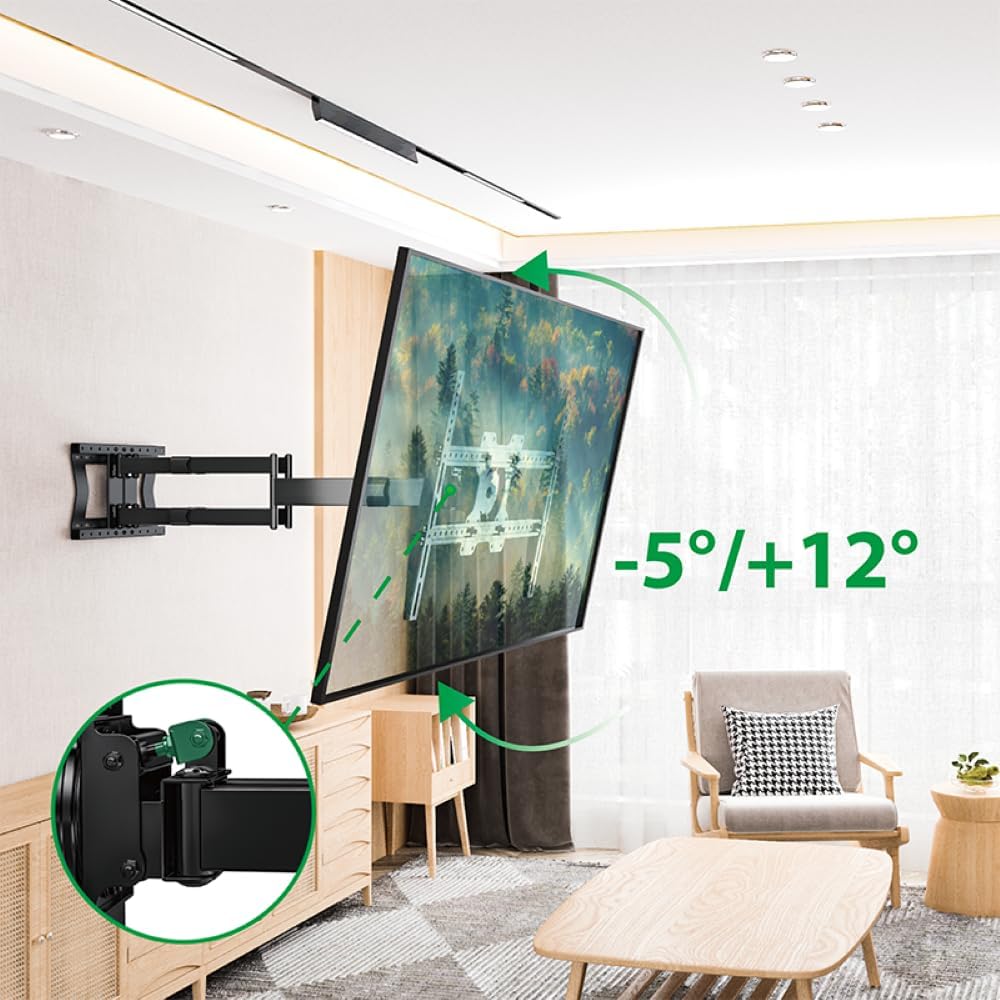
Figure 5.3: Tilt adjustment range and mechanism.
5.4 Rotation Adjustment
The mount allows for a 90-degree rotation, enabling you to switch between landscape and portrait orientation for your TV.

Figure 5.4: 90-degree rotation capability.
5.5 קאַבלע מאַנאַגעמענט
Use the provided hook-and-loop straps to bundle and organize cables along the mount arms for a tidy appearance and to prevent snagging during adjustments.
6. וישאַלט
רעגולערע אויפהאלטונג גאראנטירט די לאנגעוויטי און זיכערע אפעראציע פון אייער טעלעוויזיע וואנט מאונט.
- רייניקונג: ווישט אָפּ דעם מאָונט מיט אַ ווייכן, טרוקענעם שטאָף. פֿאַרמייַדט אַברייסיוו רייניגער אָדער סאָלווענטן וואָס קענען שאַטן דעם ענדיקונג.
- טשעק קאַנעקשאַנז: קאָנטראָלירט פּעריִאָדיש אַלע שרויפן און באָלטן צו זיכער מאַכן אַז זיי בלייבן פעסט. פֿעסט צו אויב נייטיק, אָבער נישט צו שטאַרק.
- דורכקוקן פֿאַר טראָגן: קאָנטראָלירט רעגולער די מאַונט פֿאַר קיין סימנים פון טראָגן, שעדיקן אָדער קעראָוזשאַן. אויב עס זענען פּראָבלעמען, שטעלט אָפּ די נוצן און קאָנטאַקטירט קונה שטיצע.
7. טראָובלעשאָאָטינג
If you encounter any issues with your XTRARM TiTon Double TV Wall Mount, refer to the following common problems and solutions:
| פּראָבלעם | מעגלעך סיבה | לייזונג |
|---|---|---|
| טעלעוויזיע איז נישט גלייך | Wall plate or TV brackets not level during installation. | Carefully remove the TV, adjust the wall plate or TV brackets using a spirit level, and re-mount. |
| Difficulty moving the mount | Joints may be too tight or require lubrication. | Check for any overtightened bolts. Apply a small amount of silicone-based lubricant to moving joints if necessary. |
| באַרג פילט זיך נישט סטאַביל | Loose wall plate, incorrect anchors, or exceeding weight capacity. | Immediately remove the TV. Re-check all wall plate fasteners. Ensure correct anchors were used for your wall type. Verify TV weight does not exceed 80 kg. If issues persist, consult a professional installer. |
8. וואָראַנטי און שטיצן
For information regarding warranty coverage, technical support, or replacement parts, please refer to the documentation provided at the time of purchase or visit the official XTRARM webזייטל. האַלט אייער קויף קוויטל ווי אַ באַווייַז פון קויפן.