
1. פּראָדוקט איבערview
The llano 4-in-1 NP-FZ100 Battery Charger is a versatile device designed for Sony NP-FZ100 camera batteries. It integrates a 10400mAh power bank, a 20W PD fast charger, a USB 3.0 card reader, and a secure storage case into a single compact unit. This device is intended to streamline power management and data transfer for photographers and videographers.

Image 1: llano 4-in-1 NP-FZ100 Battery Charger, closed view.

Image 2: Feature comparison highlighting 20W PD charging, SD card reader, built-in power, and battery level display.
2. פּעקל אינהאַלט
באַשטעטיקן אַז אַלע זאכן זענען פאַראַן אין פּעקל:
- llano 4-in-1 NP-FZ100 Battery Charger (Model: CS2 PRO NP FZ100)
- USB-C to USB-C Cable with USB-A adapter
- לאַניאַרד
- ווייך קעריינג פּאָוטש
- באַניצער מאַנואַל
3. סעטאַפּ
3.1 Initial Charging of the Device
Before first use, fully charge the internal 10400mAh power bank. Connect the provided USB-C cable to the charger's USB-C port and to a compatible USB power adapter (not included). The digital display will show the charging progress of the internal power bank.
3.2 Inserting a Battery for Charging
Open the magnetic flip lid of the charger. Insert one NP-FZ100 battery into the designated charging slot. Ensure the battery is correctly oriented according to the markings inside the slot.

Image 3: llano charger connected to a power adapter, illustrating external charging.
4. אַפּערייטינג ינסטרוקטיאָנס
4.1 Charging NP-FZ100 Batteries
The charger features a single charging slot for NP-FZ100 batteries. When a battery is inserted, the digital display will show its current charge level. The 20W PD fast charging capability allows a full charge in approximately 1.5 hours when connected to a compatible 20W power source. The internal power bank can also charge an inserted battery without external power.

Image 4: Digital display indicating battery charging status.
4.2 ניצן ווי אַ פּאַוער באַנק
The integrated 10400mAh power bank can charge external devices such as smartphones, tablets, or other USB-powered accessories via its USB-C port. Connect your device using a compatible USB-C cable. The power bank can recharge an NP-FZ100 battery approximately 1.5 times, an iPhone 17 Pro about 2.2 times, and a Galaxy S24 about 1.86 times.

Image 5: Illustration of the internal 10400mAh power bank capacity.
4.3 Using the USB 3.0 Card Reader
The device includes a built-in USB 3.0 card reader for SD cards (SD4.0 compatible). Insert your SD card into the designated slot. Connect the charger to a computer or compatible device using the USB-C cable to transfer files. Data transfer speeds can reach up to 312MB/s for reading and 156MB/s for writing.

Image 6: Demonstrating USB 3.0 high-speed data transmission from an SD card.
4.4 Secure Storage Case
The charger's design incorporates a storage compartment for one NP-FZ100 battery and two SD cards. The magnetic flip lid ensures secure, dustproof storage, protecting your batteries and memory cards during transport.
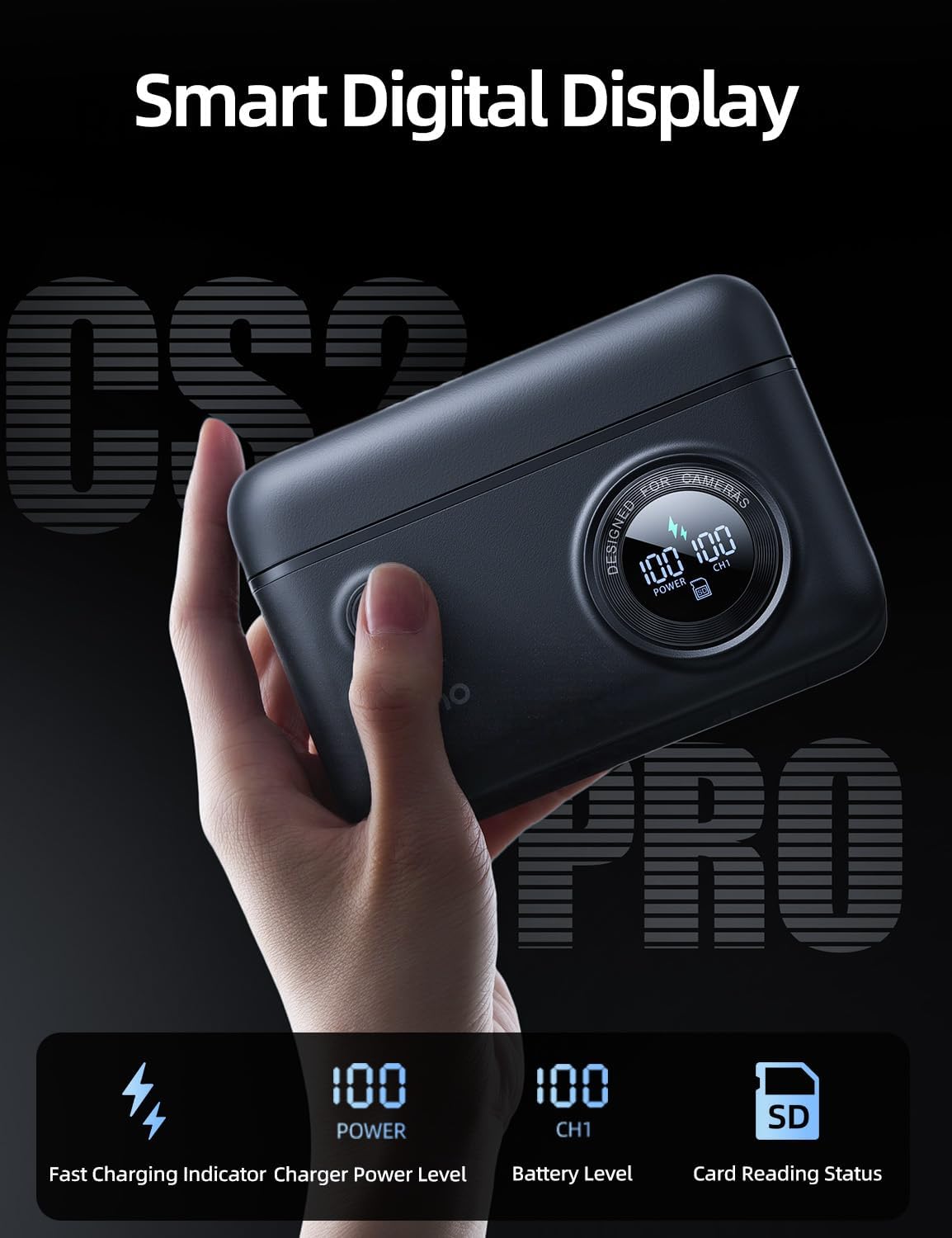
Image 7: The llano charger with its lid open, revealing storage for a battery and SD cards.
4.5 דיגיטאַלע אַרויסווייַז אינפֿאָרמאַציע
The smart digital display provides real-time information:
- שנעל טשאַרדזשינג אינדיקאַטאָר: Indicates when fast charging is active.
- Charger Power Level: Shows the remaining charge of the internal 10400mAh power bank.
- Battery Level (CH1): ווײַזט דעם אָפּצאָל פּראָצענטtage of the NP-FZ100 battery in the charging slot.
- Card Reading Status: Indicates when data is being read from or written to an inserted SD card.

בילד 8: דעטאַלירט view of the smart digital display and its indicators.
4.6 קאַמפּאַטאַבילאַטי
The charger is compatible with Sony NP-FZ100 batteries and a wide range of Sony camera models, including:
- Sony A7III, A7IV, A7C, A7CII, A7RV, A7RIII
- Sony A6600, A6700
- Sony FX3, FX30, FX2
- Sony ZV-E1, ZV-E10II
- Sony A9, A9 II, A1
The USB-C port can also charge various USB-C compatible devices such as iPhone 17, Galaxy 25, iPad Pro 11", Apple Watch, and Apple AirPods.

Image 9: Visual representation of compatible camera models and USB-C devices.
4.7 לערנ־ווידעאָס
llano 4-in-1 CS2 PRO Battery Charger Kit Overview
ווידעא 1: דאס ווידעא גיט אן אלגעמיינעם איבערבליקview of the llano 4-in-1 CS2 PRO Battery Charger Kit, showcasinג זייַנע פֿעיִקייטן און פּלאַן.
How To Use 4 in 1 Battery Charger Kit
Video 2: This video demonstrates the practical usage of the 4-in-1 Battery Charger Kit, including battery insertion, charging, and card reader functions.
5. וישאַלט
- האַלט דעם טשאַרדזשער ריין און פריי פון שטויב און שמוץ. ניצט אַ ווייכן, טרוקן שטאָף פֿאַר רייניקונג.
- ויסמיידן יקספּאָוזינג די מיטל צו עקסטרעם טעמפּעראַטורעס, הומידיטי אָדער דירעקט זונשייַן.
- Ensure the magnetic lid is closed when not in use to protect the internal components and stored items.
- Do not attempt to disassemble or modify the charger, as this will void the warranty and may cause damage.
6. טראָובלעשאָאָטינג
6.1 אפאראט לאדט זיך נישט אויף
- קוק די מאַכט מקור: Ensure the USB-C cable is securely connected to both the charger and a functional power adapter or USB port.
- קאַבלע אָרנטלעכקייַט: פרובירט ניצן אן אנדערן USB-C קאבל צו אויסשליסן א דעפעקטיוון קאבל.
- מאַכט אַדאַפּטער: Verify that the power adapter provides sufficient output (e.g., 20W PD for fast charging).
6.2 באַטעריע לאָדט זיך נישט אויף
- באַטערי ינסערשאַן: Ensure the NP-FZ100 battery is correctly inserted into the charging slot.
- באַטערי צושטאַנד: Test the battery in another compatible charger or camera to confirm it is not faulty.
- Internal Power Bank Level: If using the internal power bank to charge, ensure it has sufficient charge remaining.
6.3 Card Reader Not Functioning
- קאָרט אַרייַנלייגן: Ensure the SD card is fully and correctly inserted into the card slot.
- קשר: Verify the charger is properly connected to your computer via the USB-C cable.
- קאָרט קאַמפּאַטאַבילאַטי: Ensure the SD card is not damaged and is compatible with standard SD card readers.
- שאָפער ישוז: On your computer, check device manager for any driver issues related to USB devices or card readers.
7. ספּעסאַפאַקיישאַנז
| שטריך | באַשרייַבונג |
|---|---|
| סאָרט | llano |
| מאָדעל נומער | CS2 PRO NP FZ100 |
| פּראָדוקט דימענשאַנז | 5"ד רענטגענ 3.6"וו רענטגענ 1.9"ה |
| קאָליר | שוואַרץ |
| Internal Power Bank Capacity | 10400 מאַה |
| טשאַרדזשינג רעזולטאַט | 20 וואט פּד (מאַכט דעליווערי) |
| רעזולטאַט חלקtage | 8.4 וואלטס |
| אַרייַנשרייַב וואָלtage | 9 וואלטס |
| קראַנט רייטינג | 2.22 Amps |
| באַטאַרייע אָפּצאָל צייט | Approx. 1.5 Hours (for NP-FZ100 battery) |
| קאָרט לייענער טיפּ | USB 3.0 (SD4.0 compatible) |
| Card Reader Speed | Up to 312MB/s (Read) |
| קאַנעקטער טיפּ | וסב-C |
| זיכערקייַט סערטיפיקאַטיאָנס | UL, FCC |
8. וואָראַנטי און שטיצן
This llano product comes with a 1-year warranty from the date of purchase. The warranty covers manufacturing defects and malfunctions under normal use. It does not cover damage caused by misuse, accidents, unauthorized modifications, or natural disasters.
For technical support, warranty claims, or further assistance, please contact llano customer service through the retailer where the product was purchased or visit the official llano webפּלאַץ פֿאַר קאָנטאַקט אינפֿאָרמאַציע.