
1. הקדמה
The BAANOOL BN-401B-N is a 4G GPS tracker designed for vehicles in North American regions. This device provides real-time location tracking, various alarm functions, and remote control capabilities for enhanced vehicle security and management. It is compatible with a range of vehicles including cars, motorcycles, fleets, scooters, buses, and trucks.
This manual provides essential information for the proper installation, operation, and maintenance of your BN-401B-N GPS tracker. Please read it thoroughly before using the device.
The device operates on 4G bands: B2/B4/B5/B7/B12/B13/B66/B28A. Ensure these bands are suitable for your area before use.
2. וואָס איז אין דער קעסטל
The BAANOOL BN-401B-N GPS tracker package includes the following items:
- GPS Unit (BN-401B-N)
- וויירינג כאַרניס
- ווייַט קאָנטראָללער
- רעלע
- באַניצער מאַנואַל
- Battery (pre-installed or included separately)
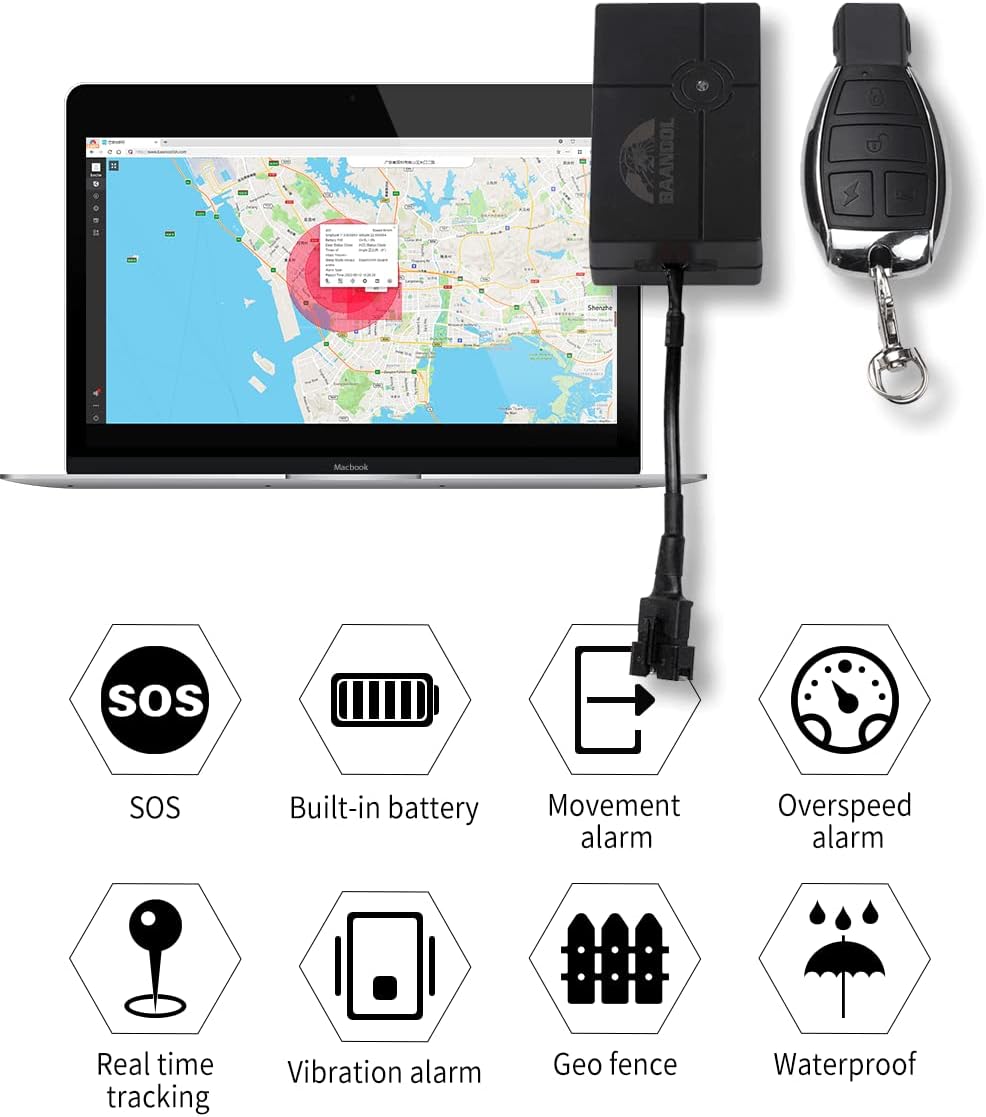
Image: Contents of the BAANOOL BN-401B-N GPS tracker package.
Video: This video demonstrates the unboxing and contents of the BAANOOL BN-401B-N GPS tracker package, including the main unit, wiring harness, remote control, and user manual.
3. סעטאַפּ און ייַנמאָנטירונג
3.1 סים קארטל אריינשטעלן
The BN-401B-N requires a 4G SIM card for network communication. Insert a compatible SIM card into the device. Ensure the SIM card is active and has data, SMS, and call services enabled. No subscription fee is required for the platform itself, but a SIM card with a data plan is necessary for the tracker to function.
3.2 וויירינג און מאַכט קאַנעקשאַן
The GPS tracker should be installed on the vehicle's onboard power supply (12-24V). Connect the red wire of the harness to the positive (+) terminal of the vehicle's power supply and the black wire to the negative (-) or vehicle body ground. For advanced functions like remote engine cut-off, consult a professional for proper relay wiring.
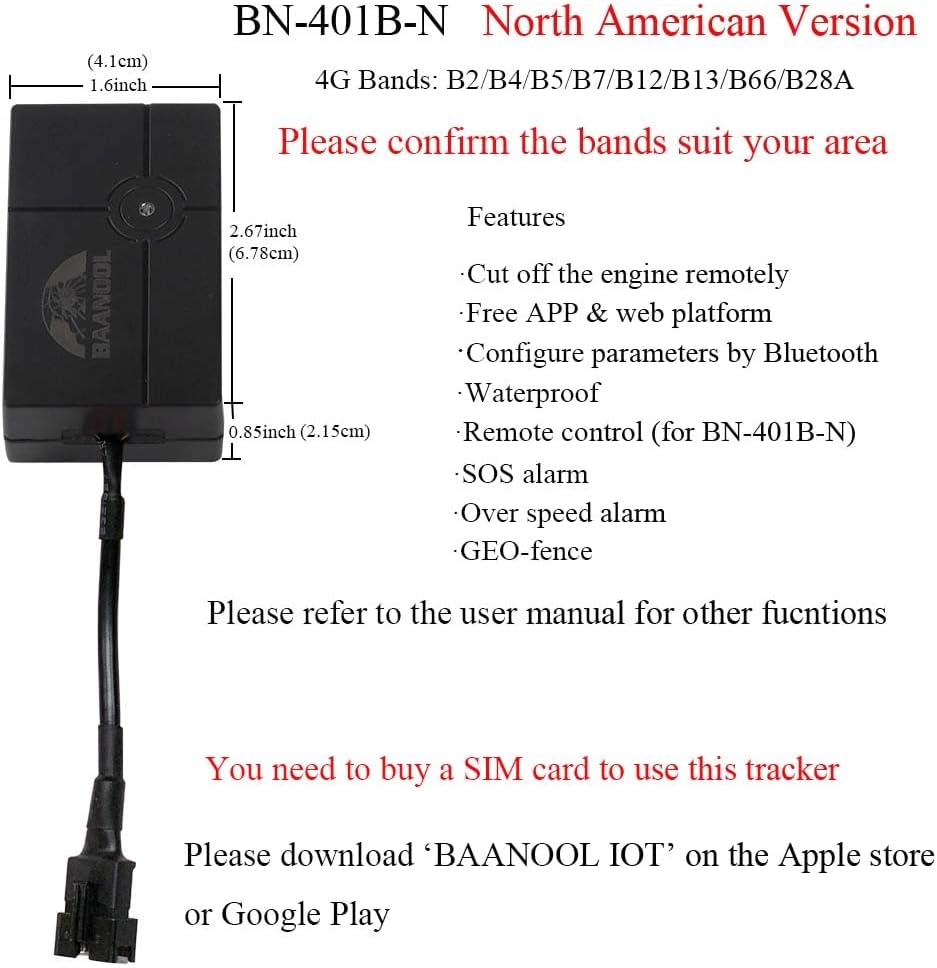
Image: Physical dimensions of the BN-401B-N tracker for installation planning.
3.3 Application Download and Account Setup
Download the official BAANOOL IOT application from the Apple App Store or Google Play Store. Follow the in-app instructions to register your device and set up your account. The device can also be managed via a free web פּלאַטפאָרמע.
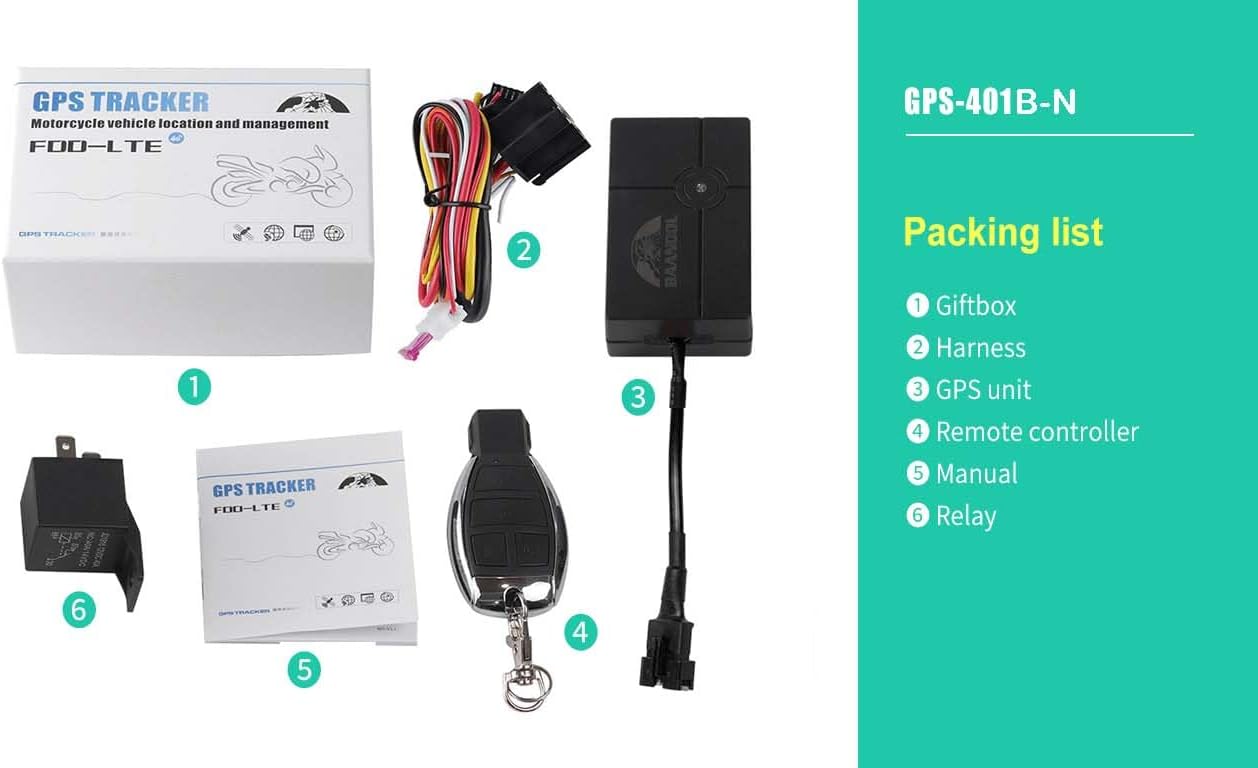
בילד: עקסample of the BAANOOL tracking application interface.
3.4 בלועטאָאָטה קאַנפיגיעריישאַן
Parameters can be configured via Bluetooth. Refer to the app or web platform for detailed instructions on connecting and adjusting settings using Bluetooth.
4. אַפּערייטינג די מיטל
The BN-401B-N offers various functions for vehicle tracking and security. Control the device using SMS commands, the mobile application, or the web פּלאַטפאָרמע.
4.1 שליסל פֿעיִקייטן
- Precise Localization: Obtain accurate GPS location data (accuracy: 5m).
- פאַקטיש-צייט טראַקינג: Monitor your vehicle's location continuously.
- געשיכטע פּלייַבאַק: Review פארגאנגענע רייזע רוטעס און דאטן.
- GEO-Fence: Set up virtual boundaries and receive alerts when the vehicle enters or exits these areas.
- ווייַט קאָנטראָללער: The BN-401B-N model includes a remote controller for functions like arming/disarming.
- Remote Engine Cut-off: If wired correctly, the device supports remotely cutting off the engine.
- וואָטערפּרוף פּלאַן: The device is designed to withstand water exposure.

Image: Visual representation of the tracker's main features.
4.2 שרעק פאַנגקשאַנז
The tracker is equipped with several alarm features to enhance security:
- ACC Alarm: Triggers when the vehicle's ignition is turned on.
- Shock Alarm: Alerts you to impacts or vibrations.
- נידעריק באַטערי שרעק: Notifies you when the internal battery is low.
- External Power Disconnection Alarm: Alerts if the main power supply is cut.
- SOS שרעק: Activated by an SOS button (if available or configured).
- באַוועגונג שרעק: Triggers if the vehicle moves without authorization.
- איבער גיכקייט שרעק: Alerts if the vehicle exceeds a predefined speed limit.

בילד: עקסamples of vehicle types compatible with the tracker.
5. וישאַלט
To ensure the longevity and optimal performance of your BAANOOL BN-401B-N GPS tracker, follow these maintenance guidelines:
- רעגולער טשעקס: קאָנטראָלירט פּעריִאָדיש די וויירינג פֿאַרבינדונגען צו זיכער מאַכן אַז זיי זענען זיכער און פֿרײַ פֿון שאָדן.
- באַטערי זאָרגן: The device contains a chargeable 3.7V 90mAh Li-ion battery. While designed for vehicle power, ensure the internal battery is charged to maintain functionality during power interruptions.
- רייניקונג: Keep the device clean and free from dust and debris. Use a soft, dry cloth for cleaning. Avoid harsh chemicals.
- וואַסער קעגנשטעל: The device is waterproof, but avoid submerging it in water or exposing it to high-pressure water jets.
6. טראָובלעשאָאָטינג
If you encounter issues with your BN-401B-N GPS tracker, refer to the following common problems and solutions:
| פּראָבלעם | מעגלעך סיבה | לייזונג |
|---|---|---|
| די מיטל איז נישט פּאַוערינג | Incorrect wiring, no power from vehicle, faulty internal battery. | Check power connections (red to positive, black to negative). Ensure vehicle power is active. Allow internal battery to charge. |
| No GPS signal / Inaccurate location | Poor installation location (e.g., under metal), device indoors, weak satellite signal. | Relocate the device to an area with a clear view of the sky. Test outdoors. |
| No GSM signal / Offline in app | SIM card not inserted correctly, SIM card inactive, no data plan, out of network coverage. | Reinsert SIM card. Verify SIM card is active and has a data plan. Check network coverage in your area. |
| Remote functions not working (e.g., engine cut-off) | Incorrect wiring of relay, app/platform issue, device offline. | Verify relay wiring with a professional. Check device status in the app/platform. Ensure device has GSM signal. |
| Constant red light, no green light (no GSM signal) | SIM card issue, network problem, device fault. | Check SIM card. Try a different SIM card. Contact support if the issue persists. |
For further assistance, please contact BAANOOL customer support.
7. ספּעסאַפאַקיישאַנז
| פּאַראַמעטער | ווערט |
|---|---|
| מאָדעל | BN-401B-N (4G) |
| 4 ג באַנדס | B2/B4/B5/B7/B12/B13/B66/B28A |
| נעץ | LTE |
| דימענסיעס (L X W X H) | 6.78 X 4.1 X 2.15 סענטימעטער (2.67 X 1.6 X 0.85 אינטשעס) |
| GPS Unit Weight | 58 ג (2.05 אַז) |
| גפּס אַקיעראַסי | 5m |
| Voltage פון מאַכט | 12-24וו |
| באַטערי | Chargeable 3.7V 90mAh Li-ion battery (included) |
| קאַנעקטיוויטי טעכנאָלאָגיע | סעליאַלער |
| ספּעציעלע פֿעיִקייטן | Geo-Fence, Remote Control (for 401B-N model), Waterproof |
| שטיצט אַפּפּליקאַטיאָנס | Car, Motorcycle, Vehicle, Fleet, Scooter, Bus, Taxi, Truck, Free APP & Web פּלאַטפאָרמע |
| ספּעציפיש ניצט | פאָרמיטל טראַקינג |
8. וואָראַנטי און שטיצן
BAANOOL GPS trackers come with a 15-חודש וואָראַנטי. As an original manufacturer, BAANOOL provides comprehensive after-sales service.
If you encounter any problems with your device or require technical assistance, please contact BAANOOL customer support. Provide your model number (BN-401B-N) and a detailed description of the issue for efficient resolution.
For support, please visit the official BAANOOL webזייטל אדער זעט די קאנטאקט אינפארמאציע וואס איז צוגעשטעלט אין אייער פראדוקט פארפאקונג.