
הקדמה
א דאנק פארן קויפןasing the Docooler GT77 BT5.4 2-in-1 Wireless Audio Adapter. This device functions as both a Bluetooth transmitter and receiver, allowing you to wirelessly stream audio to and from various devices. It features BT5.4 technology, NFC quick pairing, TF card playback, and RGB ambiance lighting. Please read this manual carefully before use to ensure proper operation and to maximize your experience with the product.
פּראָדוקט איבערview
The Docooler GT77 is a versatile audio adapter designed to enhance your audio connectivity. It can upgrade non-Bluetooth devices to be Bluetooth-compatible, offering seamless audio streaming. The device supports multiple audio input/output options including 3.5mm AUX and RCA.

Image: The Docooler GT77 adapter connected to a speaker and a smartphone, illustrating its use for upgrading wired speakers to wireless.
שליסל פֿעיִקייטן:
- 2-אין-1 פאַנגקשאַנאַליטי: Easily switch between Bluetooth Transmitter (TX) and Receiver (RX) modes.
- בלועטאָאָטה 5.4: Provides stable and high-quality audio transmission with a range of up to 10 meters.
- NFC Quick Pairing: Simplifies connection with NFC-enabled devices.
- TF Card Playback: Supports direct music playback from a TF card (up to 64GB).
- Multiple Audio Interfaces: Includes 3.5mm AUX and RCA ports for broad compatibility.
- RGB Ambiance Lighting: Customizable lighting to enhance your listening environment.

Image: The Docooler GT77 adapter shown with its various cables, including 3.5mm AUX and RCA, highlighting its rich interface compatibility.
סעטאַפּ
פּעקל אינהאַלט:
- 1 x Docooler GT77 BT Audio Adapter
- 1 רענטגענ 3.5 מם אַודיאָ קאַבלע
- 1 קס RCA קאַבלע
- 1 רענטגענ טיפּ-C מאַכט קאַבלע
- 1 x באַניצער מאַנואַל
מאַכט אויף די מיטל:
- Connect the provided Type-C power cable to the adapter's USB C port.
- Plug the other end of the Type-C power cable into a 5V USB power source (e.g., USB wall adapter, computer USB port).
- The device will power on automatically, indicated by the RGB lighting.
אַפּערייטינג ינסטראַקשאַנז
Mode Switching (Transmitter/Receiver):
The Docooler GT77 features a single button to switch between Transmitter (TX) and Receiver (RX) modes.
- דרוק די M/☀ button briefly to toggle between TX and RX modes.
- The device's indicator light will change to reflect the current mode.
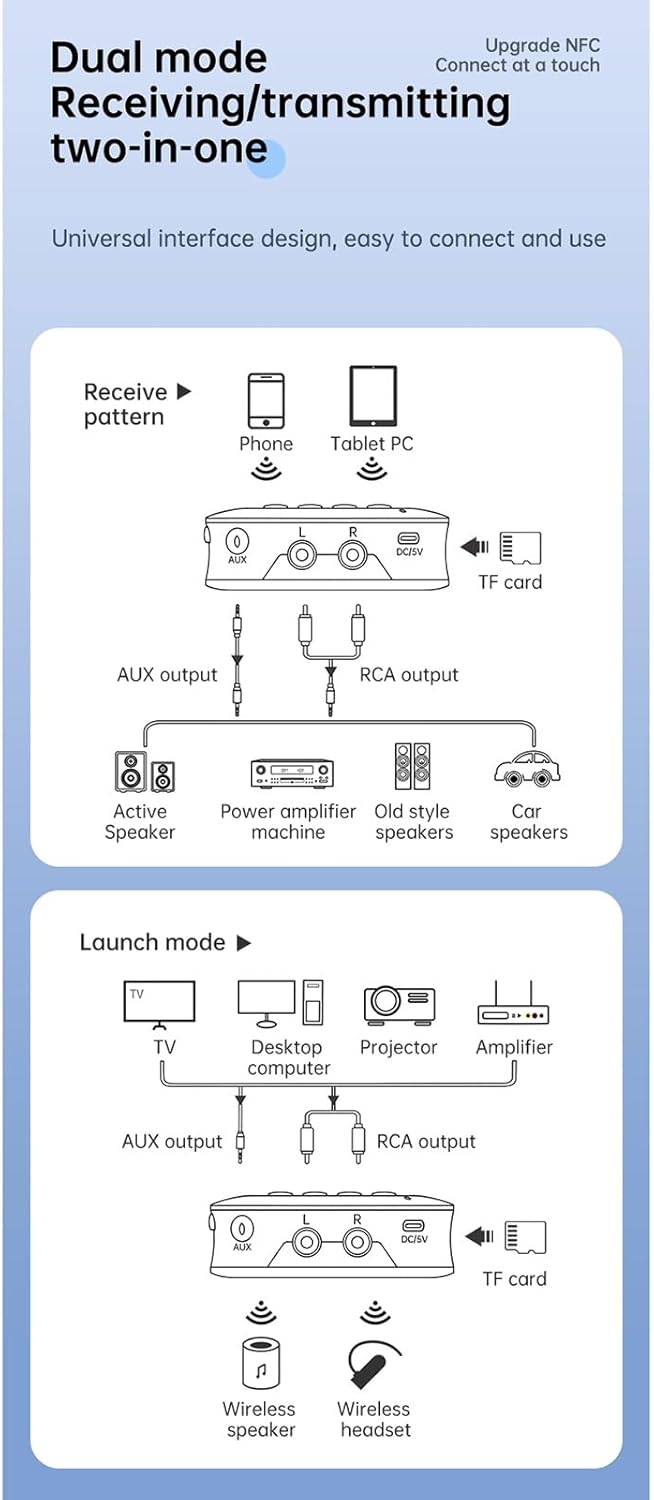
Image: A diagram illustrating the receive (RX) and launch (TX) modes, showing how the adapter connects to various devices like phones, tablets, TVs, speakers, and headphones.
ופנעמער (RX) מאָדע:
In RX mode, the adapter receives Bluetooth audio from your smartphone, tablet, or other Bluetooth-enabled device and outputs it to a wired speaker, amplifier, or car stereo system.
- Ensure the adapter is in RX mode.
- Connect the adapter's AUX OUT or RCA OUT port to your non-Bluetooth audio device (e.g., speaker, amplifier) using the appropriate cable.
- On your smartphone or tablet, enable Bluetooth and search for "GT77" in the list of available devices.
- Select "GT77" to pair. Once paired, audio from your device will stream wirelessly to your connected speaker.
Image: The Docooler GT77 adapter in Receiver (RX) mode, connected to a traditional speaker, receiving audio wirelessly from a smartphone.
טראַנסמיטער (TX) מאָדע:
In TX mode, the adapter transmits audio from a non-Bluetooth device (like a TV or PC) to Bluetooth headphones or speakers.
- Ensure the adapter is in TX mode.
- Connect your audio source (e.g., TV, desktop computer, projector) to the adapter's AUX IN or RCA IN port using the appropriate cable.
- שטעלט אייערע בלועטוט כעדפאָונז אדער רעדנער אין פּערינג מאָדע.
- The adapter will automatically search for and connect to nearby Bluetooth audio devices. Once connected, audio from your source will be transmitted wirelessly.

Image: The Docooler GT77 adapter in Transmitter (TX) mode, connected to a television, sending audio wirelessly to a user's headphones for private listening.
NFC Quick Pairing:
For NFC-enabled devices, pairing is even faster.
- זיכער מאַכן אַז NFC איז אַקטיווירט אויף דיין סמאַרטפאָון אָדער טאַבלעט.
- Hold your NFC-enabled device close to the NFC area on the Docooler GT77 adapter.
- באַשטעטיקן די פּאָרינג בעטן אויף דיין מיטל.
Note: NFC pairing is primarily for Receiver (RX) mode.
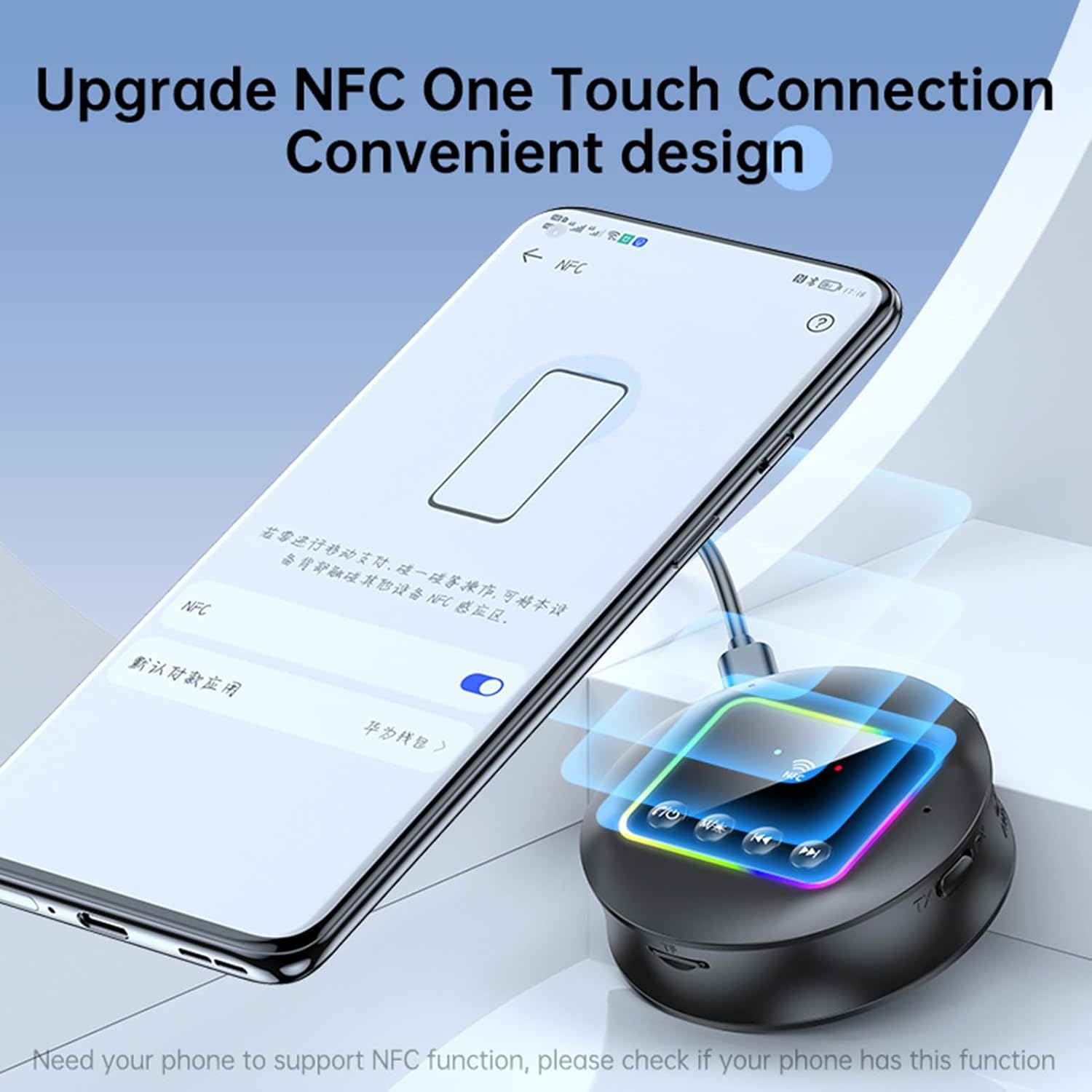
Image: A smartphone displaying an NFC connection prompt, positioned near the Docooler GT77 adapter, demonstrating the NFC quick pairing feature.
TF Card Playback:
The adapter supports direct music playback from a TF (MicroSD) card.
- Insert a TF card (up to 64GB, not included) loaded with MP3, FLAC, WMA, MAV, or APE audio files into the TF card slot on the adapter.
- לאנג דריקן די M/☀ button to switch between wireless and TF card playback modes.
- Use the previous/next track buttons on the adapter to navigate your music.

Image: The Docooler GT77 adapter with a TF card being inserted into its dedicated slot, highlighting the TF card playback functionality.
RGB Ambiance Lighting:
The adapter features RGB lighting that can be adjusted to suit your preference. Refer to the device's controls for specific RGB adjustment options (e.g., short press M/☀ button for color cycle, long press for off/on).
וישאַלט
- האַלט דעם אַפּאַראַט טרוקן. נעץ קען שאַטן די אינערלעכע קרייזן.
- דו זאלסט נישט ויסשטעלן די מיטל צו עקסטרעם טעמפּעראַטורעס.
- רייניקט דעם אַפּאַראַט מיט אַ ווייכן, טרוקענעם שטאָף. ניצט נישט קיין שאַרפע כעמיקאַלן אדער דיטערדזשענטן.
- ויסמיידן דראַפּינג אָדער אונטערטעניק די מיטל צו שטאַרק ימפּאַקץ.
טראָובלעשאָאָטינג
קיין מאַכט:
- Ensure the Type-C power cable is securely connected to both the adapter and a working 5V power source.
- פּרוּווט אַן אַנדערן USB מאַכט אַדאַפּטער אָדער USB פּאָרט.
קען נישט צוזאמענשטעלן/פארבינדן:
- Make sure the adapter is in the correct mode (RX for receiving, TX for transmitting).
- Ensure your Bluetooth device (for RX mode) or Bluetooth headphones/speaker (for TX mode) is in pairing mode.
- Move the devices closer to each other (within 10 meters).
- ויסמעקן די בלועטוט פּערינג געשיכטע אויף דיין מיטל און פּרוּווט ווידער פּערינג.
- If using NFC, ensure NFC is enabled on your phone and you are tapping the correct area.
קיין קול:
- Check all audio cable connections (3.5mm AUX, RCA) are secure and correctly plugged into the input/output ports.
- Ensure the volume on both the adapter and the connected audio device is turned up.
- Verify that the adapter is successfully paired and connected to the audio source/receiver.
- If using TF card, ensure the card is inserted correctly and the adapter is in TF card playback mode.
שלעכטע אַודיאָ קוואַליטעט/אינטערפירענץ:
- פארקלענערט די דיסטאַנץ צווישן דעם אַדאַפּטער און דעם פֿאַרבונדענעם בלועטוט מיטל.
- Avoid physical obstructions (walls, large objects) between the devices.
- Move away from other wireless devices that might cause interference (e.g., Wi-Fi routers, microwaves).
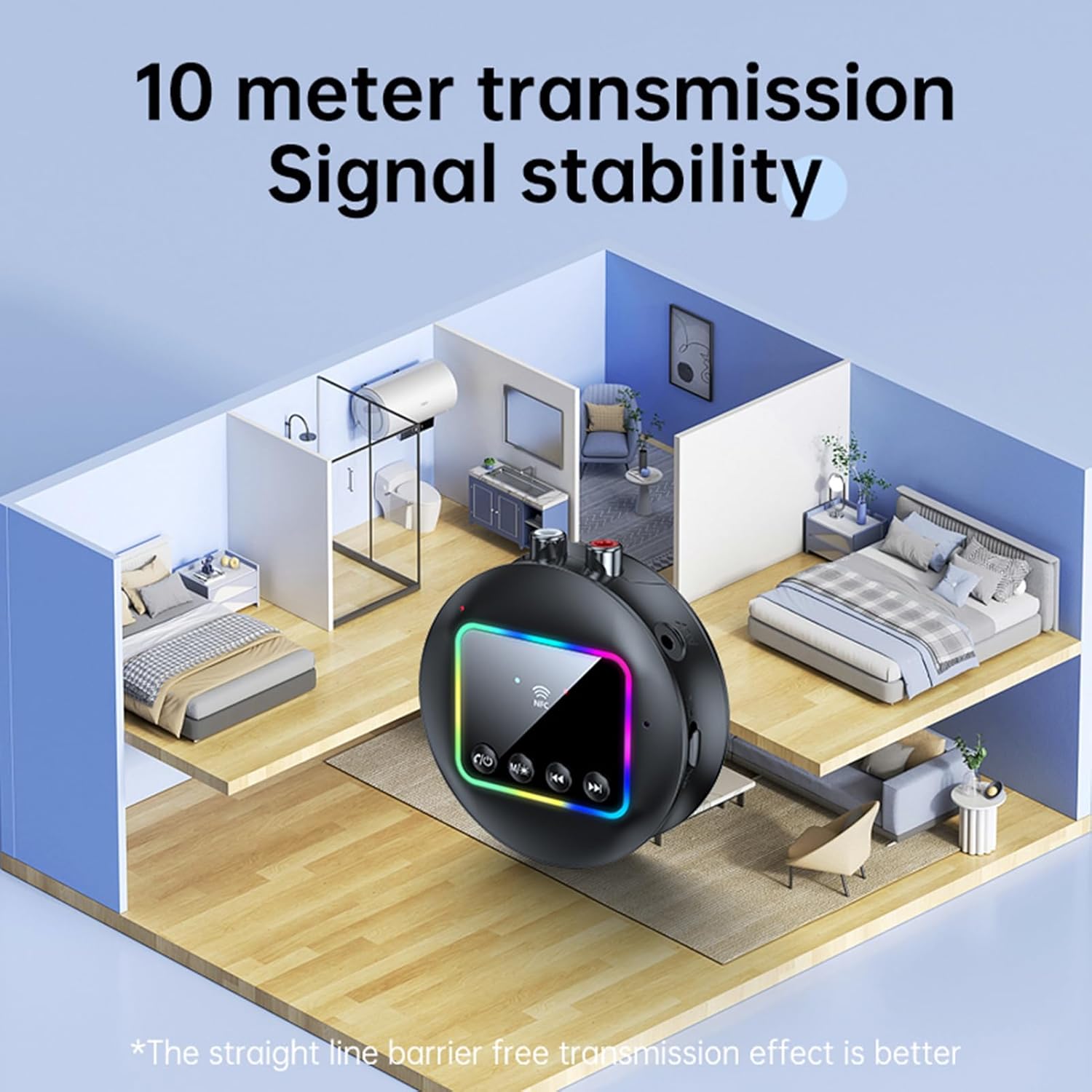
Image: A visual representation of the Docooler GT77's 10-meter transmission range, showing stable signal coverage within a typical home environment.
ספּעסאַפאַקיישאַנז
| מאָדעל נומער | ZRV0656844287655XH |
| בלועטאָאָטה ווערסיע | V5.4 |
| בלועטאָאָטה פּראָטאָקאָלס | A2DP, AVRCP |
| אַפּערייטינג דיסטאַנסע | אַרויף צו 10 מעטער (עפענען שטח) |
| NFC שטיצן | יא |
| אָפטקייַט ענטפער | 10 הערץ - 20 קילאָהרץ |
| סיגנאַל-צו-נויז ראַטיאָ | > 90 דב |
| TF קאַרטל שטיצע | מאַקסימום 64 גיגאבייט (ניט אַרייַנגערעכנט) |
| TF Card Formats | MP3, FLAC, WMA, MAV, APE |
| אַודיאָ קאָדעקס | SBC |
| טשאַרדזשינג פּאָרט | וסב טיפּ-C |
| אַרייַנשרייַב וואָלtagE/קראַנט | דק 5 וו 500 מאַ |
| קאָליר | שוואַרץ |
| Dimensions (ϕ x H) | 7.3 סענטימעטער רענטגענ 2.2 סענטימעטער (2.87 רענטגענ 0.86 אינטשעס) |
| וואָג | 44ג |
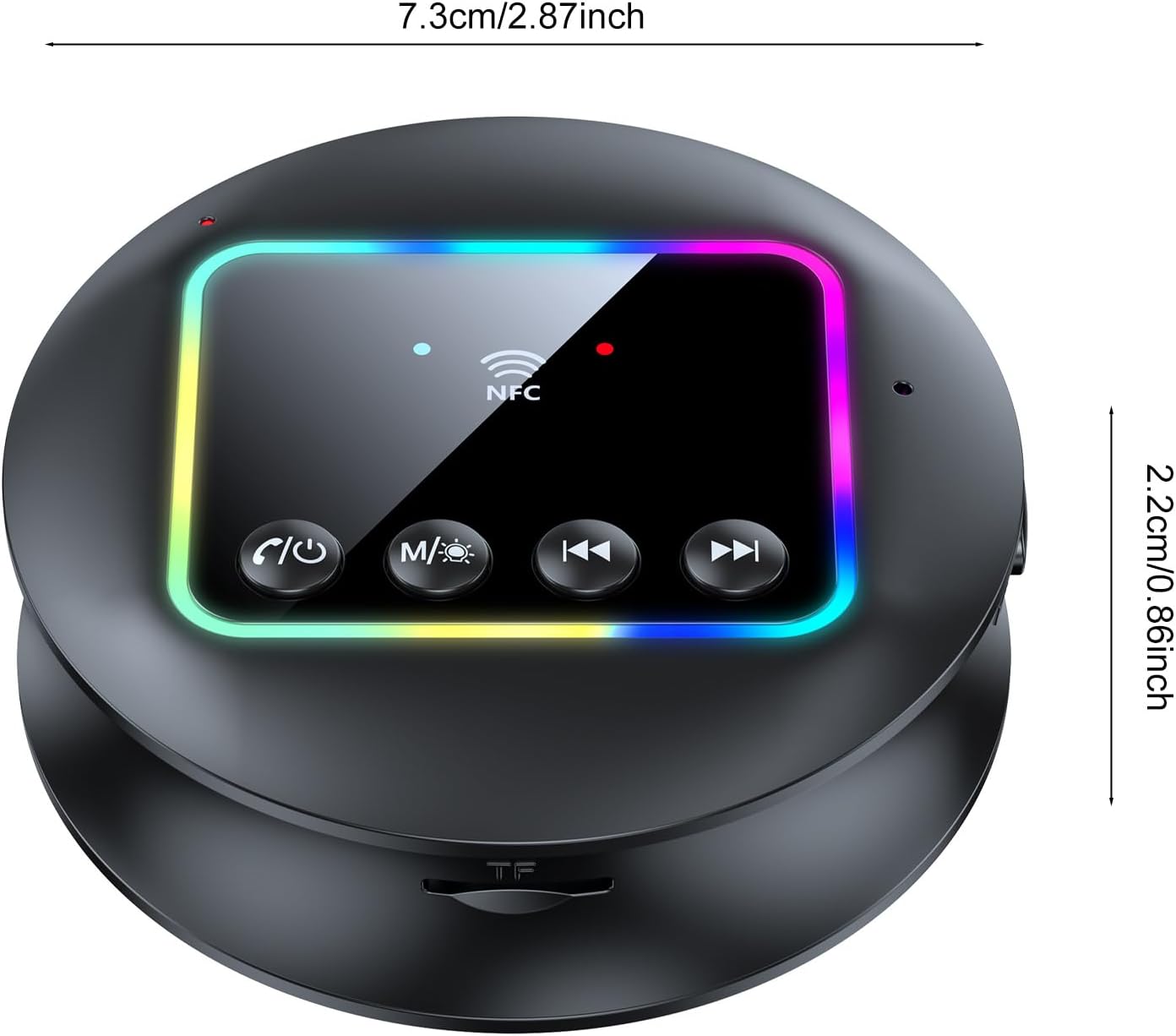
בילד: א פון אויבן אראפ view of the Docooler GT77 adapter, showing its compact dimensions of 7.3 cm diameter and 2.2 cm height.
וואָראַנטי און שטיצן
פֿאַר וואָראַנטי אינפֿאָרמאַציע און טעכנישע שטיצע, ביטע זעט די דאָקומענטאַציע וואָס איז צוגעשטעלט געוואָרן מיט אייער קויף אָדער קאָנטאַקטירט אייער הענדלער. האַלט אייער קויף באַווייַז פֿאַר וואָראַנטי קליימז.