
1. פּראָדוקט איבערview
The TOWODE Light Bulb Security Camera (Model TAHEIS) is a versatile surveillance device designed for indoor use, primarily in areas like garages, homes, and offices. It features 3MP HD video, AI human detection, two-way audio, color night vision, and compatibility with Alexa. The camera is designed for easy installation into a standard E27 light socket.

Figure 1: Product components including the camera, mobile application interface, 64GB TF card, and power adapter.
שליסל פֿעיִקייטן:
- 3MP HD ווידעא: Provides clear 2K resolution video for detailed monitoring.
- 355° פּאַן און 90° טילט: אָפפערט ברייט-ווינקל viewing to cover large areas and reduce blind spots.
- קינסטלעכע אינטעליגענץ מענטשלעכע דעטעקציע און באַוועגונג טראַקינג: Intelligently identifies human movement and tracks subjects.
- צוויי-וועג אַודיאָ: Enables communication through the camera's built-in microphone and speaker.
- קאָליר נאַכט זעאונג: Utilizes LED lights for full-color video in low-light conditions, with an infrared option.
- Alexa קאַמפּאַטאַבילאַטי: Integrates with Alexa-enabled devices for voice control and viewing.
- לאקאלע און וואָלקן סטאָרידזש: Supports up to 64GB TF card (included) and optional cloud storage for video recording.
- 30W 3000 Lumens LED Lighting: Functions as an adjustable LED light source.
2. סעטאַפּ און ייַנמאָנטירונג
פּעקל אינהאַלט:
- TOWODE Light Bulb Security Camera (Model TAHEIS)
- 64G TFcard
- Power Adapter (if applicable for non-E27 direct installation)
- Mounting Screws (if applicable for alternative mounting)
גשמיות ינסטאַלירונג:
- אידענטיפיצירן די אינסטאַלאַציע אָרט: Choose an indoor E27 light socket in your desired monitoring area (e.g., garage, living room, basement). Ensure the socket is powered off before installation.
- אַריינשטעלן TF קאַרטל: Locate the SD card slot on the camera body. Gently insert the included 64GB TF card until it clicks into place.
- Screw in Camera: Carefully screw the camera into the E27 light socket. Ensure it is securely fastened.
- מאַכט אויף: Turn on the power to the light socket. The camera will initiate its startup sequence.

Video 1: Demonstrates the location of the SD card slot and reset button on the camera.

Figure 2: Visual guide for screwing the camera into a standard E27 light socket for power and mounting.
אַפּ דאַונלאָוד און פֿאַרבינדונג:
- אראפקאפיע אַפּ: Scan the QR code in the product packaging or search for the 'AJCloud' app in your smartphone's app store (iOS/Android).
- רעגיסטרירן אַקאַונט: Open the AJCloud app and follow the on-screen instructions to register a new account. This typically requires an email address and phone number.
- לייג דיווייס: In the app, select 'Add Device' or the '+' icon. Choose 'Light Bulb Camera' from the device list.
- פאַרבינדן צו Wi-Fi: The app will guide you through connecting the camera to your Wi-Fi network. Ensure your Wi-Fi is 2.4GHz, as 5GHz networks may not be supported. Enter your Wi-Fi password when prompted.
- פּאָרינג: Follow the app's instructions for pairing. This may involve scanning a QR code displayed on your phone with the camera or listening for an audible prompt.
- נאמען מיטל: Once paired, name your camera (e.g., "Garage Camera", "Living Room").
Video 2: Demonstrates the process of connecting the light bulb camera to the mobile application, including Wi-Fi setup and device pairing.
3. אַפּערייטינג ינסטרוקטיאָנס
לעבן View and Control:
- צוטריט צו לייוו פיד: Open the AJCloud app and select your camera to view די לעבן ווידעא קאָרמען.
- פּאַן/טילט קאָנטראָל: Use the on-screen joystick or swipe gestures to remotely control the camera's 355° pan and 90° tilt movements.
- צוויי-וועג אַודיאָ: צאַפּן אויף דעם מיקראָפאָן בילדל אין דער אַפּ צו רעדן דורך דער קאַמעראַ'ס רעדנער, און הערן דורך איר מיקראָפאָן.
- ליכט קאָנטראָל: The camera features a 30W LED light. Use the app to turn the light on/off and adjust its brightness (stepless adjustment).
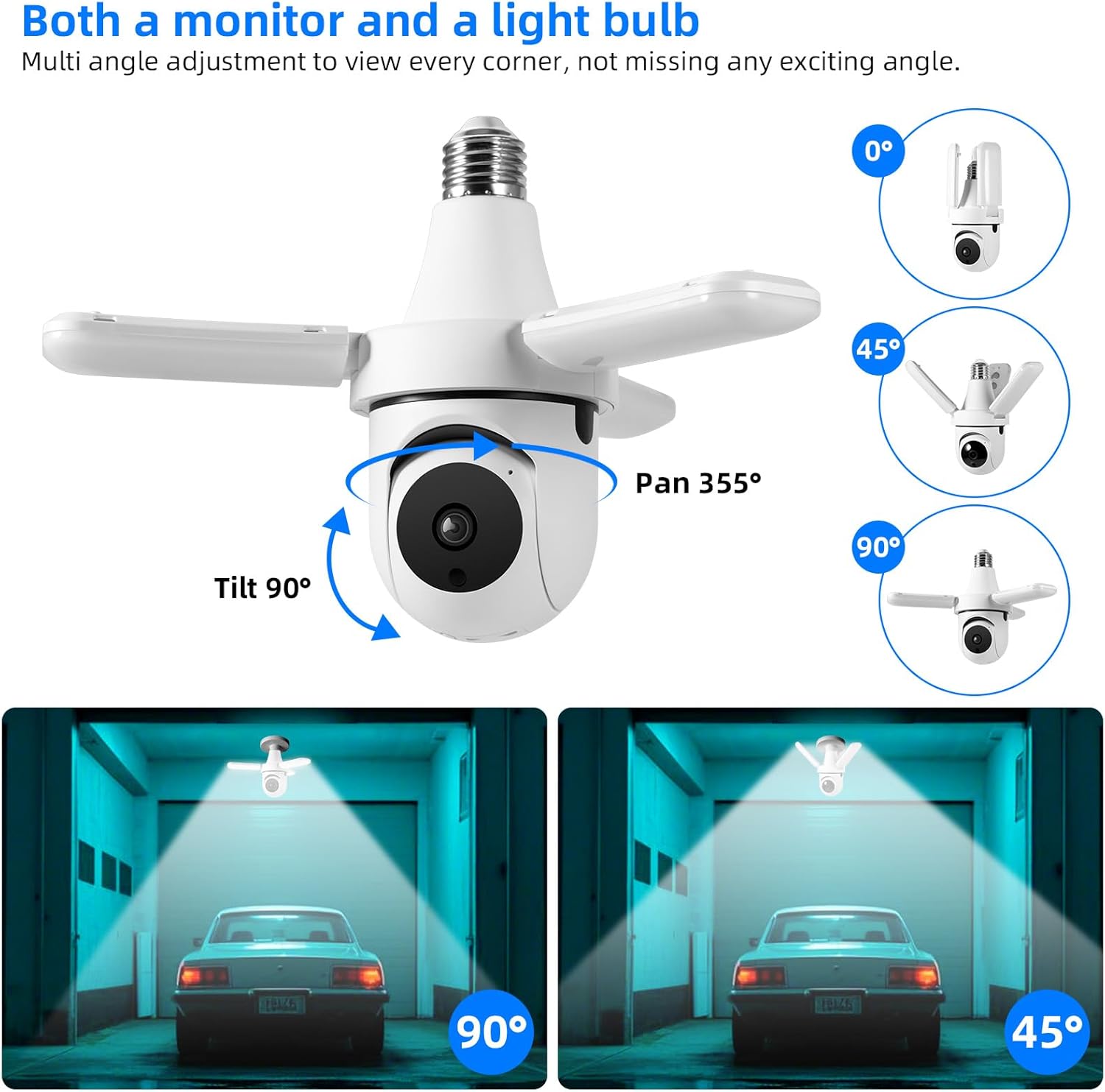
Figure 3: The camera offers extensive pan and tilt functionality to monitor a wide area.

Figure 4: Control the camera's integrated 30W LED light directly from the mobile application.
Recording and Alerts:
- באַוועגונג דעטעקשאַן: The camera is equipped with AI human detection. When motion is detected, the camera can automatically track the subject and send alerts to your phone.
- נאַכט זעאונג: The camera offers both color night vision (with LED lights on) and infrared night vision (LED lights off) for clear visibility in the dark.
- ווידעא סטאָרידזש: Recordings are saved to the installed 64GB TF card. You can review playback directly from the app. Cloud storage options may also be available through the app for an additional subscription.
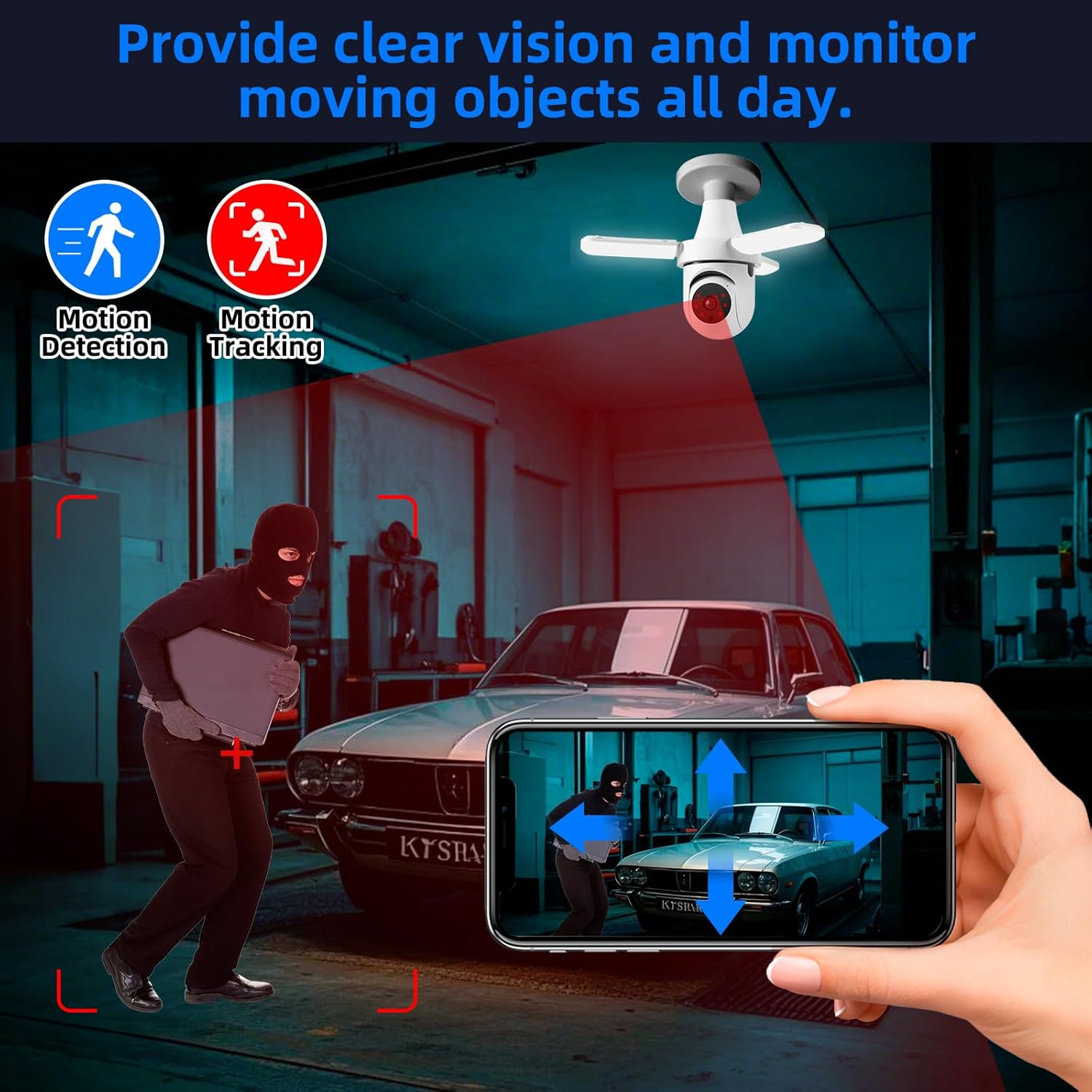
Figure 5: The camera's motion detection and tracking features provide real-time alerts and continuous monitoring.

Figure 6: Experience clear visibility day and night with 3MP HD video and color night vision capabilities.
סמאַרט היים ינטעגראַטיאָן:
- Alexa קאַמפּאַטאַבילאַטי: The camera is compatible with Alexa. Link your AJCloud account to your Alexa app to enable voice commands for viewing the camera feed on compatible Alexa devices with screens.
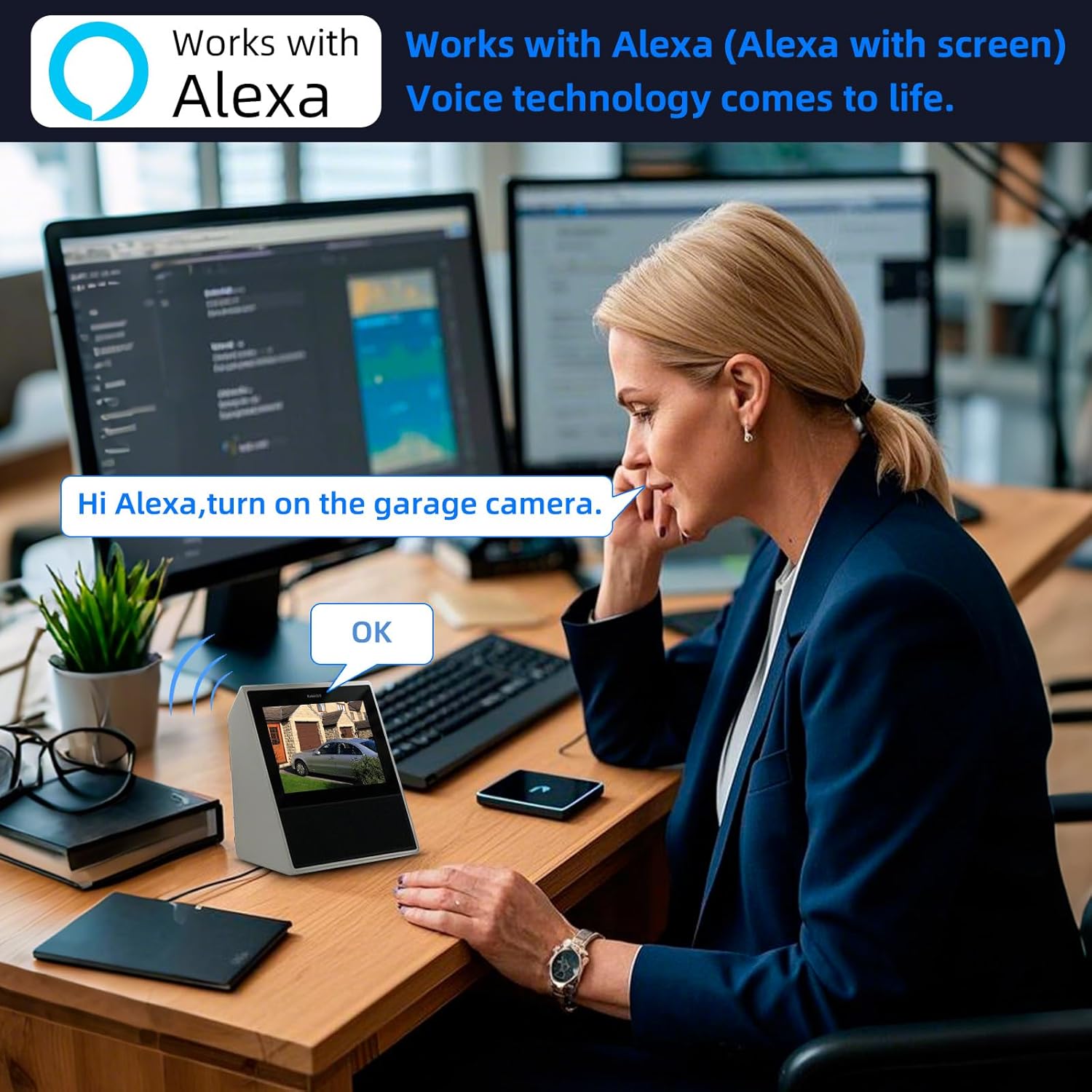
Figure 7: Control and view your camera feed using Alexa voice commands on compatible smart displays.
4. וישאַלט
- רייניקונג: Regularly wipe the camera lens and body with a soft, dry cloth to remove dust and smudges. Do not use harsh chemicals or abrasive cleaners.
- TF קאַרטל פאַרוואַלטונג: Periodically check the TF card storage status in the app. Format the card if necessary to ensure continuous recording. Back up important footage איידער פֿאָרמאַטירן.
- Firmware דערהייַנטיקונגען: Check the AJCloud app regularly for available firmware updates. Keeping the firmware updated ensures optimal performance and security.
- מאַכט ציקל: If the camera experiences issues, try turning off the power to the light socket for a few seconds, then turning it back on to restart the device.
5. טראָובלעשאָאָטינג
- אַפּאַראַט ניט קאַנעקטינג צו Wi-Fi:
- זיכער מאַכן אַז אייער Wi-Fi נעץ איז 2.4GHz. די קאַמעראַ שטיצט נישט 5GHz Wi-Fi.
- באַשטעטיקן אַז די Wi-Fi פּאַראָל איז ריכטיק.
- Check the camera's proximity to the Wi-Fi router for a strong signal.
- Perform a factory reset on the camera by pressing the reset button (often located near the SD card slot) for several seconds until you hear a prompt. Then, attempt to pair again.
- קיין באַוועגונג אַלערץ:
- Check the motion detection settings in the AJCloud app. Ensure it is enabled and sensitivity is adjusted appropriately.
- Verify that app notifications are enabled on your smartphone.
- No Recording/Playback Issues:
- Ensure the 64GB TF card is correctly inserted and not full. Format the card if needed (this will erase all data).
- If using cloud storage, verify your subscription is active.
- נעבעך ווידעא קוואַליטעט:
- Check your Wi-Fi signal strength. A weak signal can affect video streaming quality.
- זיכער מאַכן אַז די קאַמעראַ לינז איז ריין און פריי פון שטערונגען.
- צוויי-וועג אַודיאָ נישט ארבעטן:
- Check the microphone and speaker settings in the app.
- זייט זיכער אז אייער טעלעפאן'ס וואודיום איז ארויף און די אפליקאציע האט מיקראפאן פערמישנס.
6. ספּעסאַפאַקיישאַנז
| שטריך | באַשרייַבונג |
|---|---|
| מאָדעל נאָמען | TAHEIS |
| עפעקטיוו נאָך האַכלאָטע | 3 מפּ |
| ווידעא קאַפּטורע רעסאָלוטיאָן | 2K |
| Viewינג אַנגלע | 360 גראַד (355° דריי, 90° בייג) |
| נאַכט וויזשאַן ראַנגע | 20 פֿיס |
| ליכט מקור טיפּ | LED (30W, 3000 Lumens) |
| קאַנעקטיוויטי טעכנאָלאָגיע | וויירלעס (Wi-Fi 2.4GHz) |
| קאַמפּאַטאַבאַל דעוויסעס | iOS, Smartphone, Alexa |
| מאַונטינג טיפּ | Light Socket (E27) |
| אַרייַנגערעכנט קאַמפּאָונאַנץ | 64G TFcard |
| מאַכט מקור | קאָרדעד עלעקטריק |
| דרינענדיק / דרויסנדיק באַניץ | דרינענדיק |
| מאַטעריאַל | פּלאַסטיק |
| פּראָדוקט דימענשאַנז | 6 X 3 X 3 אינטשעס |
| פּונקט וואָג | 11.7 אונסעס |
7. וואָראַנטי און שטיצן
וואָראַנטי אינפֿאָרמאַציע: For detailed warranty terms and conditions, please refer to the product packaging or the official TOWODE webפּלאַץ. האַלטן דיין קויפן קאַבאָלע פֿאַר וואָראַנטי קליימז.
טעכניש שטיצן: If you encounter any issues not covered in this manual or require further assistance, please contact TOWODE customer service through their official webוועבזייטל אדער פּלאַטפאָרמע וואו דער פּראָדוקט איז געקויפט געוואָרן.