
הקדמה
Thank you for choosing the Walfront Smart Thermostat TRV Valve. This device is designed to provide intelligent temperature control for your home, offering convenience through app and voice control, multiple operating modes, and programmable schedules. Please read this manual carefully before installation and operation to ensure proper use and optimal performance.
זיכערקייַט אינפֿאָרמאַציע
- פאַרזיכערן די מאַכט צושטעלן איז דיסקאַנעקטיד איידער ינסטאַלירונג אָדער וישאַלט.
- דער מיטל איז בדעה בלויז פֿאַר דרינענדיק נוצן.
- שטעלט נישט אויס דעם אפאראט צו וואסער אדער איבעריגע הומידיטי.
- האַלטן אויס פון דערגרייכן פון קינדער.
- Use only the specified battery type (2 x AA batteries).
פּעקל אינהאַלט
באַשטעטיקן אַז אַלע זאכן זענען פאַראַן אין פּעקל:
- 1 x Thermostatic Valve
- 10 x Installation Accessories
- קסנומקס רענטגענ שרויף
- קסנומקס רענטגענ נאַט
- 1 x באַניצער מאַנואַל (דאָס דאָקומענט)
באַמערקונג: A Zigbee hub is required for smart functionality and app control. The Zigbee hub is not included and must be purchased separately.
פּראָדוקט איבערview
The Walfront Smart Thermostat TRV Valve features an integrated display and control knob for easy interaction. Below is a diagram illustrating the key components and display indicators:

בילד: פראָנט view of the Walfront Smart Thermostat TRV Valve, highlighting its display and various indicators for modes, settings, and battery status.
- טעמפּעראַטור ווייַז: ווײַזט די איצטיקע אָדער איינגעשטעלטע טעמפּעראַטור.
- קינד לאַק ינדיקאַטאָר: Appears when the child lock function is active.
- באַטערי מדרגה ינדיקאַטאָר: ווײַזט די פארבליבענע באַטעריע מאַכט.
- אַרויף און אַראָפּ אַראָוז: Used for adjusting temperature or navigating settings.
- Manual Mode Indicator: Shows when the thermostat is in manual control.
- Programming Mode Indicator: Indicates an active programmed schedule.
- Holiday Mode Indicator: Activates during holiday settings.
- Comfort Mode Indicator: Engaged for comfort temperature settings.
- ECO Mode Indicator: Shows when energy-saving mode is active.
- Energy Saving Mode Indicator: Indicates energy-saving operation.
ספּעסאַפאַקיישאַנז
| שטריך | באַשרייַבונג |
|---|---|
| נומער טיפּ | טערמאַסטאַטיק וואַלוו |
| מאַטעריאַל | ABS, PC |
| מאַכט צושטעלן | 3V, 2 x AA Batteries (not included) |
| מאַקסימום מאַך | אומגעפער 5.5 מ״מ / 0.22 אינטשעס |
| אַקיעראַסי | ±0.5℃ |
| שטעלן טעמפּעראַטורע ראַנגע | 5 צו 45 ℃ |
| אַרויסווייַזן טעמפּעראַטורע ראַנגע | 0 צו 70 ℃ |
| אַפּערייטינג טעמפּעראַטור | 0 צו 45 ℃ |
| אַפּערייטינג הומידיטי | 5 צו 95% RH (ניט-קאַנדענסינג) |
| סטאָרידזש טעמפּעראַטור | -5 צו 45 ℃ |
| טיימינג טעות | 1% |
| מדרגה | IP20 |
| קנעפּל | ראָוטיישאַן קנופּ |
| אַפּ קאַמפּאַטאַבילאַטי | Tuya, Smart Life App |

בילד: Detailed dimensions of the Walfront Smart Thermostat TRV Valve.
Motor Characteristics:
- אולטרא שטיל: Motor sound less than 25 decibels.
- Ultra large stroke: The motor stroke is 5.5mm / 0.22in.
- Extra large diameter: The motor rod diameter is 8mm / 0.31in.
- מאַכט שפּאָרן: The standby power consumption of the motor is very small.
סעטאַפּ
1. באַטאַרייע ייַנמאָנטירונג
- Gently twist and remove the top cover of the thermostatic valve.
- אַרײַנשטעלן צוויי AA באַטעריעס (נישט אַרײַנגערעכנט) אין די באַטעריע אָפּטייל, און זיכער מאַכן אַז די פּאָלאַריטעט איז ריכטיק (+/-).
- Replace the top cover, twisting it until it clicks securely into place.
2. גשמיות ייַנמאָנטירונג
The Walfront Smart Thermostat TRV Valve is designed for easy installation on various radiator valves. Use the provided installation accessories to match your specific valve type.
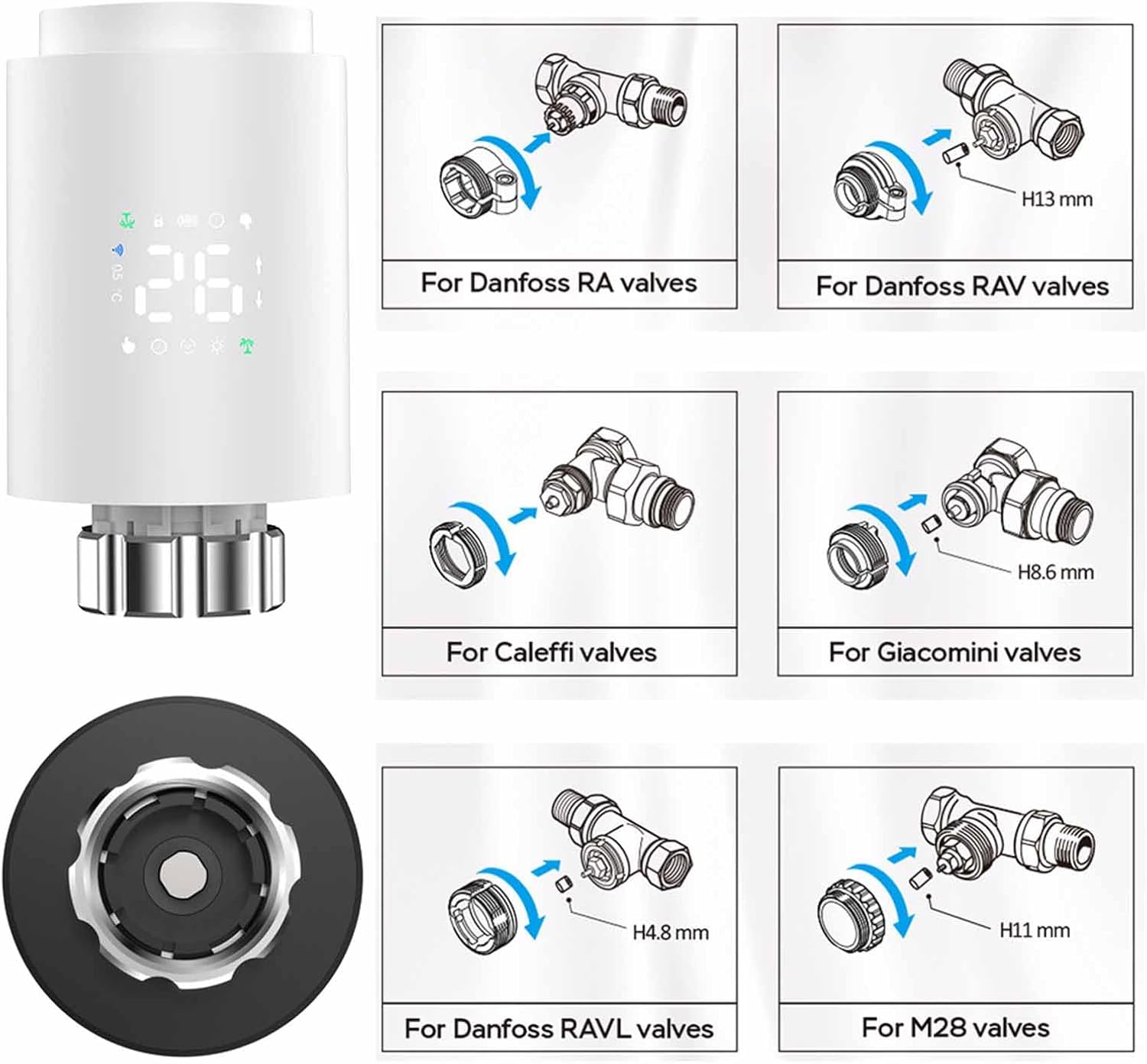
בילד: Installation guide for various radiator valve types, including adapters for Danfoss, Caleffi, Giacomini, and M28 valves.
- Identify your existing radiator valve type.
- Select the appropriate adapter from the installation accessories.
- Attach the adapter to your radiator valve as shown in the diagrams.
- Screw the Walfront Smart Thermostat TRV Valve onto the adapter until it is firmly secured.
3. App Installation and Pairing (Requires Zigbee Hub)
To utilize the smart features of your thermostat, you need to connect it to a Zigbee hub via the Tuya or Smart Life app.

בילד: Visual representation of the Zigbee pairing process between the thermostat, a Zigbee gateway, and the mobile app.
- אָפּלאָדירן די טויה סמארט or קלוג לעבן אַפּ פֿון דיין סמאַרטפֿאָן'ס אַפּ סטאָר (iOS אָדער אַנדרויד).
- רעגיסטרירן אָדער קלאָץ אין צו דיין חשבון.
- Ensure your Zigbee hub is powered on and connected to your home Wi-Fi network.
- אין דער אַפּ, דריק אויף 'צולייגן דעווייס' אדער די '+' בילדל.
- Select 'Gateway' or 'Zigbee Gateway' and follow the on-screen instructions to add your Zigbee hub.
- Once the Zigbee hub is added, select it and then choose 'Add sub-device'.
- Follow the app's instructions to put the TRV valve into pairing mode (usually by pressing and holding a button on the device until an indicator flashes).
- The app will detect and add the TRV valve. You can then rename the device for easy identification.
אַפּערייטינג ינסטראַקשאַנז
1. Basic Operation (Manual Control)
- אַדזשאַסטינג טעמפּעראַטור: Rotate the knob on the thermostat to increase or decrease the desired temperature. The new set temperature will be displayed.
- מאַנואַל מאָדע: The thermostat will maintain the set temperature until changed manually or a programmed schedule takes over.
2. אַפּ קאָנטראָל
Once paired with the Tuya or Smart Life app, you can control your thermostat remotely.

בילד: Mobile app interface demonstrating temperature control and device status.
- Open the Tuya Smart or Smart Life app and select your TRV valve.
- איר קענען view the current room temperature and adjust the set temperature directly from the app.
- Access various operating modes and programming options through the app interface.
3. אַפּערייטינג מאָדעס
The thermostat offers several modes to suit your needs:

בילד: App screenshots showing mode selection, weekly programming, and general settings.
- מאַנואַל מאָדע: האַלט אַ קאָנסטאַנטע טעמפּעראַטור וואָס דער באַניצער שטעלט איין.
- אָטאַמאַטיק מאָדע: גייט נאך דעם פראגראמירטן וועכנטלעכן פלאן.
- Comfort Mode: Sets the temperature to a predefined comfortable level.
- עקאָ מאָדע (ענערגיע שפּאָרן): Sets the temperature to an energy-efficient level.
- וואַקאַציע מאָדע: Maintains a lower, energy-saving temperature for extended periods when you are away.
- Vent Open Mode (Window Check): Automatically detects open windows/vents and temporarily suspends heating to save energy.
4. Weekly Programmable Schedules
Create personalized heating schedules for maximum convenience and energy efficiency.
- The thermostat supports 5+2 (weekdays/weekend), 6+1 (weekdays/Saturday/Sunday), or 7-day programming options.
- You can set up to six time slots per day, each with its own desired temperature.
- Access and configure schedules through the Tuya or Smart Life app under the 'Weekly Program' section.
5. קינד לאַק
Activate the child lock feature via the app settings to prevent unauthorized changes to the thermostat settings.
6. קול קאָנטראָל
The thermostat supports voice control through compatible smart home assistants (e.g., Amazon Alexa, Google Assistant) when integrated with the Tuya/Smart Life app. Refer to your smart assistant's instructions for connecting Tuya/Smart Life devices.
7. Sharing Device
You can share control of the thermostat with family members through the Tuya or Smart Life app.

בילד: Illustration of sharing device control with multiple family members via the app.
- In the app, navigate to the device settings for your TRV valve.
- Look for the 'Share Device' option.
- Follow the prompts to invite family members to control the device. They will need their own Tuya/Smart Life accounts.
וישאַלט
- באַטערי פאַרבייַט: When the battery indicator shows low power, replace the two AA batteries promptly to ensure continuous operation.
- רייניקונג: ווישט אָפּ דאָס אַפּאַראַט מיט אַ ווייכן, טרוקענעם שטאָף. ניצט נישט קיין שרײַבנדיקע רייניגערס אָדער סאָלווענטן.
- סטאָרידזש: If storing the device for an extended period, remove the batteries.
טראָובלעשאָאָטינג
- די מיטל איז נישט פּאַוערינג: קאָנטראָלירט די באַטעריע אינסטאַלאַציע און זיכערט זיך אַז די באַטעריעס זענען פריש.
- קען נישט פאַרבינדן צו אַפּ: Ensure a Zigbee hub is present and properly connected to your Wi-Fi. Confirm the thermostat is in pairing mode. Check Wi-Fi signal strength.
- Temperature not adjusting: Verify the device is not in child lock mode. Check if the valve is physically obstructed.
- נישט פּינקטלעכע טעמפּעראַטור מעסטונגען: Ensure the thermostat is not exposed to direct sunlight or drafts, which can affect readings.
- App shows device offline: Check the Zigbee hub's connection to the internet and ensure the thermostat is within range of the hub.
וואָראַנטי און שטיצן
For warranty information and technical support, please refer to the documentation provided at the point of purchase or contact Walfront customer service. Keep your purchase receipt as proof of purchase.
באַזייַטיקונג
This product contains electronic components and batteries. Do not dispose of it with general household waste. Please follow local regulations for the proper disposal of electronic waste and batteries to protect the environment.