
1. הקדמה
The SMAJAYU SMA26 Pro GNSS Base Receiver is a high-precision RTK surveying system designed for various applications including land, construction, and forestry surveys. This robust device offers wide protocol compatibility, high capability, and integrated features for versatile and accurate performance.
- Wide Protocol Compatibility: Receives and transmits signals compatible with CSS (Lora), Transparent, TT450S, Trimtalk, TRMMARK3, SOUTH, and SATEL standard radio protocols.
- High Capability & Compatibility: Full-constellation 4G RTK GNSS receiver compatible with multiple RTK brands, supporting PPP, PPK, and RTK technologies.
- טילט קאָמפּענסאַציע: Achieves tilt accuracy up to 2.5 cm (at tilt angles ≤30°) without calibration, supporting a maximum tilt measurement angle of up to 60°.
- All-in-One Integration: Features built-in Bluetooth, UHF radio, 4G, Wi-Fi, IMU, antenna, and 32GB storage. Easily switches between base station and rover modes.
- שטאַרק און פאַרלעסלעך: IP67 waterproof and dustproof rating, 2-meter drop resistance, and operates in temperatures from -45℃ to +75℃. Equipped with a 10000mAh battery for up to 20 hours of continuous operation.
2. וואָס איז אין דער קעסטל
The SMA26 Pro Base Receiver package includes the following components:
- 1x GNSS Receiver
- 1x Extension Rod
- 1x Power Adapter + USB Cable
- 1x באַניצער מאַנואַל
- 1x טייפּ מעזשער
- 1x Terminal Antenna
- 1x Disc

Image: Contents of the SMA26 Pro Base Receiver package, including the GNSS receiver, extension rod, power adapter, USB cable, user manual, tape measure, terminal antenna, and disc.
Video: An unboxing demonstration of the SMA26 Pro Base Receiver, showcasing all included components and their packaging.
3. סעטאַפּ
Proper setup of the SMA26 Pro Base Receiver is crucial for accurate measurements. Ensure the base station is placed in an unobstructed area to maximize signal reception and stability.
3.1 באַזע סטאַנציע פּלאַצירונג
Set up the base station on a stable tripod in a location with a clear view of the sky, free from obstructions like tall buildings or dense foliage. This ensures optimal satellite signal acquisition.
3.2 קאַנעקטינג די קאַמפּאָונאַנץ
Attach the GNSS receiver to the extension rod and secure it. Connect the terminal antenna to the designated port on the receiver. Power on the device using the provided power adapter.
Video: Demonstration of setting up the base station using a known point, illustrating the process for accurate initial positioning.
4. אַפּערייטינג ינסטרוקטיאָנס
The SMA26 Pro offers various operating modes and connectivity options for diverse surveying tasks.
4.1 מיטל איבערview

בילד: דעטאַלירט view of the SMA26 Pro GNSS Receiver's front panel buttons and indicator lights, along with its various interfaces including anti-dust plugs, fixed thread, UHF radio antenna, and Type-C connector with SIM slot.
4.2 קאַנעקטיוויטי
The receiver supports 4G, Wi-Fi, and Bluetooth connectivity for seamless data transfer and communication.

Image: The SMA26 Pro GNSS Receiver highlighting its 10000mAh large capacity battery, all-terrain connectivity, and Smart Web פלאטפארם (WEBUI).
4.3 Drone Connection
The SMA26 Pro can be connected to drones for advanced surveying applications. Follow these steps:
- Connect SMA26 Pro via Bluetooth, switch to base station mode, and select the Device Internet data link.
- Pair the remote controller with the UAV.
- Connect the remote controller to SMA26 Pro Wi-Fi and enter the password 12345678.
- Configure NTRIP protocol parameters on the UAV.
- Display fixed solution, indicating a successful connection.

Image: A diagram illustrating the five steps to connect the SMA26 Pro GNSS receiver to a drone for surveying operations.
Video: A demonstration of connecting the SMA26 Pro/Plus and SMA28H receivers with drones for integrated surveying tasks.
4.4 מעזשערמאַנט מאָדעס
The SMA26 Pro supports various surveying modes to suit different project requirements:
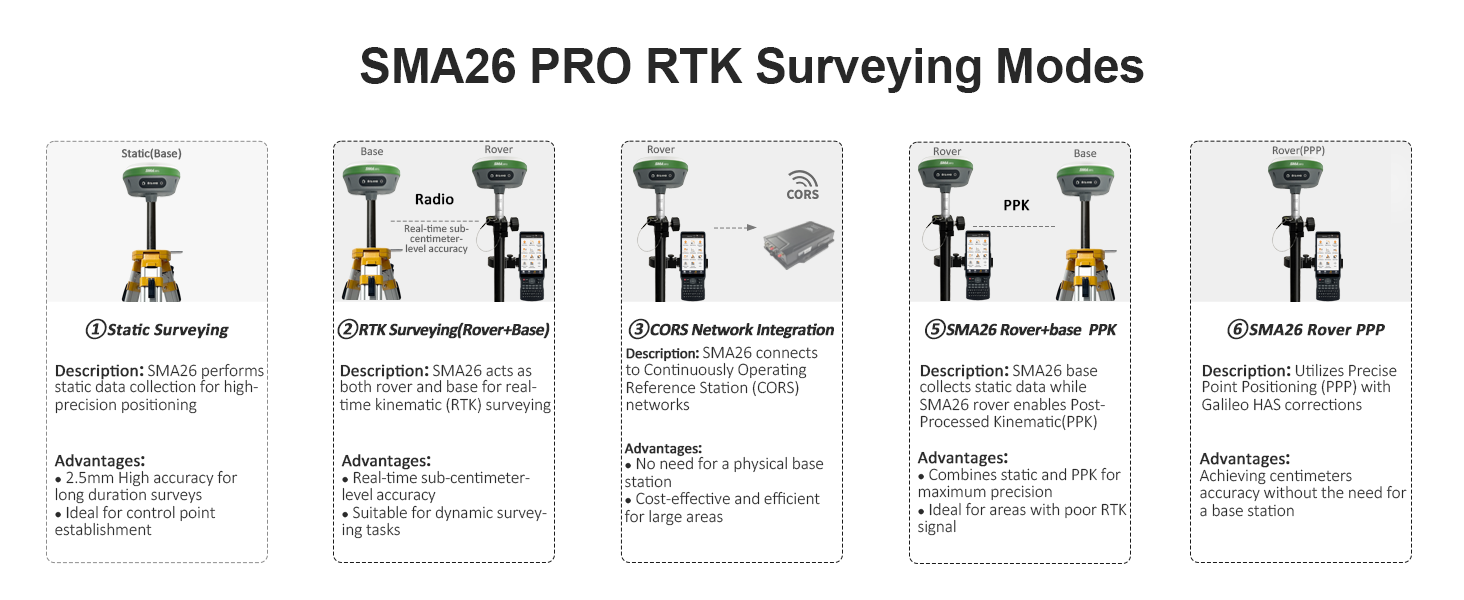
בילד: אן איבערview of the SMA26 Pro RTK Surveying Modes, including Static Surveying, RTK Surveying (Rover+Base), CORS Network Integration, SMA26 Rover+Base PPK, and SMA26 Rover PPP, with descriptions and advantages for each mode.
- Static Surveying: For high-precision data collection and control point establishment.
- RTK Surveying (Rover+Base): Provides real-time sub-centimeter level accuracy for dynamic surveying tasks.
- CORS Network Integration: Connects to Continuously Operating Reference Stations for cost-effective and efficient large-area surveys.
- SMA26 Rover+Base PPK: Combines static and PPK for maximum precision, ideal for areas with poor RTK signal.
- SMA26 Rover PPP: Utilizes Precise Point Positioning with Galileo HAS corrections for centimeter accuracy without a base station.
4.5 Tilt Measurement
The integrated IMU allows for precise tilt measurements, enabling data collection in hard-to-reach areas.

Image: Illustrates the high-precision tilt surveying capability of the SMA26 Pro, showing a user performing measurements with up to 60° tilt, 2.5cm accuracy, 5s fast initialization, and 2m drop resistance.
Video: A demonstration of the SMA26 Pro RTK GNSS Tilt Measurement (IMU) feature, showing how the device maintains accuracy even when tilted.
4.6 דאַטאַ מאַנאַגעמענט
The SMA26 Pro supports efficient data import and export operations.
Video: A guide on performing data import operations with the SMA26 Pro, ensuring seamless integration of existing data.
Video: A guide on performing data export operations with the SMA26 Pro, detailing how to retrieve measurement data from the device.
5. וישאַלט
To ensure the longevity and optimal performance of your SMA26 Pro GNSS Base Receiver, follow these maintenance guidelines:
- רייניקונג: קעסיידער ריין די מיטל מיט אַ ווייך, דamp שטאָף. פֿאַרמײַדט אַברייסיוו רייניגער אָדער סאָלווענטן.
- סטאָרידזש: Store the receiver in its protective case in a cool, dry place when not in use.
- באַטערי זאָרגן: Charge the 10000mAh battery regularly, even during periods of non-use, to maintain battery health. Avoid fully discharging the battery for extended periods.
- Firmware דערהייַנטיקונגען: Periodically check for and install firmware updates to ensure the device has the latest features and performance improvements.
Video: Instructions on how to perform a firmware upgrade for the SMA26 Pro, ensuring your device is up-to-date.
6. טראָובלעשאָאָטינג
If you encounter issues with your SMA26 Pro, refer to the following common troubleshooting tips:
- קיין מאַכט: Ensure the battery is charged and the power button is pressed and held for 2 seconds.
- קאַנעקטיוויטי ישוז: Check Bluetooth, Wi-Fi, or 4G settings. Ensure devices are within range and correctly paired.
- Poor Accuracy: Verify the base station is set up in an open area with a clear view פון הימל. קאָנטראָלירט פֿאַר קיין שטערונגען אָדער שטאַרקע עלעקטראָמאַגנעטישע שטערונגען.
- No RTK Fix: Confirm that the base station is transmitting corrections and the rover is receiving them. Check NTRIP settings if applicable.
Video: A step-by-step guide on how to output a debug file from the SMA26 Pro, which can be useful for diagnosing technical issues.
7. ספּעסאַפאַקיישאַנז
| שטריך | דעטאַל |
|---|---|
| סאָרט | SMAJAYU |
| מאָדעל נאָמען | SMA26 Pro Base |
| פאַרשטעלן גרייס | 5.45 אינטשעס |
| ספּעציעלע שטריך | NOAA certification, Static surveying, Waterproof |
| קאַנעקטיוויטי טעכנאָלאָגיע | BT (בלועטאָאָטה) |
| באַטערי לעבן | 2 days (10000mAh, up to 20 hours continuous operation) |
| אָפּערייטינג סיסטעם | לינוקס |
| זכּרון סטאָרידזש קאַפּאַסיטי | 32 גיגאבייט |
| שטיצט סאַטעליט נאַוויגאַציע סיסטעם | BeiDou, GLONASS, GPS, Galileo |
| נומער דימענשאַנז ל x וו x ה | 5.51"ל x 5.55"בר x 3.46"ה |
| פּונקט וואָג | 1.03 קילאָגראַמס |
8. וואָראַנטי און שטיצן
The SMA26 Pro GNSS Base Receiver comes with a 1 יאָר וואָראַנטי from the manufacturer, SMAJAYU.
For technical support, troubleshooting assistance, or warranty claims, please contact SMAJAYU customer service. Refer to the contact information provided in your user manual or visit the official SMAJAYU webפּלאַץ.
צוריקקער פּאָליטיק: דאָס פּראָדוקט איז בארעכטיגט פֿאַר אַ 30-טאָג צוריקקער/פאַרבייַט פּאָליטיק פֿון דעם טאָג פֿון קויפֿן.