
1. הקדמה
א דאנק פארן קויפןasing the MLWSHR Digital LED Alarm Clock Model 8808. This device combines a digital alarm clock with a thermo-hygrometer, offering dual alarms, snooze function, date and year display, 12/24 hour switch, weekday settings, Daylight Saving Time (DST) functionality, auto-dimmable display with three brightness levels, and a convenient 5V1A USB output for charging other devices. Please read this manual carefully to ensure proper use and maintenance of your new alarm clock.
2. זיכערקייַט אינפֿאָרמאַציע
- האַלט דעם אַפּאַראַט אַוועק פון וואַסער און הויך-פייכטקייט סביבות.
- שטעלט נישט אויס דעם אפאראט צו עקסטרעמע טעמפעראטורן אדער דירעקטער זון פאר לענגערע צייטן.
- Use only the provided USB Type-C cable for power.
- פרובירט נישט צו צענעמען אדער פאררעכטן דעם אפאראט אליין. קאנטאקטירט קאסטומער סופארט אויב פראבלעמען קומען אויף.
- Ensure proper ventilation when using the USB output to charge other devices.
3. פּעקל אינהאַלט
- MLWSHR Digital LED Alarm Clock Model 8808
- וסב טיפּ-C מאַכט קאַבלע
- באַניצער מאַנואַל
4. פּראָדוקט איבערview
מאַכט זיך באַקאַנט מיט די הויפּט קאָמפּאָנענטן און קאָנטראָלס פון אייער וועקער זייגער.
This image displays the front of the MLWSHR Digital LED Alarm Clock, highlighting the time display, weekday indicators, temperature in Celsius, humidity percentage, and dual alarm icons. It also points to the Daylight Saving Time (DST) indicator.

This image illustrates the side and back of the alarm clock, detailing the USB Type-C input for primary power, the battery compartment for 3x AAA backup batteries (not included), and the USB-A output (5V1A) for charging other devices. It also shows the control buttons located on the top edge.
קאָנטראָלס:
- SET קנעפּל: גייט אריין אין סעטטינג מאָדע פֿאַר צייט, דאַטע און אַלאַרמס.
- UP (+) Button: Increases values during setting, adjusts brightness.
- DOWN (-) Button: Decreases values during setting, adjusts brightness.
- שלאָף/ליכט קנעפּל: Activates snooze, adjusts display brightness.
- אַלאַרם 1 קנעפּל: Activates/deactivates Alarm 1, enters Alarm 1 setting.
- אַלאַרם 2 קנעפּל: Activates/deactivates Alarm 2, enters Alarm 2 setting.
- 12/24 שעה קנעפל: Switches between 12-hour and 24-hour time formats.
- °C/°F קנעפּל: Switches between Celsius and Fahrenheit temperature display.
5. סעטאַפּ
5.1 מאַכט צושטעלן
The MLWSHR Digital LED Alarm Clock can be powered in two ways:
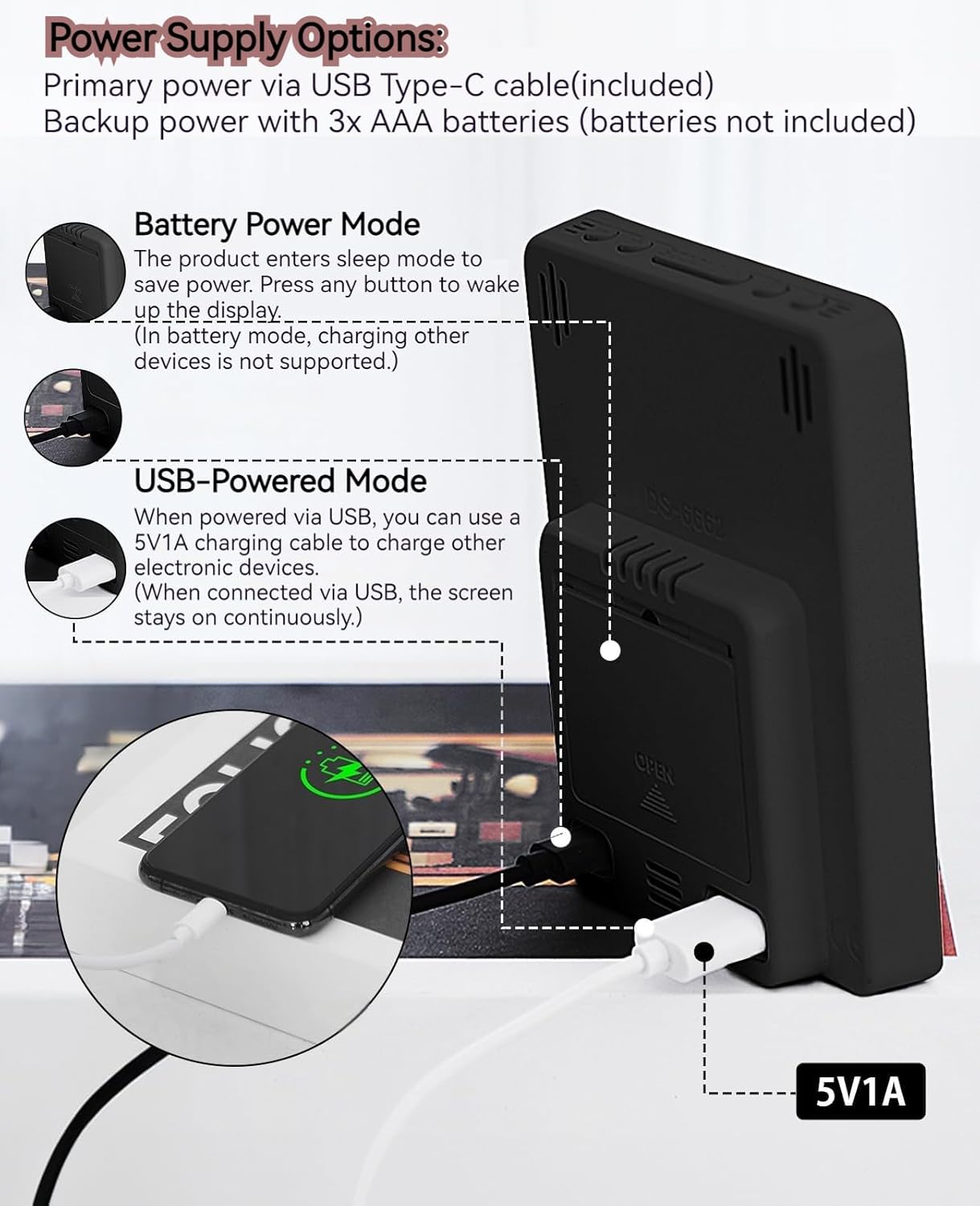
- Primary Power (USB Type-C): Connect the provided USB Type-C cable to the clock's input port and plug the other end into a 5V1A USB power adapter (not included). When powered via USB, the display will remain continuously on.
- Backup Power (3x AAA Batteries): Insert 3 AAA batteries (not included) into the battery compartment on the back of the clock. In battery-only mode, the display will enter sleep mode to conserve power. Press any button to temporarily activate the display. Note that the USB output for charging other devices is not supported when operating on battery power alone.
5.2 ערשטע צייט און דאַטע איינשטעלונג
After connecting power, the clock will typically display a default time. To set the correct time and date:
- דריקן און האַלטן די שטעלן קנעפל פאר 3 סעקונדעס צו אריינגיין אין צייט איינשטעלונג מאָדע. די שעה ציפערן וועלן בלינקען.
- ניצן די אַרויף (+) or אַראָפּ (-) קנעפּלעך צו סטרויערן די שעה.
- דרוק שטעלן נאכאמאל צו באשטעטיגן די שעה און אריבערגיין צו מינוט איינשטעלונג. די מינוט ציפערן וועלן בלינקען.
- ניצן די אַרויף (+) or אַראָפּ (-) קנעפּלעך צו סטרויערן די מינוט.
- פאָרזעצן דרינגלעך שטעלן to cycle through and set the Year, Month, and Day using the אַרויף (+) or אַראָפּ (-) buttons for adjustment.
- After setting the Day, press שטעלן נאך איין לעצט מאל צו פארלאזן דעם סעטטינג מאָדוס.
6. אַפּערייטינג ינסטרוקטיאָנס
6.1 12/24 Hour Format Switch
דרוק די 12/24HR קנעפּל צו טוישן צווישן 12-שעה (מיט AM/PM אינדיקאַטאָר) און 24-שעה צייט פֿאָרמאַטן.
This video demonstrates various features of the MLWSHR Digital LED Alarm Clock, including the time, temperature, humidity, weekday display, auto/manual brightness adjustment, 12/24 hour switch, and the easy-to-use buttons and USB-C input/USB-A output.
6.2 שטעלן אַלאַרמס (אַלאַרם 1 און אַלאַרם 2)
The clock features two independent alarms. Each alarm can be set for specific days of the week (Monday-Friday, Monday-Saturday, or Monday-Sunday).

This image illustrates the dual alarm functionality, showing how each alarm can be customized to ring on specific days of the week: Monday to Friday, Monday to Saturday, or every day. It highlights the alarm icons and weekday indicators on the display.
- דרוק די שרעק 1 or שרעק 2 קנעפל צו אויסקלייבן דעם געוואונטשענעם שרעק. די שרעק אייקאן וועט דערשיינען אויפן דיספלעי.
- דריק און האַלט די אויסגעקליבענע שרעק button for 3 seconds to enter alarm setting mode. The hour digits will flash.
- ניצן די אַרויף (+) or אַראָפּ (-) קנעפּלעך צו סטרויערן די שרעק שעה.
- דרוק די שרעק קנעפּל נאכאמאל צו באשטעטיגן די שעה און אריבערגיין צו מינוט איינשטעלונג.
- ניצן די אַרויף (+) or אַראָפּ (-) קנעפלעך צו סטרויערן די אַלאַרם מינוטן.
- דרוק די שרעק button again to set the alarm frequency (e.g., Mon-Fri, Mon-Sat, Mon-Sun). Use אַרויף (+) or אַראָפּ (-) צו אויסקלייַבן.
- דרוק די שרעק button one last time to exit alarm setting mode.
- צו אנצינדן אדער אויסלעשן אן אלארם, דריק פשוט די קארעספאנדירנדע שרעק 1 or שרעק 2 button briefly. The alarm icon will appear (ON) or disappear (OFF) from the display.
6.3 סנוז פונקציע
When an alarm sounds, you can activate the snooze function for a temporary delay.

This image shows the clock's snooze button and how it functions. When the alarm rings, a brief press of the snooze button will delay the alarm for 5 minutes. Holding the button for more than two seconds will turn off the alarm for that day.
- ווען דער שרעק רינגס, דריקן די SNOOZE / LIGHT button briefly. The alarm will pause and ring again after 5 minutes.
- To turn off the alarm for the current day, press and hold the SNOOZE / LIGHT button for more than 2 seconds, or press any other button (except SNOOZE / LIGHT).
6.4 ברייטנאַס אַדזשאַסטמאַנט
The clock features an auto-dimmable display and three manual brightness levels.
- אַוטאָ דימאַבלע: The built-in light sensor automatically adjusts the display brightness based on ambient light conditions. This is the default setting.
- מאַנועלע ברייטקייט: דריקן קורץ אויף די SNOOZE / LIGHT button to cycle through 3 manual brightness levels (L-01, L-02, L-03).
- To return to auto-dimmable mode, continue pressing the SNOOZE / LIGHT button until 'L-AU' appears on the display.
6.5 Thermometer & Hygrometer
The clock displays indoor temperature and humidity levels.

This image highlights the temperature and humidity readings on the clock's display. It also provides guidance on ideal humidity levels and suggests actions (humidifier/dehumidifier) if levels are too low or too high. The temperature detection range is 23°F to 122°F (-5°C to 50°C) with an error margin of ±2°F.
- טעמפּעראַטור אַפּאַראַט באַשטימען: דרוק די ° C / ° F button to switch between Celsius and Fahrenheit temperature display.
- The temperature range is 23°F to 122°F (-5°C to 50°C) with an error margin of ±2°F.
- The humidity measurement error is within ±5%.
6.6 USB Power Output (5V1A)
The clock features a USB-A output port (5V1A) that can be used to charge other electronic devices.

This image demonstrates the use of the clock's USB-A output port to charge a smartphone. The clock provides a 5V1A output, making it a convenient charging station. This feature is only available when the clock is powered via its USB Type-C input.
- Connect your device's charging cable to the USB-A output port on the back of the alarm clock.
- Ensure the alarm clock is powered via its USB Type-C input for this feature to function. The USB output is not active when the clock is running on battery power alone.
6.7 זומערצייט (DST)
The clock supports Daylight Saving Time adjustment.
- To activate or deactivate DST, press and hold the DST button (if available, or refer to the SET button sequence for DST in specific models). The DST indicator will appear or disappear.
7. וישאַלט
- רייניקט די זייגער מיט אַ ווייכן, טרוקענעם שטאָף. ניצט נישט קיין שרײַבנדיקע רייניגערס אדער סאָלווענטן.
- If the clock will not be used for an extended period, remove the AAA batteries to prevent leakage.
- Keep the USB ports free from dust and debris.
8. טראָובלעשאָאָטינג
| פּראָבלעם | מעגלעך סיבה | לייזונג |
|---|---|---|
| Display is off or intermittent. | Running on battery power in sleep mode, or no power. | Press any button to activate display in battery mode. Connect USB Type-C cable for continuous display. Check USB power source. |
| USB אויסגאנג לאדט נישט אויף דעווייסעס. | Clock is running on battery power, or USB cable is faulty. | Ensure the clock is connected to primary USB Type-C power. Try a different USB cable. |
| דער אַלאַרם קלינגט נישט. | דער אַלאַרם איז נישט אַקטיוויזירט אָדער פאַלש געשטעלט. | Check if the alarm icon is displayed. Re-set the alarm time and frequency. |
| טעמפּעראַטור לייענונג איז נישט פּינקטלעך. | Environmental factors or sensor error. | Allow time for the sensor to stabilize. Ensure the clock is not near heat sources or vents. Note the ±2°F error margin. |
| Cannot set time/date. | Not in setting mode, or buttons are unresponsive. | Press and hold the SET button for 3 seconds. Ensure the clock has stable power. |
9. ספּעסאַפאַקיישאַנז
- סאָרט: MLWSHR
- מאָדעל נומער: 8808
- ווייַז טיפּ: געפירט
- מאַכט מקור: USB Type-C (5V1A) / 3x AAA Batteries (backup)
- פּראָדוקט דימענשאַנז: 3.54"ברייט x 4.72"היך
- פֿעיִקייטן: Dual Alarms, Snooze, Thermo-Hygrometer, Date & Year Display, 12/24 Hour Switch, Weekdays, DST, Auto Dimmable (3 levels), USB Output (5V1A)
- מאַטעריאַל: Eco-friendly Plastic
- דרינענדיק / דרויסנדיק באַניץ: דרינענדיק
10. וואָראַנטי & שטיצן
The MLWSHR Digital LED Alarm Clock Model 8808 comes with a 2-יאָר וואָראַנטי פֿון דעם קויפֿדאַטום. די וואָראַנטי דעקט פֿאַבריקאַציע חסרונות און מאַלפאַנגקשאַנז אונטער נאָרמאַל נוצן.
For technical support, warranty claims, or any questions regarding your product, please contact MLWSHR customer service through the retailer's platform or visit our official website for contact information. Please have your purchase receipt and model number ready when contacting support.