
1. הקדמה
Thank you for choosing the TechniSat DIGITRADIO 52 BT. This DAB+ FM alarm clock radio is designed to provide reliable timekeeping, radio reception, and Bluetooth audio streaming. This manual will guide you through the setup, operation, and maintenance of your device.
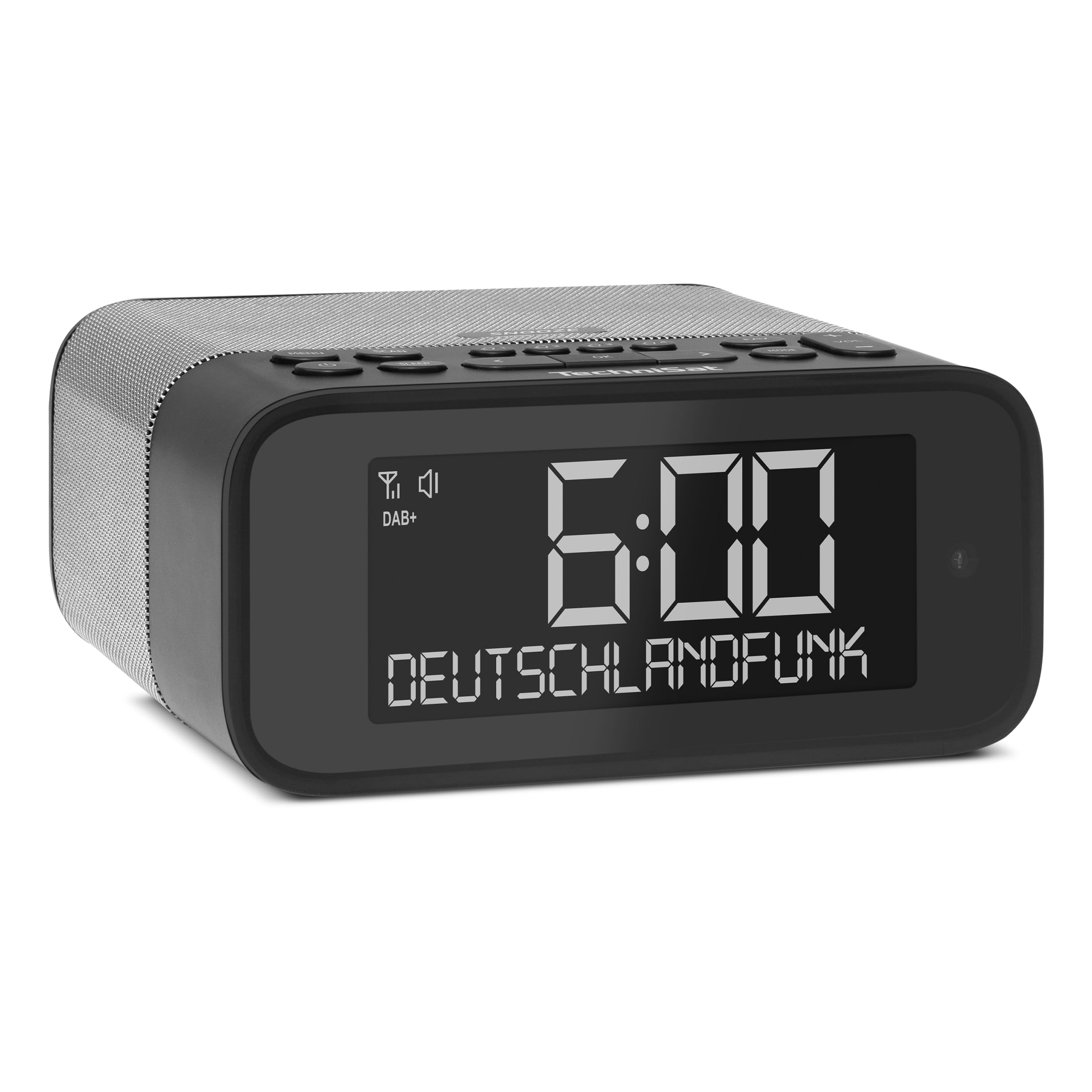
בילד 1: פראָנט view of the TechniSat DIGITRADIO 52 BT. The device is black with a large digital display showing "6:00" and "DEUTSCHLANDFUNK". Control buttons are visible on the top panel.
2. זיכערקייַט אינפֿאָרמאַציע
- לייענען אַלע ינסטראַקשאַנז קערפאַלי איידער נוצן.
- האַלט דעם אַפּאַראַט אַוועק פון וואַסער, נעץ און דירעקטע היץ-קוואַלן.
- פרובירט נישט צו צענעמען אדער מאדיפיצירן דעם אפאראט. לאָזט איבער אלע סערוויסעס צו קוואַליפֿיצירטע פּערסאָנעל.
- ניצן בלויז די צוגעשטעלט מאַכט אַדאַפּטער.
- ענשור געהעריק ווענטאַליישאַן אַרום די מיטל.
- רייניקט דעם אַפּאַראַט מיט אַ ווייכן, טרוקענעם שטאָף. ניצט נישט קיין פליסיקע רייניגער.
3. פּעקל אינהאַלט
ביטע טשעק די פּאַקעט פֿאַר די פאלגענדע זאכן:
- TechniSat DIGITRADIO 52 BT unit
- מאַכט אַדאַפּטער
- באַניצער מאַנואַל
4. פּראָדוקט איבערview
4.1. קאָנטראָלן און אַרויסווייַזונג
The DIGITRADIO 52 BT features an intuitive layout for easy access to all functions.
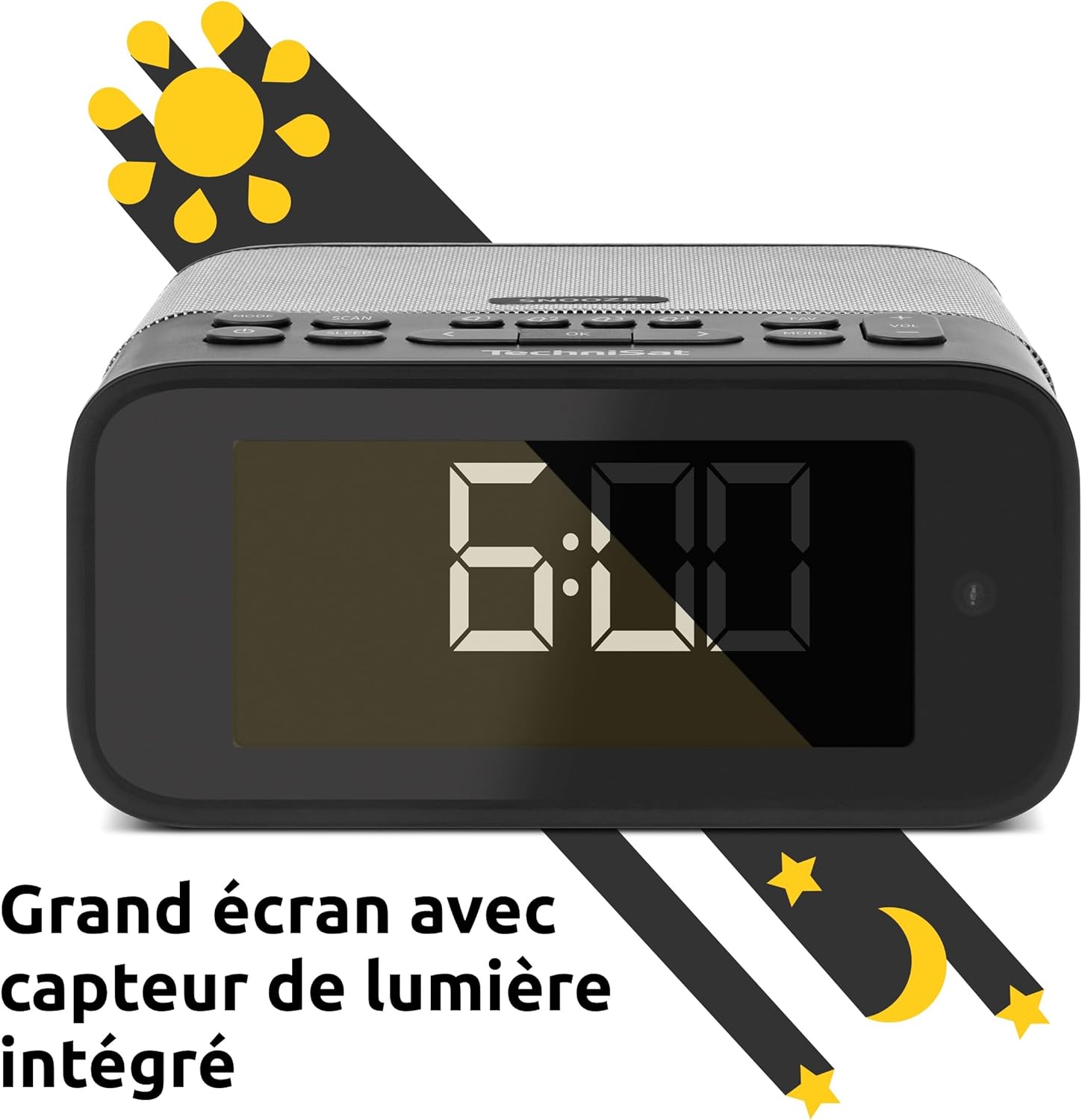
Image 2: Close-up of the large display with integrated light sensor. The display shows "6:00". The light sensor automatically adjusts screen brightness based on ambient light.
4.2. דערציען פּאַנעל קאַנעקשאַנז
The rear panel provides essential connectivity options.
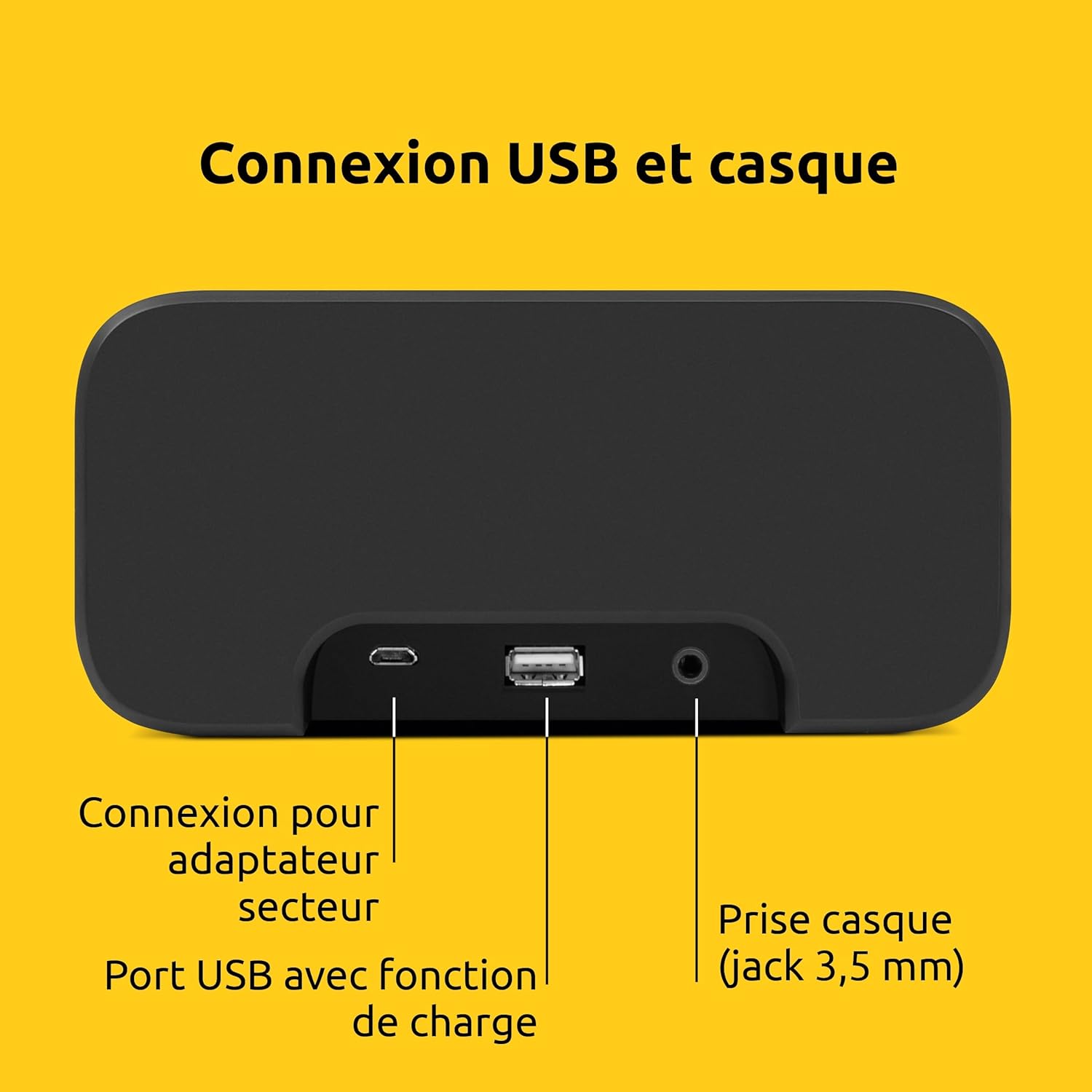
בילד 3: דערציען view of the device showing the power adapter connection, a USB port with charging function, and a 3.5mm headphone jack.
- מאַכט קשר: פאַרבינדן די סאַפּלייד מאַכט אַדאַפּטער דאָ.
- וסב פּאָרט: For charging external devices (e.g., smartphones, tablets).
- כעדפאָון דזשאַק (3.5 מם): פֿאַר פּריוואַט צוגעהערט.
5. סעטאַפּ
5.1. מאַכט קאַנעקשאַן
- Connect the power adapter to the DC input on the rear of the DIGITRADIO 52 BT.
- Plug the power adapter into a standard wall outlet (230 Volts).
- The device will power on and enter standby mode or begin initial setup.
5.2. Initial Scan (DAB+ and FM)
Upon first power-on, the radio will automatically scan for available DAB+ and FM stations. This process may take a few minutes.

Image 4: The radio display showing "DAB+" and "6:00 DEUTSCHLANDFUNK", indicating successful reception of a DAB+ station.
5.3. באַשטעטיקן צייט און דאַטע
The time and date are usually synchronized automatically via DAB+ or FM signals. If manual adjustment is needed, refer to the "Operating" section for menu navigation.
6. אָפּעראַציע
6.1. מאַכט אויף/אויס און סטאַנדביי
- דרוק די מאַכט קנעפּל צו קער די מיטל אויף אָדער אַוועק.
- In standby mode, the display shows the current time.
6.2. Radio Tuning (DAB+ / FM)
- דרוק די מאָדע קנעפּל צו אויסקלייבן DAB+ אדער FM ראַדיאָ.
- ניצן די ניגן / אויסקלייַבן knob or buttons to scan for stations.
- To save a favorite station, press and hold the פּריסעט button, then select a preset number.
- To recall a favorite station, press the פּריסעט button, then select the desired preset number. Up to 20 favorite stations can be stored for both DAB+ and FM.
6.3. בלועטוט אודיאָ סטרימינג
- דרוק די מאָדע button to select Bluetooth mode. The display will show "Bluetooth Pairing".
- On your Bluetooth-enabled device (e.g., smartphone, tablet), search for "DIGITRADIO 52 BT" in the Bluetooth settings.
- Select the device to pair. Once paired, you can stream audio from your device to the radio.
6.4. באַנד קאָנטראָל
- ניצן די באַנד buttons or knob to adjust the audio output level.
7. שרעק פאַנגקשאַנז
The DIGITRADIO 52 BT supports up to four programmable alarms, a snooze function, and a sleep timer.

Image 5: Visual representation of the alarm features: 4 adjustable alarms, adjustable alarm rhythm, sleep timer, and a tactile snooze button.
7.1. באַשטעטיקן אַלאַרמס
- דרוק די שרעק קנעפּל צו אַרייַן אַלאַרם סעטאַפּ.
- Select one of the four available alarms (Alarm 1-4).
- Set the desired alarm time, alarm source (radio or beep), and alarm volume.
- Choose the alarm rhythm: daily, weekdays (Mon-Fri), or weekends (Sat-Sun).
- באַשטעטיקן די סעטטינגס צו אַקטיווירן דעם אַלאַרם.
7.2. שלאָף פונקציע
- When an alarm sounds, gently touch the סנוז area on the top of the device to temporarily silence the alarm. The alarm will sound again after a set interval.
7.3. שלאָפן טימער
- דרוק די שלאָף קנעפּל צו אַקטיווירן דעם שלאָף טייַמער.
- Select the desired duration (e.g., 15, 30, 60 minutes). The radio will play for the set duration and then automatically switch to standby.
8. ווייַז סעטטינגס
The large display's brightness can be adjusted manually or automatically.
- אָטאַמאַטיק ברייטנאַס: The integrated light sensor automatically adjusts the display brightness based on ambient light conditions. This ensures comfortable viewing during the day and minimal disturbance at night.
- מאַנועלע ברייטקייט: Access the display settings through the menu to manually set the desired brightness level.
9. וסב טשאַרדזשינג
The USB port on the rear panel can be used to charge external devices.
- Connect your smartphone, tablet, or other USB-powered device to the USB port using a compatible charging cable.
- די דעווייס וועט אָנהייבן אויטאָמאַטיש אָפּלאָדן.
10. טראָובלעשאָאָטינג
| פּראָבלעם | מעגלעך סיבה | לייזונג |
|---|---|---|
| קיין מאַכט | שטראָם אַדאַפּטער נישט פארבונדן אדער אַ דעפעקטיווע אַוטלעט. | ענשור אַז די מאַכט אַדאַפּטער איז סיקיורלי פארבונדן און די ווענטיל איז פאַנגקשאַנאַל. |
| נעבעך ראַדיאָ אָפּטראָג | Weak signal, antenna position. | Adjust the antenna position. Try moving the radio to a different location. Perform a new station scan. |
| בלועטאָאָטה פּערינג ניט אַנדערש | Device not in pairing mode, out of range, or already paired. | Ensure the radio is in Bluetooth pairing mode. Move your device closer. Disconnect from other Bluetooth devices. |
| דער שרעק קלינגט נישט | Alarm not activated, volume too low. | Check alarm settings to ensure it is enabled and the volume is adequate. |
| ווייַז אויך טונקל / העל | Automatic brightness setting, manual override needed. | Adjust manual brightness settings or ensure the light sensor is not obstructed. |
11. ספּעסאַפאַקיישאַנז
| שטריך | דעטאַל |
|---|---|
| סאָרט | TechniSat |
| מאָדעל | DR 52 (0000/2938) |
| ראַדיאָ טונער | DAB+, עפעם |
| בלועטאָאָטה | יא (בלוטוט 5) |
| רעזולטאַט מאַכט | 3W RMS (mono) |
| ווייַז | 4.2-inch Dimmable LCD with Light Sensor |
| אַלאַרמס | 4 programmable alarms (radio/beep) |
| סנאָאָזע פֿונקציע | Yes (tactile button) |
| שלאָף טיימער | יא |
| קאַנעקטיוויטי | USB (charging), 3.5mm Headphone Jack |
| מאַכט מקור | Electric Cable (230V input) |
| דימענשאַנז (L X H X D) | 15 סענטימעטער X 7 סענטימעטער X 14 סענטימעטער |
| וואָג | 606 גראַמז |
| מאַטעריאַל | פּלאַסטיק |

Image 6: The compact design of the radio with its dimensions indicated as 15 cm (length), 7 cm (height), and 14 cm (depth).
12. וואָראַנטי און שטיצן
12.1. פאַבריקאַנט'ס גאַראַנטיע
The TechniSat DIGITRADIO 52 BT comes with a 2-יאָר לימיטעד וואָראַנטי פֿון דעם קויפֿדאַטום. די וואָראַנטי דעקט חסרונות אין מאַטעריאַלן און אַרבעט אונטער נאָרמאַלן באַנוץ. ביטע באַהאַלטן אייער קויפֿבאַווייַז פֿאַר וואָראַנטי קלאַגעס.
12.2. קונה שטיצן
For technical assistance, troubleshooting, or warranty inquiries, please contact TechniSat customer support. Refer to the official TechniSat website for contact details and further information.
Note: Software updates are not guaranteed. Information on spare parts availability is not provided.