
1. הקדמה
Thank you for choosing the GEARit Portable Bluetooth Wireless Speaker. This manual provides essential information for setting up, operating, and maintaining your speaker. Designed for versatility, this 40W speaker delivers crystal clear sound with deep bass, features IPX6 water resistance, and offers multiple connectivity options, making it ideal for both indoor and outdoor use.

Image: The GEARit Portable Bluetooth Speaker highlighting its powerful sound and IPX6 water resistance.
2. פּעקל אינהאַלט
- GEARit Portable Bluetooth Wireless Speaker
- USB-C צו USB-A טשאַרדזשינג קאַבלע
- 3.5 מם AUX קאַבלע
- באַניצער מאַנואַל

Image: The GEARit speaker shown with its USB-C charging cable and AUX cable, illustrating the complete package.
3. פּראָדוקט איבערview
3.1 קאָנטראָלן און פּאָרטן
Familiarize yourself with the speaker's buttons and connection ports for optimal use.
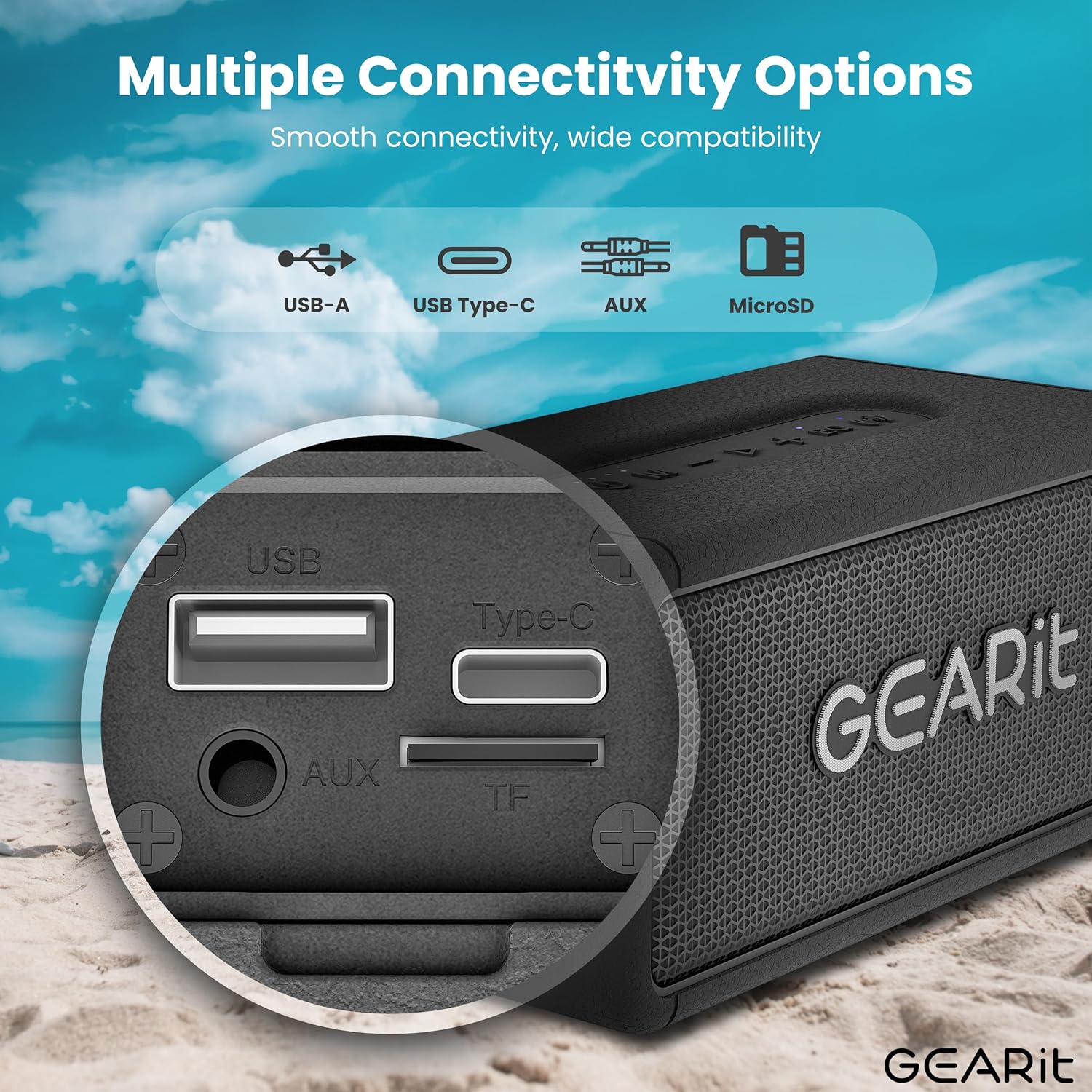
בילד: א דעטאַלירטע view of the speaker's connectivity panel, showing the USB-A, USB Type-C, AUX, and MicroSD card slots.
- מאַכט קנעפּל: דריקן און האַלטן צו אנצינדן/אויסלעשן. קורץ דריקן צו קאָנטראָלירן באַטאַרייע סטאַטוס.
- מאָדע קנעפּל (M): Short press to switch between Bluetooth, AUX, and MicroSD modes.
- באַנד אַראָפּ (-): קורץ דריקן צו פֿאַרמינערן די באַנד. לאַנג דריקן פֿאַר פֿריִערדיקן ליד.
- Play/Pause Button (>): קורץ דריקן צו שפּילן/פּויזירן מוזיק. קורץ דריקן צו ענטפֿערן/ענדיגן רופן. לאַנג דריקן צו אָפּוואַרפֿן רופן.
- באַנד אַרויף (+): קורץ דריקן צו פארגרעסערן די קול. לאנג דריקן פארן נעקסטן ליד.
- EQ Button (EQ): Short press to cycle through EQ modes (Indoor/Outdoor).
- TWS Button (Wireless Icon): Short press to initiate TWS pairing.
- וסב- C פּאָרט: פֿאַר טשאַרדזשינג די רעדנער.
- AUX-אין פּאָרט: פֿאַר דראָטיקער אַודיאָ פֿאַרבינדונג.
- MicroSD Card Slot (TF): פֿאַר שפּילן מוזיק גלייך פֿון אַ מיקראָSD קאַרטל.
- USB-A פּאָרט: For USB playback.
4. סעטאַפּ
4.1 אויפלאָדן דעם רעדנער
- פֿאַרבינדט דעם צוגעשטעלטן USB-C טשאַרדזשינג קאַבל צום רעדנער'ס USB-C פּאָרט.
- פֿאַרבינדט דעם אַנדערן עק פֿונעם קאַבל צו אַ USB מאַכט אַדאַפּטער (נישט אַרייַנגערעכנט) אָדער אַ קאָמפּיוטער'ס USB פּאָרט.
- דער LED אינדיקאַטאָר וועט ווײַזן דעם טשאַרדזשינג סטאַטוס. א פולע טשאַרדזשינג נעמט טיפּיש אַרום 3-4 שעה.
4.2 פּאַוערינג אויף / אַוועק
- To power on, press and hold the Power button until you hear an audible prompt.
- צו אויסלעשן, דריק און האלט דעם פּאַוער קנעפּל ווידער ביז דער רעדנער שליסט זיך אויס.
4.3 בלועטאָאָטה פּערינג
דער רעדנער וועט אויטאָמאַטיש אַרייַן אין בלוטוט פּערינג מאָדע ווען עס ווערט אָנגעצונדן צום ערשטן מאָל אָדער אויב קיין מיטל איז נישט פארבונדן.
- Ensure the speaker is powered on and in Bluetooth mode (blue LED blinking).
- אויף אייער דעווייס (סמאַרטפאָן, טאַבלעט, אאז"וו), אַקטיווירט בלועטוט און זוכט פֿאַר פֿאַראַן דעווייסעס.
- Select "GEARit Speaker" from the list.
- Once connected, the blue LED will remain solid, and you will hear a confirmation tone.

Image: An illustration of the Bluetooth 5.3 chip, emphasizing stable and fast connectivity.
4.4 אמתע ווירעלעס סטערעאָ (TWS) פּאָרינג
For an enhanced stereo experience, you can pair two GEARit Portable Bluetooth Wireless Speakers together.
- זיכער מאַכן אַז ביידע רעדנערס זענען אנגעצונדן און נישט פארבונדן צו קיין אַנדער בלוטוט מיטל.
- On one speaker (this will be the primary speaker), short press the TWS button (wireless icon). It will emit a pairing tone.
- דער הויפּט רעדנער וועט אויטאָמאַטיש זוכן און זיך פֿאַרבינדן מיטן צווייטן רעדנער.
- Once paired, both speakers will emit a confirmation tone, and the TWS indicator on both speakers will light up.
- איצט, פֿאַרבינדט אייער דעווייס צום הויפּט רעדנער דורך בלועטוט ווי באַשריבן אין סעקציע 4.3.

Image: Two GEARit speakers set up for True Wireless Stereo (TWS) pairing, providing an immersive audio experience for a group.
4.5 Other Connectivity Options
- AUX אין: Connect an audio device using the 3.5mm AUX cable to the AUX-in port. The speaker will automatically switch to AUX mode.
- מיקראָסד קאָרט: Insert a MicroSD card with music files into the TF slot. The speaker will automatically switch to MicroSD mode and begin playback.
- וסב פּלייַבאַקק: אַרייַנלייגן אַ וסב פאָר מיט מוזיק files into the USB-A port. The speaker will automatically switch to USB mode and begin playback.

Image: The speaker's versatile input options, including USB-A, USB Type-C, MicroSD, and AUX, for broad compatibility.
5. אַפּערייטינג ינסטרוקטיאָנס
5.1 גרונטלעכע ווידערשפּיל
- שפּיל / פּויזע: קורץ דריקן די שפּיל / פּויזע קנעפּל.
- באַנד אַדזשאַסטמאַנט: דריק קורץ די באַנד אַרויף (+) אָדער באַנד אַראָפּ (-) קנעפּלעך.
- ווייַטער / פרייַערדיק שפּור: Long press the Volume Up (+) for the next track or Volume Down (-) for the previous track.
5.2 עק מאָדעס
The speaker features two Equalizer (EQ) modes to optimize sound for different environments.
- Short press the EQ button to switch between דרינענדיק און דרויסנדיק מאָדעס.
- דרינענדיק מאָדע: פּראָווידעס אַ באַלאַנסט געזונט פּראָfile suitable for enclosed spaces.
- דרויסנדיק מאָדע: Enhances bass and volume for better projection in open environments.

Image: Visual representation of DSP Technology, highlighting 40W peak power and the two EQ modes (Indoor & Outdoor).
5.3 הענט-פריי רופן
When connected via Bluetooth, you can manage phone calls directly from the speaker.
- ענטפֿערן / סוף רופן: קורץ דריקן די שפּיל / פּויזע קנעפּל.
- אָפּוואַרפן רופן: לאנג דריקן די שפּיל / פּויזע קנעפּל.
5.4 וואַסער קעגנשטעל (IPX6)
The GEARit speaker is IPX6 water-resistant, meaning it can withstand powerful water jets. It is suitable for use outdoors, by the pool, or at the beach. דו זאלסט נישט סאַבמערדזש די רעדנער אין וואַסער. Ensure the port cover is securely closed before exposure to water.

Image: The GEARit speaker being splashed with water, showcasing its IPX6 water-resistant design.

Image: A graphic emphasizing the IPX6 water-resistant feature of the speaker, suitable for wet environments.
5.5 באַטאַרייע לעבן
דער רעדנער גיט ביז 20 שעה שפּילצייט אויף איין אָפּצאָל, דיפּענדינג אויף די באַנד און אַודיאָ אינהאַלט.

Image: The GEARit speaker in a natural outdoor environment, symbolizing its long-lasting battery for extended use.
6. וישאַלט
- רייניקונג: ווישן די רעדנער מיט אַ ווייך, דamp שטאָף. דו זאלסט נישט נוצן האַרב קעמיקאַלז אָדער אַברייסיוו קלינערז.
- סטאָרידזש: האַלט דעם רעדנער אין אַ קיל, טרוקן אָרט אַוועק פון דירעקט זונשייַן און עקסטרעמע טעמפּעראַטורן.
- באַטערי זאָרגן: To prolong battery life, fully charge the speaker before long periods of inactivity. Avoid completely draining the battery frequently.
- Port Cover: Always ensure the port cover is securely closed to maintain water resistance.
7. טראָובלעשאָאָטינג
- רעדנער טוט זיך נישט אן: זיכער מאַכן אַז די באַטאַרייע איז אָנגעלאָדן. פֿאַרבינדט דעם רעדנער צו אַ מאַכט מקור מיטן USB-C קאַבל.
- קען נישט צוזאמענשטעלן דורך בלוטוט:
- Ensure the speaker is in Bluetooth pairing mode (blue LED blinking).
- Make sure Bluetooth is enabled on your device and it is within range (up to 33 feet/10 meters).
- Forget "GEARit Speaker" from your device's Bluetooth list and try pairing again.
- If multiple Bluetooth devices are nearby, turn them off to avoid interference.
- קיין קול:
- קאָנטראָלירט די וואָלומען לעוועלס אויף ביידע דעם רעדנער און אייער פֿאַרבונדענעם מיטל.
- Ensure the correct input mode (Bluetooth, AUX, MicroSD, USB) is selected.
- אויב איר ניצט AUX, זאָרגט אַז דער קאַבל איז גאָר אַרײַנגעשטעקט און אַרבעט.
- TWS פּאָרינג איז דורכגעפֿאַלן:
- Ensure both speakers are not connected to any other Bluetooth device before initiating TWS pairing.
- שטעלט די רעדנערס נאָענט איינער צום אַנדערן בעת פּערינג.
- פרובירט צו ריסעטן ביידע רעדנערס און איבערחזרן דעם TWS פּערינג פּראָצעס.
8. ספּעסאַפאַקיישאַנז
| שטריך | באַשרייַבונג |
|---|---|
| מאָדעל נאָמען | Portable Bluetooth Speakers Wireless |
| נומער מאָדעל נומער | גי-ספּקר-בט-אין-בק |
| סאָרט | GEARit |
| רעדנער טיפּ | דרויסנדיק |
| רעדנער מאַקסימום רעזולטאַט מאַכט | 40 וואטס |
| קאַנעקטיוויטי טעכנאָלאָגיע | הילפס-פארבינדונג, בלועטוט |
| ווירעלעסס קאָמוניקאַציע טעכנאָלאָגיע | בלועטאָאָטה |
| אַודיאָ רעזולטאַט מאָדע | סטערעאָ |
| קאָנטראָל מעטאָד | App (referring to general Bluetooth control) |
| וואָטערפּרוף רייטינג | IPX6 |
| מאַכט מקור | באַטאַרייע פּאַוערד (1 ליטהיום פּאָלימער באַטאַרייע פארלאנגט) |
| פּונקט וואָג | 1.61 פונט |
| פּראָדוקט דימענשאַנז | 2.95"ד רענטגענ 6.61"וו רענטגענ 3.39"ה |
| אַרייַנגערעכנט קאַמפּאָונאַנץ | Power Cable (USB-C to USB-A), AUX Cable |

Image: The GEARit Portable Bluetooth Wireless Speaker, showcasinג זײַן קאָמפּאַקטן און דויערהאפֿטן דיזײַן.

Image: The GEARit speaker conveniently attached to a backpack, highlighting its portability for outdoor activities.
9. אפיציעלע פּראָדוקט ווידעאָ
ווידעא: אן אפיציעלע פראדוקט ווידעא ווייזונגasing the GEARit Portable Bluetooth Speaker, highlighting its IPX6 water resistance and 40W loud audio output.
10. וואָראַנטי & שטיצן
The GEARit Portable Bluetooth Wireless Speaker comes with a Limited Warranty. For detailed warranty information, please refer to the warranty card included in your package or visit the official GEARit webפּלאַץ.
For technical support, troubleshooting assistance, or any product-related inquiries, please contact GEARit customer service through their official webזייטל אדער די קאָנטאַקט אינפֿאָרמאַציע וואָס איז צוגעשטעלט אין אייער פּראָדוקט דאָקומענטאַציע.
אָנליין שטיצן: Visit the GEARit Store on Amazon