
1. הקדמה
The DATOUBOSS PSW-E-12V 2000W Pure Sine Wave Inverter is designed to convert 12V DC battery power into stable 220V-230V 50Hz AC power. This inverter provides a clean and reliable power source for various electronic devices, making it ideal for use in RVs, boats, solar power systems, and during emergency power outages.
Its pure sine wave output ensures compatibility with sensitive electronics, reducing noise and electrical interference. The robust aluminum casing offers durability and protection for both domestic and outdoor applications.
וואָס איז אַרייַנגערעכנט:
- 1 x DATOUBOSS 12V 220V Pure Sine Wave 2000W Inverter
- 2 x Battery Cables (Red and Black)
- 1 x באַניצער מאַנואַל
2. זיכערקייַט אינסטרוקציעס
Please read all safety instructions carefully before installing and operating the inverter. Failure to follow these instructions may result in electric shock, fire, or serious injury.
- ווענטילאַטיאָן: זיכערט זיך אז עס איז דא גענוג ווענטילאציע ארום דעם אינווערטער. בלאקירט נישט די ווענטילאציע עפענונגען.
- סוויווע: Install the inverter in a dry, cool, and well-ventilated area, away from direct sunlight, heat sources, and flammable materials.
- וואַסער ויסשטעלן: Do not expose the inverter to water, rain, or moisture.
- פֿאַרבינדונגען: Ensure all connections are tight and secure to prevent loose connections, which can cause overheating and fire.
- גראָונדינג: דער ינווערטער מוז זיין ריכטיק געערדעט.
- קינדער: האַלט דעם ינווערטער אַוועק פון קינדער.
- קוואַלאַפייד פּערסאַנעל: אינסטאַלאַציע און וישאַלט זאָל נאָר דורכגעפירט ווערן דורך קוואַליפֿיצירטע פּערסאָנעל.
- מאַסע קאַפּאַציטעט: Do not exceed the inverter's rated power capacity.
- באַטערי וואָלtage: פאַרזיכערן די באַטאַרייע וואָלtage פּאַסט צו דעם ינווערטער'ס אַרייַנגאַנג וואָלומעןtagE (12V DC).
ווארענונג: הויך וואַלtage inside. Do not open the inverter casing.
3. פּראָדוקט איבערview
The DATOUBOSS PSW-E-12V 2000W inverter features a compact design with multiple output ports and an intelligent cooling system.
שליסל פֿעיִקייטן:
- Pure Sine Wave Output: Provides stable and clean power for sensitive electronics.
- High Efficiency: Conversion efficiency greater than 92%.
- Multiple Output Ports: 2 EU AC sockets, 1 USB 2.1A port, and 1 Type-C port.
- LCD Display: Real-time monitoring of input/output voltage, power, frequency, and fault indications.
- Comprehensive Protection: Overload, overheating, high/low voltage, short circuit, reverse polarity protection.
- Intelligent Cooling Fan: Automatically activates based on internal temperature to prevent overheating and ensure quiet operation.
קאָמפּאָנענט אידענטיטעט:
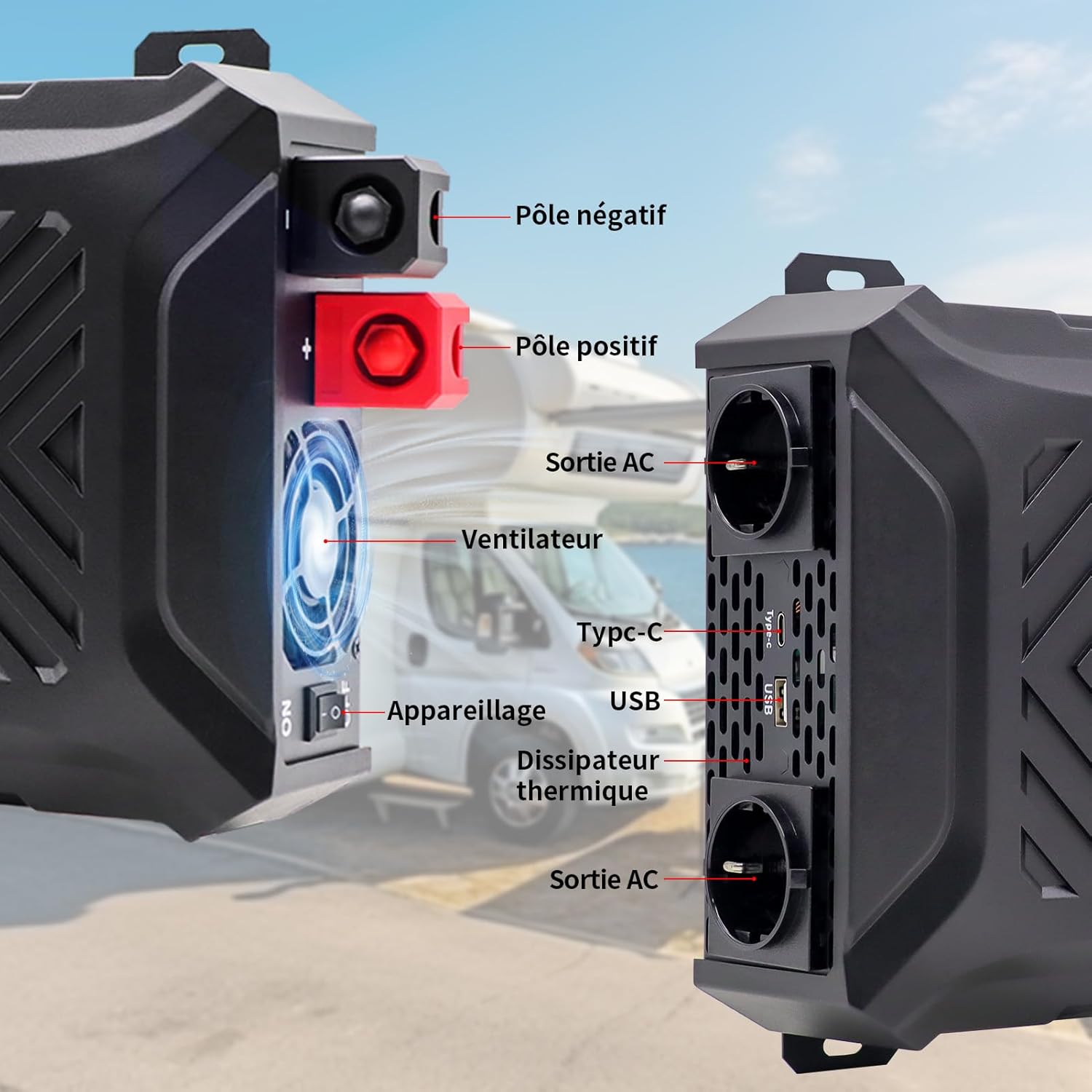
בילד: פראָנט און זייט view of the inverter with labels for the negative pole, positive pole, AC output sockets, fan, Type-C port, USB port, and heat sink.

בילד: דעטאַלירט view of the inverter's LCD screen, AC output sockets, USB port, and Type-C port, with labels for input voltagE, רעזולטאַט וואָלtage, real-time power, output frequency, and battery level.

Image: The DATOUBOSS inverter connected to various devices, illustrating its multiple output options including two EU AC outlets, a USB port, and a Type-C port, along with its 12V DC input.
4. סעטאַפּ אינסטרוקציעס
Follow these steps for proper installation and connection of your inverter.
4.1 מאַונטינג די ינווערטער
- Choose a secure, flat, and well-ventilated location.
- Ensure there is sufficient space around the inverter for airflow, especially around the fan and heat sink.
- Mount the inverter using appropriate screws and brackets (not included unless specified).
4.2 באַטערי קאַנעקשאַן
The inverter requires a 12V DC battery system. Ensure the battery type is compatible (GEL, SLA, LI, FLD, AGM, CLA, LifePO4).

Image: Icons representing various compatible battery types including GEL, SLA, LI, FLD, AGM, CLA, and LifePO4, indicating the inverter's versatility.
- Turn off the inverter: זיכער מאַכן אַז דער ינווערטער'ס מאַכט סוויטש איז אין דער 'אויס' פּאָזיציע.
- Connect the negative cable: Connect the black battery cable to the negative (-) terminal of the battery and then to the negative (-) terminal of the inverter.
- Connect the positive cable: Connect the red battery cable to the positive (+) terminal of the battery and then to the positive (+) terminal of the inverter.
- זיכערע פֿאַרבינדונגען: Tighten all connections firmly to prevent sparks or overheating.
- גראָונדינג: Connect the inverter's grounding terminal to a proper earth ground.
וויכטיק: Always connect the battery cables in the correct polarity. Reverse polarity can damage the inverter and void the warranty. Use the provided battery cables or cables of appropriate gauge for the power rating.
4.3 Optional Solar Panel Connection
The inverter can be integrated into a solar power system. A solar charge controller is required for this setup.

Image: A diagram illustrating the connection of solar panels to a solar charge controller, which then connects to a battery bank, and finally to the DATOUBOSS inverter to power various household appliances.
5. אַפּערייטינג ינסטרוקטיאָנס
Once the inverter is properly installed and connected, follow these steps to operate it.
5.1 פּאַוערינג אויף / אַוועק
- צו מאַכט אויף: After ensuring all connections are secure, switch the inverter's power button to the 'ON' position. The LCD screen will illuminate, displaying current status.
- צו מאַכט אַוועק: Disconnect all AC loads from the inverter, then switch the inverter's power button to the 'OFF' position.
5.2 ניצן דעם LCD דיספּלעי
The LCD screen provides real-time information about the inverter's operation and status.
- אַרייַנשרייַב וואָלtagE (DC): דיספּלייז די קראַנט וואָלtagE פון די באַטאַרייע.
- רעזולטאַט חלקtagE (AC): Shows the inverter's AC output voltage.
- רעזולטאַט מאַכט (וו): Indicates the real-time power consumption of connected devices.
- אַרויסגאַנג אָפטקייט (הרץ): ווײַזט די AC אַרויסגאַנג אָפטקייט (50 הערץ).
- באַטערי מדרגה ינדיקאַטאָר: Shows the approximate charge level of the connected battery.
- שולד ינדיקאַטאָרס: Displays error codes or symbols if a protection mechanism is triggered.

Image: The inverter's LCD screen displaying operational data, alongside icons representing various safety protections such as overvoltage, overheating, overload, and undervoltage.
5.3 קאַנעקטינג דעוויסעס
- Plug your AC appliances into the EU sockets.
- Connect USB-powered devices to the USB 2.1A port.
- Connect Type-C powered devices to the Type-C port.
באַמערקונג: The total power consumption of all connected devices must not exceed the inverter's rated continuous power (2000W). For inductive loads (e.g., motors, refrigerators), the starting surge power can be significantly higher than the running power. Ensure the inverter's peak power (4000W) can handle these surges.
6. וישאַלט
רעגולערע אויפהאלטונג גאראנטירט די לאנגעוויטי און אפטימאלע פאָרשטעלונג פון אייער ינווערטער.
6.1 רייניקונג
- Ensure the inverter is turned off and disconnected from all power sources before cleaning.
- Use a soft, dry cloth to wipe the exterior of the inverter.
- Periodically check and clean the ventilation openings to ensure proper airflow. Do not use liquid cleaners or solvents.
6.2 סטאָרידזש
- אויב איר לייגט אַוועק דעם ינווערטער פֿאַר אַ לענגערע צייט, זאָלט איר עס אָפּשטעקן פֿון דער באַטאַרייע און עס אַוועקלייגן אין אַ קיל, טרוקן אָרט.
- Ensure the battery connected to the inverter is properly maintained according to its manufacturer's instructions, especially if it's a lead-acid battery requiring periodic charging.
7. טראָובלעשאָאָטינג
די סעקציע באהאנדלט אלגעמיינע פראבלעמען וואס איר קענט באגעגענען מיט אייער אינווערטער.
| פּראָבלעם | מעגלעך סיבה | לייזונג |
|---|---|---|
| קיין רעזולטאַט וואָלtage / ינווערטער טוט זיך נישט אן | לויזע באַטעריע פֿאַרבינדונגען, נידעריק באַטעריע וואָלומעןtagע, ינווערטער אויסשאַלט, אינערלעכע פיוז צעבראָכן. | קאָנטראָלירט די באַטאַריע פֿאַרבינדונגען. לאָדט אויף אָדער פֿאַרבייט די באַטאַריע. מאַכט זיכער אַז דער אינווערטער סוויטש איז אָן. קאָנטאַקטירט שטיצע אויב איר האָט אַ פֿאַרדעכטיקטן פֿיוז. |
| Inverter shuts down / Overload alarm | די פארבונדענע לאסט איז גרעסער ווי די ראַטעד מאַכט פון דעם ינווערטער. | Reduce the total load by disconnecting some appliances. Check appliance wattage. |
| אָוווערכיט שרעק | Poor ventilation, excessive ambient temperature, prolonged high load. | Ensure proper ventilation. Move inverter to a cooler location. Reduce load. |
| נידעריק וואָלtage שרעק | באַטערי וואָלtage איז צו נידעריק. | Charge the battery immediately. Disconnect loads to prevent deep discharge. |
| הויך וואָלtage שרעק | באַטערי וואָלtage איז צו הויך. | Check battery charging system. Disconnect inverter from battery if voltage remains high. |
| אומנאָרמאַלער ראַש פֿון ינווערטער | Fan operating, or inductive load causing slight hum. | Normal operation for fan. If noise is excessive or unusual, contact support. |
אויב די פראבלעם בלייבט נאך פרובירן די לייזונגען, ביטע קאנטאקטירט קאסטומער סופארט.
8. ספּעסאַפאַקיישאַנז
Technical details for the DATOUBOSS PSW-E-12V 2000W Pure Sine Wave Inverter.

Image: The DATOUBOSS inverter with its dimensions labeled: 37 cm (14.57 in) length, 28.5 cm (11.22 in) width, and 18 cm (7.09 in) height, along with the included red and black battery cables.
| שטריך | דעטאַל |
|---|---|
| סאָרט | DATOUBOSS |
| מאָדעל נאָמען | PSW-E |
| מאָדעל נומער | PSW-E-12V 2000W |
| אַרייַנשרייַב וואָלtage | 12 וואלטס דק |
| רעזולטאַט חלקtage | 220V-230V AC |
| רעזולטאַט אָפטקייַט | 50 הז |
| קעסיידערדיק מאַכט | 2000 וואטס |
| שפּיץ מאַכט | 4000 וואטס |
| קאַנווערזשאַן עפיקאַסי | > 92% |
| רעזולטאַט וואַוועפאָרם | ריין סיין וואַווע |
| רעזולטאַט פּאָרץ | 2 x EU AC Sockets, 1 x USB 2.1A, 1 x Type-C |
| מאַכט מקור | זונ - און באַטעריע געטריבן |
| פּראָדוקט דימענשאַנז | 37 ל רענטגענ 28.5 וו רענטגענ 18 ה סענטימעטער |
| רעקאָממענדעד ניצט | Home and Outdoor Use |
9. וואָראַנטי און שטיצן
DATOUBOSS provides a comprehensive warranty and customer support for your product.
וואָראַנטי אינפֿאָרמאַציע:
- דער פּראָדוקט קומט מיט אַ 24-חודש פאַבריקאַנט ס וואָראַנטי פון די דאַטע פון קויפן.
- די וואָראַנטי קאָווערס חסרונות אין מאַטעריאַלס און ווערקמאַנשיפּ אונטער נאָרמאַל נוצן.
- Damage caused by improper installation, misuse, unauthorized modifications, or natural disasters is not covered.
קונה שטיצן:
If you have any questions regarding the use, performance, or troubleshooting of your DATOUBOSS inverter, please do not hesitate to contact our customer service team. We offer friendly and patient customer support.
Please refer to the contact information provided with your purchase or visit the official DATOUBOSS webפּלאַץ פֿאַר שטיצן דעטאַילס.


