
1. הקדמה
Welcome to the user manual for your Emerson CKSS7071 Sunrise Smartset Alarm Clock Radio. This device is designed to enhance your daily routine with its unique features, including a sunrise simulation, soothing sound options, Bluetooth connectivity, and an 8-color dimmable LED display. Please read this manual thoroughly to understand the full functionality and ensure proper use and care of your new alarm clock radio.
ווידעא 1: איבערview of the Emerson CKSS7071 Sunrise Smartset Alarm Clock Radio. This video demonstrates the key features and design of the product.
2. וויכטיק סאַפעטי אינפֿאָרמאַציע
- לייענען אַלע ינסטראַקשאַנז איידער איר נוצן דעם אַפּפּליאַנסע.
- האַלטן די ינסטראַקשאַנז פֿאַר צוקונפֿט רעפֿערענץ.
- דו זאלסט נישט נוצן דעם אַפּאַראַט לעבן וואַסער.
- ריין בלויז מיט אַ טרוקן שטאָף.
- בלאָקירט נישט קיין ווענטילאַציע עפענונגען. אינסטאַלירט לויט די אינסטרוקציעס פונעם פאַבריקאַנט.
- דו זאלסט נישט ינסטאַלירן לעבן קיין היץ קוואלן אַזאַ ווי ראַדיאַטאָרס, היץ רעדזשיסטערז, סטאָוווז אָדער אנדערע אַפּאַראַט (אַרייַנגערעכנט ampליפיערס) וואָס פּראָדוצירן היץ.
- באַשיצן די מאַכט שנור פון גיין אויף אָדער פּינטשט, ספּעציעל אין די פּלאַגז, קאַנוויניאַנס רעסאַפּיז און די פונט ווו זיי אַרויסגיין פון די אַפּאַראַט.
- נאָר נוצן אַטאַטשמאַנץ / אַקסעסעריז ספּעסיפיעד דורך דער פאַבריקאַנט.
- אָפּשטויסן דעם אַפּאַראַט בעשאַס בליץ סטאָרמז אָדער ווען אַניוזד פֿאַר לאַנג פּיריאַדז.
- אָפּשיקן אַלע סערוויסעס צו קוואַלאַפייד סערוויס פּערסאַנעל. סערוויס איז פארלאנגט ווען דער אַפּאַראַט איז דאַמידזשד אין קיין וועג, אַזאַ ווי מאַכט צושטעלן שנור אָדער צאַפּן איז דאַמידזשד, פליסיק איז ספּילד אָדער אַבדזשעקץ זענען געפאלן אין די אַפּאַראַט, דער אַפּאַראַט איז יקספּאָוזד צו רעגן אָדער נעץ, אַרבעט נישט נאָרמאַלי , אָדער האט שוין דראַפּט.
3. פּעקל אינהאַלט
באַשטעטיקן אַז אַלע זאכן זענען פאַראַן ווען איר עפֿנט דעם פּעקל:
- Emerson CKSS7071 Sunrise Smartset Alarm Clock Radio
- אַק מאַכט אַדאַפּטער
- באַניצער מאַנואַל
4. פּראָדוקט איבערview
4.1 פראָנט View

בילד 1: פראָנט view of the alarm clock, featuring the digital time display and the sunrise simulation light panel.
The front of the unit features the main 1.2-inch LED time display and the large circular light panel for sunrise simulation and ambient lighting. Indicators for AM/PM, Alarm 1/2, and Bluetooth status are also visible.
4.2 זייַט View (קאָנטראָלס)
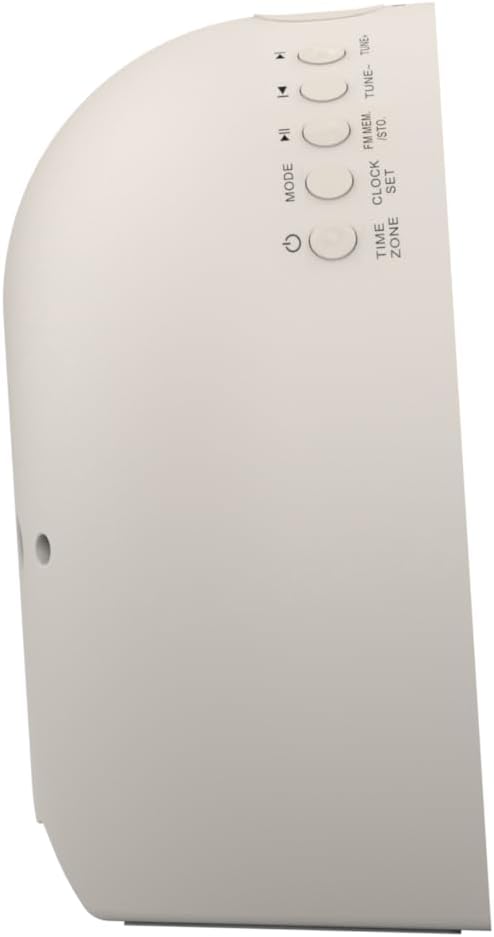
בילד 2: זייַט view פונעם וועקער זייגער, ארויסהייבנדיק די קאנטראל קנעפלעך פאר פארשידענע פונקציעס.
The side panel houses the primary control buttons, including Power, Mode, Clock Set, Time Zone, Tune/Skip, and Volume controls. These buttons are used for setting time, alarms, and navigating audio functions.
4.3 דערציען View

בילד 3: דערציען view of the alarm clock, showing the speaker grille and power connection port.
The rear of the unit features the main speaker grille and the power input port for connecting the AC adapter.
5. סעטאַפּ
5.1 מאַכט קאַנעקשאַן
- Plug the AC power adapter into the DC IN jack located on the back of the unit.
- שטעקט אריין דעם אנדערן עק פונעם אדאפטער אין א סטאנדארט וואנט אויסלאגע (AC 100-240V, 50/60Hz).
- דער אַפּאַראַט וועט קער אויף אויטאָמאַטיש.
5.2 SmartSet Automatic Time Setting
The SmartSet system automatically sets the correct time and date as soon as you plug in the unit. It also maintains time and alarm settings during power disruptions or outages, provided the button cell battery is installed.
5.3 באַטעריע באַקאַפּ ינסטאַלירונג
A button cell battery (CR2032, included) is required for battery backup. This ensures that time and alarm settings are retained during a power outage.
- געפינען די באַטאַרייע אָפּטייל אויף די דנאָ פון די אַפּאַראַט.
- עפענען די באַטאַרייע אָפּטייל דעקן.
- Insert one CR2032 button cell battery, ensuring the correct polarity (+/-).
- פאַרמאַכן די באַטאַרייע אָפּטייל דעקן סיקיורלי.
6. אַפּערייטינג ינסטרוקטיאָנס
6.1 Setting the Clock Manually
- דריקן און האַלטן די זייגער שטעלן קנעפּל. די שעה דידזשאַץ וועט בליץ.
- ניצן די TUNE -/+ קנעפּלעך צו סטרויערן די שעה. דריק זייגער שטעלן צו באַשטעטיקן.
- די מינוט ציפערן וועלן בלינקען. ניצט די TUNE -/+ קנעפּלעך צו סטרויערן די מינוטן. דריק זייגער שטעלן צו באַשטעטיקן.
- פאָרזעצן דעם פּראָצעס צו שטעלן דאָס יאָר, חודש און טאָג.
- דרוק זייגער שטעלן נאכאמאל צו פארלאזן צייט איינשטעלונג מאָדע.
6.2 שטעלן אַלאַרמס (אַלאַרם 1 און אַלאַרם 2)
The unit features dual alarms. Follow these steps for each alarm:
- דריקן און האַלטן די שרעק 1 or שרעק 2 קנעפּל. די אַלאַרם שעה ציפערן וועלן בלינקען.
- ניצן די TUNE -/+ קנעפּלעך צו סטרויערן די אַלאַרם שעה. דריק די ריספּעקטיוו שרעק קנעפּל צו באַשטעטיקן.
- The alarm minute digits will flash. Use the TUNE -/+ buttons to adjust the alarm minutes. Press the respective שרעק קנעפּל צו באַשטעטיקן.
- Select the alarm source (Buzzer, FM Radio, or Soothing Sound). Press the respective שרעק קנעפּל צו באַשטעטיקן.
- Adjust the alarm volume using the באַנד -/+ buttons. Press the respective שרעק קנעפּל צו באַשטעטיקן.
- The alarm is now set. The alarm indicator (AL1 or AL2) will appear on the display.
6.3 זונ-אויפֿגאַנג סימולאַציע
The sunrise simulation feature gradually brightens the light panel before your set alarm time, mimicking a natural sunrise to gently wake you.
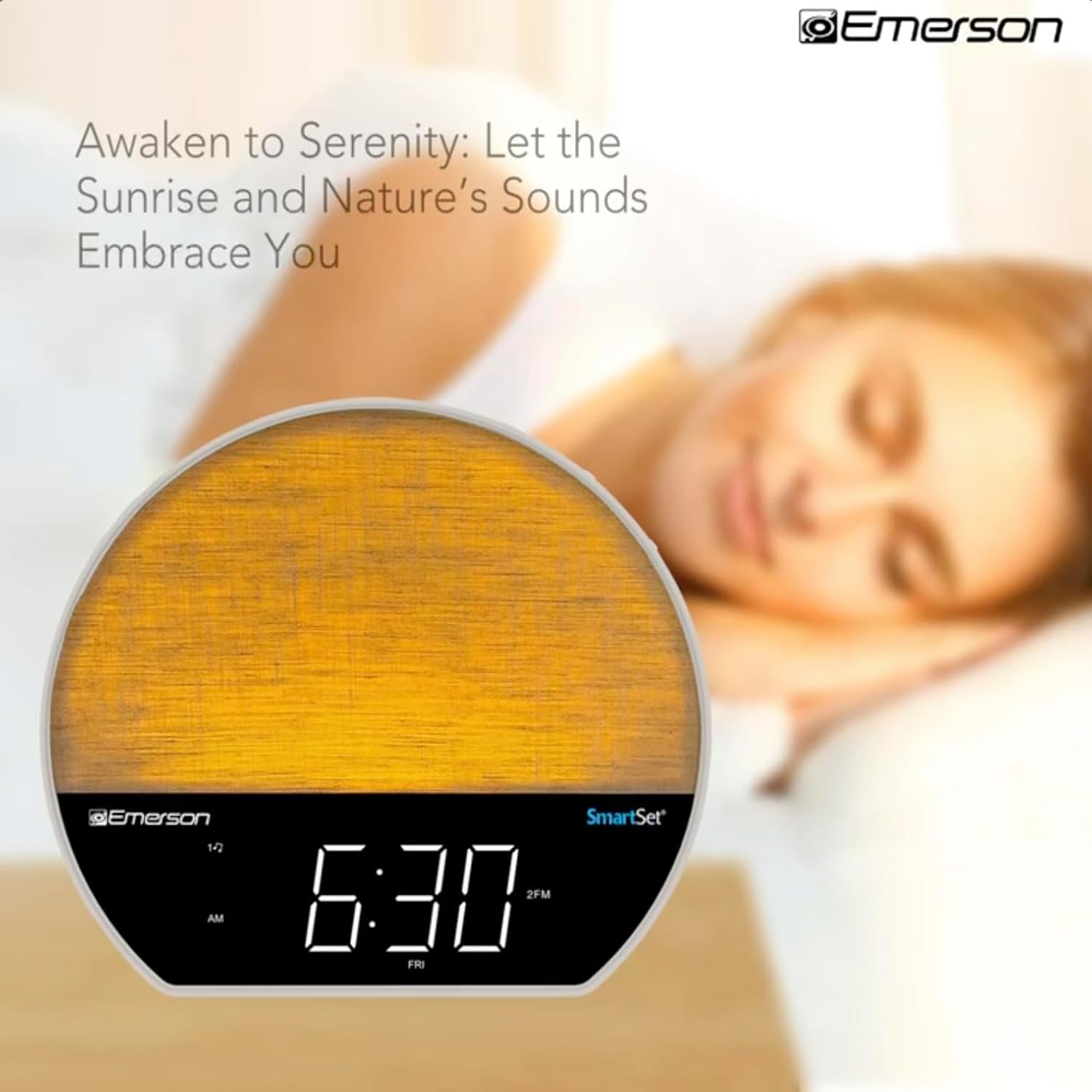
בילד 4: The alarm clock simulating a sunrise with a warm, increasinג ליכט אינטענסיטעט.
To activate, ensure the sunrise option is selected during alarm setup. The light will begin to brighten 30 minutes before the alarm sounds.
6.4 Soothing Sounds and White Noise
The unit includes 6 soothing sounds and white noise to help with relaxation or waking up.
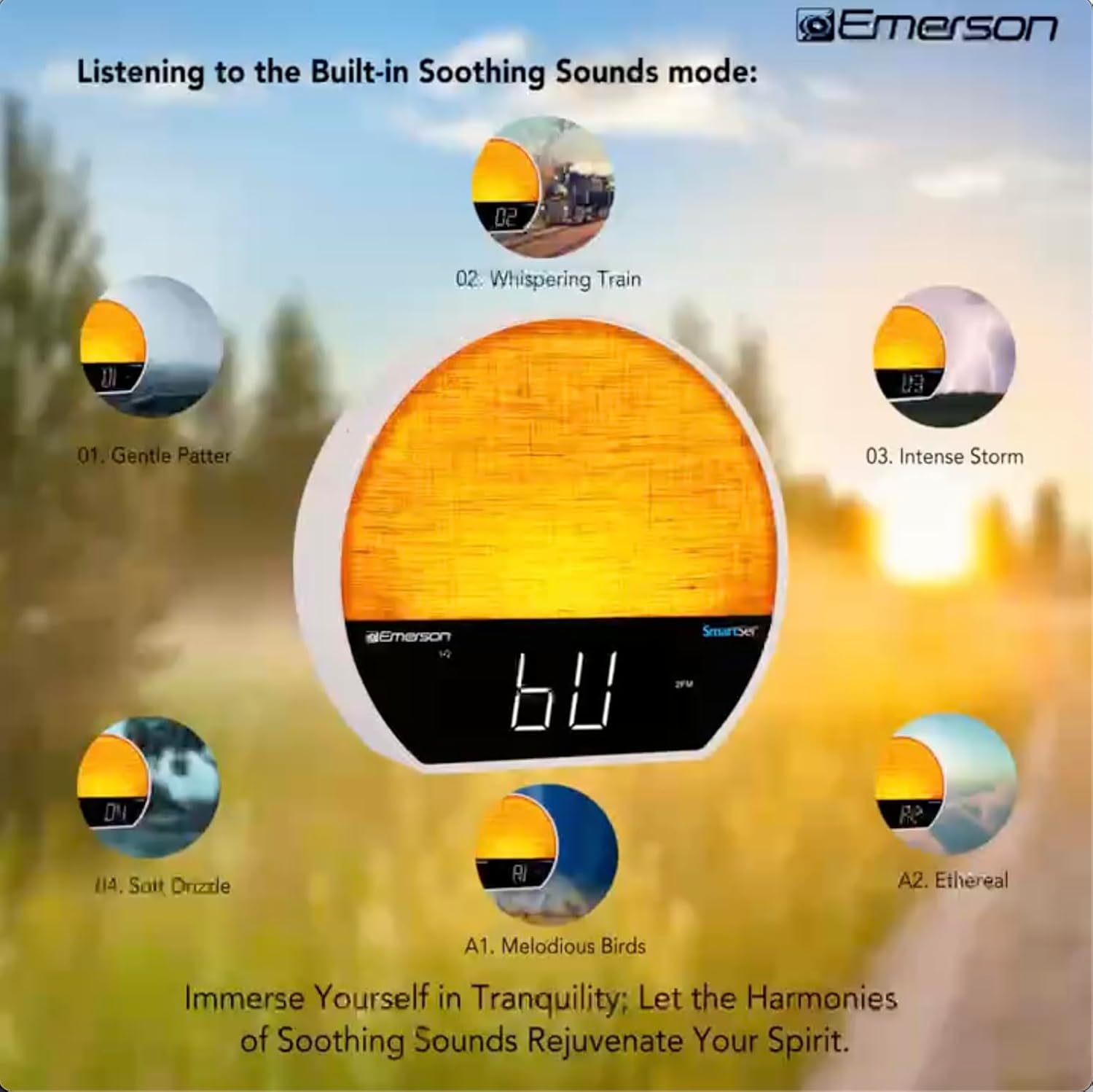
בילד 5: Visual representation of the six soothing sound modes available on the alarm clock.
- דרוק די מאָדע button repeatedly until the Soothing Sound mode is selected.
- ניצן די TUNE -/+ buttons to cycle through the available sounds (e.g., Gentle Patter, Whispering Train, Intense Storm, Soft Drizzle, Melodious Birds, Ethereal, White Noise).
- סטרויערן די באַנד ניצן די באַנד -/+ קנעפּלעך.
6.5 בלועטאָאָטה רעדנער פֿונקציע
Connect your smartphone or other Bluetooth-enabled device to stream audio wirelessly.

בילד 6: The alarm clock in Bluetooth mode, paired with a mobile device for audio streaming.
- דרוק די מאָדע button until 'BT' appears on the display, indicating Bluetooth mode.
- On your device, enable Bluetooth and search for 'Emerson CKSS7071'.
- Select the device to pair. A confirmation tone will sound upon successful pairing.
- You can now play audio from your device through the alarm clock's speaker.
6.6 FM ראַדיאָ אָפּעראַציע
הערט זיך אן צו אייערע באליבטע FM ראדיא סטאנציעס.
- דרוק די מאָדע קנעפל ביז 'FM' דערשיינט אויפן דיספלעי.
- דרוק די TUNE -/+ buttons briefly to manually tune to a station.
- דריקן און האַלטן די TUNE -/+ קנעפּלעך צו אויטאָמאַטיש סקענען פֿאַר דער ווייַטער בנימצא סטאַנציע.
- צו ראַטעווען אַ סטאַנציע, דריק און האַלט די קנעפּל FM MEM קנעפּל ביז די פאָרגעשטעלטע נומער בלינקט. ניצט TUNE -/+ צו אויסקלויבן א פאָרגעשטעלטע נומער, דאַן דריק FM MEM ווידער צו ראַטעווען.
6.7 LED Decor and Dimmer Control
Customize the ambient light with 8 different colors and adjust the brightness.

בילד 7: The alarm clock demonstrating its 8-color dimmable LED decor options.
- דרוק די ליכט button to cycle through the 8 available colors or turn the light off.
- To adjust the brightness of the LED decor light, press and hold the ליכט button. The brightness will cycle through 5 levels. Release the button at your desired brightness.
6.8 דיספּליי דימער קאָנטראָל
Adjust the brightness of the 1.2-inch LED time display.

בילד 8: The alarm clock illustrating the five distinct levels of display luminescence.
דרוק די דיממער button (often combined with another function, refer to button labels) to cycle through 4 levels of display brightness (Bright, Moderate, Dim, Faint).
6.9 שלאָפן טיימער
Set a timer for the audio to automatically turn off after a specified duration.

בילד 9: The alarm clock set for a sunset sleep timer, providing a harmonious end to the day.
- While audio is playing (FM or Soothing Sound), press the שלאָף קנעפּל.
- ריפּיטידלי דריקן די שלאָף button to cycle through available sleep timer durations (e.g., 15, 30, 60, 90 minutes, or OFF).
- The audio will automatically turn off after the selected time.
6.10 סנוז פונקציע
ווען אַן אַלאַרם קלינגט, דריק די SNOOZE button (usually a large button on top) to temporarily silence the alarm for a few minutes. The alarm will sound again after the snooze period.
7. וישאַלט
7.1 רייניקונג
- שטענדיק אָפּשטעקן די אַפּאַראַט פון די מאַכט ווענטיל איידער רייניקונג.
- ניצט אַ ווייכן, טרוקענעם שטאָף צו רייניקן די אויסערלעכע ייבערפלאַכן.
- Do not use liquid cleaners, abrasive cleaners, or chemical sprays, as these may damage the finish.
7.2 באַטערי פאַרבייַט
If the time and alarm settings are not retained during a power outage, the button cell backup battery may need to be replaced. Follow the instructions in section 5.3 to replace the CR2032 battery.
8. טראָובלעשאָאָטינג
| פּראָבלעם | מעגלעך סיבה | לייזונג |
|---|---|---|
| דער אַפּאַראַט טוט נישט מאַכט אויף. | מאַכט אַדאַפּטער נישט פארבונדן אָדער דעפעקטיוו. | Ensure the AC adapter is securely plugged into the unit and a working wall outlet. |
| צייט/אַלאַרם סעטטינגס פאַרלוירן נאָך מאַכט אויסtage. | Backup battery is dead or not installed. | Install or replace the CR2032 button cell battery (see section 5.3). |
| דער אַלאַרם קלינגט נישט. | דער אַלאַרם איז נישט אַקטיוויזירט אָדער דער באַנד איז צו נידעריק. | Ensure the alarm is set and activated (AL1/AL2 indicator on). Increase alarm volume. |
| בלועטוט דעווייס קען נישט פארבינדן. | Unit not in Bluetooth mode or device too far. | Ensure the unit is in Bluetooth mode ('BT' displayed). Move your device closer to the unit. Try unpairing and re-pairing. |
| שלעכטע FM ראַדיאָ אָפּנאַם. | אַנטענע נישט אויסגעשטרעקט אָדער שטערונג. | Extend the FM wire antenna fully and reposition it for better reception. Avoid placing near other electronic devices. |
| דער עקראַן איז צו העל/טונקעל. | Display dimmer setting needs adjustment. | דרוק די דיממער button to cycle through brightness levels (see section 6.8). |
9. ספּעסאַפאַקיישאַנז
| שטריך | דעטאַל |
|---|---|
| מאָדעל נומער | CKSS7071 |
| מאַכט מקור | AC 100-240V, 50/60Hz (via AC adapter) |
| באַטאַרייע באַקקופּ | 1 x CR2032 Button Cell Battery (included) |
| ווייַז טיפּ | 1.2-inch LED Display |
| בלועטאָאָטה ווערסיע | V5.4 |
| סודינג סאָונדס | 6 Nature Sounds + White Noise |
| LED Decor Colors | 8 Dimmable Colors |
| פּראָדוקט דימענשאַנז (ב רענטגענ ד x ה) | 7.09" x 3.15" x 6.37" |
| וואָג | ניט ספּעסיפיעד |
10. וואָראַנטי אינפֿאָרמאַציע
Emerson products are manufactured to the highest quality standards. This product is covered by a limited warranty against defects in materials and workmanship for a period of one (1) year from the original date of purchase. This warranty does not cover damage caused by misuse, accident, unauthorized modification, or normal wear and tear. Proof of purchase is required for all warranty claims. Please retain your receipt.
11. קונה שטיצן
If you have any questions, require assistance, or experience issues with your Emerson CKSS7071 Sunrise Smartset Alarm Clock Radio, please contact our customer support team.
- Webפּלאַץ: Visit the official Emerson webוועבזייטל פֿאַר אָפֿט געשטעלטע פֿראַגעס און שטיצע רעסורסן.
- בליצפּאָסט: זעט אייער פּראָדוקט פּאַקאַדזשינג אָדער די באַאַמטער website for customer service email contact.
- טעלעפֿאָן: זעט אייער פּראָדוקט פּאַקאַדזשינג אָדער די באַאַמטער webוועבזייטל פֿאַר קונה סערוויס טעלעפאָן נומערן.
Please have your model number (CKSS7071) and proof of purchase ready when contacting support.