
1. הקדמה
This manual provides detailed instructions for the installation, operation, and maintenance of your Stinger HEIGH10+ 10.1-inch Infotainment System. Designed specifically for Jeep Wrangler JL (2018-2023) and Gladiator JT (2020-2023) vehicles, this system enhances your driving experience with advanced features and seamless integration.
Please read this manual thoroughly before installation and use to ensure proper function and to maximize the benefits of your new infotainment system.
2. זיכערקייַט אינפֿאָרמאַציע
אָבסערווירן די פאלגענדע זיכערהייט מיטלען בעת ינסטאַלירונג און אָפּעראַציע:
- פאַכמאַן ינסטאַלירונג רעקאַמענדיד: Due to the complexity of vehicle electrical systems, professional installation by a certified technician is highly recommended.
- דיסקאַנעקט באַטערי: Always disconnect the vehicle's negative battery terminal before beginning any electrical work to prevent short circuits and damage.
- וויירינג: Ensure all wiring connections are secure and properly insulated to prevent electrical hazards. Do not modify the wiring harness.
- דרייווינג זיכערקייַט: Do not operate system features that may distract you from driving. Always prioritize road safety.
- ינווייראַנמענאַל טנאָים: פֿאַרמײַדט אויסשטעלן דעם אַפּאַראַט צו עקסטרעמע טעמפּעראַטורן, דירעקטע זונשײַן פֿאַר פֿאַרלענגערטע פּעריאָדן, אָדער איבערגעטריבענע פֿײַכטקייט.
3. וואָס איז אין דער קעסטל
באַשטעטיקן אַז אַלע קאָמפּאָנענטן זענען פאַראַן איידער איר הייבט אָן די אינסטאַלאַציע:
- 10.1-inch Touchscreen Display and Infotainment System
- Antenna Adapters for Satellite and AM/FM Radio
- Complete Plug-n-Play Installation Harness
- USB Retention Cables
- ינסטאַללאַטיאָן גייד
- Jeep Wrangler JL and Gladiator JT Radio Dash Kit (SRK-JW18EH)
- High-Definition Factory Camera Retention Module
- RadioPro Interface for Jeep Wrangler JL and Gladiator JT (2018-2023)
- Link Adapter for Stinger Radio
- SiriusXM Adaptor (retains factory-installed SiriusXM antenna; Tuner sold separately: SXV300V1)
4. אויפשטעלן און אינסטאַלירן
The Stinger HEIGH10+ system is designed for a plug-and-play installation in compatible Jeep Wrangler JL and Gladiator JT models, minimizing the need for additional modifications.
4.1. ינסטאַלירונג איבערview
The system includes a vehicle-specific dash kit (SRK-JW18EH) and a RadioPro Interface to ensure seamless integration with your vehicle's existing electronics and controls. Follow the detailed instructions provided in the included Installation Guide for your specific vehicle model.

Figure 4.1: Stinger HEIGH10+ installed in a Jeep dashboard, illustrating the visual upgrade from the factory unit.
4.2. Display Mounting Flexibility
The HEIGH10+ display offers enhanced mounting flexibility compared to previous models. The redesigned bracket allows for greater adjustability, enabling you to select the optimal viewing angle for your vehicle's dashboard. The display can be mounted in either a single-DIN or double-DIN configuration, accommodating various dash layouts.
Video 4.2: A Stinger product manager demonstrates the mounting flexibility and features of the HEIGH10+ system, including its adjustable display bracket.
5. שליסל פֿעיִקייטן
5.1. 10.1" High-Resolution Touchscreen
The HEIGH10+ features a large 10.1-inch HD touchscreen with a resolution of 1280x800. The display is optically bonded and includes anti-glare, anti-reflection, and anti-fingerprint film protection for optimal visibility and durability.

פיגורע 5.1: דעטאַילעד view of the 10.1" screen, showcasing its protective features and tactile controls.
5.2. דראָטלאָז עפּל קאַרפּליי און אַנדרויד אויטאָ
Enjoy seamless smartphone integration with MFi-Certified Wireless Apple CarPlay and Android Auto. Access navigation, messages, music, and hands-free calling directly from the touchscreen without needing to plug in your device.

Figure 5.2: Apple CarPlay interface on the HEIGH10+ display.

Figure 5.3: Android Auto interface on the HEIGH10+ display.
5.3. On-Screen Vehicle Information & Off-Road Gauges
Access customizable vehicle-specific screens and apps, including off-road data such as transfer case status, current position (latitude/longitude), altitude, and steering angle. This feature provides critical information for off-road enthusiasts.

Figure 5.4: Off-Road Gauges display on the HEIGH10+ screen.
5.4. אַוואַנסירטע אַודיאָ פֿעיִקייטן
The system includes a built-in HD Radio tuner for clear digital audio. Advanced audio features include 4.5 Vrms & 8-channel RCA outputs with subwoofer control, a 15-band adjustable EQ with 6 user presets, and built-in crossovers (HPF & LPF) for personalized sound tuning.

Figure 5.5: Advanced Audio Equalizer interface.
5.5. Multiple Camera Inputs
Integrate a comprehensive camera system with support for up to 4 AHD 720p or CVBS 480p camera inputs. This allows for front/rear dashcams, blind spot cameras, and a backup camera, enhancing safety and situational awareness.

Figure 5.6: Multi-camera input display.
5.6. RGB ליכט קאָנטראָל
The HEIGH10+ offers direct plug-in and on-screen control for Stinger ENLIGHT10 RGB dynamic LED lighting kits. Adjust colors and brightness directly from the infotainment display to customize your vehicle's ambiance.

Figure 5.7: RGB Lighting control interface.
5.7. Optional iGO Navigation
For reliable, offline mapping, the system supports optional iGO Navigation integration. An SD card for iGO Navigation is sold separately.
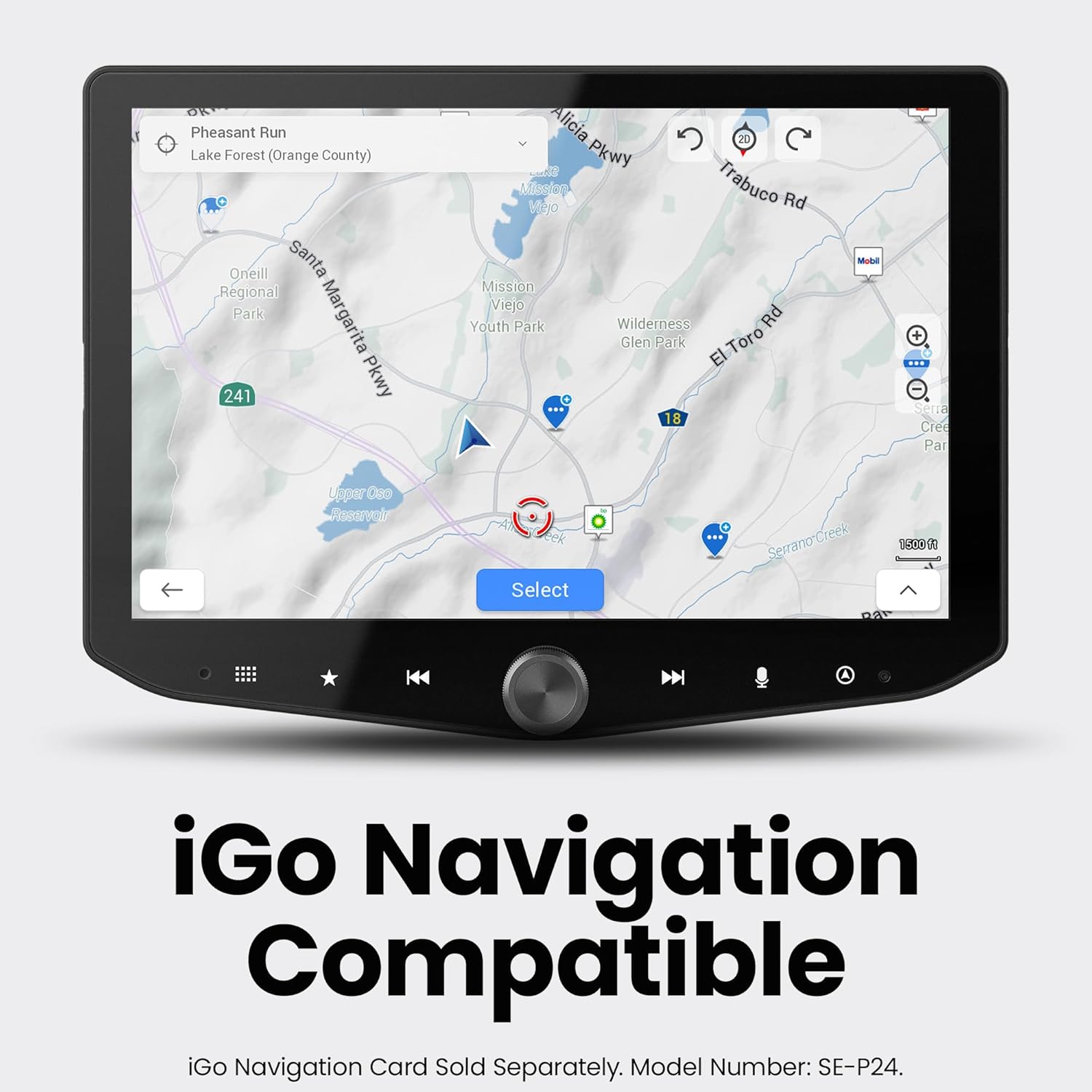
Figure 5.8: iGO Navigation interface.
6. אַפּערייטינג ינסטרוקטיאָנס
6.1. מאַכט אויף / אויסגעלאשן
- מאַכט אויף: Turn your vehicle's ignition to the ACC or ON position. The system will power on automatically.
- מאַכט אַוועק: Turn your vehicle's ignition to the OFF position. The system will power off automatically after a brief delay.
6.2. טאָוטשסקרין נאַוויגאַציע
The 10.1-inch touchscreen is highly responsive. Tap icons to select functions, swipe to navigate menus, and use pinch-to-zoom gestures where applicable (e.g., maps).
6.3. Apple CarPlay / Android Auto
- ווירעלעסס קשר: Ensure Bluetooth and Wi-Fi are enabled on your smartphone. Select the Apple CarPlay or Android Auto icon on the HEIGH10+ home screen and follow the on-screen prompts to pair your device.
- ווייערד קשר: Connect your smartphone to the system's USB-A or USB-C port using a compatible cable. The system will automatically launch Apple CarPlay or Android Auto.
6.4. ראַדיאָ אָפּעראַציע
Select the 'HD Radio' icon from the home screen. Use the on-screen controls to tune to AM/FM stations, scan for available frequencies, and save presets. HD Radio provides crystal-clear digital audio where available.
6.5. אַודיאָ סעטטינגס
Access the 'Audio Settings' icon to adjust the 15-band equalizer, select from 6 user EQ presets, configure subwoofer control, and set high-pass (HPF) and low-pass (LPF) filters for optimal sound output.
6.6. אַפּאַראַט View סעלעקציע
Tap the 'Cameras' icon to cycle through available camera views (front, rear, left, right, etc.). Parking guidelines may be displayed on the backup camera feed.
6.7. Off-Road Gauge Monitoring
Select the 'Off-Road' icon to view real-time vehicle data such as pitch, roll, heading, altitude, and tire angle. This information is crucial for navigating challenging terrains.
6.8. RGB לייטינג קאָנטראָל
If an ENLIGHT10 RGB kit is connected, tap the 'ENLIGHT10 RGB' icon to access the control interface. Adjust colors, brightness, and lighting modes directly from the touchscreen.
7. וישאַלט
- סקרין רייניקונג: ניצן אַ ווייך, לינט-פֿרייַ שטאָף אַ ביסל דampened with a screen cleaner or water. Avoid abrasive materials or harsh chemicals that could damage the anti-glare coating.
- ווייכווארג דערהייַנטיקונגען: קאָנטראָלירט פּעריִאָדיש דעם סטינגער website for firmware updates. Updates can improve performance, add features, and resolve issues. Follow the instructions provided with the update package carefully.
- אַלגעמיינע זאָרגן: Keep the unit free from dust and debris. Ensure all connections remain secure.
8. טראָובלעשאָאָטינג
8.1. קיין מאַכט
- Check vehicle's ignition status.
- Verify all power connections to the head unit and interface module are secure.
- Inspect vehicle fuses related to the radio/infotainment system.
8.2. קיין געזונט ארויסגאַנג
- זייט זיכער אז די קול איז נישט שטיל אדער געשטעלט אויף מינימום.
- Check audio settings (EQ, fader/balance) for incorrect configurations.
- Verify speaker connections. If using external amplifiers, check their power and signal connections.
8.3. Apple CarPlay / Android Auto Connectivity Issues
- For wireless connection, ensure Wi-Fi and Bluetooth are active on your phone and the system. Try forgetting the device on both ends and re-pairing.
- For wired connection, try a different USB cable (ensure it's a data-capable cable, not just charging).
- Restart your smartphone and the infotainment system.
8.4. Camera Display Issues
- Verify camera connections to the head unit.
- Check camera settings within the infotainment system to ensure correct input selection.
- Ensure the vehicle is in the correct gear (e.g., reverse for backup camera).
9. ספּעסאַפאַקיישאַנז
| שטריך | באַשרייַבונג |
|---|---|
| סאָרט | STINGER |
| מאָדעל נומער | RB10JW18HP. |
| ווייַז גרייס | 10.1 אינטשעס |
| ווייַז האַכלאָטע | 1280x800 הד |
| קאַנעקטיוויטי טעכנאָלאָגיע | בלועטוט, הדמי, יו-עס-בי |
| ספּעציעלע פֿעיִקייטן | Wireless Android Auto, Wireless Apple CarPlay, Built-In Bluetooth, Equalizer, HDMI; USB-A, USB-C, Touchscreen |
| קאַמפּאַטאַבאַל דעוויסעס | יפאָנע, אַנדרויד |
| אַודיאָ רעזולטאַט מאָדע | סטערעאָ |
| נומער פון טשאַנאַלז | 8 |
| אַודיאָ רעזולטאַט טיפּ | RCA |
| קאָנטראָל מעטאָד | ריר |
| קאָליר | שוואַרץ |
| פאַבריקאַנט | סטינגער |
| UPC | 609098907712 |
10. וואָראַנטי & שטיצן
The Stinger HEIGH10+ Infotainment System comes with a 1-יאָר מאַנופאַקטורער וואָראַנטי. For warranty claims, technical support, or additional product information, please visit the official Stinger webזייטל אדער קאנטאקט זייער קאסטומער סערוויס גלייך.
אָנליין שטיצן: www.stinger.com