
1. הקדמה
Thank you for choosing the Loewe We. BOOST Home Cinema System. This system is designed to deliver an immersive audio experience with its 4.1.2 surround sound configuration, Dolby Atmos technology, and a total output of 720 watts. Featuring wireless active satellite speakers and a wireless subwoofer, it offers a clean, cable-free setup for your home entertainment.
This manual provides essential information for setting up, operating, maintaining, and troubleshooting your Loewe We. BOOST system. Please read it carefully before use to ensure optimal performance and longevity of your device.
2. פּעקל אינהאַלט
זיכער מאַכן אַז אַלע די פאלגענדע קאָמפּאָנענטן זענען פאַראַן אין דיין פּעקל:
- 1x Loewe We. BOOST Wireless Subwoofer
- 4x Loewe We. BOOST Active Satellite Speakers
- 1x HDMI eARC Dongle for wireless transmission
- 1x רימאָוט קאָנטראָל
- Power Cables for Subwoofer and Satellite Speakers
- באַניצער מאַנואַל (דעם דאָקומענט)

Image: The complete Loewe We. BOOST system, showing the central subwoofer and four satellite speakers.
3. סעטאַפּ
3.1 רעדנער פּלייסמאַנט
Proper placement of your speakers is crucial for an optimal surround sound experience. The Loewe We. BOOST system is a 4.1.2 configuration, meaning four satellite speakers, one subwoofer, and two upward-firing channels integrated into the satellite speakers for Dolby Atmos effects.
- פראָנט ספּיקערז: Place two satellite speakers to the left and right of your television, ideally at ear level when seated.
- דערציען ספּיקערז: Place the remaining two satellite speakers behind your primary listening position, to the left and right.
- סובוואָאָפער: Position the wireless subwoofer in a corner or along a wall near your television for enhanced bass response. Experiment with placement to find the best sound for your room.

בילד: אַן עקסample setup of the Loewe We. BOOST system in a living room, demonstrating speaker placement.
3.2 פֿאַרבינדן דאָס סיסטעם
- מאַכט קשר: Connect the power cables to the subwoofer and all four satellite speakers, then plug them into a power outlet. The system is designed for plug-and-play wireless operation.
- HDMI eARC Dongle: Insert the provided HDMI eARC dongle into an available HDMI eARC port on your television. This dongle facilitates wireless audio transmission from your TV to the sound system.
- אָטאַמאַטיק פּערינג: The subwoofer and satellite speakers will automatically connect wirelessly to the HDMI eARC dongle once powered on. No manual pairing is typically required.

Image: A satellite speaker shown alongside the compact HDMI eARC dongle, illustrating the wireless connection component.
3.3 Optional Central Speaker (Advanced)
For users desiring enhanced dialogue clarity, an active central speaker can be integrated. Connect an active speaker using a line cable with a 3.5mm jack on one end and a 2.5mm jack on the other. Plug the 2.5mm jack into the HDMI eARC dongle and the 3.5mm jack into your active central speaker. The system will automatically recognize and activate the new speaker, allowing its volume to be adjusted via the remote control.
4. אַפּערייטינג ינסטרוקטיאָנס
4.1 רימאָוט קאָנטראָל פאַנגקשאַנז
The included remote control provides full command over your Loewe We. BOOST system.
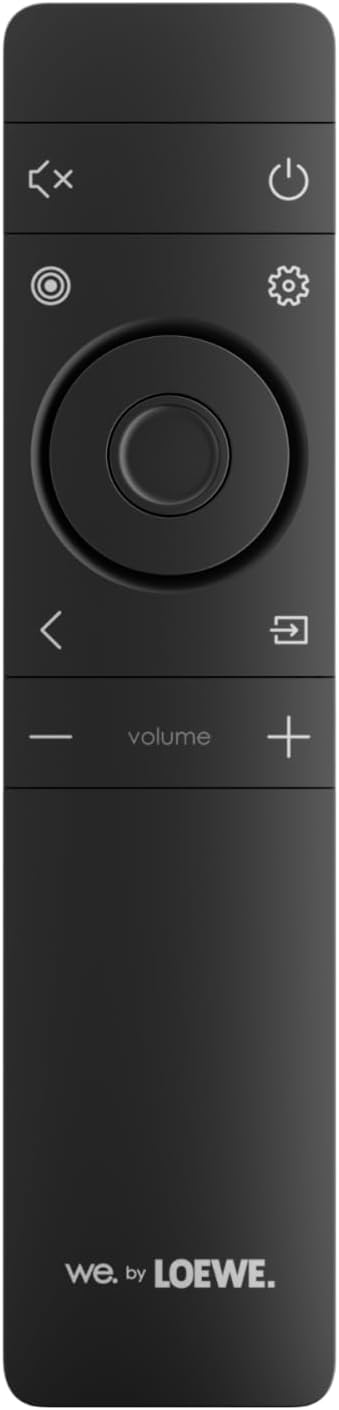
Image: The remote control for the Loewe We. BOOST system, featuring power, mute, settings, navigation, and volume controls.
- מאַכט קנעפּל: טורנס די סיסטעם אויף אָדער אַוועק.
- באנד +/-: אַדזשאַסץ די קוילעלדיק סיסטעם באַנד.
- שטיל קנעפּל: שטילט די אַודיאָ אַרויסגאַנג.
- סעטטינגס קנעפּל: Accesses audio settings and sound modes.
- נאַוויגאַציע קנעפּלעך: Used to navigate menus within the settings.
4.2 Sound Modes and Settings
The system supports various audio technologies to enhance your listening experience:
- Dolby Atmos: Provides a three-dimensional sound experience, creating an immersive audio bubble.
- דאָלבי דיגיטאַל: Standard surround sound format.
- PCM: Uncompressed audio format.
ניצן די סעטטינגס קנעפּל on the remote to cycle through or select desired sound modes and adjust individual speaker levels (including the subwoofer and any optional central speaker).
4.3 בלועטוט קאָנעקטיוויטי
To connect a smartphone or other compatible device via Bluetooth:
- Ensure your Loewe We. BOOST system is powered on.
- אַקטאַווייט בלועטאָאָטה אויף דיין רירעוודיק מיטל.
- Select "Loewe We. BOOST" from the list of available Bluetooth devices.
- אַמאָל פּערד, וועט אַודיאָ פֿון אייער דעווייס שפּילן דורך דער סיסטעם.
4.4 Multi-Room Audio
The system supports multi-room audio functionality. Refer to the Loewe app or additional documentation for detailed instructions on integrating your We. BOOST system into a multi-room setup.
5. וישאַלט
To ensure the longevity and optimal performance of your Loewe We. BOOST system, follow these maintenance guidelines:
- רייניקונג: Use a soft, dry cloth to clean the surfaces of the speakers and subwoofer. Avoid abrasive cleaners, solvents, or liquid sprays directly on the components.
- ווענטילאַטיאָן: Ensure adequate airflow around the subwoofer and speakers. Do not block ventilation openings.
- סוויווע: Keep the system away from direct sunlight, heat sources, excessive dust, and moisture. It is not waterproof.
- קאַבלעס: Periodically check power cables for any signs of damage.
6. טראָובלעשאָאָטינג
If you encounter issues with your Loewe We. BOOST system, consult the following table for common problems and solutions.
| פּראָבלעם | מעגלעך סיבה | לייזונג |
|---|---|---|
| קיין געזונט פון ספּיקערז. | System not powered on, volume too low, incorrect input, speakers not paired. | Ensure all components are plugged in and powered. Increase volume. Check TV audio output settings (eARC). Power cycle the system to re-establish wireless connection. |
| Subwoofer not producing bass. | Subwoofer not powered, not paired, bass level set too low. | Verify subwoofer power. Power cycle the system. Adjust bass level via remote control settings. |
| ווייַט קאָנטראָל נישט ארבעטן. | טויטע באַטעריעס, שטערונג, ווײַטקאָנטראָל אַרויס פון דערגרייכונג. | Replace batteries. Ensure no obstructions between remote and system. Point remote directly at the system. |
| Bluetooth device not connecting. | Bluetooth not enabled on device, system not in pairing mode, device already connected to another system. | Ensure Bluetooth is active on your device. Check system settings for Bluetooth pairing mode. Disconnect from other devices. |
| Sound distortion or crackling. | Interference, damaged cables, speaker placement issues. | Move system away from other wireless devices. Check all cable connections. Adjust speaker placement. |
If the problem persists after trying these solutions, please contact Loewe customer support.
7. ספּעסאַפאַקיישאַנז
| שטריך | דעטאַל |
|---|---|
| מאָדעל נומער | 64720T10 |
| סאָרט | LOEWE |
| אַרומרינגלען סאָונד קאַנפיגיעריישאַן | 4.1.2 |
| גאַנץ רעזולטאַט מאַכט | 720 וואטס |
| Supported Audio Technologies | Dolby Atmos, Dolby Digital, PCM |
| ווירעלעסס קאַנעקטיוויטי | Wireless (speakers), Bluetooth (device connection) |
| קאָנטראָל מעטאָד | ווייַט קאָנטראָל |
| קאַמפּאַטאַבאַל דעוויסעס | סמאַרטפאָון, טעלעוויזיע |
| ספּעציעלע פֿעיִקייטן | Multi-room Audio, Wireless Speakers, Wireless Subwoofer, HDMI eARC Dongle |
| קאָליר | אַש גרוי |
| פּראָדוקט דימענשאַנז (L x W x H) | 35 X 40 X 55 סענטימעטער |
| פּונקט וואָג | 17 קילאָגראַמס |
| מאַכט מקור | קאָרדעד עלעקטריק |
| אָפטקייַט ענטפער | 20 הז |
8. וואָראַנטי & שטיצן
8.1 פּראָדוקט וואָראַנטי
Your Loewe We. BOOST Home Cinema System is covered by a manufacturer's warranty. Please refer to the warranty card included with your product or visit the official Loewe webזייטל פֿאַר דעטאַלירטע אינפֿאָרמאַציע וועגן וואָראַנטי טערמינען, באַדינגונגען און געדויער.
8.2 קונה שטיצן
For technical assistance, service, or further inquiries, please contact Loewe customer support:
- Webפּלאַץ: Visit the official Loewe webזייטל פֿאַר שטיצע רעסורסן, אָפֿט געשטעלטע פֿראַגעס, און קאָנטאַקט אינפֿאָרמאַציע.
- אימעיל/טעלעפאן: Refer to the contact details provided on the Loewe webוועבזייטל אדער אין אייער פּראָדוקט דאָקומענטאַציע.
When contacting support, please have your product model number (64720T10) and purchase information readily available.