
NJTY T3
NJTY T3 מולטימעטער אינסטרוקציע מאַנואַל
מאָדעל: T3
הקדמה
This manual provides detailed instructions for the safe and effective use of the NJTY T3 Digital Multimeter. Please read this manual thoroughly before operation and retain it for future reference. The NJTY T3 is a rechargeable, auto-ranging digital multimeter designed for accurate measurements of AC/DC voltage, resistance, and features Non-Contact Voltage (NCV) detection and live wire testing.

Image: The NJTY T3 Digital Multimeter, showing its main unit, red and black test probes, and a USB-C charging cable connected.
זיכערקייַט אינפֿאָרמאַציע
Always adhere to safety precautions when using any electrical testing equipment. Failure to do so may result in injury or damage to the device.
- נישט איבערשרייטן די מאקסימום איינגאבע ווערטן ספעציפיצירט פאר יעדער פונקציע.
- זיכער מאַכן אַז די טעסט דראָטן זענען אין גוטן צושטאַנד און ריכטיק פֿאַרבונדן איידער איר מאַכט מעסטונגען.
- ניצן וואָרענען ווען ארבעטן מיט וואָלtagהעכער 30V AC RMS, 42V שפּיץ, אדער 60V DC, ווייל די שטעלן פאר א שאָק געפאַר.
- ניצט נישט דעם מולטימעטער אויב עס קוקט אויס צעבראכן אדער אויב די קעסטל איז אפן.
- Always disconnect power to the circuit under test before measuring resistance or continuity.
- ניצט דעם נישט-קאָנטאַקט וואָלtage (NCV) function as an initial check, but always verify with direct contact measurements when safety is critical.
פּעקל אינהאַלט
באַשטעטיקן אַז אַלע זאכן זענען פאַראַן אין פּעקל:
- NJTY T3 Multimeter (1 unit)
- טעסט דראָטן (1 פּאָר, רויט און שוואַרץ)
- טיפ-C טשאַרדזשינג קאַבל (1 איינהייט)
- אינסטרוקציע מאַנואַל (1 איינהייט)
סעטאַפּ
1. ערשטע אויפלאָדונג
The NJTY T3 Multimeter features a built-in rechargeable Lithium Ion battery. Before first use, or if the low battery indicator is displayed, charge the device using the provided Type-C charging cable.
- פֿאַרבינדט דעם טיפּ-C עק פֿונעם טשאַרדזשינג קאַבל צום מולטימעטער'ס טשאַרדזשינג פּאָרט.
- פֿאַרבינדט דעם USB-A עק פֿונעם טשאַרדזשינג קאַבל צו אַ נאָרמאַלן USB מאַכט אַדאַפּטער (נישט אַרייַנגערעכנט) אָדער אַ קאָמפּיוטער'ס USB פּאָרט.
- דער טשאַרדזשינג אינדיקאַטאָר אויפן מולטימעטער וועט זיך אָנצינדן בעת טשאַרדזשינג און זיך אויסלעשן ווען עס איז גאָר אויפגעלאָדן.

Image: The NJTY T3 Multimeter being charged via its Type-C port, connected to a laptop.
2. פֿאַרבינדן טעסט דראָטן
Insert the red test lead into the "VΩ" input jack and the black test lead into the "COM" input jack. Ensure they are securely seated.
אַפּערייטינג ינסטראַקשאַנז
The NJTY T3 Multimeter features an auto-ranging function, simplifying operation by automatically detecting the measurement type and range.
1. מאַכט אויף / אויסגעלאשן
Press and hold the power button to turn the multimeter on or off. The device will automatically shut off after approximately 15 minutes of inactivity to conserve battery life.
2. Automatic Measurement (Auto-Ranging)
In auto-ranging mode, the multimeter will automatically identify and measure AC voltagE, דק וואָלtage, or resistance when the test leads are applied to a circuit. The display will show the measurement type (AC, DC, Ω) and the value.
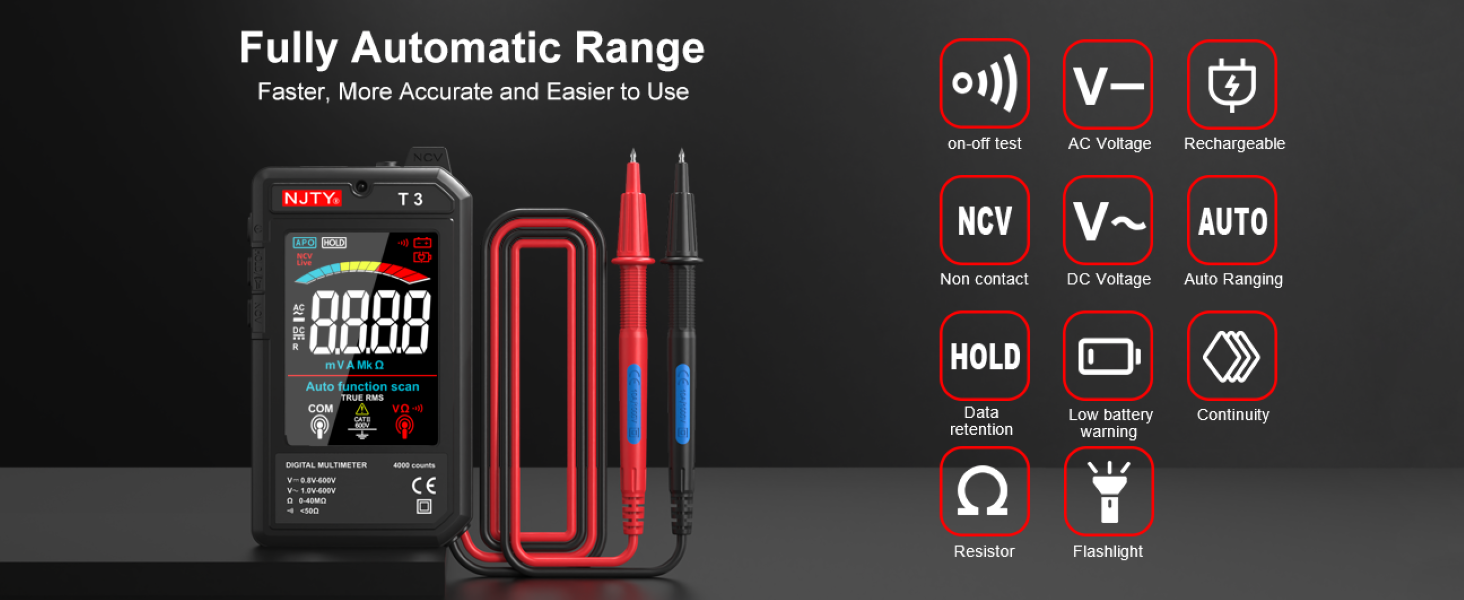
Image: The NJTY T3 Multimeter screen showing "Auto function scan" and icons representing AC/DC voltage, resistance, continuity, NCV, and flashlight functions.
3. אַק / דק חלקtagE מעזשערמאַנט
- Ensure the multimeter is powered on.
- פֿאַרבינדט די טעסט־לידער צו די קרייז־פּונקטן וואו עס איז דאָtage needs to be measured. The multimeter will automatically detect AC or DC voltage.
- לייענען דעם חלקtagדי ווערט געוויזן אויף דעם עקראַן.
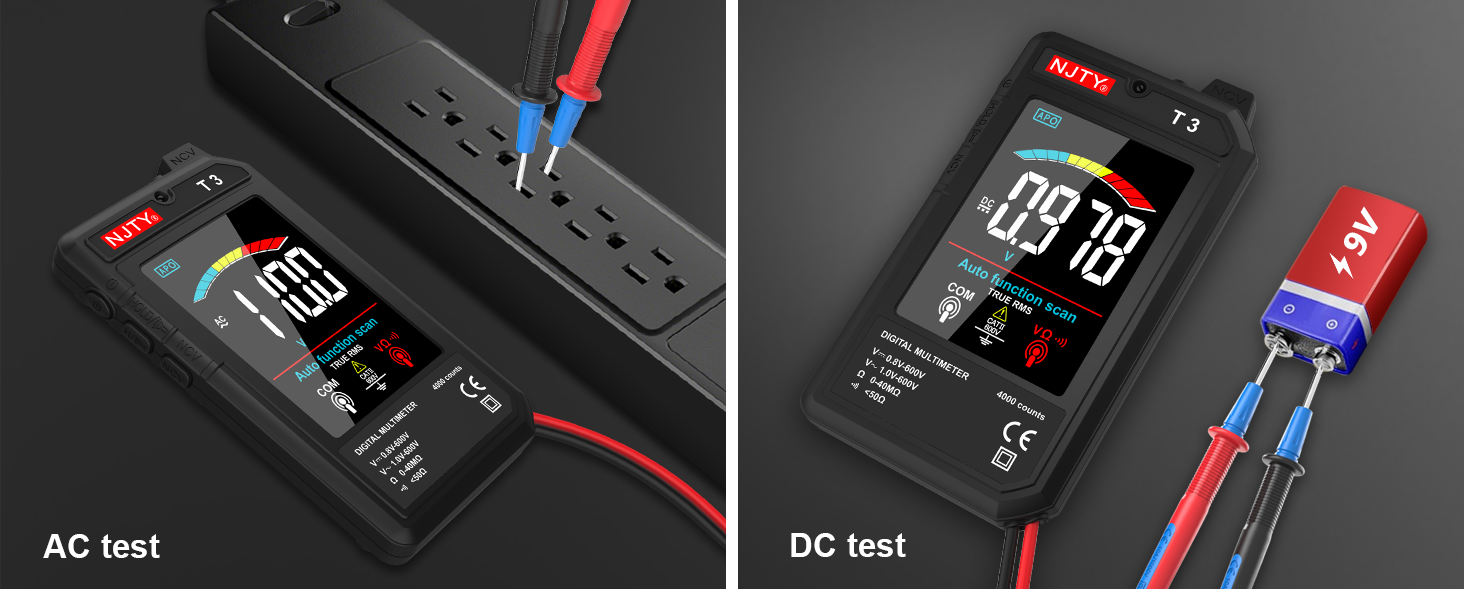
Image: Two separate images showing the NJTY T3 Multimeter measuring AC voltage from a power strip and DC voltage from a 9V battery.
4. קעגנשטעל מעזשערמאַנט
- וויכטיק: זיכער מאַכן אַז די קרייַז איז דעענערדזשייזד איידער איר מעסט די קעגנשטעל.
- Connect the test leads across the component or circuit section where resistance is to be measured.
- The multimeter will display the resistance value in Ohms (Ω), Kilo-Ohms (KΩ), or Mega-Ohms (MΩ).

Image: Two separate images showing the NJTY T3 Multimeter measuring resistance of a resistor and performing a continuity test on a wire.
5. ניט-קאָנטאַקט וואָלtagE (NCV) דעטעקשאַן
The NCV function allows for safe detection of live wires without direct contact.
- Press the NCV button (if available, or ensure NCV mode is active).
- Bring the NCV sensor at the top of the multimeter close to the wire or outlet.
- The multimeter will emit an audible beep and the display will indicate the presence of AC voltage, with increasing intensity as it gets closer to the source.

Image: The NJTY T3 Multimeter detecting non-contact voltage near an electrical wall outlet, with the screen showing "EF" and a signal strength indicator.
6. לעבעדיקע דראָט טעסטינג
די פונקציע העלפט אידענטיפיצירן לעבעדיגע דראָטן אין אַן AC קרייז.
- Insert the red test probe into the socket or touch it to the wire you want to test.
- If the multimeter emits an alarm sound and the screen changes to indicate "LIVE", it signifies a live wire.

Image: The NJTY T3 Multimeter's red probe inserted into an electrical outlet for live wire testing, with the screen displaying "LIVE".
7. קאָנטינויטי טעסט
- וויכטיק: זיכער מאַכן אַז די קרייז איז דע-ענערדזשייזד איידער איר דורכפירן אַ קאָנטינויטיטי טעסט.
- Connect the test leads across the component or wire to be tested.
- If continuity exists (resistance is low, typically below 50Ω), the multimeter will emit an audible beep.
8. Data Hold
Press the "HOLD" button to freeze the current reading on the display. Press it again to release the hold function.
9. טאַשליכט און באַקלייט
The multimeter includes a built-in flashlight for illuminating the test area and a backlight for the display, enhancing visibility in low-light conditions. Refer to the device buttons for activation (typically a short press of the power button or a dedicated light button).
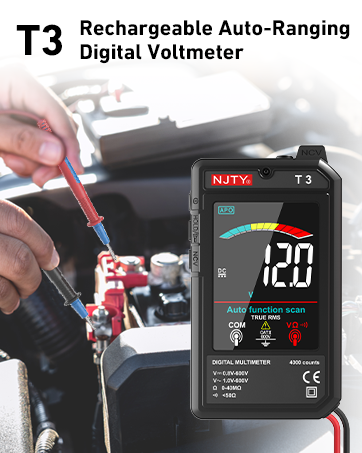
Image: The NJTY T3 Multimeter with its integrated flashlight active, illuminating a dark electrical panel.
וישאַלט
1. רייניקונג
Wipe the multimeter's case with a damp cloth and mild detergent. Do not use abrasives or solvents. Ensure the device is off and disconnected from any power source before cleaning.
2. באַטערי קער
The built-in Lithium Ion battery should be charged regularly, especially if the device is not used for extended periods. The automatic shut-off feature helps prolong battery life. A low battery indicator will appear on the display when charging is required.
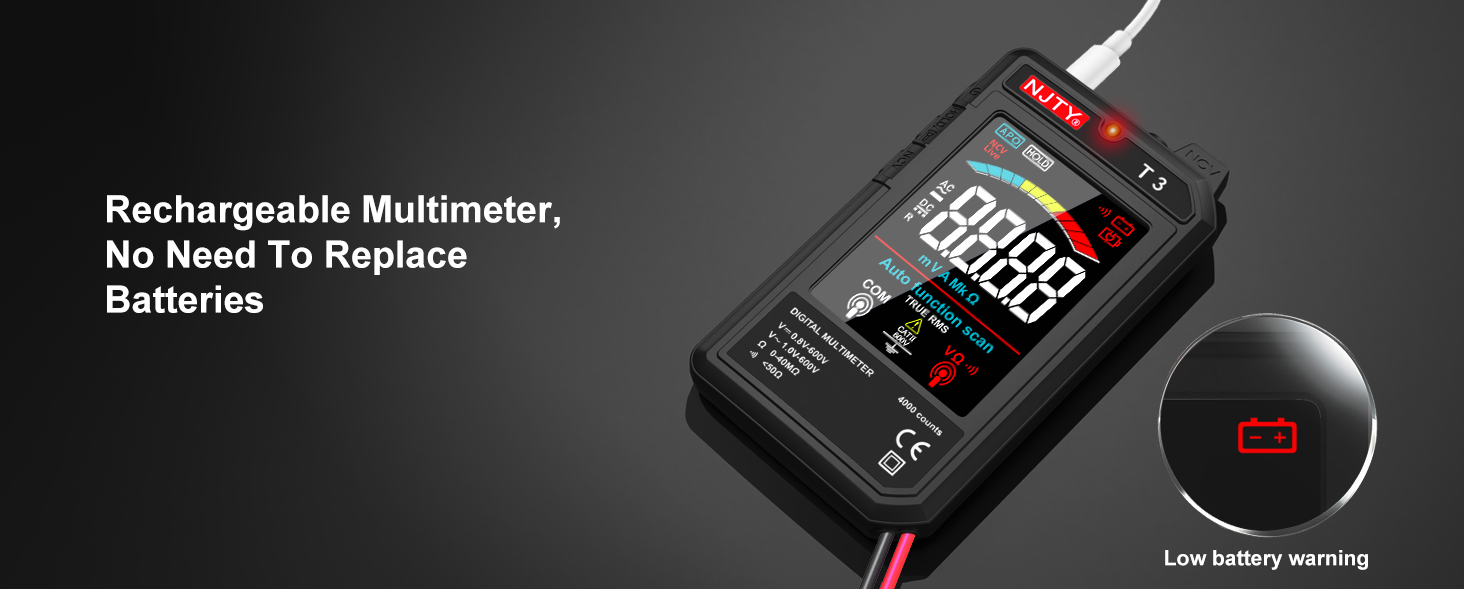
Image: The NJTY T3 Multimeter screen showing a low battery warning icon, indicating the need for recharging.
3. סטאָרידזש
Store the multimeter in a cool, dry place, away from direct sunlight and extreme temperatures. Disconnect test leads when storing.
טראָובלעשאָאָטינג
| פּראָבלעם | מעגלעך סיבה | לייזונג |
|---|---|---|
| No display or device won't turn on. | נידעריגע באַטעריע אָדער די דעוויס איז אויסגעלאָשן. | Charge the battery using the Type-C cable. Press and hold the power button to turn on. |
| ומפּינקטלעך רידינגז. | Poor test lead connection, incorrect measurement technique, or exceeding input limits. | Ensure test leads are firmly connected. Review operating instructions for correct measurement procedures. Do not exceed specified input ranges. |
| Multimeter automatically shuts off. | Automatic power-off feature activated due to inactivity. | This is normal behavior to conserve battery. Press the power button to turn it back on. |
| NCV detection not working or inconsistent. | Distance to voltage source too far, or interference. | Bring the NCV sensor closer to the suspected live wire. Ensure no other strong electromagnetic fields are present. |
ספּעסאַפאַקיישאַנז
| שטריך | דעטאַל |
|---|---|
| ווייַז | 4000 ציילן, 3.19-אינטש קאָליר LCD |
| DC VoltagE ראַנגע | 0.8V - 600V (Accuracy: ±(0.8%+5)) |
| AC VoltagE ראַנגע | 1V - 600V (Accuracy: ±(1.0%+5)) |
| קעגנשטעל ראַנגע | 0 - 40MΩ (Accuracy: ±(1.0%+10)) |
| Minimum Resolution (DCV/ACV) | 0.001V |
| Minimum Resolution (Resistance) | 1Ω |
| מאַכט מקור | ריטשאַרדזשאַבאַל ליטהיום יאָן באַטאַרייע (אַרייַנגערעכנט) |
| טשאַרדזשינג פּאָרט | טיפּ-C |
| אָטאַמאַטיק שאַט-אַוועק | Approximately 15 minutes of inactivity |
| פלאַשליגהט | Yes (1 minute auto shut-off) |
| באַקלייט | יא |
| בוזזער | Yes (for continuity, internal resistance less than 50Ω) |
| נקוו דעטעקטיאָן | יא |
| אמת RMS | Yes (45Hz-2KHz) |
| נידעריק באַטערי ינדיקאַטאָר | יא |
| לייוו ווירע לעגיטימאַציע | יא |
| פּראָדוקט דימענשאַנז | 5.51 X 1.18 X 0.79 אינטשעס |
| פּונקט וואָג | 150 גראַמז (5.29 אונסעס) |
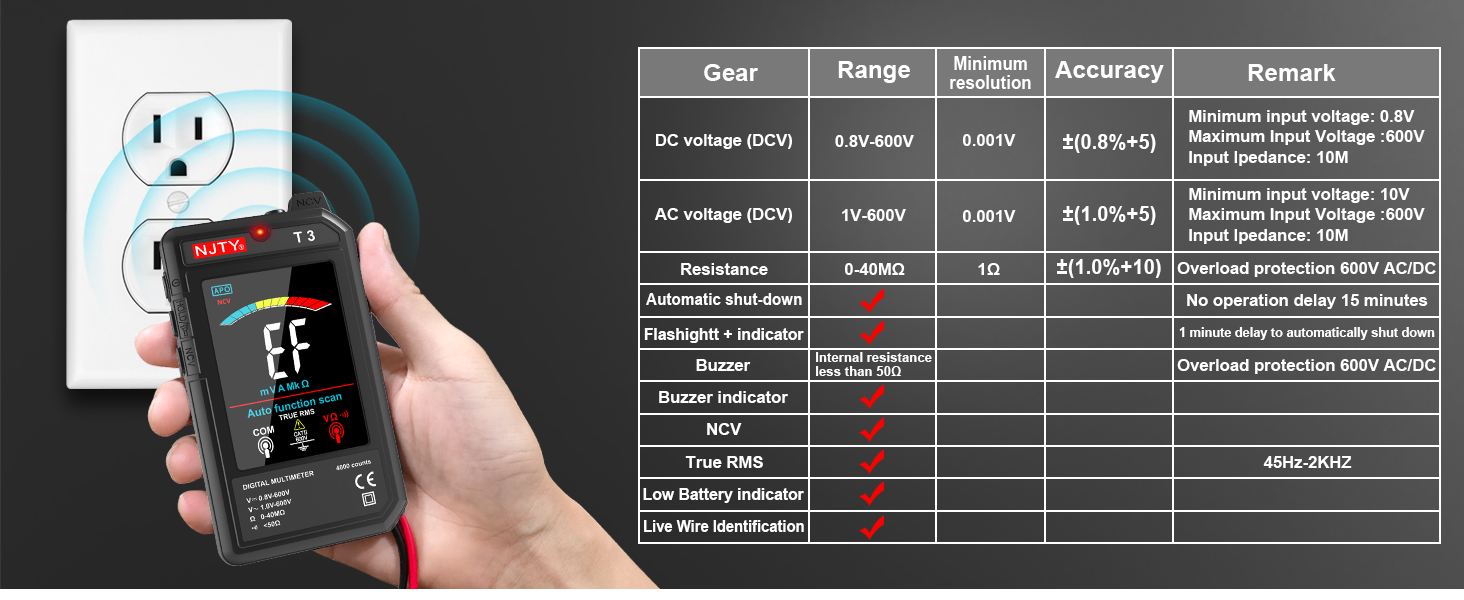
Image: The NJTY T3 Multimeter demonstrating NCV detection alongside a table detailing its technical specifications.
וואָראַנטי און שטיצן
וואָראַנטי אינפֿאָרמאַציע
For specific warranty terms and conditions, please refer to the warranty card included with your product or contact the seller directly. Warranty coverage typically addresses manufacturing defects under normal use.
קונה שטיצן
If you encounter any issues or have questions regarding the NJTY T3 Multimeter, please contact your retailer or the manufacturer's customer support channel. Refer to the "after-sales channel" information provided in your product packaging for contact details.
פֿאַרבונדענע דאָקומענטן - T3
 |
NJTY T21L LCR מעטער: אויטאָ-ריינדזשינג דיגיטאַל מולטימעטער מיט TRUE RMS - באַניצער מאַנואַל User manual for the NJTY T21L LCR Meter, an auto-ranging digital multimeter with TRUE RMS. Covers features, safety, technical specifications, and operation for accurate electrical measurements. |
 |
HABOTEST HT122 דיגיטאַל פּען טיפּ מולטימעטער באַניצער מאַנואַל א פולשטענדיגע באַניצער מאַנואַל פֿאַר די HABOTEST HT122 דיגיטאַל פּען טיפּ מולטימעטער. לערנט וועגן זייַנע זיכערהייט פֿעיִקייטן, אויטאָמאַטישע און מאַנועלע מאָדעס, NCV דעטעקציע, פאַזע סיקוואַנס מעסטונג, טעכנישע ספּעציפֿיקאַציעס, און וישאַלט. |
 |
6000 קאַונטס מיני פּען מולטימעטער באַניצער מאַנואַל און פֿעיִקייטן אויספאָרשן דעם 6000 קאַונטס מיני פּען מולטימעטער, אַ פילזײַטיקער און פּאָרטאַטיווער דיגיטאַלער מולטימעטער. די באַניצער מאַנואַל דעטאַלירט זייַנע אויטאָמאַטישע ריינדזשינג קייפּאַבילאַטיז, פּינקטלעכע מעסטונגען פֿאַר וואָלומען.tage, קעגנשטעל, קאַפּאַסיטאַנס, און מער, מאַכנדיג עס אַן אידעאַל געצייַג פֿאַר עלעקטראָניק ענטוזיאַסטן און פּראָפעסיאָנאַלס. |
 |
AstroAI M4KOR True RMS 4000 Count Digital Multimeter User Manual Comprehensive user guide for the AstroAI M4KOR True RMS 4000 Count Digital Multimeter. Learn about its features, functions, safety precautions, troubleshooting, and technical specifications for accurate electrical measurements. |
 |
NJTY T21L LCR מעטער: אויטאָ-ריינדזשינג דיגיטאַל מולטימעטער מיט TRUE RMS - באַניצער מאַנואַל א פולשטענדיגע באַניצער מאַנואַל פֿאַר די NJTY T21L LCR מעטער, אַן אויטאָמאַטיש-ריינדזשינג דיגיטאַל מולטימעטער מיט TRUE RMS. דעקט ספּעציפֿיקאַציעס, זיכערקייט, אָפּעראַציע, און מעסטונג פֿונקציעס פֿאַר וואָלומען.tage, current, resistance, capacitance, inductance, frequency, and temperature. |
 |
מאַסטפויי FY128/FY128C/FY129C קלוגער דיגיטאַלער מולטימעטער באַניצער מאַנואַל באַניצער מאַנואַל פֿאַר די מאַסטפויי FY128, FY128C, און FY129C האַנט-געהאַלטענע דיגיטאַלע מולטימעטערס. פֿעיִקייטן אַרייַננעמען 5999 קאַונטס, גרויס LCD, NCV, לעבן דראָט דעטעקציע, קאַפּאַסיטאַנס, אָפטקייט, טעמפּעראַטור מעסטונג, און אָוווערלאָוד שוץ. קאַמפּליינט מיט IEC-61010 סטאַנדאַרדס. |
Ask a question about this manual
Ask about setup, troubleshooting, compatibility, parts, safety, or missing instructions. Manuals+ will review the question and use this page’s manual context to help answer it.