
KEENSTAR ST-265TC
KEENSTAR ST-265TC Touch Screen 2-Slice Toaster
Model: ST-265TC
1. וויכטיק סאַפעגואַרדס
ווען ניצן עלעקטריקאַל אַפּפּליאַנסעס, יקערדיק זיכערקייַט פּריקאָשאַנז זאָל שטענדיק זיין נאכגעגאנגען, אַרייַנגערעכנט די פאלגענדע:
- לייענט אַלע אינסטרוקציעס איידער איר ניצט דעם טאָסטער.
- דו זאלסט נישט פאַרבינדן הייס סערפאַסיז. ניצן כאַנדאַלז אָדער נאַבז.
- צו באַשיצן קעגן עלעקטריקאַל קלאַפּ, טאָן ניט ייַנטונקען די שנור, צאַפּן אָדער צוברוינער אין וואַסער אָדער אנדערע פליסיק.
- נאָענט השגחה איז נייטיק ווען קיין אַפּפּליאַנסע איז געניצט דורך אָדער לעבן קינדער.
- אָפּשטעקן די ווענטיל ווען ניט אין נוצן און איידער רייניקונג. לאָזן צו קילן איידער איר שטעלן אויף אָדער נעמען אַוועק טיילן.
- דו זאלסט נישט אַרבעטן קיין אַפּפּליאַנסע מיט אַ דאַמידזשד שנור אָדער צאַפּן, אָדער נאָך די אַפּפּליאַנסע מאַלפאַנגקשאַנז אָדער איז דאַמידזשד אין קיין שטייגער.
- דו זאלסט נישט לאָזן די שנור הענגען איבער די ברעג פון טיש אָדער טאָמבאַנק, אָדער אָנרירן הייס סערפאַסיז.
- צי ניט שטעלן אויף אָדער לעבן אַ הייס גאַז אָדער עלעקטריש בורנער, אָדער אין אַ העאַטעד ויוון.
- דו זאלסט נישט נוצן די צוברוינער פֿאַר אנדערע ווי בדעה נוצן.
- Oversize foods, metal foil packages, or utensils must not be inserted into a toaster as they may involve a risk of fire or electric shock.
- א פייער קען פארקומען אויב טאוסטערס זענען באדעקט אדער בארירן ברענעוודיקן מאטעריאל, אריינגערעכנט קערטאַנז, דראַפּעריעס, ווענט, און ענלעכע, ווען אין אָפּעראַציע.
- דו זאלסט נישט פּרווון צו דיסלאָדזש עסנוואַרג ווען צוברוינער איז פּלאַגד אין.
- דער מיטל איז בלויז פֿאַר הויזגעזינד נוצן.
2. פּראָדוקט איבערview
The KEENSTAR ST-265TC is a modern 2-slice toaster featuring a touch screen interface for precise control over your toasting preferences. It includes wide slots to accommodate various bread types and a removable crumb tray for easy cleaning.
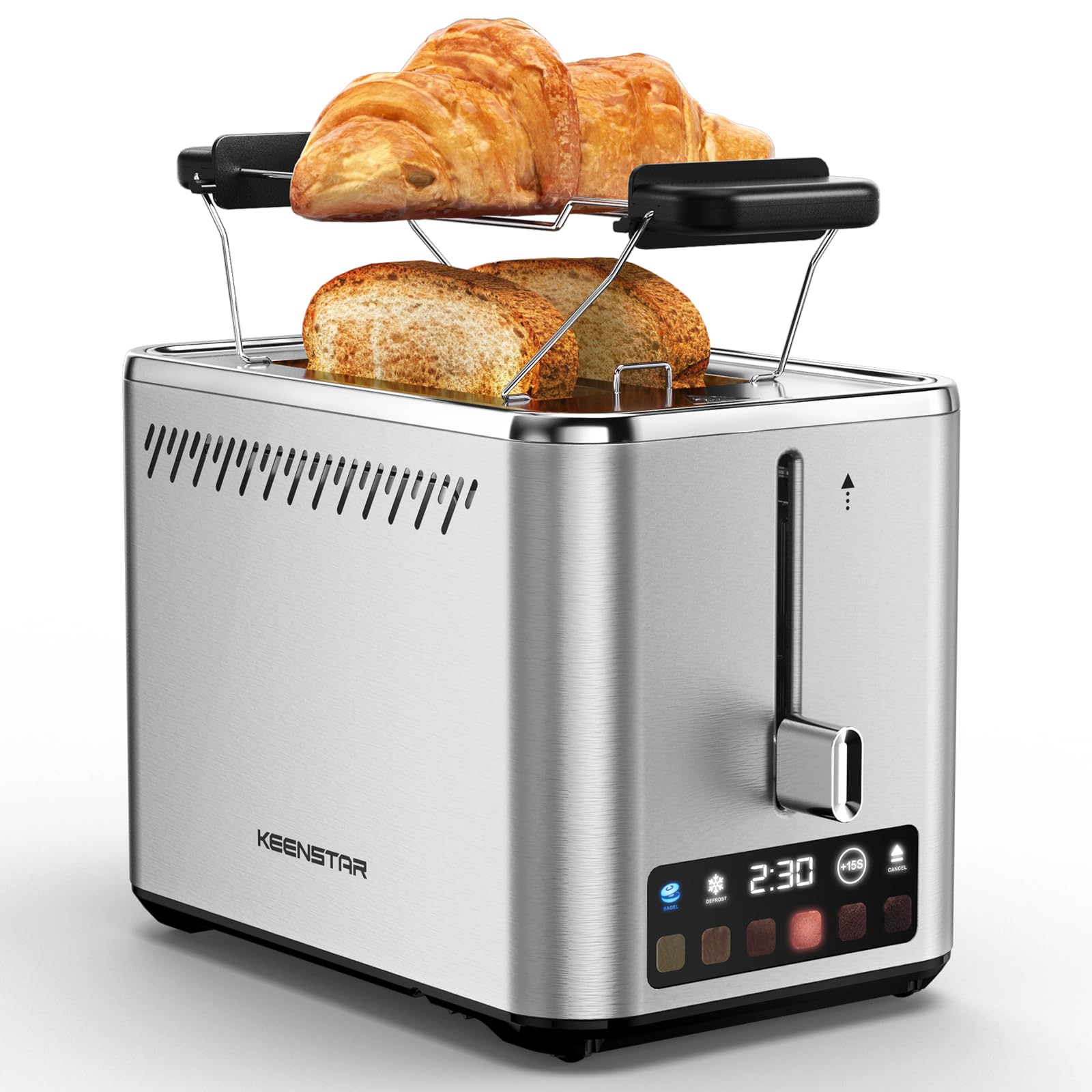
Image: KEENSTAR ST-265TC 2-Slice Toaster in silver stainless steel.
3. סעטאַפּ
ונפּאַקקינג
Carefully remove the toaster and all packaging materials from the box. Ensure all accessories, including the warming rack, are present.
פּלייסמאַנט
שטעלט דעם טאָסטער אויף אַ סטאַבילער, פלאַכער, היץ-קעגנשטעליקער ייבערפלאַך, אַוועק פון ברענענדיקע מאַטעריאַלן ווי פֿאָרהאַנגען אָדער ווענט. זאָרגט פֿאַר גענוגיקע ווענטילאַציע אַרום דעם אַפּאַראַט.
ערשטער נוצן
Before toasting food for the first time, operate the toaster without bread on the highest browning setting (level 6) to burn off any manufacturing residues. A slight odor or smoke may be present; this is normal and will dissipate.
4. אַפּערייטינג ינסטרוקטיאָנס
קאָנטראָל פּאַנעל איבערview

Image: The toaster's smart touch control display showing 6 browning levels and extra functions like Bagel, Defrost, +15S, and Cancel.
גרונטיקע טאָסטינג
- Insert up to two slices of bread into the wide 1.5-inch slots.
- Select your desired browning level (1-6) by touching the corresponding icon on the display. Level 1 is the lightest, and Level 6 is the darkest.
- Press the lever down until it locks into place. The digital display will show a countdown timer.
- The toast will automatically pop up when the cycle is complete.

Image: Visual guide showing the steps for easy toaster operation: 1. Put bread in slots, 2. Select browning level and function, 3. Press the lever down, 4. Enjoy delicious bread.
בייגל פונקציע
This function is designed to toast the cut side of bagels while gently warming the outer side.
- Insert bagel halves into the slots with the cut side facing outwards.
- אויסקלייבן אייער געוואונטשענע ברוינונג לעוועל.
- ריר די BAGEL button on the display. It will illuminate.
- Press the lever down until it locks.

Image: The toaster's display showing the illuminated BAGEL mode. BAGEL mode toasts one side only; place the cut side facing outward.
דעפראָסט פונקציע
Use this function to toast frozen bread without pre-thawing.
- אַרײַנשטעלן פֿאַרפֿרוירענע ברויט אין די שפּאַלטן.
- אויסקלייבן אייער געוואונטשענע ברוינונג לעוועל.
- ריר די דעפרוסט button on the display. It will illuminate.
- Press the lever down until it locks.

Image: The toaster's display showing the illuminated DEFROST mode. This mode allows you to cook frozen breads easily without guesswork.
+15S Function
If your toast is not quite browned enough after a cycle, you can add an additional 15 seconds of toasting time.
- After a toasting cycle, if more browning is desired, touch the +15S קנעפּל.
- The toaster will initiate a 15-second toasting cycle.
באָטל מאַכן פֿונקציע
To stop the toasting cycle at any time, simply touch the באָטל מאַכן button. The lever will automatically raise, and the heating elements will turn off.

Image: The toaster's display highlighting the +15S button to increase baking time by 15 seconds, and the Cancel button to stop heating.
וואַרמינג ראַק
The included warming rack can be used to warm pastries, croissants, or other items that cannot be placed directly into the toaster slots.
- Place the warming rack securely on top of the toaster, aligning it over the slots.
- Place the item to be warmed on the rack.
- Start a toasting cycle (without bread in the slots) to generate heat. The heat rising from the toaster will warm the item on the rack.
- Monitor the item closely to prevent over-warming or burning.

Image: The removable warming rack attached to the toaster, with a croissant placed on it for warming.
פּראָדוקט ווידיאס
Video: Demonstrates the touchscreen and warming tray features of the KEENSTAR toaster.
ווידעא: א דעטאלירטע רעקארדירונגview of the KEENSTAR Smart 2-Slice Toaster, highlighting its touch screen and various functions.
Video: Explores the key features and functionalities of the KEENSTAR toaster.
5. וישאַלט און רייניקונג
אַלגעמיינע רייניקונג
Always unplug the toaster from the power outlet and allow it to cool completely before cleaning. Wipe the exterior with a soft, damp טוך. ניצט נישט קיין שרײַבנדיקע רייניגער אדער מעטאַלענע שרײַבענדיקע פּאַדס, ווײַל די קענען קראַצן דעם ומבאַפלעקטן שטאָל.
ברעקלעך טאַץ
The removable crumb tray collects crumbs during toasting and should be emptied regularly to prevent fire hazards.
- זייט זיכער אז דער טאָסטער איז נישט אריינגעשטעקט פון דער עלעקטרישער מאַכט און איז אינגאנצן קיל.
- ציעט ארויס די קרומל טאַץ וואָס געפינט זיך אין דער אונטערשטער הינטערשטער טייל פון דעם טאָסטער.
- אַוועקוואַרפן די ברויט־קרומען און ווישן דעם טאַץ ריין מיט אַד.amp שטאָף.
- שטופּ צוריק דעם קרומל טאַץ אין פּלאַץ ביז עס קליקט זיכער.

Image: The toaster's convenient design showing the removable crumb tray being pulled out and the cord storage area on the bottom.
שנור סטאָרידזש
For neat storage, the power cord can be wrapped around the designated area on the underside of the toaster.
6. טראָובלעשאָאָטינג
- טאָסטער טוט זיך נישט אָן: Ensure the power cord is securely plugged into a working electrical outlet. Make sure the toast lever is fully pressed down.
- אומגלייכע טאָוסטינג: Ensure bread slices are centered in the slots. Try adjusting the browning level. Different types of bread may require different settings.
- Bread stuck in slots: Unplug the toaster immediately and allow it to cool. Gently remove the bread using non-metallic tongs. Never use metal utensils.
- רויך קומט פון טאָסטער: Unplug the toaster immediately. Remove any food particles or crumbs that may be lodged inside the slots or on the heating elements. Ensure the crumb tray is clean.
7. ספּעסאַפאַקיישאַנז
| סאָרט | KEENSTAR |
| מאָדעל | ST-265TC |
| מאַכט | 900 וואטס |
| Voltage | 120 וואלטס (AC) |
| נומער פון סלייסיז | 2 |
| מאַטעריאַל | ומבאַפלעקט שטאָל |
| פּראָדוקט דימענשאַנז (ד רענטגענ וו רענטגענ ה) | 10.39" x 7.1" x 6.1" |
| סלאָט ברייט | 1.5 אינטשעס |
| ספּעציעלע פֿעיִקייטן | Cancel Function, LED Indicator, Removable Crumb Tray, Touchscreen, Warming Rack |

Image: Diagram showing the dimensions of the KEENSTAR ST-265TC toaster: 9.4 inches (24cm) length, 6.1 inches (15.6cm) width, 7 inches (18cm) height, and 1.5 inch (3.8cm) wide slots.
8. וואָראַנטי און שטיצן
וואָראַנטי
This KEENSTAR toaster comes with a 2-year warranty. Please refer to the warranty card included in the product packaging for detailed terms and conditions.
קונה שטיצן
For any questions, technical assistance, or warranty claims, please contact KEENSTAR customer support. Contact information can typically be found on the warranty card or the official KEENSTAR webפּלאַץ.
Ask a question about this manual
Ask about setup, troubleshooting, compatibility, parts, safety, or missing instructions. Manuals+ will review the question and use this page’s manual context to help answer it.