
זיכערקייַט אינפֿאָרמאַציע
Always read and understand this manual completely before operating the treadmill. Ensure all safety precautions are followed to prevent injury or damage. Keep children and pets away from the treadmill during operation. The maximum weight capacity for this treadmill is 300 lbs.
The included safety key is crucial for operation. Attach it to your clothing before starting the treadmill. If the safety key is detached, the treadmill will automatically stop, preventing falls or accidents.
פּעקל אינהאַלט
באַשטעטיקט אַז אַלע זאכן וואָס זענען אויסגערעכנט אונטן זענען אַרייַנגערעכנט אין אייער פּעקל:
- באַניצער מאַנואַל
- זיכערקייַט שליסל
- מאַכט שנור
- ווייַט קאָנטראָל
- מכשיר קיט
- לובריקייטינג אָיל

Image: All components included in the HiFast Walking Pad Treadmill package.
סעטאַפּ גייד
אויספּאַקן און ערשטע פּלאַצירונג
Carefully remove the treadmill from its packaging. The treadmill arrives in a compact, flat configuration, making it easy to slide under furniture or store in small spaces. Place the treadmill on a flat, stable surface.

Image: The HiFast Walking Pad Treadmill in its compact, folded state, ready for storage or use.
Raising the Handlebar
To raise the handlebar, locate the adjustment pins on each side of the vertical supports. Pull the pins outwards, then lift the handlebar to your desired height. Release the pins to lock the handlebar securely in place. The handlebar can be adjusted from 41.34 inches to 47.24 inches to accommodate users of different heights.
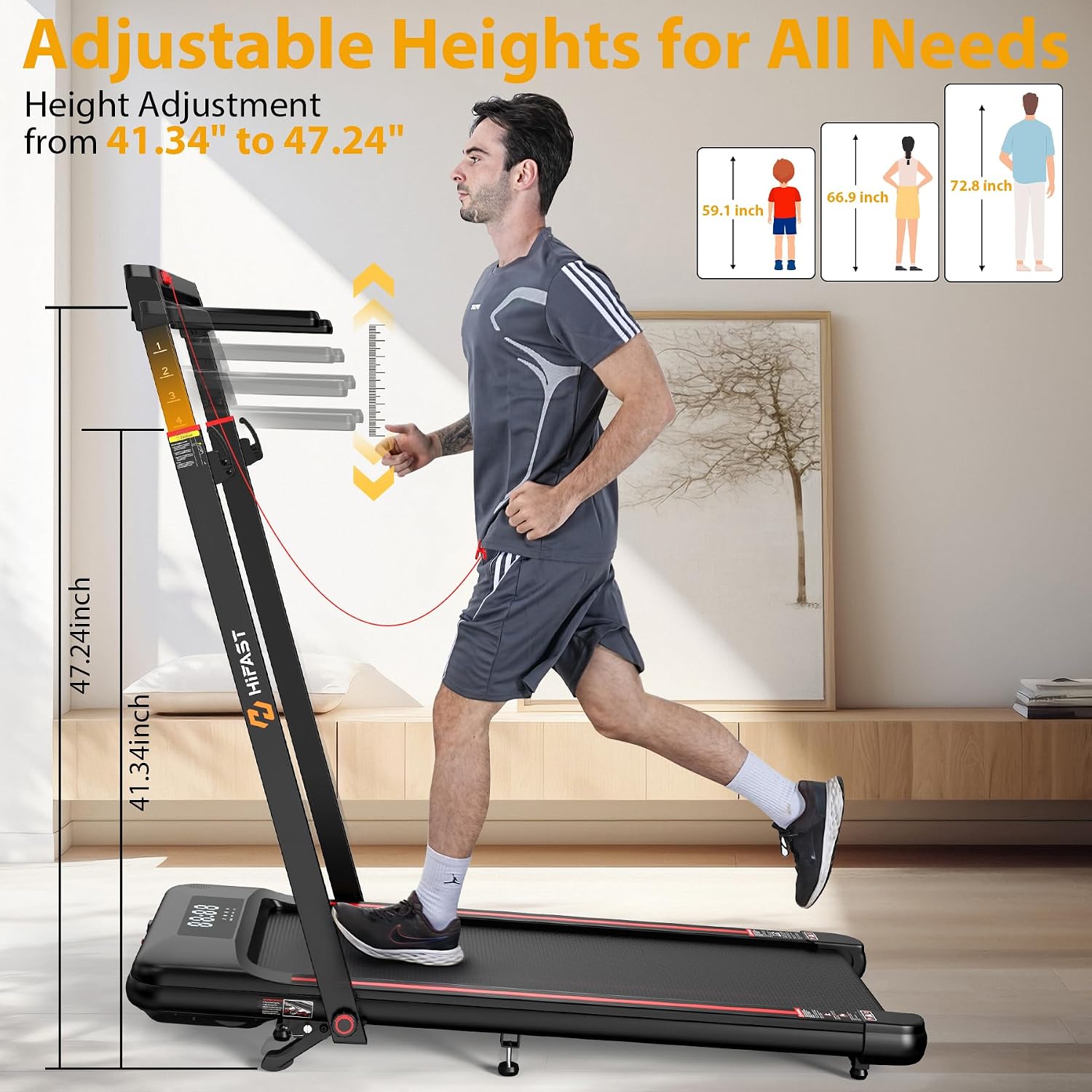
Image: A user adjusting the height of the treadmill's handlebar for comfortable use.
Video: Official product video demonstrating the setup and features of the HiFast Walking Pad Treadmill, including handlebar adjustment.
Attaching the Removable Workstation
The treadmill comes with a detachable workstation. Align the workstation with the designated slots on the handlebar supports and slide it into place until it clicks securely. The workstation features a cup holder and a tablet slot for convenience while exercising.

Image: The removable workstation attached to the treadmill, highlighting its features.

Image: Detail of the tablet mount on the workstation.

Image: Detail of the cup holder on the workstation.
אַפּערייטינג ינסטראַקשאַנז
מאַכט אויף און אַוועק
Connect the power cord to a suitable electrical outlet and to the treadmill's power port. Locate the main power switch, usually near the power cord connection, and flip it to the 'ON' position. To turn off, flip the switch to 'OFF' and unplug the unit.
Understanding Display and Controls
The LED display tracks essential metrics including time, distance, speed, and calories burned. Control the treadmill using the remote control, buttons on the handlebar, or compatible fitness apps.

Image: The three control methods for the treadmill: App, Remote Control, and Console.
גיכקייט און מאָדע אויסוואל
The treadmill offers four distinct modes: Walking (0.6-2 MPH), Working (2-4 MPH), Climbing (4-8.6 MPH), and Running (0.6-8.6 MPH). Select your desired mode and adjust speed using the control options.

Image: Visual representation of the treadmill's four modes and their speed ranges.
אַדזשאַסטינג ינקליין
The treadmill features an 8% incline option to enhance your workout intensity. No tools are required to quickly switch between flat and incline running modes. This helps burn more calories and target different muscle groups.

Image: Comparison of 8% incline versus 0% incline on the treadmill.

Image: Detail of the manual incline adjustment.
Using the Safety Key
For your safety, always attach the red safety key to the designated slot on the console and clip the other end to your clothing. If you accidentally step off or fall, the safety key will detach, immediately stopping the treadmill to prevent injury.

Image: The safety key in place on the treadmill console.
בלועטאָאָטה רעדנער
Enhance your workout experience by connecting your smartphone to the built-in Bluetooth speaker. The device name is 'EsangAudio'. Pair your device and enjoy your favorite music or podcasts while you exercise.
וישאַלט
לובריקיישאַן
Regular lubrication of the running belt is essential for optimal performance and longevity. Use the provided lubricating oil as instructed in the user manual. Frequency of lubrication depends on usage, typically every few months.
גאַרטל אַדזשאַסטמאַנט
The 2025 upgraded running belt features exclusive anti-slip technology designed to prevent shifting during workouts. If the belt appears to be off-center or slipping, refer to the user manual for instructions on how to adjust it properly.
טראָובלעשאָאָטינג
If you encounter any issues with your treadmill, please refer to the following basic troubleshooting steps:
- קיין מאַכט: Ensure the power cord is securely plugged into both the treadmill and the wall outlet. Check if the main power switch is in the 'ON' position.
- טרעדמיל הייבט זיך נישט אן: Verify that the safety key is correctly placed on the console. The treadmill will not start without the safety key engaged.
- ומגעוויינטלעך נויזיז: Check for any loose parts or debris under the running belt. Ensure the belt is properly lubricated.
- גאַרטל גליטשן: The running belt may need adjustment or lubrication. Refer to the maintenance section for guidance.
פֿאַר שטענדיקע פּראָבלעמען אָדער פּראָבלעמען וואָס זענען נישט דאָ אויסגערעכנט, ביטע קאָנטאַקטירט קונה שטיצע.
ספּעסאַפאַקיישאַנז
| שטריך | באַשרייַבונג |
|---|---|
| סאָרט | HiFast |
| מאָדעל נאָמען | S8HF-WM07 |
| מאָטאָר כאָרספּאַוער | 3.0 הפּ (שפּיץ) |
| ספּיד ראַנגע | 0.6 - 8.6 מייל פּער שעה |
| מאַקסימום ינקליין | 8% |
| וואָג קאַפּאַסיטי | 300 פונט |
| פּראָדוקט דימענשאַנז | 59.2"ד רענטגענ 24.84"וו רענטגענ 4.88"ה |
| פּונקט וואָג | 71.43 פונט |
| מאַטעריאַל | אַקרילאָניטרילע בוטאַדיענע סטירענע (אַבס) |
| ווייַז טיפּ | געפירט |
| ספּעציעלע פֿעיִקייטן | Adjustable Height, Shock Absorbent, Manual Incline, Foldable |
וואָראַנטי אינפֿאָרמאַציע
The HiFast Walking Pad Treadmill comes with a 1-Year Manufacturer Warranty. Please retain your proof of purchase for warranty claims.
קונה שטיצן
For any inquiries, technical assistance, or warranty claims, please contact HiFast customer support. We are committed to providing excellent service and offer 24-hour support to address your needs.
Visit the official HiFast Store for more information and products: HiFast Store on Amazon