
EIGIIS K22
EIGIIS K22 Smartwatch User Manual
מאָדעל: K22
1. הקדמה
Welcome to the EIGIIS K22 Smartwatch user manual. This guide provides essential information for setting up, operating, and maintaining your new smartwatch. The EIGIIS K22 is a robust military-grade smartwatch designed for active lifestyles, featuring an AMOLED HD Always On Display, Bluetooth calling, comprehensive health monitoring, and over 100 sports modes.

Image: EIGIIS K22 Smartwatch, showcasinזײַן גראָבן דיזײַן און לעבעדיקן אַרויסווייַז.
2. וואָס איז אין דער קעסטל
ביטע טשעק די אינהאַלט פון די פּאַקעט ווען איר עפֿנט עס אויס:
- EIGIIS K22 Smartwatch (with 1 Watch Band)
- טשאַרדזשינג קאַבלע
- באַניצער מאַנואַל (דעם דאָקומענט)
3. ערשט סעטאַפּ
3.1 אויפלאָדן די סמאַרטוואַטש
Before first use, fully charge your EIGIIS K22 Smartwatch. The device features a 400mAh battery that typically charges in approximately 2 hours.
- פֿאַרבינדט דעם מאַגנעטישן טשאַרדזשינג קאַבל צו די טשאַרדזשינג קאָנטאַקטן אויף דער הינטערשטער זייגער פֿון דער סמאַרטוואַטש.
- שטעקט אריין דעם USB עק פונעם קאַבל אין א סטאַנדאַרט USB מאַכט אַדאַפּטער (5V/1A רעקאָמענדירט) אדער א קאָמפּיוטער'ס USB פּאָרט.
- די זייגער אויסשטעלונג וועט ווײַזן דעם טשאַרדזשינג סטאַטוס.

Image: The smartwatch displaying its charging status, indicating a 400mAh battery capacity and charging time.
3.2 אַפּ ינסטאַלירונג
To unlock the full functionality of your smartwatch, download and install the FitCloudPro אַפּ אויף דיין סמאַרטפאָנע.
- Scan the QR code provided in the quick start guide or search for "FitCloudPro" in your smartphone's app store (Google Play Store for Android, Apple App Store for iOS).
- Install the app and grant necessary permissions for optimal performance.
3.3 פארבינדן מיט אייער סמאַרטפאָון
After installing the app, pair your smartwatch with your phone via Bluetooth.
- מאַכן זיכער אַז בלועטאָאָטה איז ענייבאַלד אויף דיין סמאַרטפאָנע.
- Open the FitCloudPro app and follow the on-screen instructions to add a new device.
- Select the EIGIIS K22 from the list of available devices.
- באַשטעטיקן די פּאָרינג בעטן אויף ביידע דיין טעלעפאָן און די סמאַרטוואַטש
4. אפערירן די סמאַרטוואַטש
4.1 אַרויסווייַזונג און נאַוויגאַציע
The EIGIIS K22 features a 1.43-inch AMOLED HD Always On Display. You can navigate the watch interface using touch gestures and the physical buttons.
- שלעפּן אַרויף / אַראָפּ: צוטריט צו שנעלע סעטטינגס אדער נאטיפיקאציעס.
- שלעפּן לינקס / רעכט: גיי דורך ווידזשעטס ווי טעטיקייט דאַטן, האַרץ טעמפּאָ, וועטער, אאז"וו.
- דריקן די זייט קנעפל: צוריק צום היים עקראַן אָדער אַקסעס די אַפּ מעניו.

Image: Close-up of the 1.43-inch AMOLED display, showing a detailed watch face with time and activity data.
4.2 Bluetooth Calling and Smart Notifications
The smartwatch allows you to make and receive calls directly from your wrist and receive notifications from your paired smartphone.
- מאַכן קאַללס: Use the built-in dialer or access your contacts through the watch interface.
- באַקומען קאַללס: Answer or reject incoming calls directly on the watch.
- נאָטיפיקאַטיאָנס: Receive alerts for messages, social media, and other app notifications. Ensure notification permissions are enabled in the FitCloudPro app.

Image: The smartwatch displaying an incoming call and various app notification icons, illustrating its Bluetooth call and smart notification capabilities.
4.3 ספּאָרט מאָדעס
The EIGIIS K22 supports over 100 sports modes to track your physical activities. Data such as calories burned, steps taken, and distance covered are recorded and synced to the FitCloudPro app.
- Access the Sports menu on your watch.
- Select your desired activity (e.g., Running, Cycling, Basketball).
- די זייגער וועט אָנהייבן טראַקינג דיין וואָרקאַוט דאַטן.

Image: A user hiking while the smartwatch displays workout metrics like calories, distance, and steps, alongside icons for various sports modes.
4.4 געזונט מאָניטאָרינג
The smartwatch continuously monitors key health metrics.
- הארץ ראטע: רעאַל-צייט האַרץ קורס טראַקינג.
- בלוט דרוק: Estimates blood pressure levels.
- בלוט זויערשטאָף (SpO2): מעסט בלוט זויערשטאָף זעטיקונג.
- שלאָף מאָניטאָרינג: Analyzes sleep patterns (Awake, Light Sleep, Deep Sleep) to provide insights into sleep quality.
All health data is synced to the FitCloudPro app for detailed analysis and historical trends.
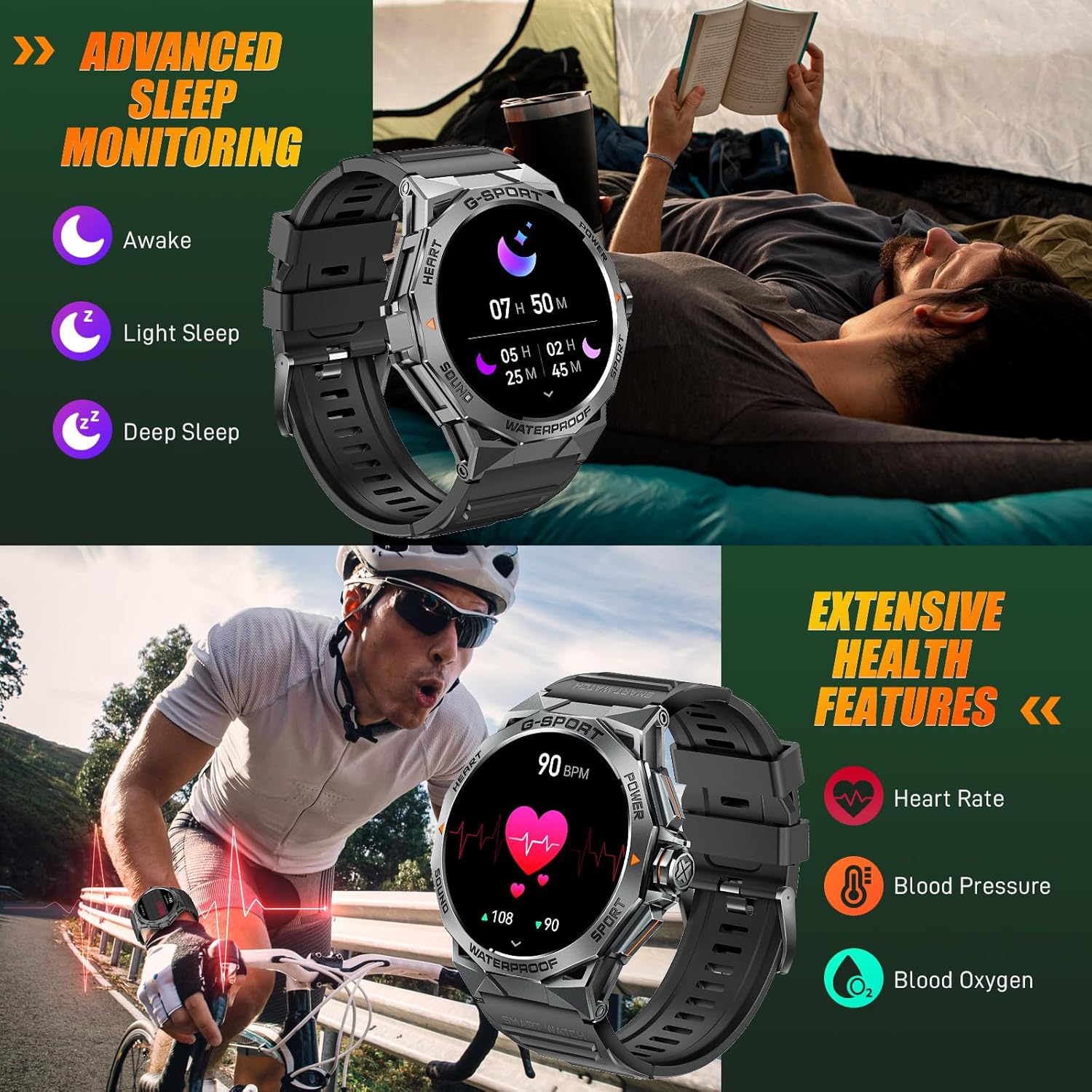
Image: The smartwatch displaying sleep data and heart rate monitoring, with icons for heart rate, blood pressure, and blood oxygen.
4.5 אַנדערע קלוגע פֿעיִטשערס
The EIGIIS K22 offers several additional features to enhance daily convenience:
- מוזיק קאָנטראָל: קאָנטראָל מוזיק פּלייבאַק אויף דיין סמאַרטפאָנע.
- ווייַט אַפּאַראַט קאָנטראָל: ניצט אייער זייגער ווי אַ ווייַט לאָדן פֿאַר אייער טעלעפאָן'ס קאַמעראַ.
- וועטער דערהייַנטיקונגען: באַקומען וועטער פאָרויסזאָגן אין רעאַל-צייט.
- וועקער זייגער: שטעלט אַלאַרמס גלייך פֿון אייער האַנטגעלענק.
- געפֿינען טעלעפֿאָן: געפינט אייער פארלוירענעם סמאַרטפאָן.
- זיצנדיקע דערמאָנונגען: באַקומען וואָרענונגען צו רירן זיך נאָך פּעריאָדן פון אינאַקטיוויטעט.
- שטימע אַססיסטאַנט: Access your phone's voice assistant.

Image: A collage showing the smartwatch controlling music, acting as a camera remote, displaying weather, and featuring stopwatch, alarm, and 'find phone' functions.
5. וישאַלט און קער
5.1 וואַסער קעגנשטעל (IP68)
The EIGIIS K22 Smartwatch is IP68 waterproof, meaning it is resistant to dust and can withstand immersion in water up to 1.5 meters for 30 minutes. It is suitable for daily use, including washing hands and swimming.
- Avoid prolonged exposure to hot water, steam, or high-pressure water jets.
- דו זאלסט נישט אַרבעטן די קנעפּלעך אונטער וואַסער.
- טריקנט די זייגער גוט אויס נאכדעם וואס זי איז געווען אויסגעשטעלט צו וואסער.

Image: A person swimming while wearing the EIGIIS K22 Smartwatch, highlighting its IP68 waterproof rating.
5.2 באַטעריע לעבן אָפּטימיזאַציע
The 400mAh battery provides 4-7 days of typical usage and up to 25 days on standby. To maximize battery life:
- שטעל די ליכטיקייט פון דעם עקראַן צו אַ נידעריקערע שטאַפּל.
- Limit the use of the Always On Display feature if extended battery life is critical.
- דיאַקטיווירן אומנייטיקע נאָוטאַפאַקיישאַנז.
- Close background apps on the watch when not in use.
5.3 רייניקונג
Regularly clean your smartwatch and watch band to prevent skin irritation and maintain performance.
- ווישט אָפּ די זייגער און באַנד מיט אַ ווייכן, טרוקענעם שטאָףamp שטאָף.
- ויסמיידן ניצן האַרב קעמיקאַלז אָדער אַברייסיוו מאַטעריאַלס.
6. טראָובלעשאָאָטינג
If you encounter issues with your EIGIIS K22 Smartwatch, refer to the following common solutions:
| פּראָבלעם | מעגלעך לייזונג |
|---|---|
| וואַך נישט אויסגעדרייט אויף | זיכער מאַכן אַז די זייגער איז גאָר אויפגעלאָדן. פֿאַרבינדט עס צום טשאַרדזשער פֿאַר לפּחות 30 מינוט. |
| קען נישט צוזאמענשטעלן זיך מיטן סמאַרטפאָן | Ensure Bluetooth is enabled on your phone. Restart both the watch and phone. Make sure the FitCloudPro app has Bluetooth permissions. |
| נאָוטאַפאַקיישאַנז ניט באקומען | Check notification settings in the FitCloudPro app and your phone's system settings. Ensure the app is running in the background. |
| קורץ באַטאַרייע לעבן | Disable the Always On Display feature. Reduce screen brightness. Limit frequent heart rate monitoring. See Section 5.2 for more tips. |
| Bluetooth audio defaults to watch speaker | This is a common behavior for smartwatches with built-in speakers. In your phone's Bluetooth settings, you may be able to disconnect the watch's audio profile while keeping the data connection. Alternatively, some apps allow you to select the audio output device. |
| אומגענויע געזונטהייט דאַטן | Ensure the watch is worn snugly on your wrist, about one finger's width above the wrist bone. Avoid excessive movement during measurements. Note that smartwatches are not medical devices and readings are for reference only. |
7. ספּעסאַפאַקיישאַנז
| שטריך | דעטאַל |
|---|---|
| מאָדעל נומער | K22 |
| ווייַז | 1.43 Inches AMOLED HD Always On Display |
| באַטאַרייע קאַפּאַציטעט | 400 מאַה |
| באַטערי לעבן | 4-7 days (typical use), up to 25 days (standby) |
| טשאַרדזשינג צייט | בעערעך 2 שעה |
| וואַסער קעגנשטעל | IP68 |
| קאַנעקטיוויטי | בלועטאָאָטה |
| אָפּערייטינג סיסטעם | טראָגן אַס |
| קאַמפּאַטאַבילאַטי | אַנדרויד 4.4 און העכער, יאָס 8.0 און העכער |
| פּונקט וואָג | 50 גראַמז (1.76 אונסעס) |
| פּראָדוקט דימענשאַנז | 6.69 X 4.33 X 1.18 אינטשעס |
8. וואָראַנטי און שטיצן
8.1 פּראָדוקט וואָראַנטי
The EIGIIS K22 Smartwatch comes with a 12-חודש קוואַליטעט גאַראַנטירן from the date of purchase. This warranty covers manufacturing defects and issues arising from normal use. It does not cover damage caused by misuse, accidents, unauthorized modifications, or failure to follow instructions.
8.2 קונה שטיצן
For any questions, technical assistance, or warranty claims, please contact EIGIIS customer support through the following channels:
- זעט די קאָנטאַקט אינפֿאָרמאַציע וואָס איז צוגעשטעלט מיט אייער פּראָדוקט פּאַקאַדזשינג.
- Visit the official EIGIIS webפּלאַץ פֿאַר שטיצן רעסורסן.
- Contact the seller directly through the platform where you purchased the product.
Please have your purchase receipt and product model number (K22) ready when contacting support.
Ask a question about this manual
Ask about setup, troubleshooting, compatibility, parts, safety, or missing instructions. Manuals+ will review the question and use this page’s manual context to help answer it.