
ETOE A1222
ETOE Starfish 720P Projector User Manual (Model A1222)
אייער גייד צו סעטאַפּ, אָפּעראַציע און וישאַלט
1. הקדמה
Welcome to the ETOE Starfish 720P Projector user manual. This guide provides essential information for setting up, operating, and maintaining your projector. The ETOE Starfish projector offers a native 720P resolution with 300 ANSI lumens, a built-in Google Android system for streaming, and features like 140-degree rotation, auto keystone correction, and dual-band Wi-Fi connectivity. Please read this manual thoroughly before using your device to ensure optimal performance and longevity.
2. וואָס איז אין דער קעסטל
Carefully unpack your ETOE Starfish projector and ensure all items are present:
- פּראַדזשעקטער
- אַדאַפּטער
- באַניצער מאַנואַל
- ווייַט קאָנטראָל
- מאַכט שנור
3. פּראָדוקט איבערview
Familiarize yourself with the main components and features of your ETOE Starfish projector.

בילד: פראָנט view of the ETOE Starfish Projector, showcasinג זײַן קאָמפּאַקטן און מאָדערנעם דיזײַן.
3.1. פּאָרטן און פֿאַרבינדונגען
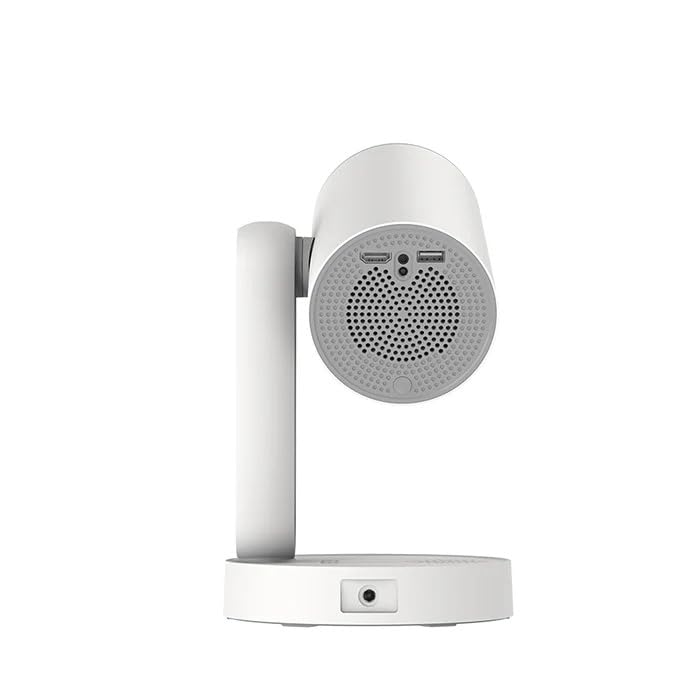
בילד: זייט view of the ETOE Starfish Projector, highlighting its connectivity ports including USB and HDMI.
The projector includes various ports for connectivity:
- הדמי פּאָרט: For connecting external devices like gaming consoles, Blu-ray players, or laptops.
- וסב פּאָרט: פֿאַר פֿאַרבינדן USB סטאָרידזש דעוויסעס צו שפּילן מעדיע files.
- מאַכט אַרייַנשרייַב: פֿאַר קאַנעקטינג די מאַכט אַדאַפּטער.
3.2. שליסל פֿעיִקייטן
- 140° ראָוטיישאַן: The projector head can be rotated up to 140 degrees for flexible projection angles, including ceiling projection.
- Touch-controlled Ambient Light: A customizable seven-color night light feature with adjustable brightness and color temperature.
- Built-in Google Android System: Access popular streaming services like Netflix, YouTube, and Prime Video directly.
- אַוטאָ קיסטאָנע קערעקשאַן: Automatically adjusts the image for a perfectly rectangular display.
- צוויי-באַנד ווי-פי: Supports 2.4G and 5G Wi-Fi for stable wireless connectivity.
- נידעריק ראַש אָפּעראַציע: Designed for quiet performance, operating at approximately 24.5 dB.
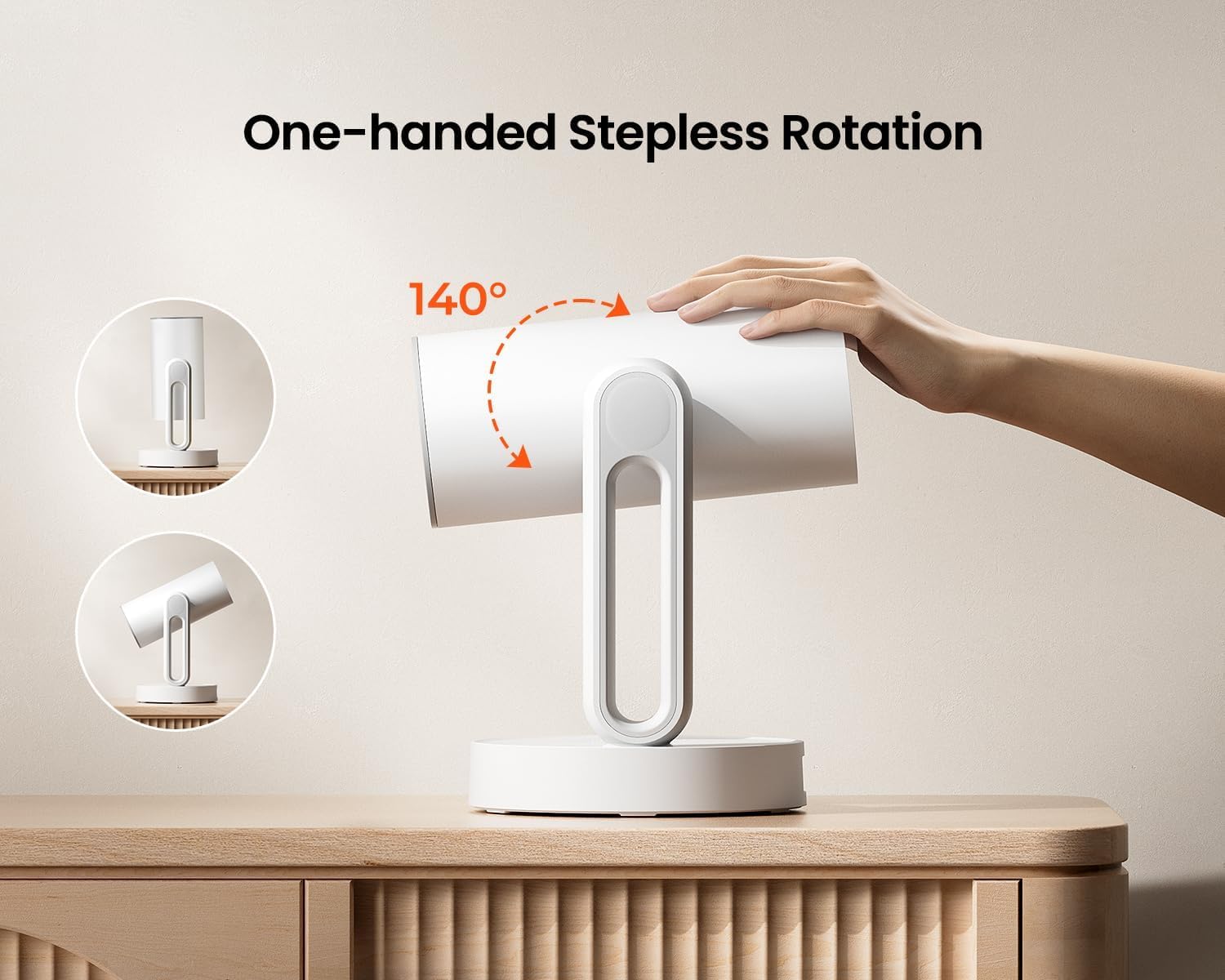
Image: The ETOE Starfish Projector shown rotating 140 degrees, illustrating its flexible projection capabilities.

Image: The ETOE Starfish Projector displaying its touch-controlled ambient light feature with various color options.
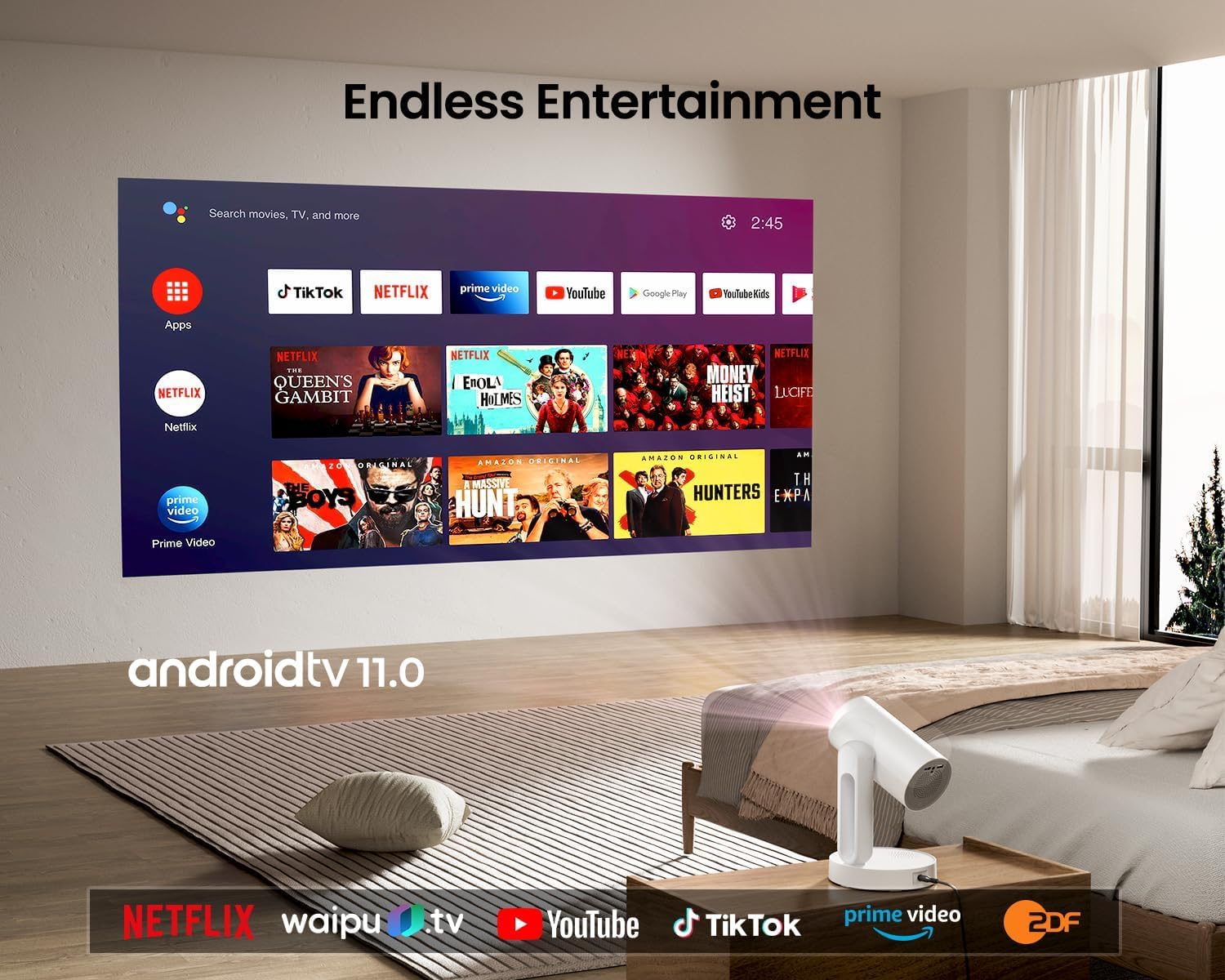
Image: The ETOE Starfish Projector displaying the Android TV interface, showing various streaming applications like Netflix, YouTube, and Prime Video.

Image: The ETOE Starfish Projector automatically correcting a distorted image to a perfect rectangle.

Image: Illustration comparing the low noise level of the ETOE Starfish Projector (24.5 dB) to common sounds.
4. סעטאַפּ
4.1. מאַכט קאַנעקשאַן
- Connect the power cord to the adaptor.
- Plug the adaptor into the projector's power input port.
- צאַפּן די אנדערע סוף פון די מאַכט שנור אין אַ וואַנט ווענטיל.
4.2. ערשטע פּלאַצירונג
שטעלט דעם פּראָיעקטאָר אויף אַ שטאַרקער, גלאַטער ייבערפלאַך. פֿאַר אָפּטימאַלן viewing, ensure the projection surface (wall or screen) is clean and smooth. The 140° rotation feature allows for flexible positioning, including ceiling projection.
4.3. רימאָוט קאָנטראָל סעטאַפּ
Insert two AAA batteries (not included) into the remote control, observing the correct polarity.
4.4. First Boot and Network Connection
- דריק דעם מאַכט קנעפּל אויף דעם פּראָיעקטאָר אָדער ווײַטקאָנטראָל צו עס אנצינדן.
- Follow the on-screen instructions for the initial Google Android system setup. This will include language selection and connecting to a Wi-Fi network.
- Select your preferred 2.4G or 5G Wi-Fi network and enter the password.
5. אַפּערייטינג ינסטרוקטיאָנס
5.1. יקערדיק אָפּעראַציע
- מאַכט אויף / אַוועק: דריק דעם מאַכט קנעפּל אויף דער ווייַטקאָנטראָל אָדער פּראָיעקטאָר.
- נאַוויגאַציע: Use the directional buttons on the remote to navigate the Android interface.
- באַנד קאָנטראָל: Use the volume buttons on the remote.
5.2. בילד אַדזשאַסטמאַנט
- דיגיטאַל פאָקוס: Adjust the image clarity using the focus controls on the remote or through the settings menu.
- אַוטאָ קיסטאָנע קערעקשאַן: The projector automatically corrects trapezoidal distortion. If manual adjustment is needed, access it via the settings.
- דיגיטאַל פארגרעסער: Adjust the image size from 50% to 100% without moving the projector, accessible in the settings menu.
- 140° ראָוטיישאַן: Physically rotate the projector head to project onto different surfaces, including ceilings. The auto keystone will adjust the image accordingly.

Image: The ETOE Starfish Projector projecting content onto a ceiling, demonstrating its versatility for different viewing angles, with a smartphone mirroring content.
5.3. Smart System Features
- Streaming Applications: Access pre-installed apps like Netflix, YouTube, and Prime Video. Ensure you are logged into your respective accounts.
- גוגל אַססיסטאַנט: Use voice commands via the remote control for navigation, content search, and system control.
- Chromecast Built-in: Cast content directly from compatible Android, iOS, and PC devices to the projector. Ensure both devices are on the same Wi-Fi network.
5.4. Ambient Light Function
The projector features a touch-controlled ambient light. Touch the designated area on the projector to cycle through seven colors, adjust brightness, and change color temperature to create your desired atmosphere.
6. וישאַלט
געהעריגע אויפהאלטונג גאראנטירט די לאנגעוויטי און אפטימאלע פערפארמאנס פון אייער פראיעקטאר.
- לענס רייניקונג: ניצט אַ ווייכע, לינט-פֿרייע שטאָף ספּעציעל דיזיינד פֿאַר אָפּטישע לענסעס צו פֿאָרזיכטיק ווישן די פּראָיעקטאָר לענס. פֿאַרמייַדט אַברייסיוו מאַטעריאַלן אָדער שאַרפֿע כעמיקאַלן.
- שטויב שוץ: The ETOE Starfish features a fully sealed optical engine designed to protect against dust ingress, minimizing the need for internal cleaning.
- אַלגעמיינע רייניקונג: ווישט אָפּ די אויסערלעכע זייט פון פּראָיעקטאָר מיט אַ ווייכן, טרוקענעם שטאָף. ניצט נישט פליסיקע רייניקונגסמיטלען גלייך אויף דעם אַפּאַראַט.
- סטאָרידזש: ווען נישט אין באַנוץ פֿאַר לענגערע פּעריאָדן, זאָל מען האַלטן דעם פּראָיעקטאָר אין אַ קיל, טרוקן אָרט, אַוועק פֿון דירעקטער זון און עקסטרעמע טעמפּעראַטורן.
7. טראָובלעשאָאָטינג
אויב איר טרעפט פּראָבלעמען מיט אייער פּראָיעקטאָר, זעט די פאלגענדע געוויינטלעכע פּראָבלעמען און לייזונגען:
| פּראָבלעם | מעגלעך סיבה | לייזונג |
|---|---|---|
| פּראָיעקטאָר גייט נישט אָן. | Power cord not connected properly; power outlet issue. | Ensure power cord is securely connected to both projector and outlet. Test outlet with another device. |
| קיין בילד געוויזן. | Input source incorrect; external device not connected; projector in standby. | Check input source settings. Ensure HDMI/USB devices are connected and powered on. Wake projector from standby. |
| דאָס בילד איז פֿאַרשוואָמען. | פאָקוס נישט אַדזשאַסטיד; פּראָיעקטאָר צו נאָענט/ווייט פֿון עקראַן. | Adjust digital focus using the remote. Ensure optimal projection distance. |
| Image is distorted (not rectangular). | קיסטאָון קאָרעקציע איז נויטיק. | The projector has auto keystone. If manual adjustment is required, access it in the settings menu. |
| קיין געזונט. | Volume too low; external audio device issue; mute enabled. | Increase volume. Check external audio connections. Disable mute. |
| Wi-Fi פֿאַרבינדונג פּראָבלעמען. | Incorrect password; router too far; network interference. | Re-enter Wi-Fi password. Move projector closer to router. Restart router. |
| ווייַט קאָנטראָל נישט ארבעטן. | Batteries low/dead; line of sight blocked. | Replace batteries. Ensure no obstructions between remote and projector. |
8. ספּעסאַפאַקיישאַנז
Detailed technical specifications for the ETOE Starfish 720P Projector (Model A1222).
| סאָרט | ETOE |
| מאָדעל | A1222 |
| פאַבריקאַנט | JVDN International |
| פּראָדוקט דימענשאַנז | 61 X 48 X 43 סענטימעטער |
| פּונקט וואָג | 3 קג |
| ווייַז טיפּ | לקד |
| בילד ברייטנאַס | 300 אַנסי לומענס |
| בילד קאַנטראַסט פאַרהעלטעניש | 3000:1 |
| אַספּעקט פאַרהעלטעניש | 16:9 |
| געבוירן האַכלאָטע | 1280 X 720 |
| Voltage | 240 וואלטס |
| וואָסtage | 5 וואטס |
| דערפרישן קורס | 60 הז |
| קאַנעקטיוויטי טעכנאָלאָגיע | Wi-Fi (2.4G און 5G) |
| ייַזנוואַרג צובינד | HDMI, וסב |
| קאַמפּאַטאַבאַל דעוויסעס | Smartphones (Android & iOS), Gaming Consoles, Blu-ray Players, Media Players |
| ספּעציעלע פֿעיִקייטן | Digital Focus, Portable, Wireless, Auto Keystone, 140° Rotation, Built-in Android System, Ambient Light |
| מאַונטינג טיפּ | טאַבלעטאָפּ בארג |
9. וואָראַנטי און שטיצן
9.1. וואָראַנטי אינפֿאָרמאַציע
The ETOE Starfish Projector is manufactured by JVDN International. For specific warranty terms and conditions, please refer to the warranty card included with your product or contact the manufacturer directly. Keep your purchase receipt as proof of purchase for warranty claims.
9.2. קונה שטיצן
For technical assistance, troubleshooting not covered in this manual, or warranty inquiries, please contact JVDN International customer support:
- קאָנטאַקט מענטש: JAYESH KUMAR JAGETIYA
- טעלעפֿאָן: +91 91361 87951
- בליצפּאָסט: jayesh@jvdninternational.com
- אַדרעס: B-1122 Sun Westbank, Ashram Road, Ahmedabad, Gujarat, India, 380009
Ask a question about this manual
Ask about setup, troubleshooting, compatibility, parts, safety, or missing instructions. Manuals+ will review the question and use this page’s manual context to help answer it.