
1. הקדמה
The MESTEK EMF Meter (Model EMF02R-YW) is a multi-functional device designed to detect and measure various types of radiation and environmental factors. It integrates five key measurement capabilities: Electromagnetic Field (MF), Electric Field (EF), Radiofrequency (RF) radiation, and ambient Temperature and Humidity. This meter provides quick and accurate readings, making it suitable for assessing radiation levels in homes, offices, and other environments.
וואָס איז אין די קעסטל
- 1x MESTEK EMF Meter
- 1 קס וסב טיפּ-C טשאַרדזשינג קאַבלע
- 1 קס סטאָרידזש באַג
- 1x באַניצער מאַנואַל (דאָס דאָקומענט)

פיגורע 1.1: פּעקל אינהאַלט
2. שליסל פֿעיִקייטן
- 5-אין-1 מעסטונג: Simultaneously detects Electromagnetic Field (MF), Electric Field (EF), Radiofrequency (RF) radiation, and measures ambient Temperature and Humidity.
- הויך-פרעקווענסי קייט: RF detection up to 8GHz, suitable for identifying radiation from base stations and various wireless devices.
- Large VA Color LCD Display: Provides clear, intuitive readings with a three-color analog bar display for quick radiation level assessment (Green: Low, Yellow: Moderate, Red: High).
- אַודיבלע און וויסואַל אַלאַרמס: Alerts users with sound and screen indicators when radiation levels exceed preset safety thresholds. The audible alarm can be muted.
- דאַטן פונקציעס: Includes Data Hold, Maximum Value (MAX), and Average Value (AVG) display for comprehensive analysis.
- באַניצער-פרייַנדלעך פּלאַן: Features a low battery reminder, auto-power off after 15 minutes of inactivity, and unit switching for temperature (°C/°F) and magnetic field (mG/µT).
- דוראַבאַל און פּאָרטאַטיוו: Compact size with soft rubber casing for drop resistance, making it easy to carry and operate with one hand.

Figure 2.1: 5-in-1 Function Modes

Figure 2.2: Large VA Color LCD Display
3. סעטאַפּ
3.1 טשאַרדזשינג די מיטל
The MESTEK EMF Meter is equipped with a rechargeable Lithium-Ion battery. Before first use, or when the low battery indicator appears, charge the device using the provided USB Type-C cable.
- Connect the USB Type-C cable to the charging port at the bottom of the meter.
- פֿאַרבינדט דעם אַנדערן עק פֿונעם קאַבל צו אַ נאָרמאַלן USB מאַכט אַדאַפּטער (נישט אַרייַנגערעכנט) אָדער אַ קאָמפּיוטער USB פּאָרט.
- The charging indicator on the screen will show the charging status. A full battery icon indicates charging is complete.

Figure 3.1: Charging the EMF Meter

Figure 3.2: Low Battery Indicator
3.2 פּאַוערינג אויף / אַוועק
- צו אנצינדן: דריק און האלט די מאַכט קנעפּל (
 ) located below the screen.
 - צו אויסלעשן: דריק און האלט די מאַכט קנעפּל again. The device will also automatically power off after 15 minutes of inactivity to conserve battery.
4. אַפּערייטינג ינסטרוקטיאָנס
4.1 קנעפּל פאַנגקשאַנז
- מאַכט קנעפּל (): Press and hold to power on/off.
- SEL קנעפּל: Short press to switch between Electric Field (E-field) and Magnetic Field (H-field) measurement modes.
- AVG/MAX קנעפּל: Short press to cycle through current value, maximum value (MAX), and average value (AVG) display.
- HOLD קנעפּל: Short press to freeze the current reading on the display. Press again to release.
- רף קנעפּל: Short press to enter Radiofrequency (RF) measurement mode. Press again to exit RF mode and return to EF/MF measurement.
- שטום קנעפּל (Bell icon): Short press to toggle the audible alarm on or off.
4.2 Measurement Modes and Display
The meter's display shows real-time readings, an analog bar, and environmental data. The analog bar changes color to indicate radiation intensity:
- גרין: Low radiation level.
- געל: Moderate radiation level.
- רויט: High radiation level, indicating potential concern.

Figure 4.1: Three-Color Analog Display Indication
4.2.1 Electric Field (EF) Measurement
In EF mode, the meter measures electric field strength in V/m. Press the SEL button until 'E-field' is indicated on the display. Common sources include power lines, electrical appliances, and wiring.
4.2.2 Magnetic Field (MF) Measurement
In MF mode, the meter measures magnetic field strength in mG or µT. Press the SEL button until 'H-field' is indicated. You can switch between mG and µT units. Common sources include motors, transformers, and high-current devices.
4.2.3 Radiofrequency (RF) Measurement
In RF mode, the meter measures radiofrequency power density in µW/cm². Press the RF button to enter this mode. The meter can detect frequencies from 30 MHz to 8 GHz. Common sources include Wi-Fi routers, mobile phones, cell towers, and microwave ovens.

Figure 4.2: RF Measurement near a Wi-Fi Router

Figure 4.3: EMF Measurement near Appliances
4.2.4 טעמפּעראַטור און הומידיטי מעסטונג
The meter continuously displays ambient temperature in °C or °F and relative humidity in %. Use the appropriate button (refer to the full manual for specific button if not SEL) to switch between Celsius and Fahrenheit.
4.3 שרעק פֿונקציע
When the measured radiation value exceeds the safety threshold, the meter will activate both an audible alarm (beeping sound) and a visual alarm (screen flashing, analog bar turning red). This alerts you to potentially high radiation areas.
- To mute the audible alarm: Press the שטום קנעפּל (bell icon). The visual alarm will remain active.
- To unmute: Press the שטום קנעפּל ווידער.
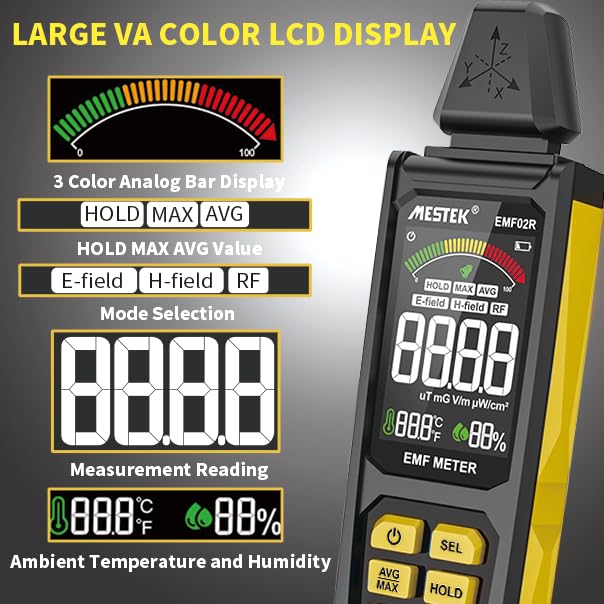
Figure 4.4: Sound-Light Alarm Indication
4.4 Analog Digital Comparison Table
The following table provides a general guide for interpreting the analog bar display and corresponding digital values for different radiation types. These are indicative thresholds and may vary based on specific regulations or personal sensitivity.
| Unit Analog Display | RF (µW/cm²) | EF (V/m) | MF (mG) | MF (µT) |
|---|---|---|---|---|
| גרין (נידעריק) | 0.0 ~ 9.9 | 0 ~ 9 | 0.0 ~ 0.9 | 0.00 ~ 0.09 |
| Yellow (Moderate) | 10 ~ 39.9 | 10 ~ 399 | 1.0 ~ 39.9 | 0.10 ~ 3.99 |
| רויט (הויך) | 40 ~ 9999 | 400 ~ 999 | 40.0 ~ 199.9 | 4.00 ~ 19.99 |
פיגור 4.5: אנאלאג דיגיטאלע פארגלייך טאבעלע פאר ראדיאציע לעוועלס
5. אַפּפּליקאַטיאָנס
The MESTEK EMF Meter is a versatile tool for various applications:
- היים און אפיס: Identify radiation sources from household appliances (TVs, computers, printers, microwave ovens, refrigerators) and office equipment.
- ענוויראָנמענטאַל מאָניטאָרינג: Detect high-frequency radiation signals near base stations, mobile phone antenna masts, and high-voltagE קייבאַלז.
- פערזענליכע זיכערקייט: Assess potential exposure to harmful electromagnetic fields in your living and working spaces.
- ספּעציעלע נוצן: Can be used for ghost hunting or identifying unusual electromagnetic phenomena.
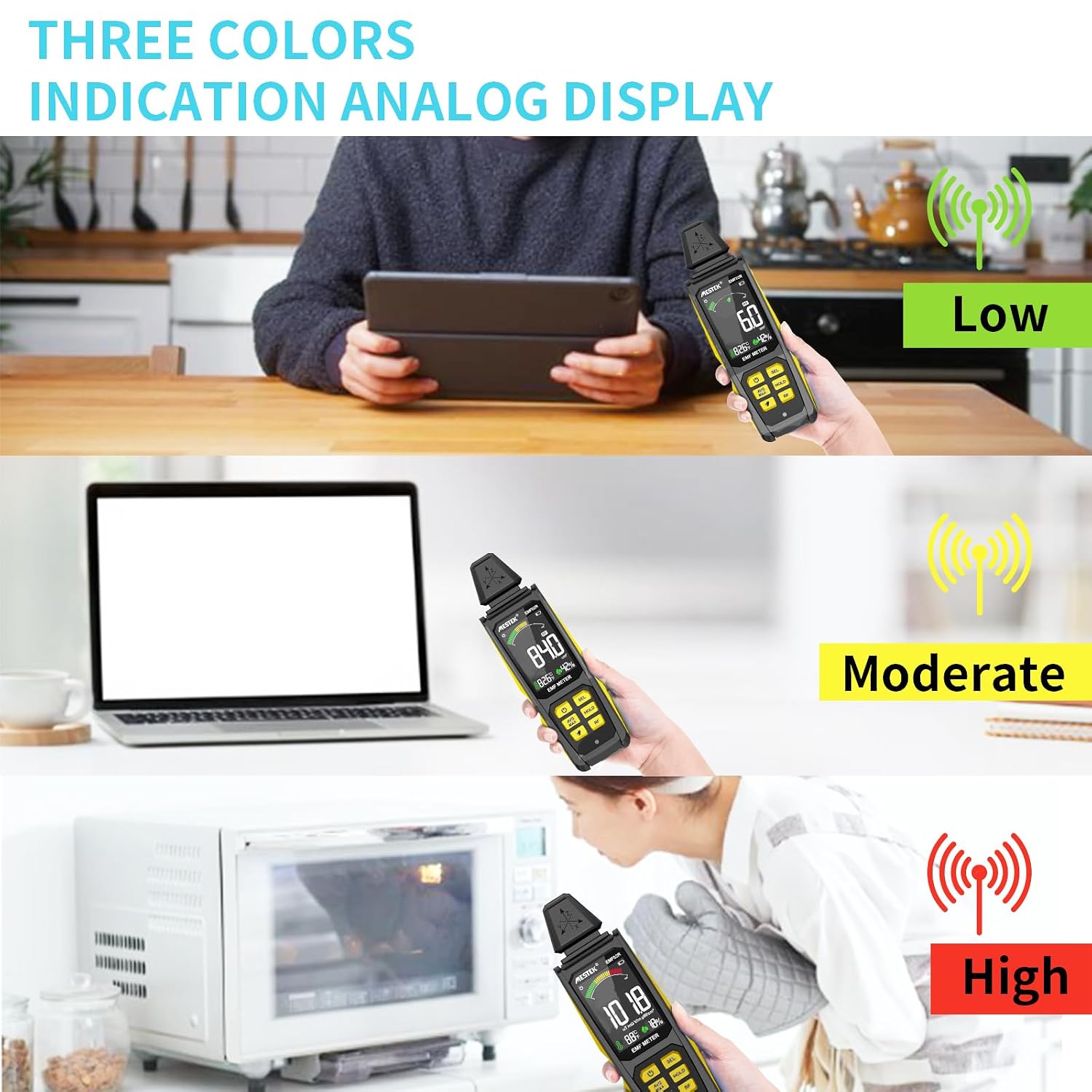
Figure 5.1: Widely Used EMF Radiation Tester

Figure 5.2: Identifying High Radiation Sources

Figure 5.3: Suitable for Various Users
6. וישאַלט
6.1 רייניקונג
To clean the device, use a soft, dry cloth. Do not use abrasive cleaners, solvents, or immerse the device in water. Ensure the device is powered off before cleaning.
6.2 סטאָרידזש
When not in use for extended periods, store the meter in its provided storage bag in a cool, dry place, away from direct sunlight and extreme temperatures. Ensure the battery is partially charged before storage to prolong its lifespan.
6.3 באַטערי קער
The integrated Lithium-Ion battery should be recharged regularly, even if the device is not frequently used, to maintain battery health. Avoid completely draining the battery for prolonged periods.
7. טראָובלעשאָאָטינג
If you encounter issues with your MESTEK EMF Meter, refer to the following common problems and solutions:
- אַפּאַראַט אַרבעט נישט אָן:
- Ensure the battery is charged. Connect the device to a power source using the USB Type-C cable.
- Press and hold the Power button for a few seconds to ensure it registers.
- נישט פּינקטלעכע אָדער נישט קאָנסיסטענטע לייענונגען:
- Ensure there are no strong interfering electromagnetic sources nearby that are not the target of measurement.
- Check if the device is in the correct measurement mode (EF, MF, or RF) for the type of radiation you are trying to detect.
- Move the device slowly and steadily during measurement.
- Audible alarm not working:
- Press the Mute button (bell icon) to ensure the alarm is not muted.
- Check if the radiation level is above the alarm threshold.
- דער עקראַן איז ליידיק אָדער פֿאַרפֿרוירן:
- Try pressing the HOLD button to see if the display was simply frozen.
- Power off the device and restart it. If the issue persists, ensure the battery is charged.
אויב די טריט לייזן נישט דעם פראבלעם, ביטע קאנטאקטירט קאסטומער סופארט.
8. ספּעסאַפאַקיישאַנז
| שטריך | באַשרייַבונג |
|---|---|
| מאָדעל נומער | MESTEK EMF02R-YW |
| פאַבריקאַנט | MESTEK |
| דימענשאַנז | 20.32 X 6.35 X 3.3 סענטימעטער (8 X 2.5 X 1.3 אינטשעס) |
| וואָג | 220 ג |
| באַטערי טיפּ | 1x ליטהיום יאָן (אריינגערעכנט) |
| מעאַסורעמענט אַקיעראַסי | +/-1 |
| MF Test Range | 0.1-99.9 מג / 0.01-9.99 µט |
| EF Test Range | 1-999 V/m |
| RF Test Range | 0.0-9999 µW/cm² (30 MHz - 8 GHz) |
| טעמפּעראַטור ראַנגע | °C/°F (32-122°F) |
| הומידיטי ראַנגע | 0-90% רה |
| אַוטאָ מאַכט אויסגעלאשן | נאָך 15 מינוט פון ינאַקטיוויטי |
| ווייַז | Large VA Color LCD with Analog Bar |
9. וואָראַנטי און שטיצן
MESTEK provides a 24-חודש וואָראַנטי for this product, covering manufacturing defects and malfunctions under normal use. Additionally, lifetime technical support is available to assist you with any questions or issues you may encounter.
For warranty claims, technical assistance, or any product-related inquiries, please contact MESTEK customer service through the platform where you purchased the product or refer to the contact information provided in your product packaging.
We are committed to providing high-quality products and excellent customer service. Your satisfaction is our priority.