
1. הקדמה
Thank you for choosing the MESTEK TH11 Digital Temperature and Humidity Meter. This device is designed for precise measurement of ambient temperature, relative humidity, wet bulb temperature, and dew point temperature. Its portable and user-friendly design makes it suitable for a wide range of applications, from home environments to industrial and agricultural settings. Please read this manual thoroughly before use to ensure proper operation and to maximize the lifespan of your instrument.

Image 1.1: The MESTEK TH11 meter highlighting its multi-functional capabilities including ambient temperature, humidity, wet bulb, and dew point measurements.
2. זיכערקייַט אינפֿאָרמאַציע
- דו זאלסט נישט פּרווון צו דיסאַסעמבאַל אָדער מאָדיפיצירן די קיילע.
- Keep the device away from water and high humidity environments to prevent damage.
- ויסמיידן יקספּאָוזינג די מיטל צו עקסטרעם טעמפּעראַטורעס אָדער דירעקט זונשייַן פֿאַר פּראַלאָנגד פּיריאַדז.
- טוישט די באַטעריעס גלייך ווען דער נידעריק-באַטעריע אינדיקאַטאָר דערשיינט צו ענשור גענויע מעסטונגען.
- פּאָטער פון געוויינט באַטעריז לויט די היגע רעגיאַליישאַנז.
- רייניקט דעם אַפּאַראַט מיט אַ ווייכן, טרוקענעם שטאָף. ניצט נישט קיין שרײַבנדיקע רייניגערס אדער סאָלווענטן.
3. פּראָדוקט איבערview
3.1. פּעקל אינהאַלט
ביים עפענען דעם פעקל, ביטע זיכער מאכן אז אלע זאכן זענען דא און אין גוטן צושטאנד:
- 1 x MESTEK TH11 Digital Temperature and Humidity Meter
- 3 X AAA באַטעריז
- קסנומקס רענטגענ שטאָף באַג
- 1 x שרויפנ - ציער
- 1 x באַניצער מאַנואַל

Image 3.1: The complete packing list for the MESTEK TH11, showing all included accessories.
3.2. מיטל קאַמפּאָונאַנץ
Familiarize yourself with the main parts of your MESTEK TH11 meter:
- פּראָבע סענסאָר: Located at the top, this high-precision Swiss SHT30 sensor measures temperature and humidity.
- ווייַז פאַרשטעלן: A backlit LCD for clear reading of measurement values.
- פֿונקציע קיז: Buttons for power, mode selection, unit switching, and data hold.
- באַטערי אָפּטייל: Located at the rear for AAA battery installation.

Image 3.2: Labeled diagram of the MESTEK TH11, indicating the probe sensor, display screen, and function keys, along with its dimensions.
3.3. ווייַז פֿעיִקייטן
The backlit LCD provides clear readings and important indicators:
- צווייענדיק ווייַז: Shows both temperature and humidity simultaneously.
- באַקלייט: פֿאַרבעסערט זעאונג אין נידעריק-ליכט באדינגונגען.
- נידעריק באַטערי ינדיקאַטיאָן: An icon will appear when batteries need replacement.
- דאַטן האַלטן (האַלטן): איינפֿרירט די איצטיקע מעסטונג אויף דעם עקראַן.
- מאַקס/מין: ווײַזט מאַקסימום אָדער מינימום רעקאָרדירטע ווערטן.
- WB/DP: Indicates Wet Bulb or Dew Point temperature mode.
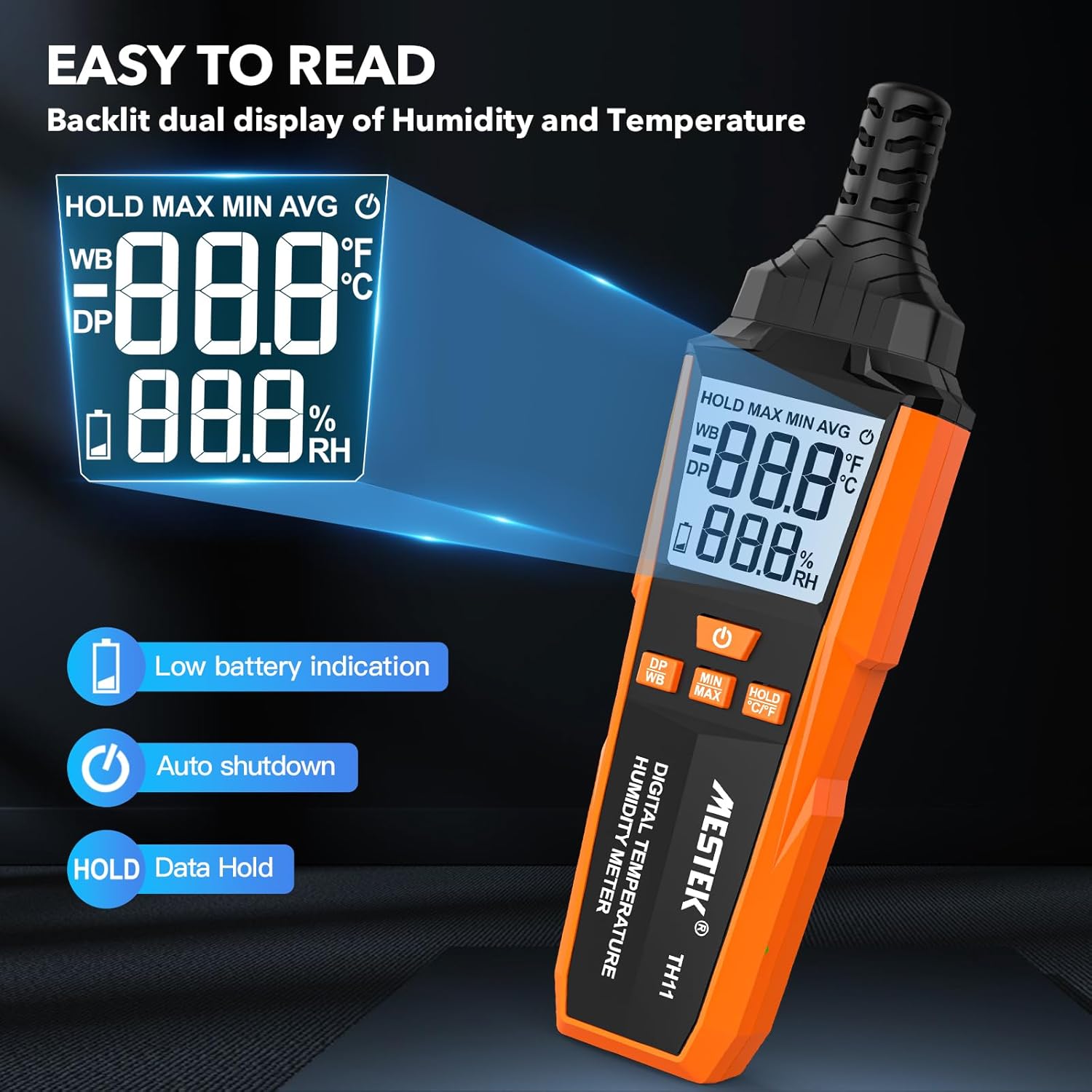
Image 3.3: The MESTEK TH11's backlit display, illustrating its clarity and indicators for low battery and data hold.
4. סעטאַפּ
4.1. באַטאַרייע ייַנמאָנטירונג
The MESTEK TH11 requires 3 AAA batteries for operation. Follow these steps to install them:
- געפינט דעם דעקל פונעם באַטעריע־אָפּטייל אויף דער הינטערשטער זייט פונעם אַפּאַראַט.
- Use the provided screwdriver to loosen the screw on the battery compartment cover.
- אַראָפּנעמען די דעקל.
- אַרײַנשטעלן 3 AAA באַטעריעס, און זיכער מאַכן אַז די ריכטיקע פּאָלאַריטעט (+/-) איז אָנגעוויזן אין דעם אָפּטייל.
- פאַרבייַטן די דעקן פון די באַטאַרייע אָפּטייל און פאַרשטייַפן די שרויף.
5. אַפּערייטינג ינסטרוקטיאָנס
5.1. מאַכט אויף / אויסגעלאשן
- צו מאַכט אויף די מיטל, דריקן די מאַכט קנעפּל ().
- צו מאַכט אַוועק די מיטל, דריקן און האַלטן די מאַכט קנעפּל for approximately 2 seconds. The device also features an automatic shutdown function after 30 minutes of inactivity to conserve battery life.

Image 5.1: The automatic shutdown feature of the MESTEK TH11, activating after 30 minutes of inactivity.
5.2. איינהייט סוויטשינג (°C/°F)
- כדי צו בייטן צווישן צעלזיוס (°C) און פאַהרענהייט (°F), דריק און האַלט די קנעפּל HOLD °C/°F button פֿאַר בעערעך 2 סעקונדעס.
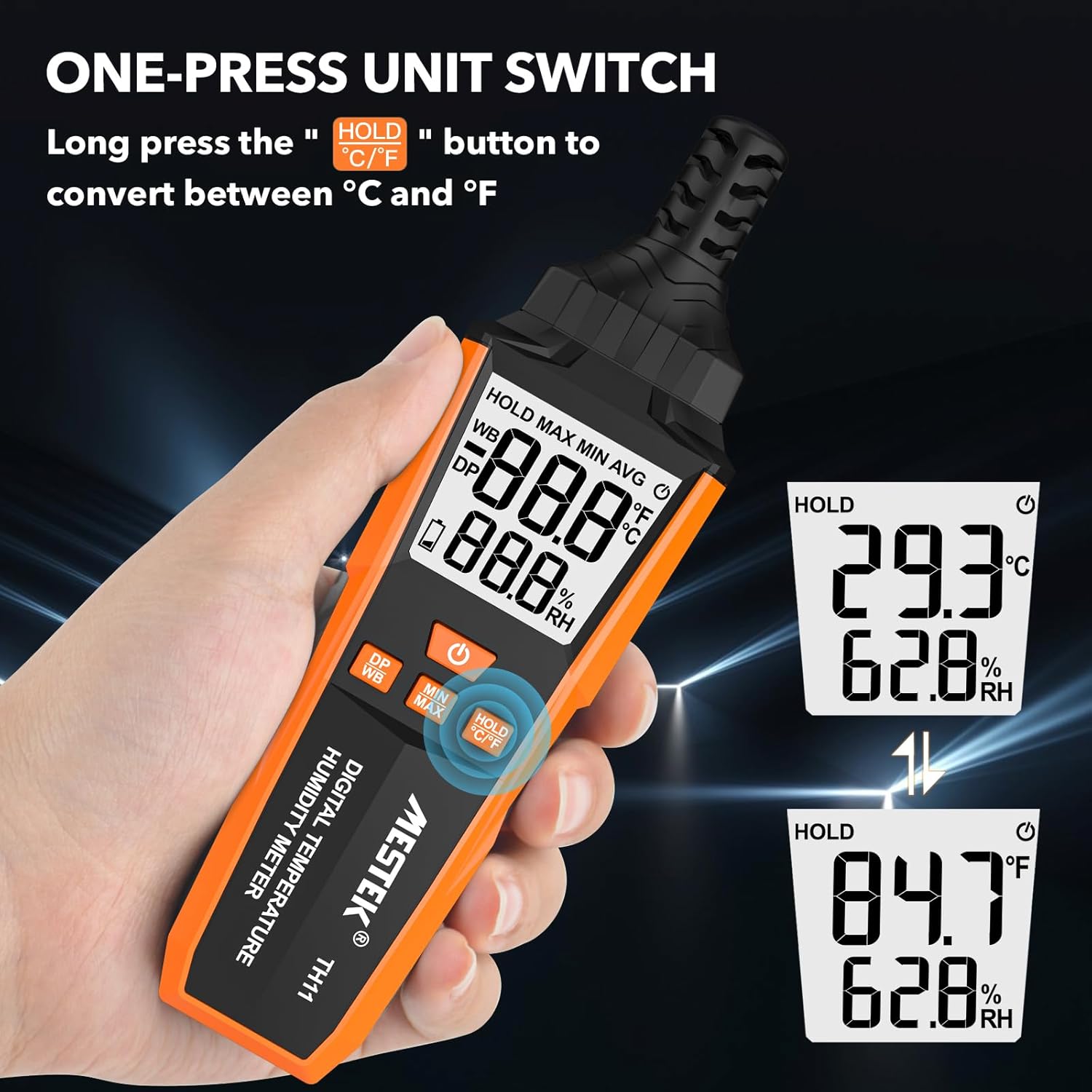
Image 5.2: The MESTEK TH11 showing how to switch between Celsius and Fahrenheit temperature units.
5.3. דאַטן האַלטן פונקציע
- To freeze the current measurement on the display, short press the HOLD °C/°F button. The "HOLD" icon will appear on the screen.
- Press the button again to exit the data hold mode.

Image 5.3: The MESTEK TH11 display indicating the active HOLD function.
5.4. Minimum/Maximum Value Measurement
- צו view the maximum recorded temperature and humidity, short press the MIN/MAX קנעפּל. The "MAX" icon will appear.
- דרוק די MIN/MAX קנעפּל ווידער צו view the minimum recorded values. The "MIN" icon will appear.
- Press the button a third time to return to real-time measurement.

Image 5.4: The MESTEK TH11 displaying the maximum and minimum recorded temperature and humidity values.
5.5. Wet Bulb / Dew Point Mode
- To switch between Wet Bulb (WB) and Dew Point (DP) temperature display, short press the DP/WB קנעפּל. The corresponding icon will be shown on the display.
6. אַפּפּליקאַטיאָנס
The MESTEK TH11 Digital Temperature and Humidity Meter is versatile and can be used in various environments:
- היים: Monitor indoor climate in bedrooms, children's rooms, and living areas for comfort and health.
- אָפיס: Ensure optimal working conditions by monitoring office temperature and humidity.
- אַגריקולטורע: Ideal for gardens, greenhouses, and agricultural crops to maintain suitable growing conditions.
- אינדוסטריע: Useful in warehouses, cellars, and facilities with air conditioning systems for environmental control.
- Specialized Environments: Suitable for maternity wards and areas requiring precise climate control.

בילד 6.1: עקס.amples of the MESTEK TH11's diverse applications in home, plant, storage, and warehouse settings.
6.1. Ambient Temperature and Relative Humidity Reference Values
For optimal conditions in various environments, consider the following reference values:
| סוויווע | טעמפּעראַטור | רעלאטיוו הומידיטי (RH) |
|---|---|---|
| Human Body Comfort | 15-25 °C | 45% -75% רה |
| Room Environment | 40% -70% רה | |
| Library/Art Gallery/Museum | 40% -60% רה | |
| Electronic Equipment/Communication Room | 45% -60% רה | |
| Agricultural/Cotton/Wool Textiles Storage | 40% -60% רה | |
| Dairy Products Storage | 50% -60% רה | |
| Fruit Storage | 60% -70% רה | |
| Best Convalescent Environment | 30% -50% רה |
Table 6.1: Reference values for ambient temperature and relative humidity in various settings.
7. ספּעסאַפאַקיישאַנז
| פּאַראַמעטער | ווערט |
|---|---|
| מאָדעל נומער | TH11 |
| סאָרט | MESTEK |
| וואָג | 210 ג |
| דימענסיעס (L X W X H) | 18.8 X 5.4 X 3.4 סענטימעטער |
| קאָליר | מאַראַנץ |
| סטייל | מאָדערן |
| מאַכט מקור | באַטאַרייע פּאַוערד |
| באַטערי טיפּ | 3 רענטגענ אַאַאַ אַלקאַלינע באַטעריז |
| Measurement Accuracy (Temperature) | ±0.1°C |
| ווייַז סטייל | דיגיטאַל |
| מאַונטינג טיפּ | Handheld / Freestanding |
| ספּעציעלע פֿעיִקייטן | High Accuracy, Backlit Display, Data Hold, Min/Max, Auto Shutdown, Low Battery Indicator |
| הומידיטי ראַנגע | 0-99% רה |
| טעמפּעראַטור ראַנגע | -20°C ~ 60°C (-4°F ~ 140°F) |
| טוי פונט טעמפּעראַטור ראַנגע | -50°C ~ 60°C (-58°F ~ 140°F) |
| נאַס באַלב טעמפּעראַטור קייט | -20°C ~ 60°C (-4°F ~ 140°F) |
| סענסאָר טיפּ | Swiss SHT30 High-Precision Sensor |
| Sampלינג קורס | בעערעך 1 סעקונדע |
8. וישאַלט
- רייניקונג: ווישט אָפּ דאָס אַפּאַראַט מיט אַ ווייכן, טרוקענעם שטאָף. ניצט נישט קיין פליסיקע רייניקונגס־מיטלען און טונקט נישט דאָס אַפּאַראַט אין וואַסער.
- סטאָרידזש: ווען נישט אין באַנוץ פֿאַר לענגערע פּעריאָדן, אַרויסנעמען די באַטעריעס צו פאַרמייַדן ליקאַדזש. האַלטן די מיטל אין אַ קיל, טרוקן אָרט, אַוועק פון דירעקט זונשייַן און עקסטרעמע טעמפּעראַטורן.
- סענסאָר זאָרגן: The probe sensor is delicate. Avoid touching it directly or exposing it to dust and debris.
9. טראָובלעשאָאָטינג
- אַפּאַראַט אַרבעט נישט אָן:
Check if the batteries are installed correctly with the right polarity. Ensure the batteries are not depleted; replace them if necessary. - נישט פּינקטלעכע לייענונגען:
Ensure the device has been in the environment for at least 15 minutes to stabilize. Check for any obstructions around the sensor. Replace old batteries. - די ווייַז איז טונקל אָדער פלינק:
דאָס ווײַזט געוויינטלעך אויף אַ נידעריקע באַטעריע. טוישט די באַטעריעס. - די קנעפּלעך זענען נישט ריספּאַנדינג:
Try powering off and on the device. If the issue persists, replace the batteries.
10. וואָראַנטי און שטיצן
The MESTEK TH11 Digital Temperature and Humidity Meter comes with a 24-חודש וואָראַנטי from the date of purchase, covering manufacturing defects. Additionally, MESTEK provides לעבן טעכניש שטיצן פֿאַר דעם פּראָדוקט.
If you encounter any issues, have questions, or require assistance, please do not hesitate to contact our customer support team. We are committed to providing satisfactory solutions.
For support, please refer to the contact information provided on the MESTEK official webוועבזייטל אדער אייער קויפן פּלאַטפאָרמע.