
LAUNCH LAUNCH CRE V2.0 for JLR
LAUNCH Creader Elite V2.0 User Manual
Model: LAUNCH CRE V2.0 for JLR
סאָרט: LAUNCH
הקדמה
The LAUNCH Creader Elite V2.0 is a professional diagnostic scan tool designed specifically for Land Rover and Jaguar vehicles. This device offers comprehensive system diagnostics, bi-directional control, and a wide range of maintenance services. It is equipped with an improved Android 8.1 operating system, a 4-inch touchscreen, and a 3000mAh battery for efficient and smooth operation. This manual provides detailed instructions for setting up, operating, maintaining, and troubleshooting your device.
1. סעטאַפּ
1.1 וואָס איז אין דער קעסטל
- 1 * LAUNCH Creader Elite V2.0 OBD2 Scanner for JLR
- 1 * OBD2 Diagnostic Cable
- 1 * שנעל אָנהייב גייד
- 1 * באַניצער מאַנואַל
1.2 Initial Setup and Power On
To begin using your LAUNCH Creader Elite V2.0, connect the OBD2 diagnostic cable to the device and then to your vehicle's OBD2 port. The device will typically power on automatically upon connection to the vehicle's power supply. Ensure your vehicle's ignition is in the ON position (engine off) for proper communication.
1.3 ווייכווארג אַפּדייט
The device supports lifetime free updates via Wi-Fi. It is recommended to regularly update the software to ensure access to the latest functions, bug fixes, and vehicle model support. To update, navigate to the "Upgrade" icon on the main screen and follow the on-screen instructions. A stable Wi-Fi connection is required.

Figure 1: LAUNCH Creader Elite V2.0 Main Interface. The "Upgrade" icon facilitates software updates via Wi-Fi.
2. אַפּערייטינג די מיטל
2.1 OE-Level All System Diagnosis
The Creader Elite V2.0 provides in-depth diagnostics for all available electronic control modules in Land Rover and Jaguar vehicles. This includes, but is not limited to, Engine, ABS, SRS, Transmission, EPB, TPMS, and more. The device can automatically identify the vehicle's VIN and perform a comprehensive scan of all systems.
- Auto-Identify VIN: Automatically detects vehicle identification number for quick setup.
- Auto-Scan All Systems: Performs a complete scan across all modules to identify faults.
- Read & Clear Codes: Displays diagnostic trouble codes (DTCs) and allows for their clearing after repairs.
- View לעבעדיקע דאַטן סטרים: Shows real-time sensor data in various formats (text, waveform, graphic).
- Read ECU Info: Accesses control unit details such as unit type and version numbers.
- לייענט פריז ראַם: Captures a snapshot of vehicle conditions when a fault occurs.

Figure 2: OE-Level All System Diagnosis. This image illustrates the comprehensive diagnostic capabilities across various vehicle systems.
2.2 Enhanced Bi-directional Control (Active Test)
This function allows the diagnostic tool to send commands to the vehicle's ECUs to perform specific tests on actuators and components. This helps in quickly determining if a specific system, component, or subsystem is functioning correctly without disassembling parts. Examples include activating the fuel pump, cycling ABS solenoids, or testing window motors.
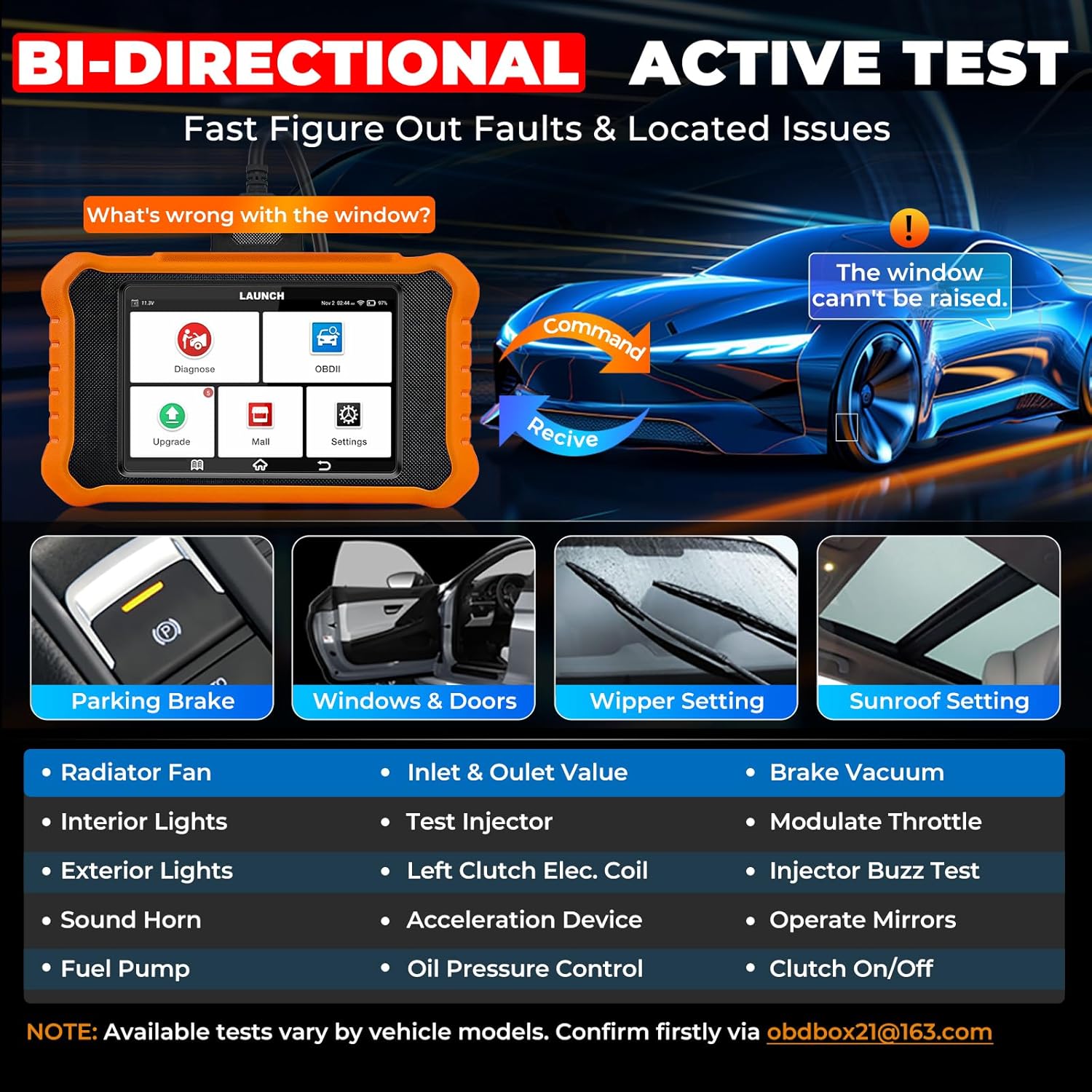
Figure 3: Bi-directional Control (Active Test). This feature enables direct control over vehicle components for diagnostic purposes.
2.3 Full OBD2 Functions for All Car Brands
In addition to Land Rover/Jaguar specific functions, the Creader Elite V2.0 serves as a universal OBD2 code reader for all vehicles manufactured after 1996 that comply with OBD2 protocols. It supports all 10 OBD2 test modes:
- Read/Erase Codes
- View לייוו דאַטן סטרים
- פרירן פריים דאַטאַ
- I/M Readiness Check
- אָ2 סענסאָר טעסט
- On-Board Monitoring Test (Mode 6)
- עוואַפּ סיסטעם טעסט (מאָדע 8)
- קאָמפּאָנענט טעסט
- פאָרמיטל אינפֿאָרמאַציע
- DTC Lookup

Figure 4: Full OBD2 Functions. This image displays the comprehensive OBD2 capabilities for general vehicle diagnostics.
2.4 Smart Diagnostic Features
The device incorporates several smart features to enhance diagnostic efficiency:
- 4-IN-1 Data Stream Graphing: Visually displays sensor data for in-depth analysis.
- דאַטן רעקאָרד און פּלייבאַק: ערמעגליכט אויפנעמען און ווידער-אויפנעמעןviewing of live data streams.
- Diagnostic Report Share & Print: Generates detailed reports that can be shared via email or printed.
- DTC Lookup & Code Search: Provides explanations for over 3000 DTCs and offers online code search.
- אָנליין באַמערקונגען: Enables users to send issues directly to technical support for troubleshooting.
- מולטי-שפּראַך שטיצן: שטיצט 11 שפּראַכן פֿאַר ברייטערע צוטריטלעכקייט.

Figure 5: Smart Diagnostic Features. These features streamline the diagnostic process and data management.
3. אויפהאלטונג סערוויסעס
The LAUNCH Creader Elite V2.0 provides a wide array of special functions and reset services specifically for Land Rover and Jaguar vehicles, designed to assist with common maintenance tasks. These services can be accessed via "Diagnose > Brand > System Selection > Special Function".
| סערוויס | באַשרייַבונג |
|---|---|
| אָיל לamp באַשטעטיק | Resets the oil service light and maintenance mileage after an oil change. |
| Parking Brake Reset (EPB) | Deactivates/activates the brake control system for brake pad replacement. |
| ינדזשעקטער קאָודינג | Codes new injector numbers into the ECU after replacement. |
| SAS קאַליבראַטיאָן | קאליברירט דעם סטירינג ווינקל סענסאָר. |
| באַטערי פאַרבייַט | Registers new battery information with the vehicle's power management system. |
| אַבס בלידינג | Performs brake system bleeding when ABS contains air. |
| Throttle Body Adaptation | איניציאליזירט די טראָטל אַקטואַטאָרס צו זייער פעליקייַט צושטאַנד. |
| הייך קאַלאַבריישאַן | Calibrates the electronic air suspension system, crucial for Land Rover/Jaguar. |
| טראַנסמיסיע אַדאַפּטאַציע | Resets transmission adaptive learning values. |
| Sunroof Calibration | Initializes the sunroof system. |
| Airbag (SRS) Reset | Resets the Supplemental Restraint System. |
Note: Specific functions may vary by vehicle model and year. Always check compatibility before performing a service.

Figure 6: All Free Maintenance Services. A visual representation of the various reset and calibration functions available.
4. טראָובלעשאָאָטינג
This section addresses common issues and provides solutions to help you resolve problems encountered while using the LAUNCH Creader Elite V2.0.
4.1 פּראָסט ישוז און סאַלושאַנז
- אַרויסגעבן: The device does not power on or connect to the vehicle.
לייזונג: Ensure the OBD2 cable is securely connected to both the device and the vehicle's OBD2 port. Verify that the vehicle's ignition is in the ON position (engine off). Check the vehicle's battery voltage; נידעריקע באַנדtage can prevent proper communication.
- אַרויסגעבן: The device fails to communicate with a specific vehicle system or module.
לייזונג: Confirm the vehicle's ignition is ON. Ensure the software is up to date. Some functions or system access may vary by vehicle model and year; verify compatibility. Try restarting both the device and the vehicle.
- אַרויסגעבן: Received a broken or used product.
לייזונג: If you receive a product that appears broken or used, please contact customer support at obdbox21@163.com פֿאַר אַ פאַרבייַט.
- אַרויסגעבן: Topology map not working after free update period.
לייזונג: The topology map function should continue to work even after the free update period expires. Updates primarily provide bug fixes, optimizations, and support for new functions and models.
- אַרויסגעבן: Need assistance with a specific problem or function.
לייזונג: For technical assistance, please contact our support team via email at obdbox21@163.com. Provide detailed information about the issue, including vehicle make, model, year, and any error messages displayed.
5. ספּעסאַפאַקיישאַנז
| שטריך | דעטאַל |
|---|---|
| סאָרט | LAUNCH |
| מאָדעל | LAUNCH CRE V2.0 for JLR |
| פּראָדוקט דימענשאַנז | 8"ל x 1.5"בר x 7.5"ה |
| אָפּערייטינג סיסטעם | אַנדרויד 8.1 |
| אַוטאָמאָטיווע פּאַסיק טיפּ | Universal Fit (for OBD2), Specific for Land Rover/Jaguar |
| UPC | 884508003790 |
| פּונקט וואָג | 1.55 פונט |
| באַטעריז | 1 ליטהיום יאָן באַטאַרייע (אַרייַנגערעכנט) |
| קאַנעקטיוויטי | 2.4 גהז ווי-פי |
| זכּרון | 2 גיגאבייט באַראַן + 16 גיגאבייט סטאָרידזש |
| סקרין | 4-inch Bright Full Touchscreen |
6. וואָראַנטי און שטיצן
LAUNCH provides comprehensive support for the Creader Elite V2.0:
- לעבנס-לאנגע פרייע דערהייַנטיקונג: Enjoy continuous software updates for Land Rover and Jaguar specific functions.
- צוריקקער און אויסטויש: An extended 60-Day Return & Replacement policy is offered.
- Quality Backup: A 5-Year Quality Backup ensures long-term reliability.
- טעכניש הילף: 24/7/365 technical assistance is available. For any questions or support, please contact us via email at obdbox21@163.com.
Ask a question about this manual
Ask about setup, troubleshooting, compatibility, parts, safety, or missing instructions. Manuals+ will review the question and use this page’s manual context to help answer it.