
1. הקדמה
Thank you for choosing the FEELWORLD P215-9HSD 21.5 Inch Broadcast Production Monitor. This monitor is designed for professional video production environments, offering a 1920x1080 Full HD display, multiple input/output options including 4K HDMI and 3G-SDI, and advanced monitoring features. This manual provides essential information for the safe and efficient operation of your device. Please read it thoroughly before use and retain it for future reference.

פיגורע 1.1: פראָנט view of the FEELWORLD P215-9HSD monitor, highlighting its 21.5-inch screen, Full HD 1920x1080 resolution, 3000:1 contrast, and 250 nits brightness.
2. זיכערקייַט אינפֿאָרמאַציע
- מאַכט מקור: Use only the provided 3A DC power adapter. Ensure the power supply voltage איז אין די ספּעסיפיעד קייט.
- ווענטילאַטיאָן: Do not block ventilation openings. Ensure adequate airflow around the monitor to prevent overheating.
- וואַסער און נעץ: Do not expose the monitor to rain, moisture, or immerse it in water. If liquid enters the unit, disconnect power immediately and contact service personnel.
- רייניקונג: אָפּשטעקן די מאַכט איידער רייניקונג. ניצט אַ ווייכע, טרוקענע שטאָף. ניצט נישט פליסיקע אָדער אַעראָזאָל רייניגער.
- אָרט: Place the monitor on a stable surface. Avoid placing it in direct sunlight, near heat sources, or in environments with excessive dust or vibration.
- סערוויס: דו זאלסט נישט פּרווון צו דינען דעם פּראָדוקט זיך. קאָנטאַקט אַלע קוואַלאַפייד סערוויס פּערסאַנעל.
3. פּעקל אינהאַלט
באַשטעטיקט אַז אַלע זאכן וואָס זענען אויסגערעכנט אונטן זענען אַרייַנגערעכנט אין אייער פּעקל. אויב עפּעס פעלנדיק אָדער צעבראָכן, ביטע קאָנטאַקט אייער הענדלער.
- FEELWORLD P215-9HSD 21.5 Inch Broadcast Production Monitor
- 3A DC Power Adapter
- V Battery Plate
- מיני הדמי קאַבלע
- Tally Kit
- סונשייד
- U קלאַמער
- אָפּעראַציע מאַנואַל
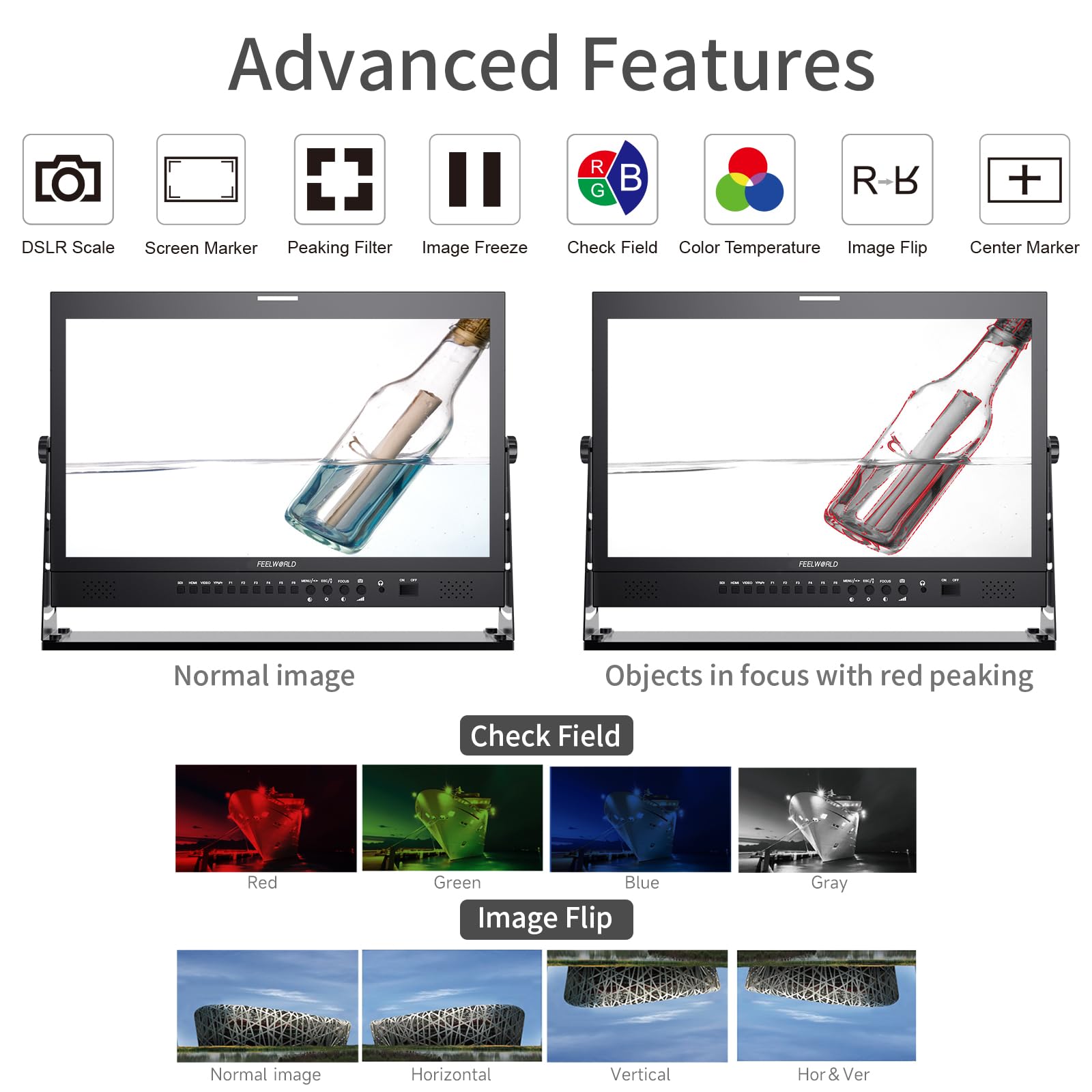
Figure 3.1: Included accessories with the FEELWORLD P215-9HSD monitor, showing the monitor, Mini HDMI cable, V battery plate, 3A power adapter, Tally Kit, Jib Crane Bracket (U bracket), and Operation Manual.
4. פּראָדוקט איבערview
4.1 פראָנט פּאַנעל קאָנטראָלס
The front panel features various buttons and indicators for controlling the monitor's functions and navigating the On-Screen Display (OSD) menu.
- אַרייַנשרייַב סעלעקציע קנעפּלעך: SDI, HDMI, VIDEO, YPbPr for selecting video sources.
- פונקציע קנעפּלעך (F1-F6): Customizable shortcut buttons for quick access to frequently used features.
- MENU/ESC/◄/► Buttons: Used for OSD menu navigation, entering sub-menus, and adjusting settings.
- FOCUS Button: Activates peaking focus assist.
- ON/OFF קנעפּל: Powers the monitor on or off.
- געבויט-אין ספּיקערז: For audio monitoring.
- 3.5mm Stereo Earphone Jack: For private audio monitoring.
4.2 דערציען פּאַנעל קאַנעקשאַנז
The rear panel provides all necessary input and output ports for connecting video and audio sources, as well as power.
- DVI אַרייַנשרייַב: Digital Visual Interface input.
- HDMI אַרייַנשרייַב / רעזולטאַט: High-Definition Multimedia Interface for both input and loop-through output.
- YPbPr Input: קאָמפּאָנענט ווידעא אַרייַנשרייַב.
- ווידעא אַרייַנשרייַב / רעזולטאַט: Composite video input and loop-through output.
- אַודיאָ אַרייַנשרייַב / רעזולטאַט: RCA connectors for analog audio.
- 3G-SDI Input/Output: Serial Digital Interface for professional video input and loop-through output.
- XLR קאַנעקטער: For professional audio input.
- DC Barrel (5.5, 2.1): Power input for the 3A DC adapter.
- USB Upgrade Port: פֿאַר פירמוואַרע דערהייַנטיקונגען.
- לאַן אײַן: עטהערנעט פּאָרט.
- TALLY Port: DP-9 connector for Tally light control.

Figure 4.1: Top section shows the front panel OSD operation buttons. Bottom section details the rear panel connections including DVI, HDMI, YPbPr, Video, Audio, 3G-SDI, XLR, DC power, USB, LAN, and Tally.
פיגורע 4.2: נאָענט-אַרויף view of the rear panel, emphasizing the 3G-SDI, HDMI, Video, and Audio input/output connections, along with the USB upgrade port and DC power input.
5. סעטאַפּ
5.1 מאָנטירן דעם מאָניטאָר
The monitor comes with an adjustable U bracket for desktop placement. Ensure the bracket is securely attached to the monitor and placed on a stable, flat surface. The monitor also supports VESA mounting for alternative setups (mounting hardware not included).
5.2 קאַנעקטינג מאַכט
- Connect the provided 3A DC power adapter to the DC barrel input on the rear of the monitor.
- צאַפּן די מאַכט אַדאַפּטער אין אַ פּאַסיק מאַכט ווענטיל.
- Alternatively, attach a compatible V-mount battery to the V Battery Plate on the rear of the monitor for portable power.
5.3 פֿאַרבינדן ווידעאָ קוועלער
Connect your video source (camera, video switcher, etc.) to the appropriate input port on the monitor's rear panel.
- הדמי: Use an HDMI cable (Mini HDMI cable included) to connect to the HDMI IN port.
- 3G-SDI: Use an SDI cable to connect to the 3G-SDI IN port.
- יפּבפּר: Use component video cables to connect to the YPbPr IN ports.
- ווידעא: Use a composite video cable to connect to the VIDEO IN port.
If you need to loop out the signal to another device, connect an appropriate cable from the corresponding OUT port (HDMI OUT, 3G-SDI OUT, VIDEO OUT) to your next device.
6. אַפּערייטינג ינסטרוקטיאָנס
6.1 פּאַוערינג אויף / אַוועק
דרוק די ON/OFF button on the front panel to power the monitor on or off.
6.2 אַרייַנשרייַב סעלעקציע
Press the corresponding input button (SDI, HDMI, VIDEO, YPbPr) on the front panel to switch between video sources.
6.3 OSD מעניו נאַוויגאַציע
דרוק די MENU button to open the On-Screen Display menu. Use the ◄ און ► buttons to navigate through menu options and adjust values. Press MENU again to confirm a selection or ESC צו אַרויסגאַנג די מעניו.
6.4 אַוואַנסירטע פאַנגקשאַנז
The monitor includes several advanced features to assist with professional monitoring:
- Peaking Focus Assist: Highlights sharp edges in the image to aid in achieving precise focus. Activate with the פאָקוס button or assign to a function button.
- צענטער מאַרקער: Displays a crosshair in the center of the screen.
- Screen Marker: Provides various aspect ratio markers (e.g., 16:9, 4:3, 2.35:1) and safety area markers.
- בילד פרייז: פּויזירט דעם איצטיקן ווידעאָ ראַם.
- בילד פליפּ: Flips the image horizontally, vertically, or both. Useful for specific mounting orientations.
- Camera 5D II Mode: Optimizes display for Canon 5D Mark II camera output.
- קוק פעלד: Displays only Red, Green, Blue, or Mono channels for color calibration.
- פּיקסעל צו פּיקסעל: Displays the image at its native resolution without scaling.
- פארגרעסער אַלע: Magnifies the entire image.
- U/D & L/R Zoom: Allows independent vertical and horizontal zooming.
- אַספּעקט פאַרהעלטעניש: Adjusts the display aspect ratio.
- קאָליר טעמפּעראַטור אַדזשאַסטמאַנט: Allows fine-tuning of the display's color temperature.
Figure 6.1: Visual demonstration of advanced features including Peaking Filter (red peaking), Check Field (Red, Green, Blue, Gray channels), and Image Flip (Normal, Horizontal, Vertical, Horizontal & Vertical).
6.5 Tally Light System
The monitor features a 3-color Tally light system (Red, Green, Yellow) on both the front and rear panels, controlled via the DP-9 Tally port. This allows for clear indication of live, preview, and standby states in a multi-camera setup.
- רויט: Indicates the camera is live (On Live).
- גרין: Indicates the camera is on preview (On Preview).
- געל: Indicates the camera is on standby (Standby).

Figure 6.2: Illustration of the Red, Green, and Yellow Tally lights and their corresponding states (On Live, Standby, On Preview), controlled via the DP-9 Barrel on the rear.
7. וישאַלט
- רייניקונג די פאַרשטעלן: ווישט אָפּ דעם עקראַן מיט אַ ווייכן, לינט-פֿרײַעם שטאָף. פֿאַר שווערע פֿלעקן, ווישט אַ ביסלampווישט דעם שטאָף מיט וואַסער אָדער אַ רייניקונג לייזונג ספּעציפֿיש פֿאַרן עקראַן. שפּריצט נישט קיין פליסיקייט גלייך אויפן עקראַן.
- רייניקונג פון די Casing: ניצט אַ ווייכע, טרוקענע שטאָף צו ווישן די מאָניטאָר'ס קasinז. פֿאַרמײַדן אַברייסיוו רייניגער אָדער סאָלווענטן.
- סטאָרידזש: ווען נישט אין באַנוץ פֿאַר לענגערע פּעריאָדן, זאָל מען האַלטן דעם מאָניטאָר אין אַ קיל, טרוקן אָרט, אַוועק פֿון דירעקטער זון און עקסטרעמע טעמפּעראַטורן.
- Firmware דערהייַנטיקונגען: Periodically check the FEELWORLD official website for any available firmware updates to ensure optimal performance and access to new features. Use the USB Upgrade Port for this purpose.
8. טראָובלעשאָאָטינג
אויב איר טרעפט פּראָבלעמען מיט אייער מאָניטאָר, ביטע זעט די פאלגענדע געוויינטלעכע פּראָבלעמען און לייזונגען:
| פּראָבלעם | מעגלעך סיבה | לייזונג |
|---|---|---|
| קיין מאַכט | מאַכט אַדאַפּטער נישט פארבונדן אָדער דעפעקט; פּראָבלעם מיט מאַכט אַוטלעט. | Ensure power adapter is securely connected to monitor and outlet. Test outlet with another device. Check if V-mount battery is charged and properly installed. |
| קיין ווידעא סיגנאַל | Incorrect input selected; cable not connected or faulty; source device not outputting signal. | Select the correct input source (HDMI, SDI, etc.). Check all video cables for secure connection. Verify the source device is powered on and outputting video. Try a different cable. |
| Image is distorted or incorrect colors | Incorrect display settings; faulty cable; source issue. | Reset monitor settings to default via OSD menu. Check cable connections. Verify source device output. Adjust color temperature settings. |
| קיין אַודיאָ | Audio cable not connected; volume too low; source device not outputting audio. | Ensure audio cables are connected (if applicable). Increase monitor volume. Check audio settings on the source device. |
| Tally light not working | Tally cable not connected or faulty; switcher not sending Tally signal. | Ensure the Tally Kit is correctly wired and connected to the DP-9 port. Verify your video switcher is configured to send Tally signals. |
9. ספּעסאַפאַקיישאַנז
Detailed technical specifications for the FEELWORLD P215-9HSD Broadcast Production Monitor:
- פאַרשטעלן גרייס: 21.5 אינטשעס
- געבוירן רעזאלוציע: 1920 רענטגענ 1080 (פול הד)
- ווייַז טיפּ: LED IPS Panel
- אַספּעקט פאַרהעלטעניש: 16:9
- ברייטקייט: 400 סי / מ²
- Viewאין ווינקל: 160 Degrees (H/V)
- קאַנטראַסט פאַרהעלטעניש: 3000:1
- קאָליר טיפקייַט: 8-ביסל, 16.7 מיליאָן קאָלאָרס
- ווידעא ינפּוץ: 1x HDMI, 1x 3G-SDI, 1x YPbPr, 1x Video, 1x DVI
- ווידעא אַוטפּוץ: 1x HDMI, 1x 3G-SDI, 1x Video
- אַודיאָ ינפּוץ: Analog Audio (RCA), XLR
- אַודיאָ אַוטפּוץ: 3.5mm Stereo Earphone Jack, Built-in Speakers
- מאַכט אַרייַנשרייַב: DC 12V (3A)
- קאַנעקטיוויטי טעכנאָלאָגיע: HDMI, 3G-SDI
- ספּעציעלע פֿעיִקייטן: Peaking Focus Assist, Center Marker, Screen Marker, Image Freeze, Image Flip, Camera 5D II Mode, Check Field, Pixel to Pixel, Zoom All, U/D & L/R Zoom, Aspect Ratio, Color Temperature Adjustment, 3-Color Tally Light
פיגורע 9.1: איבערview of key specifications and features including 8-bit color, HDMI input/output, 3G-SDI input/output, 1920x1080 resolution, 3000:1 contrast, and 250 nits brightness.
10. וואָראַנטי און שטיצן
The FEELWORLD P215-9HSD Broadcast Production Monitor comes with a 1-יאָר פאַבריקאַנט ס וואָראַנטי פון די דאַטע פון קויפן. די וואָראַנטי קאָווערס חסרונות אין מאַטעריאַלס און ווערקמאַנשיפּ אונטער נאָרמאַל נוצן.
For warranty claims, technical support, or service inquiries, please contact your authorized FEELWORLD dealer or visit the official FEELWORLD website for customer service contact information. Please retain your proof of purchase for warranty validation.
For more information about FEELWORLD products, visit the FEELWORLD Store on Amazon.