
1. הקדמה
This manual provides detailed instructions for the installation, operation, and maintenance of your FLIPSKY TFT Advanced Display V2.0. This display is designed to enhance your e-bike experience with its advanced features, including GPS functionality, IP65 waterproofing, and a clear TFT color screen. Please read this manual thoroughly before using the product to ensure proper function and safety.
2. פּראָדוקט איבערview
The FLIPSKY TFT Advanced Display V2.0 offers a comprehensive interface for monitoring your e-bike's performance. Its robust design and intuitive interface make it a valuable addition to your setup.
שליסל פֿעיִקייטן:
- Clear TFT Display: 3.2-inch RGB color display with 240*320 resolution for enhanced readability.
- גפּס פאַנגקשאַנאַליטי: Built-in GPS module for automatic time calibration and tracking.
- IP65 וואָטערפּרוף שאַץ: זיכערט געווער און פאָרשטעלונג אין פֿאַרשידענע וועטער באדינגונגען.
- מולטי-שפּראַך שטיצן: Supports Chinese, English, and Russian for broader user accessibility.
- רעאַל-צייט דאַטן אַרויסווייַזונג: Provides instant access to cycling and ESC data, including speed, mileage, riding time, power output, energy recovery, and temperatures.
- סאָליד און לייטווייט: Dimensions of 124.4*68.1*18.5mm and a weight of 116g for easy integration.
- Enhanced Human-Computer Interaction: Displays ESC energy consumption and maximum data records.
וואָס איז אין די קעסטל:
The package includes the FLIPSKY TFT Advanced Display V2.0 and a user manual. Please ensure all components are present upon unboxing.

Image: FLIPSKY TFT Advanced Display V2.0 with various connection cables and accessories.
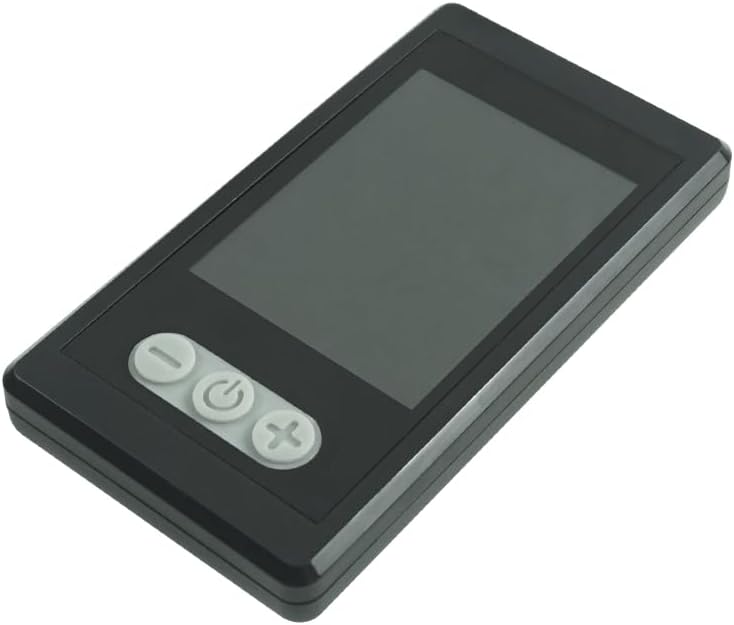
בילד: פראָנט view of the FLIPSKY TFT Advanced Display V2.0, highlighting the display screen and the three control buttons.

Image: FLIPSKY TFT Advanced Display V2.0 with its physical dimensions (length, width, thickness) clearly labeled in millimeters.
3. סעטאַפּ
Proper installation and wiring are crucial for the display's functionality. Follow the diagram and instructions carefully.
וויירינג דיאַגראַמע:

Image: Detailed wiring diagram illustrating the connection of the FLIPSKY TFT Advanced Display V2.0 to an Electronic Speed Controller (ESC) using a UART communication mode, including waterproof M6 male and female connectors and a USB cable.
Connect the display to your Electronic Speed Controller (ESC) using the provided UART communication cable. Ensure the waterproof M6 connectors are securely fastened. The USB cable is typically used for firmware updates or advanced configuration via a computer.
Supported ESC Types:
- FTESC: Flipsky Non VESC ESCs
- FSESC: ESCs based on VESC
- FOCBOX: FOCBOX Unity
Ensure your ESC is compatible with one of the listed types for proper communication with the display.
סעטאַפּ ווידעא:
Video: An official product video demonstrating the setup and features of the FLIPSKY TFT Advanced Display V2.0. This video provides a visual guide to connecting and configuring the display.
4. אַפּערייטינג ינסטרוקטיאָנס
The display features three buttons for navigation and control. Familiarize yourself with their functions for optimal use.
קנעפּל פאַנגקשאַנז:
| קנעפּל | קאַמף | פֿונקציע |
|---|---|---|
| "-" קנעפּל | קורץ דרוק | Switch to the left interface/menu item. |
| לאנג דריקן | Enter/Exit navigation bar. | |
| "Power" Button | קורץ דרוק | Select current item/Confirm. |
| לאנג דריקן | מאַכט אויף / אַוועק. | |
| "+" קנעפּל | קורץ דרוק | Switch to the right interface/menu item. |
| לאנג דריקן | Enter/Exit settings menu. |
Display Modes and Data:
The display provides various screens to show real-time data and cycling records. Navigate between screens using the "-" and "+" buttons.
- ריידינג צובינד: Displays current speed, battery level, mileage, and other essential real-time riding data.
- ESC Interface: Shows detailed ESC data, including power output, energy recovery, and temperature.
- סעטטינגס צובינד: Allows configuration of various parameters such as speed units, battery settings, and language.
- Record Interface: View historical cycling data, including total mileage, average speed, and maximum values.
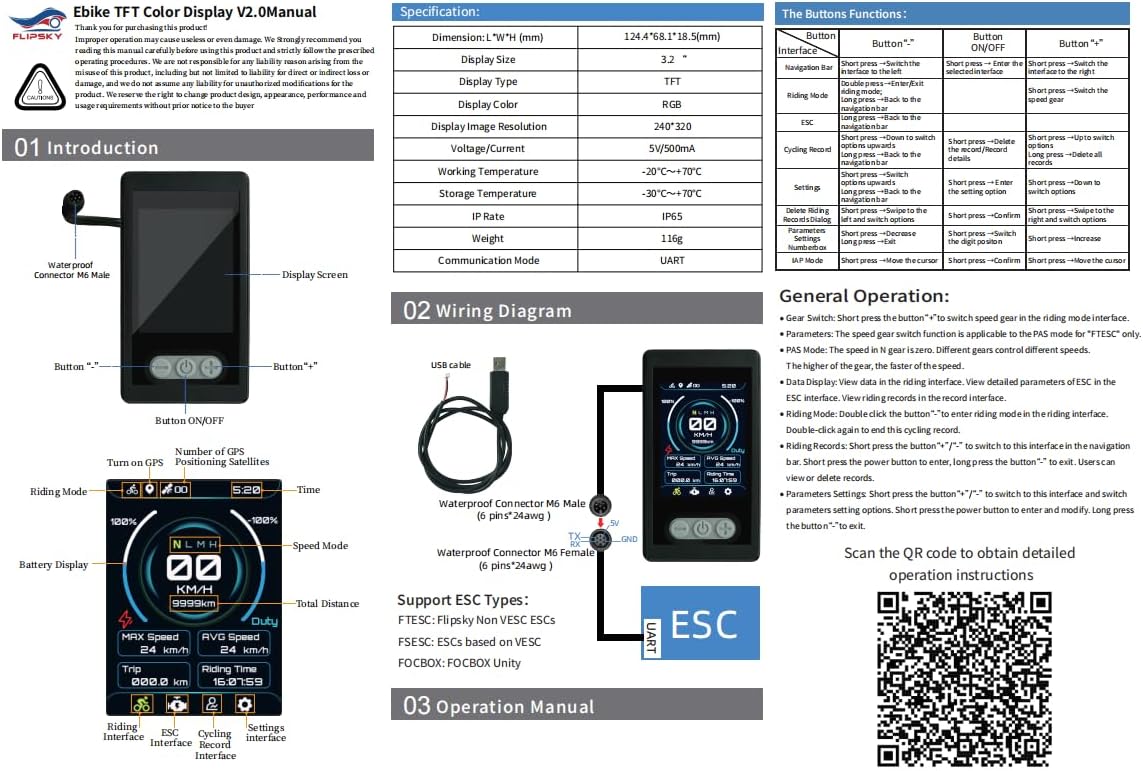
Image: A comprehensive manual page detailing the display's layout, button functionalities, and the wiring diagram, providing a quick reference for users.
גפּס פאַנגקשאַנאַליטי:
The built-in GPS module automatically calibrates the date and time. You can manually set your time zone in the settings menu. The display will synchronize time while riding.
שפּראַך סעטטינגס:
The display supports Chinese, English, and Russian. You can switch between languages in the settings menu to suit your preference.
Firmware Update (IAP Mode):
Video: A short official product video demonstrating the IAP (In-Application Programming) mode, which supports online firmware updates for the display. This shows how to access and confirm a firmware update.
The display supports firmware updates via IAP mode. Refer to the video above for a demonstration on how to access this feature and update your device's software.
5. וישאַלט
To ensure the longevity and optimal performance of your FLIPSKY TFT Advanced Display V2.0, follow these maintenance guidelines:
- רייניקונג: ניצן אַ ווייך, דamp שטאָף צו רייניקן דעם עקראַן אוןasing. Avoid abrasive cleaners or solvents that may damage the surface.
- וואַסער קעגנשטעל: The display has an IP65 rating, meaning it is protected against dust ingress and low-pressure water jets from any direction. While it can withstand splashes and rain, avoid submerging the device in water.
- סטאָרידזש: ווען נישט אין באַנוץ פֿאַר לענגערע פּעריאָדן, זאָל מען האַלטן דעם דיספּליי אין אַ קיל, טרוקן אָרט, אַוועק פֿון דירעקטער זון און עקסטרעמע טעמפּעראַטורן.
- קאַבלע קאַנעקשאַנז: Periodically check all cable connections for tightness and signs of wear. Ensure waterproof connectors are clean and properly sealed.
6. טראָובלעשאָאָטינג
אויב איר טרעפט פּראָבלעמען מיט אייער דיספּליי, זעט די פאלגענדע געוויינטלעכע טראָובלעשווטינג טריט:
- דיספּליי טוט זיך נישט אן:
- קאָנטראָלירט אַלע מאַכט קאַנעקשאַנז צו זיכער מאַכן אַז זיי זענען זיכער.
- באַשטעטיקן אַז די עלעקטרישע וועלאָסיפּעד'ס באַטאַרייע איז גענוג אָפּגעלאָדן.
- Ensure the power button is pressed and held for the required duration to turn on the device.
- No Data Displayed / Incorrect Readings:
- Confirm that the UART communication cable is correctly connected between the display and the ESC.
- Ensure your ESC type is supported (FTESC, FSESC, FOCBOX Unity).
- Check ESC settings to ensure data output via UART is enabled and configured correctly.
- If GPS data is incorrect, ensure the device has a clear view פון הימל פֿאַר סאַטעליט אַקוויזישאַן.
- קנעפּלעך ניט ריספּאַנדאַבאַל:
- Ensure the display is not in a locked mode (if applicable).
- Restart the display by powering it off and on again.
- Check for any physical obstructions or damage to the buttons.
- פירמוואַרע אַפּדייט ישוז:
- Ensure a stable power supply during the update process.
- פאָלגט די פירמווער אַפּדייט אינסטרוקציעס פּינקטלעך.
- If using a computer, ensure the correct drivers are installed for the USB connection.
For further assistance, please contact FLIPSKY customer support or refer to the official resources provided in the support section.
7. ספּעסאַפאַקיישאַנז
| פּאַראַמעטער | ווערט |
|---|---|
| ויסמעסטונג (ל*וו*ה) | 124.4 x 68.1 x 18.5 מ״מ (4.9"ל x 2.68"ברייט x 0.73"ה) |
| ווייַז גרייס | 3.2 אינטשעס |
| ווייַז טיפּ | TFT RGB Color |
| בילד האַכלאָטע | 240*320 |
| VoltagE/קראַנט | 5 וו / 500 מאַ |
| ארבעטן טעמפּעראַטור | -20℃ to +70℃ (-4°F to 158°F) |
| סטאָרידזש טעמפּעראַטור | -30℃ to +70℃ (-22°F to 158°F) |
| יפּ קורס | IP65 |
| וואָג | 116ג |
| קאָמוניקאַציע מאָדע | UART |
| סענסאָר טיפּ | גפּס סענסאָר |
| מאַונטינג טיפּ | Handlebar Mount, Stem Mount (Mounting hardware not included) |
| מענטש צובינד אַרייַנשרייַב | קנעפּלעך |
| מאָדעל נומער | PJTFTN002 |
| UPC / GTIN | 762104406842 |
8. וואָראַנטי און שטיצן
וואָראַנטי: This product comes with a 2-month warranty from the manufacturer, Flipsky. Please retain your proof of purchase for warranty claims.
שטיצן: For technical support, troubleshooting beyond this manual, or warranty inquiries, please contact FLIPSKY directly. Additional resources, including updated manuals and software, may be available through their official channels.
אָנליין רעסורסן: For more detailed information and downloads, please visit the official FLIPSKY support page or the following link: